CRM Software
-
 Salesforce
 - Zoho CRM
- HubSpot
- SugarCRM
-
 Freshsales
Whether you need to connect third-party platforms or Microsoft tools, our Dynamics 365 integration consultants help make D365 work as one unified system.
Talk To Our ExpertsIntegrations Delivered
Serving Clients Globally
Years in Business
Quality & Standards
Here are key tools and platforms we integrate with Dynamics 365 to support your business workflows.
Salesforce
Freshsales Manhattan WMS
 Fishbowl Inventory
 Cin7
Cin7 Zoho Desk
 Mailchimp
 Pardot
 ActiveCampaign
 ClickUp
 Gusto
Gusto BigCommerce
 Square POS
 Epic
Epic Cerner
 Athenahealth
 NexGen Healthcare
 eClinicalWorks
We can help you evaluate the best way to connect it with Dynamics 365
Get My Integration Plan
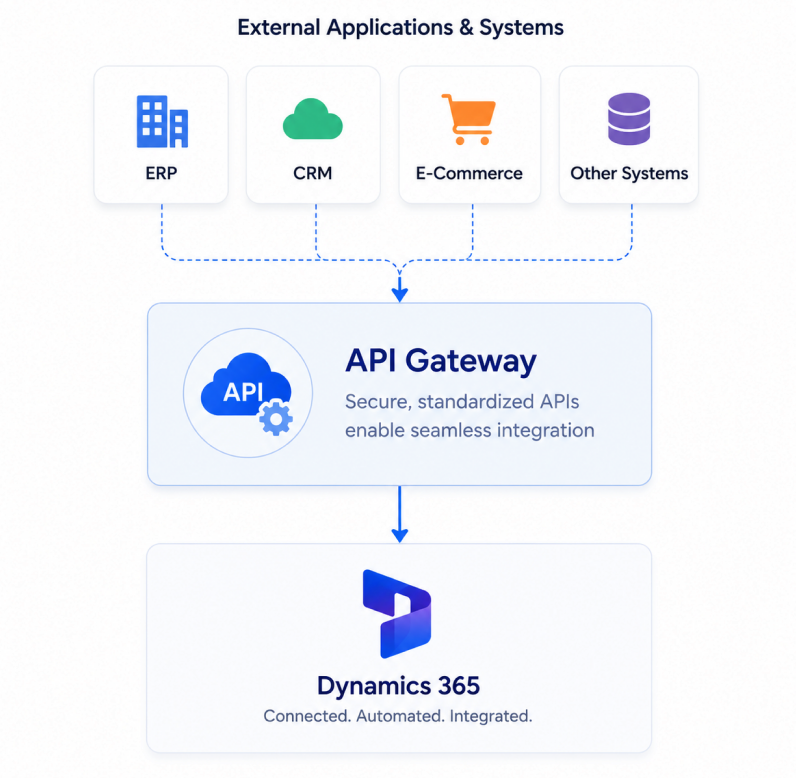
We create tailored interface layers and service endpoints that allow Dynamics 365 to exchange information smoothly with other platforms, applications, and internal systems.
We help keep business data aligned across systems so updates in one platform are reflected accurately where they need to be, reducing gaps and duplicate records.
We structure, clean, and move data from different sources into formats that work properly within your business workflows, reporting systems, and operational processes.
We support integrations across cloud applications, on-premise software, legacy platforms, and modern business tools so your ecosystem works together more effectively.
We link Dynamics 365 with eCommerce, shipping, finance, marketing, and other business applications to create a more connected operating environment.
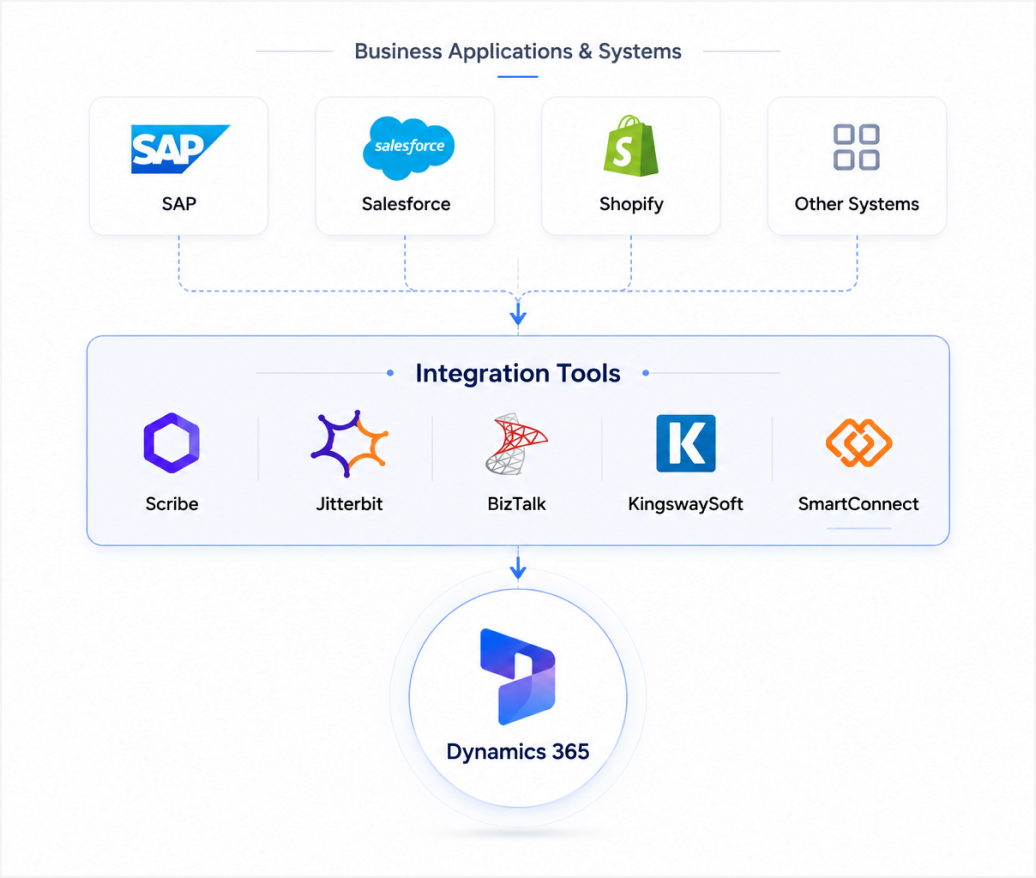
Different business systems need different integration methods. Based on your environment, workflow complexity, and long-term goals, Dynamics 365 can be connected using the right mix of tools, automation frameworks, and API-led development.
Scribe, Jitterbit, BizTalk, KingswaySoft, and SmartConnect
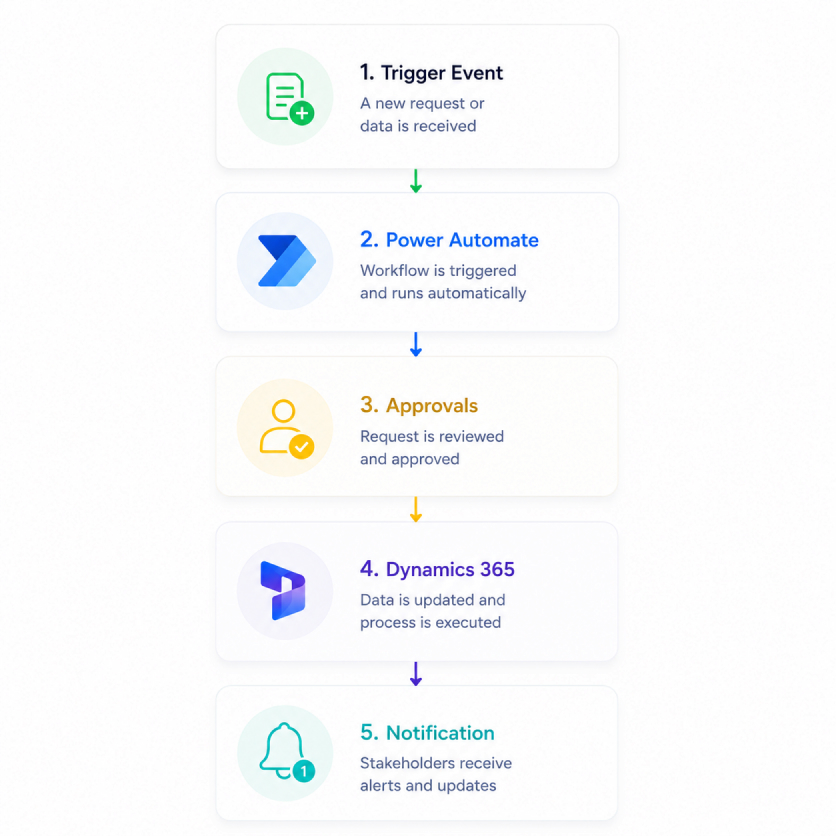
Automating data movement, notifications, approvals, and data synchronization
AI is built into the way Dynamics 365 integrations are planned, developed, tested, and optimized, helping reduce manual effort and improve speed at every stage.
When businesses evaluate Microsoft dynamics integration options, the question is rarely whether a connection is technically possible, it is whether it will hold up under real operational conditions. Here is why teams trust us with that.

Strong experience across Dynamics 365, Microsoft platforms, and connected business applications. Our Microsoft dynamics 365 integration services are built to be scalable, stable, and aligned with best practices across the full Microsoft stack.

Support for both modern cloud environments and complex on-premise setups, helping businesses connect legacy systems with newer platforms without disruption.

Our Microsoft Dynamics CRM Integration services designed around real industry workflows, ensuring Dynamics 365 works seamlessly with the systems your teams use every day.

From discovery and architecture to implementation, testing, and support every stage of the D365 integration lifecycle is handled with a structured approach that reduces risk and improves long-term performance.

A strong focus on data accuracy, system reliability, and secure information exchange to reduce silos, minimize errors, and keep operations running smoothly.

A global delivery presence backed by approachable post-go-live support, so your team continues to get help with enhancements, issues, and evolving integration needs.
Beyond support, we offer end to end Dynamics 365 services to help you plan, implement, extend, optimize, and support your business systems.
 Consulting and implementation support in one engagementHelp choosing the right Dynamics 365 apps and modulesSolution design aligned to your processes and goalsSetup, configuration, and business-ready deploymentSupport for smoother adoption across teams and workflows
 Upgrade support for older Dynamics systemsAssessment of current setup, customizations, and gapsSafer transition to newer Dynamics 365 capabilitiesReduced disruption to day-to-day operationsBetter readiness for future integrations and scale
Dynamics 365 AI services for smarter business workflowsCopilot, automation, and AI-led process improvementsBetter use of data for recommendations and decisionsIntelligent support across sales, service, and operationsPractical AI use cases aligned to real business needs
Power BI for reporting and business visibilityPower Automate for process automation and approvalsPower Apps for custom business applicationsConnected workflows across Dynamics 365 and Microsoft toolsServices that help turn manual work into efficient processes
Ongoing Dynamics 365 support and issue resolutionHelp with enhancements, updates, and platform changesContinuous optimization as business needs evolveSupport for stability, usability, and long term valueFlexible engagement based on your business size and needs
Upgrade support for older Dynamics systemsAssessment of current setup, customizations, and gapsSafer transition to newer Dynamics 365 capabilitiesReduced disruption to day-to-day operationsBetter readiness for future integrations and scale
Dynamics 365 AI services for smarter business workflowsCopilot, automation, and AI-led process improvementsBetter use of data for recommendations and decisionsIntelligent support across sales, service, and operationsPractical AI use cases aligned to real business needs
Power BI for reporting and business visibilityPower Automate for process automation and approvalsPower Apps for custom business applicationsConnected workflows across Dynamics 365 and Microsoft toolsServices that help turn manual work into efficient processes
Ongoing Dynamics 365 support and issue resolutionHelp with enhancements, updates, and platform changesContinuous optimization as business needs evolveSupport for stability, usability, and long term valueFlexible engagement based on your business size and needs

Work with us
Our experts can help you assess the possibilities and guide the next step
Talk to Our Expert
Dynamics 365 Solutions
Our Microsoft Dynamics 365 Integration Services are designed to enable seamless connectivity between Dynamics 365 and an extensive array of Microsoft products and third-party applications. As a comprehensive CRM and ERP solution, Dynamics 365 allows for robust integration with critical tools such as Power BI, SharePoint, Office, Outlook, Exchange, OneNote, Yammer, and ESB.
At Nalashaa Digital, our Microsoft dynamics 365 integration services are meticulously crafted to ensure smooth Dynamics 365 integration with external systems and Microsoft's suite of products, enhancing your operational efficiency and data coherence across business functions.
Yes. Dynamics 365 supports API-based integration through the Dynamics 365 Web API and Dataverse API. These APIs make it possible to connect Dynamics 365 with external applications, automate data exchange, and build more tailored D365 integration scenarios. Our d365 integration consultants can advise on the right approach for your specific setup.
Custom integrations are usually built using APIs, middleware, or automation tools depending on complexity. As a dedicated dynamics 365 integration consultant, we connect CRM, ERP, eCommerce, finance, and internal business systems to Dynamics 365 in ways that support your exact workflows.
Yes. Dynamics 365 can integrate with Outlook and Exchange, and in some cases with Gmail depending on the setup, connector support, and synchronization requirements. The right approach depends on whether the environment is cloud, on-premise, or hybrid.
Synchronization can be configured in different ways depending on the use case. Some integrations support near real-time updates, while others run on scheduled sync intervals. The right model depends on data volume, business urgency, and system dependencies.
This usually happens because production environments involve larger data volumes, real user activity, stricter security settings, more connected systems, and live business rules. Differences in configuration, error handling, logging, or retry logic can also cause failures after go-live.
Sync issues often come from incorrect field mapping, data mismatches, authentication failures, API limitations, plugin conflicts, or unstable connections between systems. In many cases, poor monitoring and incomplete error logging make these issues harder to detect early.
When fields are mapped incorrectly or source data is inconsistent, records may fail to sync properly, duplicate, or create downstream process issues. Good mapping and validation are essential for maintaining data quality across systems.
Slow integrations can be caused by large data loads, inefficient workflows, excessive plugin execution, poor API design, unoptimized queries, or too many point-to-point connections between systems. These issues can affect both speed and reliability.
A more scalable approach is to use a hub-and-spoke or platform-led integration model, often supported by Power Platform or middleware tools. This helps reduce maintenance effort, improve visibility, and make future integrations easier to manage.
Bi-directional sync requires clear ownership of each data object, well-defined update rules, conflict handling, and monitoring. This is especially important when syncing orders, inventory, contacts, or pricing data across systems such as ERP and eCommerce platforms.
Power Automate is one of the fastest ways to get visible results from ms dynamics crm integration without writing a single line of code. It connects Dynamics 365 with Microsoft and third-party applications through prebuilt connectors, handling approvals, notifications, record creation, and data updates automatically, and bridging the gap between CRM activity and the rest of your business systems.
Authentication should be planned carefully using secure, supported methods that align with Microsoft standards. This includes managing access permissions properly, protecting credentials, and ensuring the integration can continue securely as systems scale.
Dynamics 365 can be integrated with a wide range of ERP and financial systems. The most common include SAP, Oracle ERP Cloud, NetSuite, QuickBooks, Sage, Microsoft Dynamics GP, and various industry-specific platforms.
The integration approach varies by system. Some platforms have prebuilt connectors available through Power Automate or middleware tools like KingswaySoft and Jitterbit. Others, particularly older or highly customized environments, require API-led development or a bespoke middleware layer. The right method depends on data volume, sync frequency, and how much custom logic the source system carries.
If you’re looking for Microsoft Dynamics ERP integration services get in touch with Nalashaa's Microsoft Dynamics integration experts, and we will help you map the right path before you commit to a direction.
Production environments are fundamentally different from test environments in ways that matter for D365 integration: larger data volumes, real user activity, tighter security policies, active business rules, and more connected systems all behaving simultaneously. The most common failure points are field mapping assumptions that hold in small datasets but break at scale, authentication configurations that differ between environments, and retry logic that wasn't tested under load. A proper staging environment that mirrors production data conditions, not just structure, is the best protection against this.
The costs most businesses underestimate when working with a dynamics 365 integration company are data preparation (cleaning and reconciling records before go-live), stakeholder alignment time (agreeing on business rules and ownership across departments), post-go-live monitoring and refinement, and the internal resource cost of testing. Licensing for middleware tools is also often discovered later in the project when vendor selection is already locked. A structured discovery phase surfaces most of these before they become surprises.
Dynamics 365 can be integrated with a wide range of ERP and financial systems. The most common include SAP, Oracle ERP Cloud, NetSuite, QuickBooks, Sage, Microsoft Dynamics GP, and various industry-specific platforms.
The integration approach varies by system. Some platforms have prebuilt connectors available through Power Automate or middleware tools like KingswaySoft and Jitterbit. Others, particularly older or highly customised environments, require API-led development or a bespoke middleware layer. The right method depends on data volume, sync frequency, and how much custom logic the source system carries.
If you’re looking for Microsoft Dynamics ERP integration services, get in touch with Nalashaa's Microsoft Dynamics integration experts and we will help you map the right path before you commit to a direction.
Handling pre-existing data is one of the most overlooked parts of ms dynamics crm integration. Before the integration goes live, a data reconciliation exercise is needed to identify duplicates, define which system owns each record type, and set clear rules for how conflicts are resolved when both systems have different values for the same field. Skipping this step is one of the main reasons integrations that work cleanly in testing create problems in production.
It depends on the scope of what you're trying to connect and how predictable your roadmap is. An independent Dynamics 365 integration consultant works well when the scope is tight, say, a single CRM-to-ERP connection, and you already have internal architects who can own the longer-term picture. You get focused expertise without coordination overhead. The trade-off is bus-factor risk: if your consultant gets booked elsewhere mid-project, the work stalls.
A Microsoft Dynamics integration company is the better fit when integrations cross multiple systems (CRM, ERP, eCommerce, finance), when you need both delivery and post-go-live support, or when timelines depend on parallel workstreams. You're paying for the redundancy, a D365 integration consultant designing the data flow while an MS CRM integration consultant handles plugins and customizations, and for the institutional patterns a company has hardened across past projects.
A few questions worth asking before you decide:
Look for a dynamics 365 integration company with proven experience across your industry, a structured delivery approach, and the ability to support both implementation and long-term optimization. Nalashaa Digital brings all three, backed by 15+ years of experience and 400+ integrations delivered.
Explore our latest publications on industry trends, insights, and innovations
Microsoft Dynamics 365 CRM offers a robust suite of tools to enhance your sales and marketing processes, but its true potential can be unlocked through smart integrations.
Read More >Understanding your customers is paramount—their demographics, preferences, and purchase behaviors hold the key to unlocking new sales opportunities.
Read More >Our client builds reliable, cost-effective solutions across a plethora of technologies aiming to increase productivity as a priority.
Read More >