Well, this is what organizations are actually achieving when they get Salesforce and Power BI to work together. Enterprise teams that integrate both systems report returns as high as 299 percent within three years, and in some cases even 445 percent when the wider ecosystem includes platforms like MuleSoft. Yet most companies are still far from this reality. Only 28 percent of applications in a typical enterprise are truly connected, and 95 percent of businesses say integration challenges are slowing down their AI ambitions.
When Salesforce data finally flows into Power BI the way it should, the results are immediate. Project delivery speeds up by nearly 78 percent, sales forecast accuracy improves by up to 32 percent, and customer response times drop sharply as teams gain access to real time insights. Integrated teams also report higher CSAT scores and faster sales cycles, often shortening the path to revenue by 8 to 14 days.
In a CRM market racing toward 262 billion dollars, Power BI Salesforce Integration is no longer a technical upgrade. It has become a direct driver of ROI, operational clarity, and competitive advantage.
6 Reasons to Integrate Salesforce with Power BI
If you have worked with Salesforce long enough, you already know the reporting limitations. The platform is excellent for managing customer interactions, but when it comes to deep analytics or multi-system visibility, it can feel restrictive. That is usually the point where teams start exporting CSVs, building Excel workbooks, or stitching reports together manually. If any of this sounds familiar, integrating Salesforce with Power BI is what solves those day-to-day pain points.
Close Gaps in Salesforce Native Reporting
You might have noticed that Salesforce dashboards start to feel limiting once you want more than basic summaries. Things like complex cross-object joins, historical trend analysis, or advanced modeling are difficult to achieve in Salesforce. Power BI fills those gaps. It lets you combine multiple objects, create powerful DAX calculations, build richer visuals, and explore your data on a deeper level without wrestling with Salesforce’s constraints.
Consolidate Customer Journey Data
It is hard to get a complete customer picture if all your data lives in disconnected tools. You probably have customer information in Salesforce, financial data in your ERP, marketing data in another system, plus support activity captured elsewhere. Power BI brings all of this together. It pulls Salesforce data and blends it with every other source you depend on, so you finally get a true end-to-end view of your customer journey.
Real-Time, Data-Driven Decision Making
Most teams end up relying on stale reports because updating data manually takes too much time. If you have ever refreshed a dashboard only to realize it reflects last week’s pipeline, you know this problem well. Power BI lets you set up near real-time refreshes so your pipeline numbers, opportunity updates, and sales trends stay current. It helps leaders respond to issues faster instead of discovering them after the damage is done.
Improve Forecast Accuracy
Forecasting inside Salesforce works, but only to a point. If you want to test scenarios, compare historical patterns, or model different business outcomes, the built-in tools can feel restrictive. Power BI changes this completely. You get AI-powered visuals, what-if simulations, and DAX-based calculations that make forecasts more accurate and more flexible. This helps teams refine predictions and understand how different strategies could influence revenue.
Reduce Manual Work and Data Errors
If someone in your team still exports CSV files to build weekly or monthly reports, they are doing extra work that Power BI can automate. Manual exports increase the chance of errors and slow down reporting cycles. Integrating Salesforce directly with Power BI removes that effort entirely. Data moves automatically, stays consistent, and gives you a clean foundation to build trustworthy insights.
Boost Team Productivity
Switching between systems just to piece together numbers waste time. Power BI keeps everything in one place so sales reps, managers, and executives can access the insights they need without juggling tools. Instead of gathering data, your teams can focus on interpreting it, planning next steps, and acting on what the numbers really say.
Power BI Salesforce Integration Use Cases Across Teams
Here’s how your team can bring Power BI Salesforce integration into everyday work:
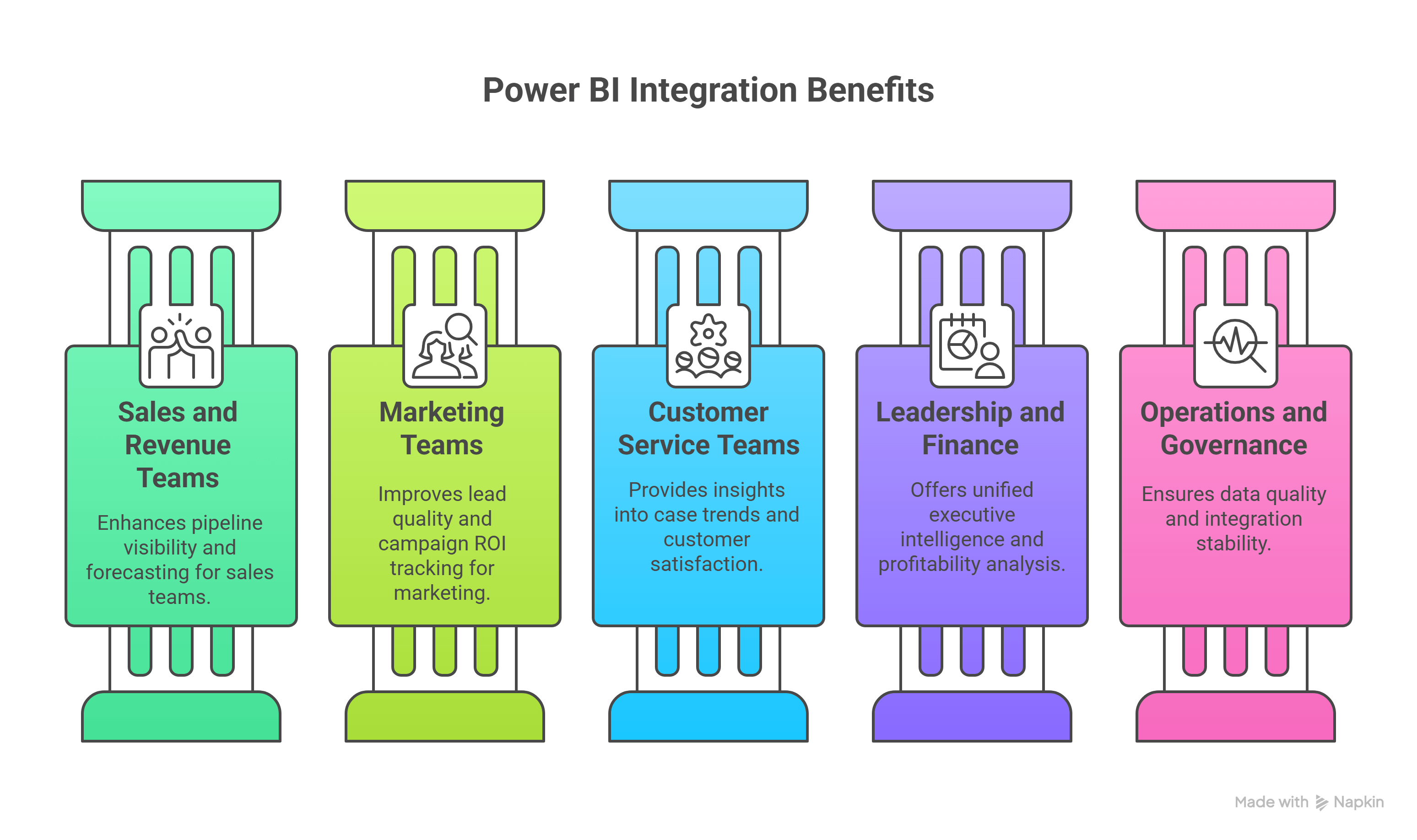
Sales and Revenue Teams
- Pipeline visibility: Visual stage-by-stage breakdown of deals to spot bottlenecks.
- Conversion funnel performance: Highlights where leads drop off and why.
- Opportunity forecasting: Uses AI and historical data to improve close probability insight.
- Territory performance: Dashboards by region, team, or rep instead of spreadsheets.
- Quota attainment tracking: Real-time visibility into progress and gaps.
Marketing Teams
- Strong Lead quality and source performance: Connects campaigns to actual lead outcomes.
- Strong Campaign ROI by source and segment: Tracks impact by channel and audience.
- Strong Lead-to-opportunity performance: Measures handoff effectiveness to refine targeting.
- Strong Multi-channel attribution: Combines data sources for full touchpoint visibility.
Customer Service Teams
- Strong Case trends: Detects recurring issues and predicts case volume spikes.
- Strong SLA adherence: Tracks real-time compliance with service commitments.
- Strong Time to first response: Identifies delays in initial customer engagement.
- Strong Customer satisfaction analysis: Combines CSAT and case data to find improvement areas.
Leadership and Finance
- Strong Revenue trends vs forecast: Track actuals, forecast variances, and insights.
- Strong Churn predictions: Detect churn signals from usage, service, and sales data.
- Strong Multi-department KPIs: Unified KPI dashboard for marketing, finance, and sales.
- Strong Profitability analysis using Salesforce plus ERP: Understand profit at deal or customer level.
Operations and Governance
- Strong API consumption monitoring: Stay ahead of API limits and usage spikes.
- Strong Data quality issues: Find inconsistencies, gaps, or duplicates in data.
- Strong Integration bottlenecks: Visualize delays and flow issues across systems.