Dynamics 365 BC-CE Integration [What Breaks, What Works, and What to Build]
Apr 17, 2026 Aiswarya Madhu
Most teams assume that because Business Central and Customer Engagement are both Microsoft products, connecting them is mostly a configuration exercise. Pick the connector, map a few fields, and the two systems start sharing data. That assumption is where the trouble starts.
The native integration between BC and CE covers Dynamics 365 Sales and stops there. If your CE environment includes Customer Service, Field Service, or Marketing, the out-of-the-box connector does not reach that far. Practitioners on the Microsoft Dynamics community forum have flagged this repeatedly: anything beyond Sales requires custom development, and that is a scope most teams did not plan for.
Even within the Sales connector, the field mapping problem surfaces quickly. Customer names, addresses, and product IDs are structured differently in Business Central than they are in CE. Write-in products added manually in Dynamics 365 Sales have no equivalent record in Business Central, which means order sync breaks silently, and nobody knows until a customer calls about a wrong invoice.
Microsoft's own documentation states clearly that the scheduled synchronization between Dataverse and Business Central does not guarantee real-time data consistency. That one line in the docs represents a significant gap between what teams expect and what they actually get.
Were you aware of this, or did you take the word native at face value and never look beyond it? If you did, you are not alone. Most teams do. And if that is where you are, this is exactly where you can begin. Let us walk through the most common ways teams connect CE and BC (from the native connector and Dataverse integration to Power Automate and custom APIs) how to choose the right one, and what you are likely to stumble upon during the process
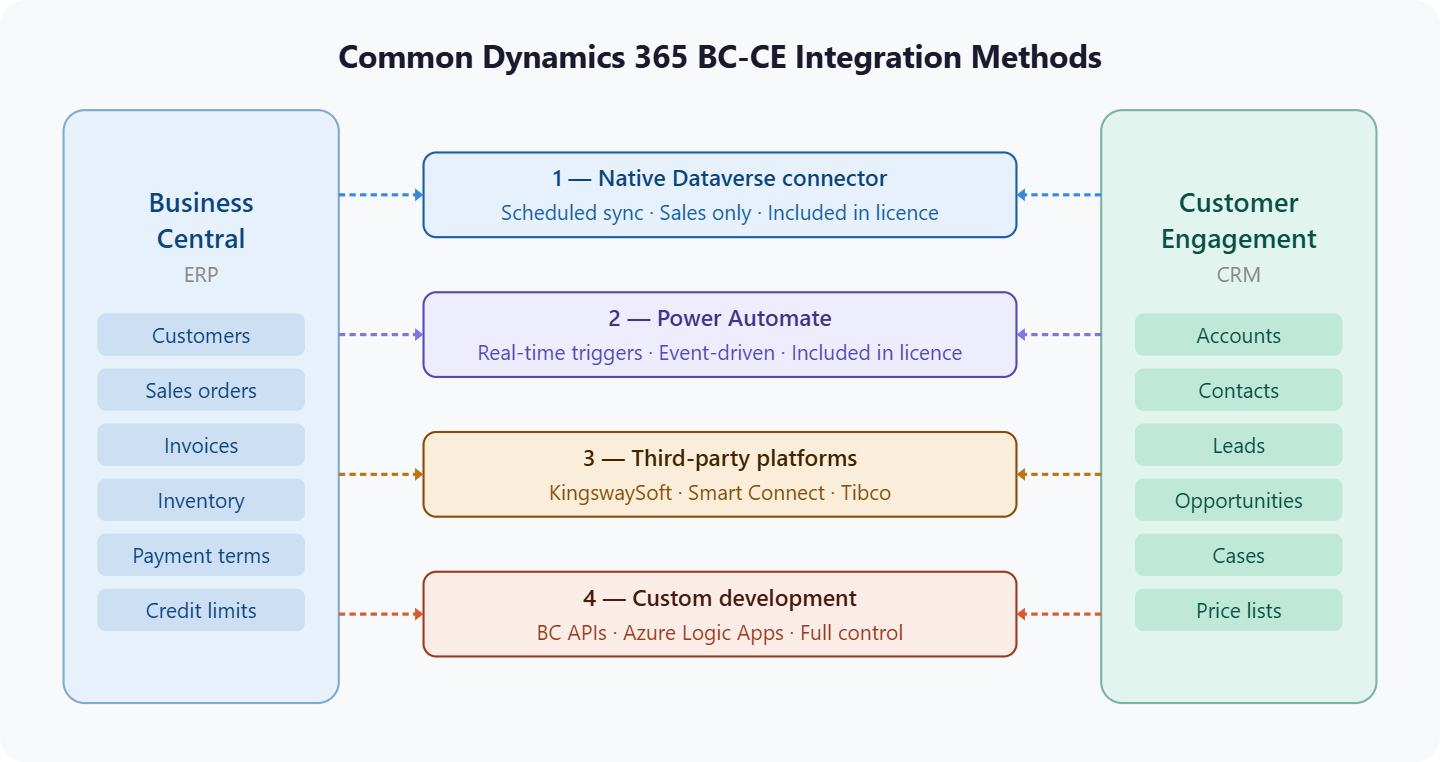
Common Dynamics 365 BC-CE Integration Methods
There is no single way to integrate BC and CE. Depending on how your business operates and what your teams need from the integration, the approach will look different. Here is a quick overview of what is available.
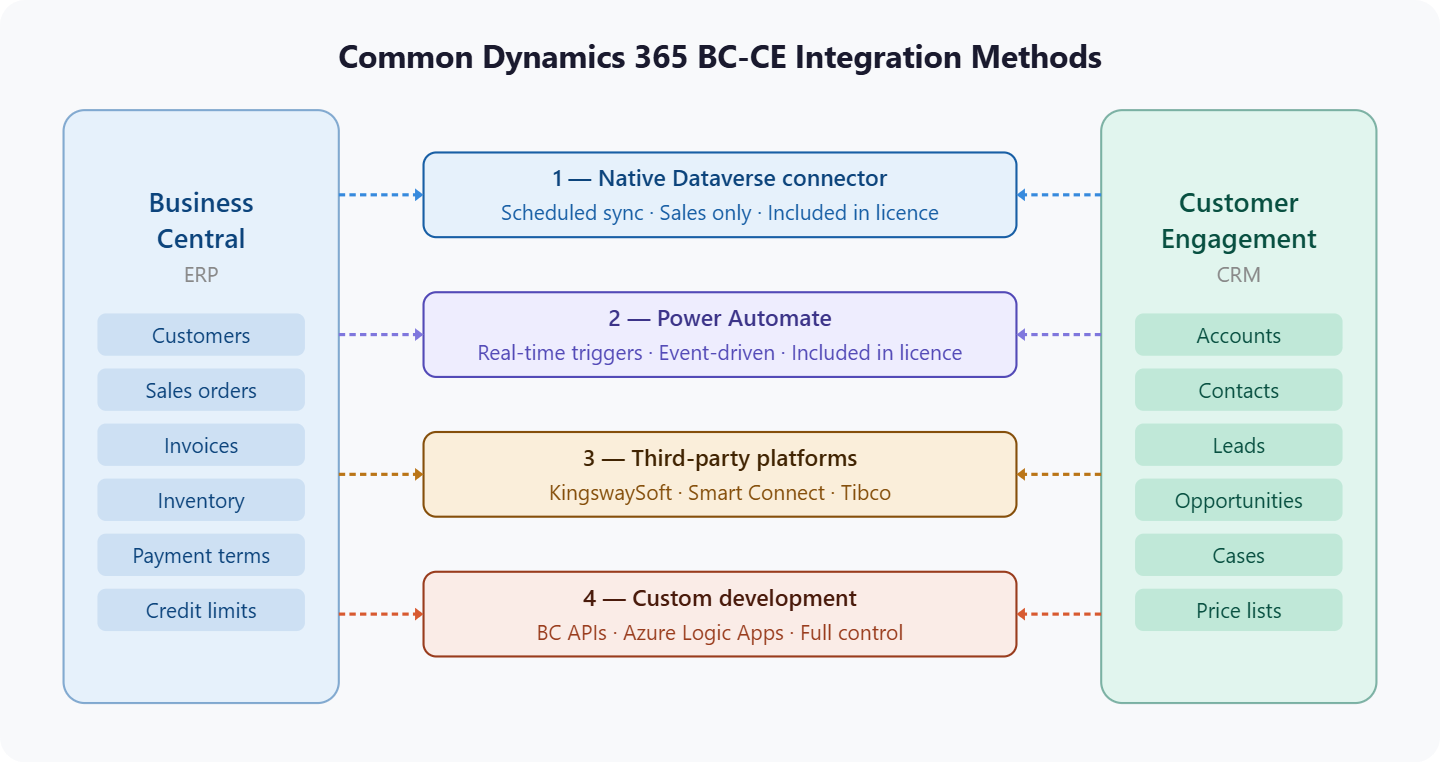
1. Native Dataverse Connector
Microsoft's built-in connector that comes included with your licenses. It connects BC and CE through Dataverse, Microsoft's shared data platform, and synchronizes standard records like customers, contacts, payment terms, and sales orders between the two systems. It works in two ways. It can physically copy and sync records from BC into CE so they are available to work with. Or it can display BC data directly in CE through virtual tables, which show live BC data without duplicating it. Both mechanisms are part of the same native setup.
2. Power Automate
Also included with your existing Microsoft 365 and Business Central licenses. It does not replace the native connector but extends it. You use Power Automate to trigger specific actions the moment something changes in either system, rather than waiting for a scheduled sync. It is also the most accessible way to automate cross-system workflows, like creating a BC order the moment a deal closes in CE, without manual re-entry.
3. Third-Party Integration Platforms
For organizations with more complex requirements, a range of dedicated integration platforms sit between BC and CE and give you greater control over how data flows between them. These include tools like Kingsway Soft, Smart Connect by E1 Solutions, and Tibco, among others. They are particularly useful when you need to connect CE applications beyond Sales, handle custom field mapping, manage multi-company BC setups, or maintain detailed logs of what synced, what failed, and why.
4. Custom Development
For requirements that no off-the-shelf approach handles cleanly. This typically involves building directly against Business Central APIs, Azure Logic Apps, or Azure Data Factory. It gives you complete control but carries the highest implementation and maintenance cost.
We have seen this play out directly. One of our clients, a data integration platform provider, needed to connect their product suite to Microsoft Dynamics. The problem was that generic APIs could not handle their requirements and the naming conventions of Microsoft objects made standard mapping unworkable. The only viable path was building high-performance custom middleware connectors from scratch. The result worked, but it required dedicated development effort that a more standard setup would not have needed. That is not a reason to avoid custom development. It is a reason to know before you start whether you are heading in that direction.
Which Integration Approach Fits Your Situation?
We have already covered where the native Dataverse connector starts and where it stops. But knowing a tool's limitations is only useful if you know what to reach for when you hit them. The approach that works for your organization depends on what your teams actually need to do with the data, not on what any single system can do in isolation.
Here are the situations that come up most often, and what the right integration looks like for each one.
Scenario 1: Your teams just need to see each other's data without changing it
Imagine your customer service team is handling a call. The customer is asking about their last order. That order is in Business Central. The customer service agent is working in Customer Engagement. Right now, they have to put the customer on hold, call someone in finance, and wait. All they need is to be able to see the order. They do not need to edit it. They do not need it copied anywhere. They just need it to be visible.
This is the lightest integration requirement, and it can be solved without any complex data synchronization at all. The way it works is through something called virtual tables, and it is worth explaining this plainly because the name alone confuses a lot of people.
A virtual table is not a copy of your data. Nothing is being moved or duplicated. Think of it like a window cut into the wall between two rooms. The furniture in the room next door stays exactly where it is, but you can see it through the window. In the same way, a virtual table lets people in Customer Engagement look at live Business Central data directly on their screen, without that data ever leaving Business Central. The moment someone updates an invoice in BC, the person looking at it in CE sees the updated number right away.
Virtual tables enable real-time accessibility. The user can see the data in Business Central, and it is immediately visible in connected applications. No syncing or duplicating is required.
For a customer service agent, a field service technician, or anyone who needs to read financial or operational data without editing it, this is the cleanest answer. It avoids data duplication, does not add to storage costs, and keeps Business Central as the single source of truth for financial data.
The limitation is that virtual tables are better suited for reading than for writing. If your situation involves people in CE creating or updating records that need to flow back into BC, virtual tables alone will not cover that.
Scenario 2: Data needs to flow in both directions and stay reasonably current
Your sales team closes a deal in CE. That deal needs to become an order in Business Central so finance can process it. At the same time, when finance marks an account on credit hold in BC, the sales team needs to see that before they make promises to that customer on their next call.
This is the core bidirectional integration scenario, and the native Dataverse connector was built for it. It synchronizes standard records like customers, contacts, and sales orders between the two systems on a schedule. By default, that schedule runs roughly every 30 minutes.
For most updates, 30 minutes is fine. A contact's phone number changing, a new product being added, an invoice status updating from open to paid. None of those need to happen in seconds.
But there are specific situations where 30 minutes is long enough for a problem to develop. A credit hold placed in Business Central at 9am may not reach the sales rep in CE until 9:30. If that rep calls the customer at 9:15 and offers a discount on a new order, the company now has a conflict on its hands that could have been avoided.
This is where Power Automate becomes relevant. Power Automate is not a separate system you need to buy or learn from scratch. It is already included in your Microsoft 365 and Business Central licenses. It lets you set up specific triggers that fire the moment something important changes in either system, instead of waiting for the next scheduled sync.
So, the way it works in practice is straightforward. You decide which updates cannot afford to wait. A credit hold being placed. A deal being marked as won. A payment being received. You set up a trigger for each of those events, and the moment it happens in one system, the right action fires in the other automatically. No one has to remember to manually update anything. No one has to check whether the sync has run yet.
The native connector keeps everything in the background moving on its schedule. Power Automate handles the moments where timing actually matters. Between the two, most bidirectional integration requirements are covered without additional cost or significant technical work.
The one thing to keep in mind is that Power Automate works best for event-driven actions; one thing happens, so another thing follows. If you need to move large volumes of records between systems in bulk, or if your integration logic is complex enough to involve multiple conditions and transformations, you will likely need to look at the third option below.
Scenario 3: Your CE environment goes beyond Dynamics 365 Sales
The native connector was designed for Dynamics 365 Sales. If your Customer Engagement environment also includes Customer Service, Field Service, Marketing, or Project Operations, those applications sit outside what the standard connector covers.
This matters more than it might appear. A business running Dynamics 365 Customer Service for support tickets alongside Business Central for billing has a real gap if the two do not talk. A customer calls to raise a complaint. The support agent logs the case in CE. But they cannot see whether there is an open invoice, whether the customer has a credit hold, or whether finance has flagged this account for escalation. That information is in Business Central, and the standard connector does not bring it through.
The cost of that gap is not abstract. A manufacturing client came to us with exactly this kind of fragmentation across their sales, service, and customer support teams. Marketing was not talking to sales. Sales was not talking to service. And nobody had a clean view of the customer. The result was delayed responses, missed opportunities, and a customer experience that suffered for it. Once the systems were connected and handoffs between departments were automated, the transformation was measurable, not just in efficiency but in how quickly the team could respond when something needed attention.
Connecting additional CE applications to Business Central requires either extending the native integration through custom development, building specific workflows in Power Automate that use Business Central APIs to pull or push data, or using a third-party integration platform that has broader support for the CE suite beyond Sales.
There is no single right answer here. It depends on how many CE applications need to be connected, how complex the data flows between them are, and whether your team has the capability to build and maintain what is needed. What matters is knowing this gap exists before you go live rather than discovering it after.
Scenario 4: Your data structures do not match out of the box
The native connector maps standard fields between Business Central and CE. Customer name to account name. Invoice number to order number. Payment terms to payment terms. That works cleanly when both systems follow the standard structure.
Most organizations, after years of use, have added custom fields to one or both systems. A custom field the sales team added to track a specific customer category in CE. A custom field finance added to Business Central to flag contract type. These fields do not appear in the standard integration mapping. Getting them to sync requires a developer to write code on the Business Central side to expose that field before it can be mapped.
Country codes between CE and Business Central must match exactly before syncing or you end up with hidden failures. They must use the two-character country codes, otherwise records fail to synchronize silently.
Hidden failures are the most expensive kind because nobody catches them until a customer or a manager asks a question, and the numbers do not add up. By then the problem has been running quietly for weeks. For organizations with significant customization on either side, a more structured integration approach with dedicated tooling gives you visibility into what is syncing, what is failing, and why, rather than finding out through the problems it causes downstream.
Scenario 5: Your business has outgrown what standard approaches can handle
Some organizations reach a point where their integration requirements are specific enough to their business that no standard approach handles them cleanly. Multiple Business Central companies connecting to one CE environment, each with different rules about who owns which data. Integration that spans BC, CE, and external systems like logistics platforms or third-party portals in a single process. Business logic that needs to run in a specific order across both systems every time something changes.
For these situations, custom development using APIs and web services provides the highest level of customization, though it requires more resources and technical expertise. This might involve building workflows that orchestrate data across multiple systems or setting up pipelines that handle large volumes of data moving between environments at scale.
This path carries the highest maintenance overhead. Every time Microsoft updates either BC or CE, custom integrations need to be checked to make sure nothing has broken. It is not the right starting point for most organizations, but it is the right answer when everything else has run out of road.
The Question That Points You in the Right Direction
Before evaluating any approach, three questions cut through most of the complexity.
What data needs to move between the two systems, who needs to see it, and does that person need to act on it or just read it? How quickly does that data need to be current for the people who depend on it? And how far does your CE footprint extend beyond Dynamics 365 Sales?
The answers to those three questions will tell you more about what your integration needs to look like than any technical comparison will.
Challenges You Are Actually Going to Stumble Upon
[13 Integration Problems Nobody Warns You About]
Before anything else, the most important thing to understand is that CE and BC are two different databases. They are not natively in sync just because they share the Microsoft name. Every connection you build between them is a deliberate decision, and each one has its own set of surprises.
- You will assume all CE apps connect to BC the same way, and you will be wrong. The native connector covers Dynamics 365 Sales only. Customer Service, Customer Insights, and Project Operations have no equivalent. If you are running any of those, you are building custom. There is no single setup that covers the full CE suite, and most teams only discover this after the Sales integration is live and they turn their attention to the next module.
- To connect Field Service to BC, you have to set up a Sales integration first, even if you do not use Sales. Field Service is built on top of Dynamics 365 Sales. There is no way around this dependency. If your organisation went straight to Field Service without Sales, you still have to establish both a Dataverse connection and a Sales connection in BC before Field Service will talk to it. Nobody mentions this at the start of a Field Service project.
- The Field Service integration only maps to BC Projects, not BC Service Orders. A practitioner posted this directly in the community forum. They followed the official documentation, got the integration running, and then discovered that work orders in Field Service only sync to Project Journal Lines in BC. If your finance team processes field service through the Service module rather than Projects, the native integration does not fit your workflow and you are back to custom development.
- You need a BC Premium license to use the Field Service integration at all. Essentials will not get you there. This is documented by Microsoft but not surfaced prominently during planning conversations. Teams on Essentials licences find this mid-setup, at which point it becomes a commercial conversation that nobody budgeted for.
- Installing another CE app in the same environment can quietly break your Sales integration with BC. Microsoft states this in their own documentation. Applications that modify the standard workflow or data model in Sales, and Customer Service and Project Service Automation are both capable of this, can interfere with the Sales connector. It does not always break immediately and visibly. Sometimes it degrades behaviour in ways that only become obvious when records start behaving unexpectedly.
- Customer Insights can see BC data but cannot write back to it. If your marketing team wants to segment customers using financial data from BC, purchase history, revenue, payment patterns, they can surface that data through virtual tables. But virtual tables are read-only. Any scenario that involves enriching BC records based on what happens in Customer Insights requires a custom pipeline. The integration goes one direction only out of the box.
A good example of what becomes possible when you solve this properly: one of our clients in the AEC sector was sitting on rich customer data across both their CRM and their operational systems, but because nothing was connected, their marketing team could not act on it. Once the data pipeline was working, they could identify customers on one product who were obvious candidates for an upgrade and reach out before the renewal window closed. That kind of proactive outreach is only possible when the data flows both ways.
- The sync is scheduled, not real time, and nobody tells the business that until something goes wrong. Microsoft is clear in their own documentation that the synchronization between Dataverse and BC does not guarantee real-time data consistency. The default runs every 30 minutes. In a live environment where sales, service, and finance teams are all depending on the same records, that gap creates confusion and occasionally causes the wrong version of data to be acted on.
- The integration can run without errors while silently skipping records. This is the one that takes the longest to diagnose. The job queue shows healthy, no obvious errors, but certain records are failing to sync because of a data edge case and the system is not surfacing it loudly. The errors exist on the Integration Synchronization Errors page but unless someone is checking that page regularly, they pile up unnoticed until a customer calls about a missing order or a wrong invoice.
- After your first full sync, new records stop coming across and nobody understands why. The mapping silently switches to sync only coupled records after a full sync runs. Anything created in CE after that point does not automatically sync to BC. It just gets ignored. This catches teams off guard because the integration looks like it is working. It is just no longer picking up anything new.
- A sales rep adds a product manually as a write-in, and the order breaks. Write-in products in Dynamics 365 Sales have no matching record in BC. The order line simply does not carry across cleanly. Microsoft has a documented workaround but most teams hit this problem before they find that page.
- The moment you need to sync a custom field, you are in development territory. The Integration Field Mapping List has insert disabled. You cannot add a row for a custom field through configuration. The fix requires an AL extension or a Power Automate flow, both of which need a developer. This is one of the most common unplanned scope items in a CE-BC integration.
- BC decides your sales order mapping direction, and you cannot override it. A team on the community forum tried to manually set the integration mapping direction for sales orders. BC reverted it every time. The system bases this on the connection setup options and does not allow manual overrides from the mapping page. If that default direction does not fit your process, the workaround is a custom flow, not a setting change.
- Trying to change the currency on an existing deal removes all your product lines. If an opportunity, quote, or order in Sales already has products attached and someone tries to switch the currency, the system blocks the change. The only path forward is to strip the product lines, change the currency, then rebuild. Microsoft has a dedicated troubleshooting page for this scenario, which tells you something about how regularly teams run into it.
Before you go — these might help too
What's Next?
Every situation in this guide has one thing in common. The cost of getting it wrong shows up quietly. That is why the integration decisions you make at the start shape everything that comes after. The right approach for your business depends on your CE footprint, your data structure, and how your teams actually work, and that is not something a generic setup guide can tell you.
Book a free 30-minute Dynamics 365 ERP CRM integration discovery call with our team. We will tell you where your current setup stands, what is likely to break, and what it actually takes to get it working the way it should.
Recent Posts

Dynamics 365 Activate: Do You Still Need a Migration Partner?
Oct 05, 2026

Tableau to Power BI Migration: A Practical Guide
Sep 09, 2026
SAP ECC to Dynamics 365 Finance & SCM Migration Guide
Sep 09, 2026
Category
Our Expertise



About Author

Aiswarya Madhu
Aiswarya Madhu is an experienced content writer with extensive expertise in Microsoft Dynamics 365 and related Microsoft technologies. With over four years of experience in the technology domain, she has developed a deep understanding of Dynamics 365 applications, licensing, integrations, and their role in driving digital transformation for organizations across industries.
Never Miss News
Want to implement Dynamics 365?
We have plans which will meet your needs, and if not we can tweak them around a bit too!