AI in Business Central [Capabilities, Costs, and Readiness]
Jul 30, 2026 Aiswarya Madhu
Most write-ups on AI in Business Central stop at a feature list.
They tell you Copilot can draft a product description, reconcile a bank account, or summarize a record, and leave it there.
That misses the questions a finance or operations leader actually needs answered:
- What is Business Central AI becoming?
- What can employees realistically do with it?
- Which capabilities are included in the license?
- What needs to be true in your system before the investment pays off?
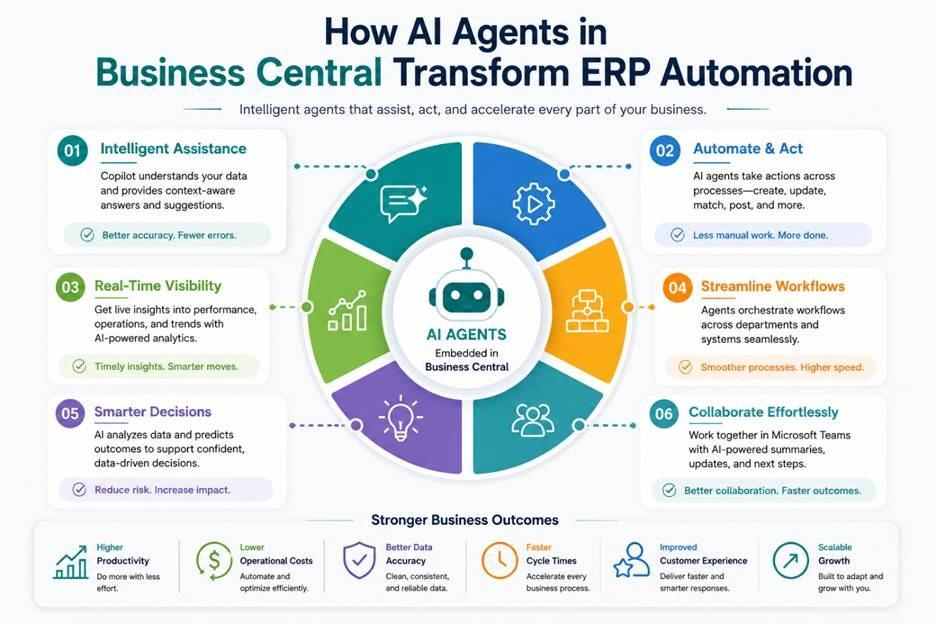
Business Central AI now has two layers.
Copilot is the assistant built into the interface
It helps users find, analyze, summarize, explain, and draft using plain language.
Agents are the newer autonomous layer
They can monitor work and move multi-step processes forward, such as processing vendor invoices or creating sales orders, while keeping a person involved in review and approval.
Most assistive Copilot capabilities are included with Business Central, while agents are billed separately. Both require Business Central online, and the quality of their output depends heavily on the quality of the data already in your ERP.
Turning on more AI does not make those weaknesses disappear. It makes them more visible.
That is what decides whether an AI rollout works. In the sections ahead, we look at the capabilities available today, how Copilot and agents differ, what they cost, and what your data, permissions, processes, and governance need to look like before you scale.
The Shift Defining Business Central AI: From Assistant to Agent
For the past few years, Copilot in Business Central has behaved like a smart helper sitting beside the user.
A person asks a question, opens a task, or requests an analysis. Copilot responds with an answer, suggestion, summary, or draft.
It can help someone find a record, understand a field, build an analysis view, complete missing information, or reconcile a bank statement.
The newer direction is different.
Microsoft is moving Business Central towards an agentic ERP, where AI does not only assist with one step. It can take responsibility for more of a business process.
The distinction is simple:
An assistant waits to be asked.
An agent monitors the work, completes several steps, and hands the result to a person for review.
The Payables Agent is one of the clearest examples. Instead of an employee opening every invoice, entering the information, finding the purchase order, and checking what was received, the agent can monitor the invoice mailbox, extract the details, perform the matching, and route exceptions for review.
The Sales Order Agent applies the same idea to emailed sales requests. It can identify the customer and requested products, prepare a quote, and move the process forward when the customer confirms.
For a small or mid-sized business, this raises the amount of work one person can supervise.
The work does not disappear, and it should not run without oversight. But routine reading, matching, and drafting move into the system, while employees focus on exceptions, approvals, and decisions.
![AI Agents in Business Central [Beyond “Just Automated”]](/images/blog-meta-images/ai-agents-in-business-central-beyond-just-automated.png)
What Can Users Actually Do with AI in Business Central?
The full capability list is extensive, but a few examples show how Business Central AI changes everyday work.
Ask Business Central Questions in Plain Language
Chat with Copilot lets employees ask Business Central questions the way they would ask a colleague, from “show me the latest order for this customer” to “what is a dimension?” Copilot finds the record, explains the concept, or links to the correct page. That reduces everyday dependence on the one person who knows the system best, and shortens the ramp for new employees.
Turn a Business Question into an Analysis View
Analysis Assist builds a view from a plain-language description, so a request such as “group purchases by vendor location and sort by total purchase amount, highest first” returns entries grouped, totaled, and ranked without anyone touching a filter or a pivot. Because it stays conversational, the user can add a vendor count, bring in a time period, or pull in related fields until the view answers the question. The result saves as a reusable tab that is already current the next time it is opened.
Summarize a Customer, Order, or Account
Copilot condenses a customer, order, or account into a short summary with links through to the supporting detail, so nobody has to rebuild the relationship from FactBoxes, statistics, and activity history before every call. The summary also reflects who is asking. A salesperson sees recent conversations and open opportunities, while a credit controller sees overdue balances, payment behavior, and credit limit.
Fill Missing Information Before It Becomes a Reporting Problem
Records are often created with only the minimum information needed to continue, and those blanks surface months later as gaps in reporting, segmentation, and forecasting. Autofill with Copilot suggests values for empty fields as records are created or updated, and where web search is permitted it can propose details such as an organization’s address, phone number, or website. The gain is fewer blanks and fewer typing errors in the records every downstream report relies on.
Reconcile Bank Accounts with Less Manual Matching
Bank reconciliation consumes hours because the statement and Business Central rarely describe the same transaction the same way.
The name on a statement line is the payer's bank-registered or trading name, which often differs from the customer name on the record, and the reference field may be blank, mistyped, or truncated, so it gives little indication of where the amount belongs.
Payments also arrive bundled or split, or come through a third party such as a payment platform or factoring company, so a single statement line does not map cleanly to a single ledger entry.
The accountant has to work down the statement line by line, searching for the entry each one matches, and the morning goes into work that is mechanical but unavoidable.
Copilot proposes the matches between statement lines and ledger entries, including the cases a person would only catch by recognizing that a payment under an unfamiliar registered name belongs to an existing customer.
For the lines it cannot match with confidence, it suggests an appropriate posting account rather than leaving the accountant with nothing to work from.
The accountant still reviews the proposed matches, corrects what is wrong, resolves the true exceptions, and posts the reconciliation. The difference is that the morning is spent reviewing a reconciliation that is already most of the way complete instead of building every match by hand.
Process Vendor Invoices with an Agent
Vendor invoices often arrive in a shared mailbox where someone must open each document, enter the details, locate the purchase order, compare it with the receipt, and investigate discrepancies.
Volume is what makes this expensive. Each invoice takes a few minutes, none of it calls for judgment, and the queue refills every morning. The exceptions that do need a person, a price that does not match, a quantity short on the receipt, a line billed against a closed order, sit buried among the invoices that would have gone through untouched.
The Payables Agent can monitor the mailbox, extract invoice information, compare the invoice with purchase orders and receipts, suggest accounts where required, and route exceptions to a person. Its activity remains visible and reviewable.
What changes is where the work starts. Instead of opening a full queue and processing it, the payables clerk opens a set of already matched invoices and a short list of exceptions, and spends the morning on the ones that actually need a decision.
This is most valuable where invoice volumes are high, and the process is repetitive. A business with a modest monthly invoice load may not see the same return.
Speed Up Sales Order Entry
Sales requests rarely arrive in a form the system can use. They come as an email listing what the customer wants, a product list pasted from a spreadsheet, a reference to "the same as last time," or a purchase order attached as a file.
Turning any of these into a sales order has meant reading through it, matching each item to the right record in the catalog, checking the customer is on the correct unit of measure, and keying the lines in one by one. The information was never the problem. Getting it into Business Central in a usable shape was.
Sales Line Suggestions remove that step. On a quote, order, or invoice, the user pastes the email text, describes the items in plain language, points Copilot at a previous document, or uploads a CSV of the order.
Copilot reads the input and matches it against the product catalog, working through item numbers, barcodes, and attributes rather than exact names, so a described item still resolves to the right record even with typos or a customer's own wording.
It returns the suggested lines with quantities converted to the customer's sales unit of measure, and the user reviews them, drops anything that does not belong, and inserts the rest. For a repeat customer, it draws on recent and frequent purchases to surface the items that customer actually orders.
Where inbound email orders come in high volume, the Sales Order Agent takes the process a step further. It monitors the company mailbox, drafts a quote from the request, and once the customer confirms, converts that quote into an order, keeping a person in the loop to review before the order is committed.
The result is that order entry stops being a queue of manual keying and becomes a review step, whether a salesperson is building one order from an email or the agent is clearing a steady stream of them.
Help Sales Teams Recover From Stockouts
When an item is unavailable, Copilot searches your existing catalog for substitutes, reading across item descriptions, barcodes, and attributes, and ranks the proposals by confidence so the strongest matches sit at the top. The salesperson keeps what fits and drops the rest, and the same capability lets a product or operations team populate substitution lists on item cards ahead of time. This recovers the immediate sale, though the underlying inventory problem belongs to forecasting.
Forecast Inventory, Payments, and Cash
Business Central also includes predictive features that sit alongside Copilot, and Microsoft is explicit that these use machine learning models trained on your history rather than generative AI. Inventory Forecasting estimates future demand and flags likely shortfalls, Late Payment Prediction scores open invoices by the risk of late payment, and Cash Flow Analysis projects inflows and outflows from historical patterns and current financial documents. These are among the most valuable capabilities in the system and the most sensitive to data quality, because a forecast is only as good as the history behind it.
Draft Product Descriptions
Where a large catalogue holds detailed item attributes but no customer-facing copy, Copilot drafts descriptions from the item card and the organization’s tone preferences, and with the appropriate Shopify integration the approved text can publish straight to the connected store. Marketing or ecommerce reviews and refines instead of starting from a blank page. The gain is small across a limited catalogue and much larger across thousands of products.
Ready to switch on AI
Book a free 30-minute conversation with our Business Central experts.
What It Takes to Make Business Central AI Work
Here is the part most product demonstrations move past quickly.
AI in Business Central does not repair a messy ERP environment, It uses what is already there.
Copilot does not require you to train a custom model. It reads your Business Central records, pages, permissions, dimensions, and document structures.
That means poor item records, duplicate vendors, inconsistent customer information, weak document setups, and incomplete financial dimensions flow into the AI output.
Turning on more AI does not make those weaknesses disappear. It makes them more visible.
That reframes an AI rollout as a data, process, governance, and adoption project.
Four areas need attention:
1. The Data Foundation
Reliable AI output starts with reliable Business Central data.
Before scaling AI use, review:
- Duplicate customer and vendor records
- Incomplete item information
- Inconsistent naming and coding conventions
- Missing contact details
- Weak document structures
- Incorrect or incomplete dimensions
- Historical data that no longer reflects current operations
Dimensions deserve particular attention. They are the tags attached to transactions, such as department, region, project, or cost centre. They determine how Business Central can later group, compare, and analyze financial and operational data.
If dimensions are used consistently, an analysis request lands on something dependable.
If they are incomplete or inconsistent, AI can still return an answer, but the answer may not reflect the business correctly.
Not every capability needs perfect data. Chat, summaries, search, and task guidance can still deliver value in an imperfect environment.
Predictive capabilities such as inventory forecasting, late payment prediction, and cash flow analysis require much more confidence in the history beneath them.
2. The Deployment Reality
Copilot and agents are available for Business Central online.
If your organization is using Business Central on-premises or in a private-cloud deployment, AI is not simply a capability that can be enabled.
Moving to Business Central online becomes a prerequisite. That makes AI readiness partly a deployment decision. The organization needs to understand:
- Whether a cloud move is already planned
- Which customizations need to be reviewed
- Whether connected applications are ready
- What data needs to be migrated or cleaned
- Which Business Central AI capabilities are available in its region and language
This should be established at the beginning of the plan, not discovered halfway through implementation.
3. Governance, Permissions, and Control
Copilot works inside the user’s existing Business Central permissions.
It cannot provide a user with information they are not already authorized to access.
That means the permission model is also part of the AI security model.
Before rollout, organizations should review:
- Who can access customer, vendor, financial, and employee information
- Which capabilities should be available to each role
- Where human approval must remain mandatory
- How agent-created or modified records will be reviewed
- Who is responsible for exceptions
- How AI activity will be monitored
- What regional data requirements apply
- What happens when an agent needs to be paused
Agents require particular attention because they continue working without a person initiating every step.
The process should make it clear what the agent can prepare, what a person must approve, and what happens when the information does not match.
The goal is not to remove people from the process. It is to move their attention to the points where judgement is actually required.
4. Adoption and Trust
A capable AI feature that employees do not trust will sit unused.
Users need to understand:
- What the capability can do
- What it cannot do
- Which answers should be verified
- Who owns the final decision
- Where agent activity can be reviewed
- How mistakes and exceptions should be reported
Starting small is usually more effective than turning on every available feature.
Choose a few recognizable problems:
- Repetitive Business Central questions
- Reporting queues
- Slow bank reconciliation
- Incomplete master data
- Manual sales order entry
- High invoice volumes
When employees see the feature remove a real problem, adoption becomes easier.
Want us to walk it with you?
Book a free 30-minute Business Central AI readiness review and leave knowing exactly where you stand.
A Business Central AI Readiness Check
Before expanding AI use, assess the environment against these questions:
- Are you using Business Central online, or is a cloud move still required?
- Is your master data reliable enough that you would trust a report created from it without extensive correction?
- Are financial dimensions complete and used consistently?
- Are customer, vendor, item, and document structures standardized?
- Does the user permission model accurately reflect who should see what?
- Is it clear where human approval is required?
- For any agent being considered, is the workflow high enough in volume to justify separate billing?
- Does the team know how to review AI-generated answers, suggestions, and records?
- Is there an owner for governance, monitoring, and adoption?
A "no" does not mean you should abandon AI.
It identifies the work required to make AI worth using. Most of that work improves Business Central even without AI.
Business Central AI Billing at a Glance
Business Central AI is generally charged through Copilot Credits.
You do not pay for a separate AI seat. Instead, credits are consumed whenever Copilot or an agent performs an action. The same credit system is also used across Microsoft Copilot Studio.
How many credits does each action use?
| AI action | Credits used |
|---|---|
| Scripted or classic answer | 1 credit |
| Generative answer | 2 credits |
| Agent action, such as completing an ERP task | 5 credits |
| Tenant graph grounding | 10 credits |
| Basic AI tool, per 10 responses | 1 credit |
| Standard AI tool, per 10 responses | 15 credits |
| Premium AI tool, per 10 responses | 100 credits |
What Business Central agents may cost
| Agent | Credit usage | Microsoft’s monthly example |
|---|---|---|
| Sales Order Agent | 2–5 credits per step | 100 requests may use about 1,650 credits |
| Payables Agent | 50 credits per invoice, plus 5 credits per line | 100 invoices with three lines each may use about 6,500 credits |
| Expense Agent, currently in preview | 50 credits per receipt | The cost remains the same regardless of the number of lines |
The Payables Agent can consume credits more quickly because the charge includes both invoice processing and individual invoice lines.
Two ways to pay for Copilot Credits
| Payment model | Price | Best suited for |
|---|---|---|
| Prepaid capacity pack | $200 per month for 25,000 credits | Organizations with stable, predictable usage |
| Pay-as-you-go | $0.01 per credit through Azure | Organizations with variable usage or no fixed commitment |
Prepaid credits are used before pay-as-you-go charges begin. Any unused prepaid credits do not roll over to the following month.
Where Should You Start?
Most of what you need is already inside Business Central.
What decides whether any of it pays off is the environment you point it at. So the task in front of you is not only choosing features. It is also preparing the ground for them. Get your data, deployment, governance, and adoption right, and Business Central AI does its best work. And nearly all of that preparation improves Business Central whether you switch the AI on or not. If you have more questions about AI in Business Central, or about how to prepare your Business Central to switch AI on, get in touch with our experts for a 30-minute conversation.
Frequently Asked Questions
What is AI in Business Central?
AI in Business Central has two main parts. Copilot is the built-in assistant that helps users find information, analyze data, summarize records, explain processes, and draft content using natural language.
Agents can monitor and complete multi-step processes, such as processing vendor invoices or creating sales orders, while keeping people involved in review and approval.
Is Copilot included with Business Central?
Most assistive Copilot capabilities are included with Business Central.
The Payables Agent and Sales Order Agent are billed separately. The Finance solution in Microsoft 365 Copilot is also a separate product with its own setup and licensing.
Commercial terms and availability can change, so the current position should be confirmed before implementation.
What is the difference between Copilot and an AI agent?
Copilot assists a user who is actively working. The user asks a question or starts a task, and Copilot responds.
An agent monitors a process and completes several steps with minimal human input, then presents the result or exception for review.
Copilot is an assistant. An agent is an autonomous worker operating within a controlled process.
Is Business Central AI available on-premises?
Copilot and agents are designed for Business Central online.
Organizations using on-premises or private-cloud deployments need to consider moving to Business Central online before these capabilities can be introduced.
Is Business Central data safe with Copilot?
Copilot works within the user’s existing Business Central permissions.
It should not provide access to information the user is not authorized to view. Organizations should still review permissions, governance settings, regional data requirements, and approval controls before expanding AI use.
What does Business Central AI need to work well?
The most important requirements are:
- Business Central online
- Reliable master data
- Complete financial dimensions
- Consistent document and transaction structures
- Appropriate user permissions
- Clear review and approval rules
- A practical adoption and governance plan
Recent Posts

Dynamics 365 Activate: Do You Still Need a Migration Partner?
Oct 05, 2026

Tableau to Power BI Migration: A Practical Guide
Sep 09, 2026
SAP ECC to Dynamics 365 Finance & SCM Migration Guide
Sep 09, 2026
Category
Our Expertise



About Author

Aiswarya Madhu
Aiswarya Madhu is an experienced content writer with extensive expertise in Microsoft Dynamics 365 and related Microsoft technologies. With over four years of experience in the technology domain, she has developed a deep understanding of Dynamics 365 applications, licensing, integrations, and their role in driving digital transformation for organizations across industries.
Never Miss News
Want to implement Dynamics 365?
We have plans which will meet your needs, and if not we can tweak them around a bit too!