A Guide to Microsoft Dynamics 365 Nonprofit Accelerator
Jun 01, 2026 Aiswarya Madhu
Nonprofits manage some of the most relationship-heavy, accountability-driven work in any sector. Donor engagement, grant cycles, volunteer coordination, program delivery, impact reporting, and financial transparency all need to work together. Yet many organizations still manage these functions across disconnected tools, and choosing the right nonprofit CRM software to unify them is one of the most consequential technology decisions a nonprofit can make.
This is not a small technology gap. Salesforce's Nonprofit Trends Report found that only 12% of nonprofits qualify as digitally mature, while digitally mature organizations are four times more likely to achieve their mission goals. NTEN's 2024 research also found that 45% of nonprofits say they are not spending enough on technology, with budget, funder support, and donor support listed as major barriers.
The result is visible in daily operations. Donor data sits in one system, program outcomes in another, volunteer records somewhere else, and grant reporting often depends on manual compilation. Teams spend time reconciling information instead of using it. Leaders struggle to get a live view of performance. Funders ask for evidence that takes days to assemble.
The reporting burden is especially clear in grant-funded organizations. Research cited in the brief shows that disconnected intake tools can force nonprofits to spend 40 to 80 staff hours per reporting cycle reconciling data before narrative work even begins.
Microsoft Dynamics 365 for nonprofits addresses this gap through its purpose-built Nonprofit Accelerator. Built on Dynamics 365 and Power Platform, it gives nonprofits a sector-specific framework with preconfigured data models, templates, dashboards, and workflows designed around nonprofit operations.
This guide explains what the Accelerator does, where it helps, and how nonprofits can approach adoption without overextending their teams.
The Infrastructure Problem Most Nonprofits Share
Many nonprofits have built their technology stack one need at a time. A fundraising platform was added for campaigns. A spreadsheet became the volunteer tracker. A legacy database holds beneficiary records. Finance runs on a separate system. Program outcomes get reported manually. Each tool may have solved a local problem when it was introduced, but together, they create a compounding organizational problem.
This pattern is common across the sector. Sage's 2024 Nonprofit Technology Study found that 36% of nonprofits still operate without any CRM, relying on spreadsheets, paper, or generic tools. Even among organizations that do use CRM software, fragmentation persists. Blackbaud Institute's 2025 research found that 56% of fundraisers say improved system integration is needed to streamline collaboration and increase effectiveness.
The consequences are both operational and strategic.
- Donors, volunteers, beneficiaries, and partners exist as separate records across separate systems. Without a single constituent view, it is difficult to understand the full relationship a person has with the organization, or to coordinate engagement across teams. Development, programs, and volunteers operate with different pictures of the same people.
- The link between funding and impact is weak. Many organizations cannot clearly show how a specific grant, donation, or campaign contributed to a measurable program outcome. That gap has direct consequences. Grantmakers for Effective Organizations research found that the average grant proposal process takes 27.45 hours per grant, with some nonprofit research placing the average closer to 40 hours. Yet only 20% of grantmaking foundations provide enough overhead allocation to cover the time grantees spend on reporting. When data infrastructure is fragmented, producing that evidence becomes even more expensive.
- Without a common data standard, every integration becomes a custom project. Data transparency suffers and innovation slows. This becomes a critical constraint when nonprofits try to add automation, analytics, or AI. Salesforce's 2025 Nonprofit Trends Report found that only 41% of U.S. nonprofits, and just 17% elsewhere, use automation tools to create unified stakeholder profiles. Most organizations are trying to build modern engagement and reporting practices on fragmented data, which limits what those tools can actually do.
- Manual work fills the gaps that systems cannot. Teams spend hours on data entry, volunteer scheduling, donor list preparation, compliance tracking, campaign reporting, and grant updates. In nonprofit CRM and accounting environments, finance teams typically spend 15 to 20 or more hours per month reconciling data between systems. Research has shown that integration reduces accounting discrepancies by 85 to 90%, which quantifies how much of that time is structural rather than necessary.
- Fragmented data makes donor stewardship harder at exactly the moment retention is under pressure. When communication history, giving patterns, preferences, and engagement data are scattered across systems, development teams miss opportunities to cultivate stronger relationships. The Fundraising Effectiveness Project reported that overall U.S. donor retention was 42.9% in 2024, down 2.6% from 2023. First-time donor retention fell 5.9% year over year, and the total number of donors fell 4.5%. Personalized stewardship depends on having a complete, current picture of each relationship, and most organizations do not have that.
- Compliance and transparency requirements compound the problem. Institutional donors and government agencies increasingly expect structured, traceable reporting. Without the right infrastructure, assembling that reporting is time-consuming and error-prone. Instrumentl found that only 18% of grant professionals can answer whether they have enough budget remaining without digging through multiple spreadsheets or waiting on finance. The same research found that 22% have turned down a grant because they could not manage the reporting burden.
These are not isolated problems. They share a common root: systems that were never designed to work together, and data that was never structured to support the full scope of nonprofit operations.
What Is the Microsoft Dynamics 365 Nonprofit Accelerator?
The Microsoft Dynamics 365 Nonprofit Accelerator is the direct response to those infrastructure problems. It is a purpose-built framework that extends Dynamics 365 and Power Platform with nonprofit-specific data models, workflows, dashboards, and templates. It is designed around the way nonprofits actually operate, not the way generic enterprise software does.
Unlike a standard CRM that requires heavy customization before it fits nonprofit work, the Accelerator comes with a shared data architecture and ready-to-use solution modules that cover the core areas of nonprofit operations:
- Constituent management
- Fundraising and donation management
- Grant and award management
- Program delivery and outcome tracking
- Volunteer coordination
- Membership management
- Case and assessment management
- Campaign and email engagement
- Compliance and transparency reporting
The Accelerator was developed with input from nonprofit organizations, sector experts, and Microsoft implementation partners. Its purpose is to help nonprofits reduce fragmented data, standardize processes, and connect fundraising, programs, finance, and reporting through a single, coherent foundation.
At its core, the Accelerator solves an architecture problem, not just a feature problem. Most operational challenges in nonprofit technology do not come from one missing tool. They come from systems that cannot work together cleanly. The Accelerator is designed to fix that at the structural level.
The Foundation: How the Common Data Model Works
The most important thing to understand about the Accelerator is not its features. It is the data architecture underneath them.
Every operational problem described in the previous section, including disconnected constituent records, no link between funding and outcomes, manual reconciliation, and fragmented donor stewardship, traces back to the same structural issue: there is no shared language between systems. Donor records in one platform do not recognize grant records in another. Volunteer data held in a spreadsheet has no relationship to the program delivery record it belongs to. Each system stores data in its own format, with its own field names and its own logic.
The Common Data Model, or CDM, solves this at the foundation. It is an open, standardized data schema designed specifically for nonprofit workflows. Rather than connecting systems after the fact through custom integrations, the CDM establishes a common structure from the start. It creates a shared vocabulary that every module, workflow, dashboard, and connected tool can use.
The nonprofit CDM includes more than 75 data entities and 1,400 data attributes mapped to nonprofit best practices. It covers five major domains:
- Constituent management
- Fundraising
- Donation management
- Awards and grants
- Program delivery
It also supports International Aid Transparency Initiative, or IATI, organization and activity standards as an optional add-on. This is important for nonprofits that report to institutional donors, government agencies, or international development funders.
In practice, this means:
- A donor can also be a volunteer or board member, with one unified record.
- A grant can be connected to a specific program budget and its delivery activities.
- Program outcomes can be tied back to the funding sources that supported them.
- Volunteer hours can be linked to program delivery records.
- Constituent engagement can be tracked across multiple roles over time.
This gives nonprofits a cleaner foundation for reporting, automation, analytics, and future system integration. It also means that when AI or advanced analytics tools are layered in, they are working from a coherent, connected dataset, not a patchwork of disconnected sources.
Core Modules in Nonprofit Accelerator
The Accelerator includes ready-to-use modules for major nonprofit functions. Organizations can adopt these independently or combine them into a broader operating system.
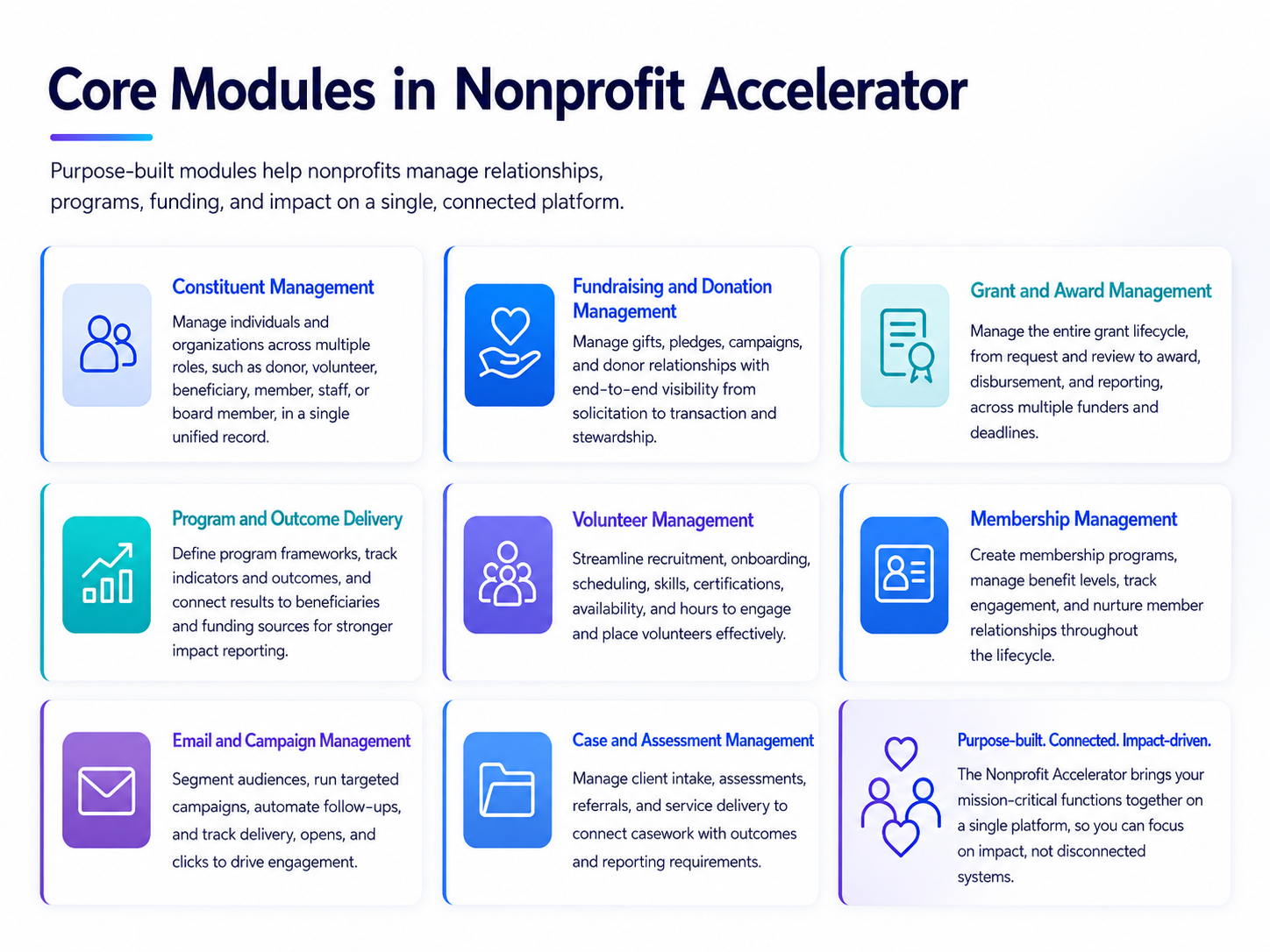
Constituent Management
A single contact record can carry multiple roles, such as donor, volunteer, beneficiary, member, staff, or board member. This helps teams understand relationships more clearly and avoid duplicate records across different systems.
Fundraising and Donation Management
This module supports one-time gifts, recurring donations, pledges, gifts in kind, bequests, and campaign activity. Development teams can segment donors, manage campaigns, automate follow-ups, and track the full solicitation-to-transaction history.
Grant and Award Management
This module manages the full grant lifecycle, from initial request and review through to award, disbursement, and reporting. It is especially useful for organizations managing multiple funders, compliance deadlines, and disbursement schedules simultaneously.
Program and Outcome Delivery
This module helps nonprofits define delivery frameworks, set indicators, track results, and connect program outcomes to beneficiaries and funding sources. This is where the Accelerator becomes particularly valuable for impact reporting. It helps organizations move from activity tracking to outcome-based reporting.
Volunteer Management
This module supports recruitment, onboarding, scheduling, skills tracking, certifications, availability, hours, and contribution history. Volunteer coordinators can place people more effectively and reduce manual scheduling work.
Membership Management
This module helps organizations create membership programs, manage benefit levels, track engagement, and manage member relationships through the full lifecycle.
Email and Campaign Management
This module helps teams segment audiences, create targeted outreach, automate follow-ups, and track delivery, open, and click rates. This gives fundraising and engagement teams a clearer view of what is working.
Case and Assessment Management
This module supports client service workflows, needs assessments, referrals, and program delivery tracking. For nonprofits delivering direct services, this connects casework to outcomes and reporting requirements.
The Microsoft Ecosystem
The Accelerator does not work in isolation. It sits within the broader Microsoft ecosystem, which gives nonprofits access to enterprise-grade tools at nonprofit pricing. These are tools that most staff are already familiar with.
- Power BI enables dashboards for fundraising performance, program outcomes, donor trends, volunteer contribution, and financial activity. Leadership gains live visibility without waiting for end-of-quarter manual reporting.
- Power Apps supports the development of custom applications, portals, mobile tools, and field workflows with low-code development that does not require a dedicated engineering team.
- Power Automate handles routine workflows, such as donation acknowledgements, grant renewal reminders, volunteer scheduling notifications, event task management, and cross-system data updates.
- Microsoft Teams connects program teams, volunteer coordinators, fundraising staff, and leadership in the same collaborative environment where Dynamics 365 data can be surfaced directly.
- SharePoint supports document management, intranet use, volunteer centers, and knowledge sharing across the organization.
- Azure provides secure cloud infrastructure and a nonprofit-ready foundation for data storage and compliance.
- Microsoft Fabric supports data integration, transformation, and deeper analytics across fundraising, programs, and operations. This is especially relevant for organizations with multiple data sources they need to bring together.
- Outlook and Excel allow staff to work with CRM data inside the tools they already use every day, reducing the friction of system switching.
Ready to see how this applies to your organization?
7 Ways the Accelerator Improves Nonprofit Operations
Here are the keyways the Accelerator helps nonprofits connect data, reduce manual work, and manage operations with better visibility.
It connects funds to results
The Accelerator links donor contributions, grants, program budgets, delivery activities, and measured outcomes in a connected record. That supports stronger donor reporting, funder transparency, and internal decision-making. It also moves organizations away from the manual compilation that currently dominates impact reporting.
Creates a full constituent view
A person's relationship with a nonprofit is rarely limited to one role. Someone may donate, volunteer, attend events, receive services, and serve on a committee across years of engagement. The Accelerator brings those roles into one record, giving every team a fuller picture of the person behind the interaction.
Improves fundraising decisions
Structured donor data makes segmentation more precise. Fundraising teams can understand giving frequency, campaign response, lapsed status, engagement history, and donor preferences, then use that insight to make outreach more relevant and timely.
Streamlines grant and award management
Grant workflows involve deadlines, approvals, documentation, disbursements, compliance requirements, and final reports. Managing these steps across disconnected systems creates risk. The Accelerator connects them in a single workflow, reducing the likelihood of missed deadlines, incomplete documentation, and reactive reporting.
Supports volunteer coordination at scale
Volunteer programs become difficult to manage when scheduling, skills, availability, and contribution hours sit in disconnected spreadsheets. The Accelerator helps teams match volunteers to opportunities, track hours, and manage engagement more consistently, without the manual overhead.
Improves dashboards and analytics
With Power BI integration, nonprofits can build live dashboards for fundraising, program performance, volunteer contribution, financial activity, and outcome measurement. Leadership no longer needs to wait for end-of-quarter manual reporting to understand organizational performance.
Reduces repetitive administrative work
Power Automate supports routine workflows, such as donation acknowledgements, grant renewal reminders, volunteer notifications, event tasks, and cross-system updates. This helps staff spend less time on manual coordination and more time on work that advances the mission.
How to Get Started
The Accelerator can be deployed from Microsoft AppSource or implemented with the support of a certified Microsoft partner. The right path depends on your organization's size, internal technical capability, existing systems, and process complexity.
Step 1: Confirm nonprofit eligibility
Microsoft provides discounted pricing for qualified nonprofits through its Tech for Social Impact program. Before planning budget or implementation scope, confirm eligibility and review current nonprofit pricing.
Step 2: Explore the AppSource solution
The Accelerator is available through Microsoft AppSource. Reviewing prebuilt dashboards, sample apps, workflows, and templates will help you understand how closely the standard solution matches your existing operations.
Step 3: Map your highest-friction processes
Before implementation, identify where your current systems create the most operational strain. Common starting points include donor management, volunteer scheduling, grant reporting, program outcome tracking, campaign segmentation, case management, and compliance reporting. Start with the area where improvement will be most visible and measurable.
Step 4: Decide what stays standard and what needs customization
The Accelerator includes many standard nonprofit workflows, but each organization has its own operating model. Some teams can use the out-of-the-box structure with minor configuration. Others may need customization, integrations, or additional automations. The goal should be to customize only where it creates clear operational value.
Step 5: Plan data migration carefully
The Common Data Model is a structure, not a data-cleaning service. Before migration, audit where your data currently lives and assess its quality. This includes CRM records, donation history, volunteer records, email lists, event platforms, grant records, program data, finance data, and spreadsheets. Clean, well-structured data will make the Accelerator more useful from day one.
Step 6: Layer in Power Platform gradually
Power BI, Power Automate, and Power Apps do not all need to be deployed at once. Many organizations start with core CRM and reporting, then add automation and custom apps as teams become more confident with the platform.
Step 7: Choose the right implementation partner
The Accelerator has a global ecosystem of certified implementation partners. The right partner should understand nonprofit operations, not just Dynamics 365 configuration. A strong partner conversation begins with your mission, workflows, reporting requirements, and operational pain points, not a product demonstration.
Bottom Line
Having a platform dedicated to nonprofit operations can make a real difference. The Dynamics 365 Nonprofit Accelerator gives organizations a structured way to connect constituents, fundraising, grants, programs, volunteers, outcomes, and reporting within one shared foundation.
But the value does not come from the platform alone. It comes from how maturely the organization uses it alongside the rest of its technology stack. A nonprofit may have a CRM, finance system, spreadsheets, email tools, reporting dashboards, and collaboration platforms already in place. The real shift happens when these systems stop working in isolation and start supporting one connected operating model.
That is where Microsoft Dynamics 365 becomes useful. It helps nonprofits move away from fragmented records, manual reconciliation, and reactive reporting toward cleaner data, connected workflows, and more reliable visibility across teams.
Interested in understanding how Microsoft Dynamics 365 can improve your nonprofit's operational flow? Schedule a 30-minute call with our team to explore where your current systems can be connected, simplified, and made easier to manage.
Frequently Asked Questions
How much does Dynamics 365 cost for nonprofits?
Microsoft offers discounted pricing for qualified nonprofits through its Tech for Social Impact program, including donated and discounted licenses for eligible organizations. Pricing depends on the specific modules and user count required. The best starting point is to confirm your eligibility through Microsoft's nonprofit program before planning implementation budget.
Is Dynamics 365 a good CRM for nonprofits?
For mid-size to large nonprofits managing complex grant portfolios, multi-program delivery, and high donor volumes, Dynamics 365 is one of the strongest options available. Its main advantage over nonprofit-specific platforms like Salesforce NPSP or Blackbaud is the depth of its enterprise integration — particularly with Microsoft 365, Power BI, and Azure — and the flexibility of its Common Data Model. Smaller organizations with simpler needs may find lighter-weight tools easier to adopt.
How long does implementation take?
Implementation timelines vary by complexity. A focused deployment covering constituent management and fundraising can go live in 8–12 weeks. Full implementations covering grants, programs, volunteer management, and Power BI reporting typically run 4–6 months. A phased approach — starting with core CRM and adding modules progressively — is the most common path.
Can Dynamics 365 replace a nonprofit's existing grant management software?
Yes. The Nonprofit Accelerator includes a full grant and award management module covering the lifecycle from initial request through disbursement and final report. For organizations currently managing grants across spreadsheets or standalone tools like Fluxx or Submittable, Dynamics 365 can consolidate that workflow into the same system as donor management and program delivery.
Recent Posts

Dynamics 365 Activate: Do You Still Need a Migration Partner?
Oct 05, 2026

Tableau to Power BI Migration: A Practical Guide
Sep 09, 2026
SAP ECC to Dynamics 365 Finance & SCM Migration Guide
Sep 09, 2026
Category
Our Expertise



About Author

Aiswarya Madhu
Aiswarya Madhu is an experienced content writer with extensive expertise in Microsoft Dynamics 365 and related Microsoft technologies. With over four years of experience in the technology domain, she has developed a deep understanding of Dynamics 365 applications, licensing, integrations, and their role in driving digital transformation for organizations across industries.
Never Miss News
Want to implement Dynamics 365?
We have plans which will meet your needs, and if not we can tweak them around a bit too!