For many Business Central teams, upgrades still get treated as a technical event. A date gets picked, a few apps are checked, testing is assumed to be "good enough," and the business waits to see what happens next.
The teams that handle upgrades well take a very different approach.
They treat upgrades as preparation, not execution. What matters to them is not the upgrade itself, but whether the business continues to operate smoothly after it.
That shift in thinking becomes important because upgrades today are not optional or one-time events. Business Central online follows a structured update cycle. If an update fails within the allowed window, it gets rescheduled. If dependencies are not ready, extensions can block or even get removed so the system can proceed.
Which means the real risk is not the upgrade. It is being unprepared for it.
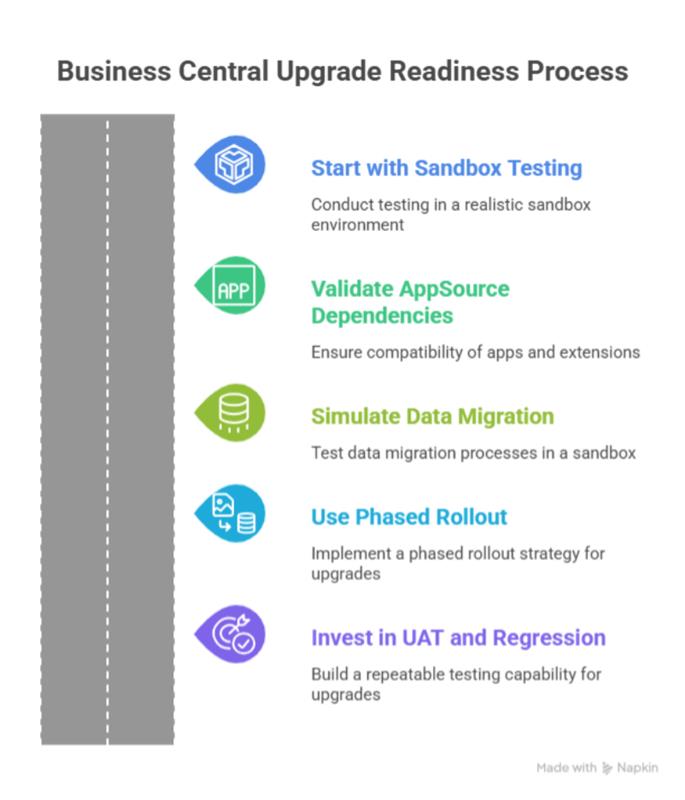
The teams that avoid disruption do a few things consistently before every wave.
- They test in sandboxes that reflect real usage
- They validate AppSource apps and extensions early
- They rehearse data and upgrade impact on realistic volumes
- They roll out changes in phases instead of all at once
- They rely on repeatable UAT and regression testing
Zero downtime in Business Central really means controlled interruption
In Business Central online, updates run within a fixed time window. If the upgrade takes longer than expected or something fails, it does not just continue in the background. It gets stopped and scheduled again.
When teams are not prepared, this turns a planned upgrade into repeated disruption.
That is why experienced teams focus on preparation, not just execution.
5 Ways to Keep Business Central Upgrades Controlled and Risk-Free
Think of these as five pillars of upgrade readiness that successful teams follow consistently (not occasionally).
1. Smart teams start with sandbox first testing
The biggest mistake teams make is testing in environments that do not reflect real usage. A basic sandbox might show that the system opens, but it will not reveal the issues that actually impact users.
Problems usually show up only when the system behaves like production. For example:
- Permission edge cases → A user cannot post or approve due to role conflicts
- Rare posting scenarios → Transactions like partial shipments or complex billing fail
- High transaction volumes → The system slows down or throws errors under load
- Long running jobs → Background tasks like posting or syncing get delayed or stuck
- Integration timing issues → Data from other systems does not sync correctly or arrives late
That is why testing needs to be done on realistic data, not partial setups.
Microsoft recommends testing critical scenarios before upgrading production. For major updates, this means using a sandbox created from current production data. Business Central supports this through production to sandbox copy, giving teams a proper rehearsal environment.
Smart teams go beyond just checking if the upgrade "worked." They treat sandbox testing as a full rehearsal:
- Measure how long the upgrade takes
- Check how quickly users can resume normal work
- Identify errors and warnings in telemetry
- Validate integrations and external connections
- Retest critical business workflows
2. They treat AppSource dependency validation like a core upgrade workstream
A large number of upgrade issues do not come from Business Central itself. They come from what surrounds it. AppSource apps, per tenant extensions, and custom dependencies often decide whether an upgrade runs smoothly or creates disruption.
Business Central does provide visibility through the Admin Center, where teams can review installed apps and control update cadence. But visibility alone is not enough. The real difference comes from how seriously teams treat dependency readiness.
Stronger teams turn this into a structured checkpoint instead of an afterthought.
They make sure they clearly understand their app landscape:
- Identify all installed apps across environments
- Separate business critical apps from supporting ones
- Confirm vendor readiness for the target version
- Decide how and when apps should update
They then validate how these dependencies behave during the upgrade:
- Test update sequencing in sandbox
- Check compatibility across extensions and libraries
- Validate custom apps using Microsoft's analyzers and pipelines
- Ensure upgrade code supports version continuity
This matters because extension failures are rarely isolated. One unresolved dependency can delay the whole environment. One incompatible app can trigger retry behavior. One poorly planned preview app update can introduce ForceSync risk and data loss concerns in certain scenarios.
3. They simulate data migration instead of discovering it live
This is one of the most commonly missed steps in upgrades. Teams assume data will move cleanly because the system upgrade works. That is where problems start.
Most issues show up not in the application, but in how data behaves during the upgrade.
The areas teams usually underestimate are:
- Schema synchronization taking longer than expected
- Upgrade codeunits failing or needing re-run
- Data mismatches after upgrade
- Job queues not restarting cleanly
- Integrations breaking or processing incomplete data
These are rarely visible in basic testing. They show up only when real data is involved.
Smart teams handle this differently. They do not wait to discover these issues during production. They simulate them early using a production copy sandbox.
- Compare financials like trial balance before and after upgrade
- Check inventory values and open transactions
- Verify record counts across key tables
- Confirm workflows and integrations are running correctly
They also use this stage to validate timing.
- Measure how long the upgrade actually takes
- Check how quickly the system stabilizes for users
If the timing or results are not acceptable, they adjust the plan before production:
- Stage extensions earlier
- Reduce what is included in the upgrade window
- Separate feature rollout from platform update
- Refine the cutover steps
The lesson is clear here ...do not discover data issues during the upgrade. Simulate them early, validate the outcome, and fix what needs attention before production.
4. They use phased rollout to reduce blast radius
One area where teams often go wrong is moving everything in one go. Platform update, apps, features, integrations, and user access all at the same time.
That approach increases risk because when something breaks, it is harder to understand what caused it.
Smart teams avoid this by sequencing the rollout.
They do not treat the upgrade as a single event. They break it into controlled steps:
- Upgrade the environment first
- Validate apps and extensions
- Confirm business processes
- Then expose features and integrations gradually
This reduces the number of unknowns at any given point.
Business Central supports this approach if used properly. Teams can control update timing through update windows. App updates can be scheduled separately. Features can be enabled later instead of immediately after upgrade.
The idea is simple. Just because something is available does not mean it has to be turned on immediately.
Phasing also helps with decision making.
Teams can clearly see:
- What changed
- When it changed
- What needs to be validated next
If something does not behave as expected, it is easier to isolate and fix.
5. They invest in UAT and regression like an ongoing capability
Most teams treat testing as a one-time activity during upgrades. They start fresh every cycle, rebuild test cases, and rely heavily on manual validation.
That approach slows things down and increases the chances of missing issues.
Smart teams take a different approach. They build testing as a repeatable capability.
Instead of starting over each time, they create assets that can be reused across every upgrade.
For user validation, they capture critical business flows and repeat them consistently. Business Central's Page Scripting helps teams record and replay key actions inside the system, making it easier to validate common workflows without relying on manual checks.
For deeper validation, they use automated testing. AL test codeunits and test runners allow teams to execute tests repeatedly without manual effort. This ensures that core logic continues to work as expected after every update.
They also pay attention to performance and system behavior.
- Simulate real workloads using the Performance Toolkit
- Monitor errors, delays, and failures using telemetry tools like Application Insights
- Identify issues early instead of waiting for users to report them
What matters here is not just running tests, but building a system that works every time an upgrade happens.
It Is Time to Rethink How You Approach Business Central Upgrades
The real story behind zero downtime upgrades is not about speed...It is discipline that matters.
Teams that handle upgrades well build a structured approach around them. They plan early, validate what matters, and remove uncertainty before production is ever touched. That is what keeps operations stable while the platform continues to evolve.
If you want to move toward predictable, low risk upgrades without putting business operations under pressure, it starts with understanding where your current gaps are and how to close them.
Get in touch with our Business Central experts for a focused discovery session. We will help you assess your upgrade readiness, identify risks early, and put a structured plan in place so every future upgrade runs with confidence, not uncertainty.