SAP ECC to Dynamics 365 Finance & SCM Migration Guide
Sep 09, 2026 Aiswarya Madhu
SAP ECC Support Ends on December 31, 2027
Mainstream maintenance stops for SAP ERP 6.0 with Enhancement Packages 6 through 8, which is where most ECC customers sit. You can pay to stretch it to 2030, and a small set of RISE customers to 2033. Both buy time. Neither changes what you have to do.
So you are probably already thinking about S/4HANA. That is the obvious move, and SAP built this deadline to make sure it is the first thing you think of.
Before you commit, look at what your peers are doing.
A growing number of them are not going to S/4HANA. They are moving to Microsoft Dynamics 365 Finance & Supply Chain Management.
The reason is simple enough. For most ECC estates, fifteen years of custom code and undocumented interfaces rule out a clean technical conversion, which means you are re-implementing whichever platform you choose. Once that is true, the question stops being how to upgrade SAP and becomes which ERP should run the business for the next ten years. Companies that already run Azure, Power BI, Teams, and Entra are answering that question differently than they would have five years ago.
Here is the comparison, the data model gap that catches most migrations, and the roadmap to get there.
On this Page
- Dynamics 365 F&SCM vs S/4HANA
- How to Approach SAP ECC to Dynamics 365 F&SCM Migration
- SAP ECC to Dynamics 365 F&SCM Migration Steps
- Ready to Plan Your ECC Exit?
- Frequently Asked Questions
Dynamics 365 F&O vs S/4HANA: A Comparison to Help You decide
Feature checklists are not useful here. Both platforms are capable enterprise ERPs and both will run a global manufacturer. What separates them is program cost, risk profile, skills availability, and how well each one fits the environment you already operate.
| Dynamics 365 F&O | SAP S/4HANA | |
|---|---|---|
| Deployment | Cloud-first SaaS on Azure. On-premises and cloud-hosted editions exist but are the exception. | Cloud (public and private edition via RISE) or on-premises. Private edition is the most common landing spot for ECC customers. |
| Path from ECC | New implementation. Data is translated and loaded into a fresh environment. | Brownfield conversion, greenfield re-implementation, or a selective bluefield approach. Brownfield only works cleanly with a contained custom code footprint. |
| What happens to custom code | ABAP does not carry over. Custom logic is rebuilt in X++ as extensions, or replaced by standard functionality and Power Platform. | ABAP can be remediated for S/4HANA, but simplification changes and the new data model force rework on a large portion of it. |
| Data migration | Structural translation through the Data Management Framework and OData. No direct table-to-table path from SAP. | SAP Migration Cockpit and conversion tooling. Native, but the underlying data model changes force redesign anyway. |
| Typical program duration | 9 to 18 months for a mid-sized enterprise. 18 to 30 months for multi-entity, multi-country programs with complex manufacturing. | 12 to 24 months for a straightforward conversion. 24 to 36 months and beyond for a full transformation. |
| Licensing model | Per-user subscription with capacity add-ons. Predictable, and the negotiation position for a Microsoft-heavy customer is usually stronger. | RISE subscription bundles infrastructure, licensing, and services. Commercially dense and harder to unpick line by line. |
| Skills market | X++ and D365 F&O consultants. Smaller specialist pool than SAP, but Microsoft-stack developers are widely available and the ramp is shorter. | Deep and mature, but ECC-era ABAP and S/4HANA skills are both in high demand through the deadline window. Rates reflect that. |
| Microsoft stack fit | Native. Power BI, Power Automate, Power Apps, Dataverse, Teams, Entra ID, Azure Data Lake and Fabric all connect without middleware. | Integration is well-supported and there is a formal Microsoft partnership, but it is integration rather than shared platform. |
| Embedded AI | Copilot capabilities across finance and supply chain, plus agent scenarios built on the same Microsoft platform your other business apps use. | SAP Business AI and Joule, tied to the SAP platform and its licensing. |
| Update cadence | Continuous service updates on a published schedule. You stay current by design rather than by project. | Annual release cycle for private edition, with upgrade projects. Public cloud updates more frequently. |
| Industry depth | Strong in discrete manufacturing, distribution, retail, project-based services, and multi-entity finance. Vertical depth often comes from ISV solutions. | Deeper native coverage in process manufacturing, oil and gas, utilities, chemicals, and other industries with SAP industry solutions built over decades. |
| Best fit | Organizations already standardized on Microsoft, with a moderate custom code footprint, where finance and supply chain are the core requirement. | Organizations with heavy investment in SAP industry solutions, a large internal SAP centre of excellence, and processes built around SAP-specific capabilities. |
D365 F&SCM implementation is the stronger answer when the SAP investment is mostly inertia. If your ECC implementation has drifted into a heavily customized general-purpose ERP, if your custom code inventory is large and poorly documented, if your finance and reporting teams already live in Excel and Power BI, if identity and collaboration already run on Microsoft, and if you are facing a re-implementation either way, then continuing with SAP means paying re-implementation cost to stay on a platform you are not using the distinctive parts of.
You've chosen Dynamics 365 F&SCM
Let us make sure your move from ECC is smooth and strategic
How to Approach SAP ECC D365 F&SCM Migration
So, there are a few things you need to understand before the migration starts, during migration and post migration. Let's see them in detail
First, You Need to Start with a Road Map
Begin with the question How do we get our SAP data into Dynamics 365?
Before extracting anything from ECC, the project needs a clear picture of what the current ERP environment actually contains and what the future environment should look like.
That means documenting:
- legal entities and organizational structures
- finance and controlling processes
- manufacturing and supply chain processes
- customers, vendors, materials, and other master data
- custom ABAP programs and Z-code
- interfaces and third-party integrations
- reports and regulatory outputs
- batch processes
- security roles
- business-critical workarounds that may never have been formally documented
Microsoft's own Dynamics 365 implementation guidance treats data migration, integration, business-process design, testing, security, cutover, reporting, and change management as connected parts of the implementation rather than isolated technical tasks.
The roadmap should then answer a few larger questions:
- Which companies or business units move first?
- Does finance move before supply chain?
- Will ECC and Dynamics 365 coexist for a period?
- Which surrounding applications remain?
- Which integrations need to be rebuilt?
Which SAP customizations should disappear rather than follow the business into Dynamics 365?
And most importantly, what does the organization want the new ERP to do differently?
Without those decisions, data mapping turns into an attempt to recreate SAP inside Dynamics 365.
Plan for the SAP and Dynamics 365 Data Model Gap
This is where an ECC-to-Dynamics migration becomes fundamentally different from moving between versions of the same ERP.
SAP ECC and Dynamics 365 F&O do not organize business information in exactly the same way.
You cannot treat SAP tables as if there is a matching Dynamics table waiting on the other side.
Dynamics 365 uses data entities as the business-facing layer for migration and integration. Microsoft describes the Data Management Framework as the primary tool for data-related migration tasks in Finance and Supply Chain Management. Public data entities can also be exposed through OData for suitable integration scenarios.
That means data has to be understood, mapped, transformed, validated, and then loaded into the appropriate Dynamics 365 entities.
A few examples make the difference easier to see.
Company structures need to be remapped
An SAP company code has a reasonably close business counterpart in a Dynamics 365 legal entity.
But the mapping becomes harder once you get into management accounting.
SAP concepts such as controlling areas, cost centers, profit centers, and internal orders do not translate one-for-one into Dynamics 365. Some of that reporting structure may need to be redesigned using financial dimensions.
So this is not an IT team deciding which column goes where.
Finance needs to decide how the organization wants to report and analyze costs in the new ERP.
A material master may become several Dynamics 365 records
SAP can hold extensive material information across different organizational views.
Dynamics 365 separates the concept differently. A product can exist as a shared definition and then be released into the legal entities where it is actually used.
As a result, one SAP material does not necessarily equal one imported Dynamics 365 record.
Sites, warehouses, units of measure, costing, product attributes, and company-specific information all need mapping decisions before migration begins.
Customers and vendors are structured differently
SAP traditionally maintains customer and vendor records separately. Dynamics 365 uses a broader party and global address book model, allowing the same organization or person to take different roles.
That creates opportunities to clean duplicate records, but it also means the migration cannot simply copy customer and supplier tables independently without first understanding the relationships between them.
The point is simple:
Do not design the Dynamics 365 environment around the shape of your SAP database. Design it around the business that needs to run after SAP is gone.
Decide What Actually Deserves to Move
Once the target model is clear, the next question should be:
How much SAP data does Dynamics 365 actually need?
Years of historical ERP data can make a migration significantly harder without making the new system more useful.
A useful starting framework is:
| Data | Usually Consider Migrating | Usually Consider Archiving |
|---|---|---|
| Customers and vendors | Active records needed for current operations | Long-inactive or duplicate records |
| Products/materials | Active products and required associated information | Obsolete materials no longer used |
| Accounts receivable/payable | Open invoices, payments, and outstanding items | Closed historical transactions |
| General ledger | Opening balances and the history genuinely required for operational reporting | Older closed periods that can remain accessible through an archive |
| Inventory | Current quantities, values, lots, serials, and other operationally required data | Historical stock movements not needed in daily ERP processing |
| Fixed assets | Active assets and required balances | Fully retired or depreciated assets where retention requirements can be met outside D365 |
| Orders | Open sales, purchase, production, and other transactions needed after go-live | Completed transactions retained for history |
| Historical reporting | Only what needs to remain transactional | Older history that can be accessed through an appropriate reporting or archive environment |
This should not be treated as a universal retention policy. Regulatory, tax, audit, warranty, industry, and business requirements can change what needs to remain accessible.
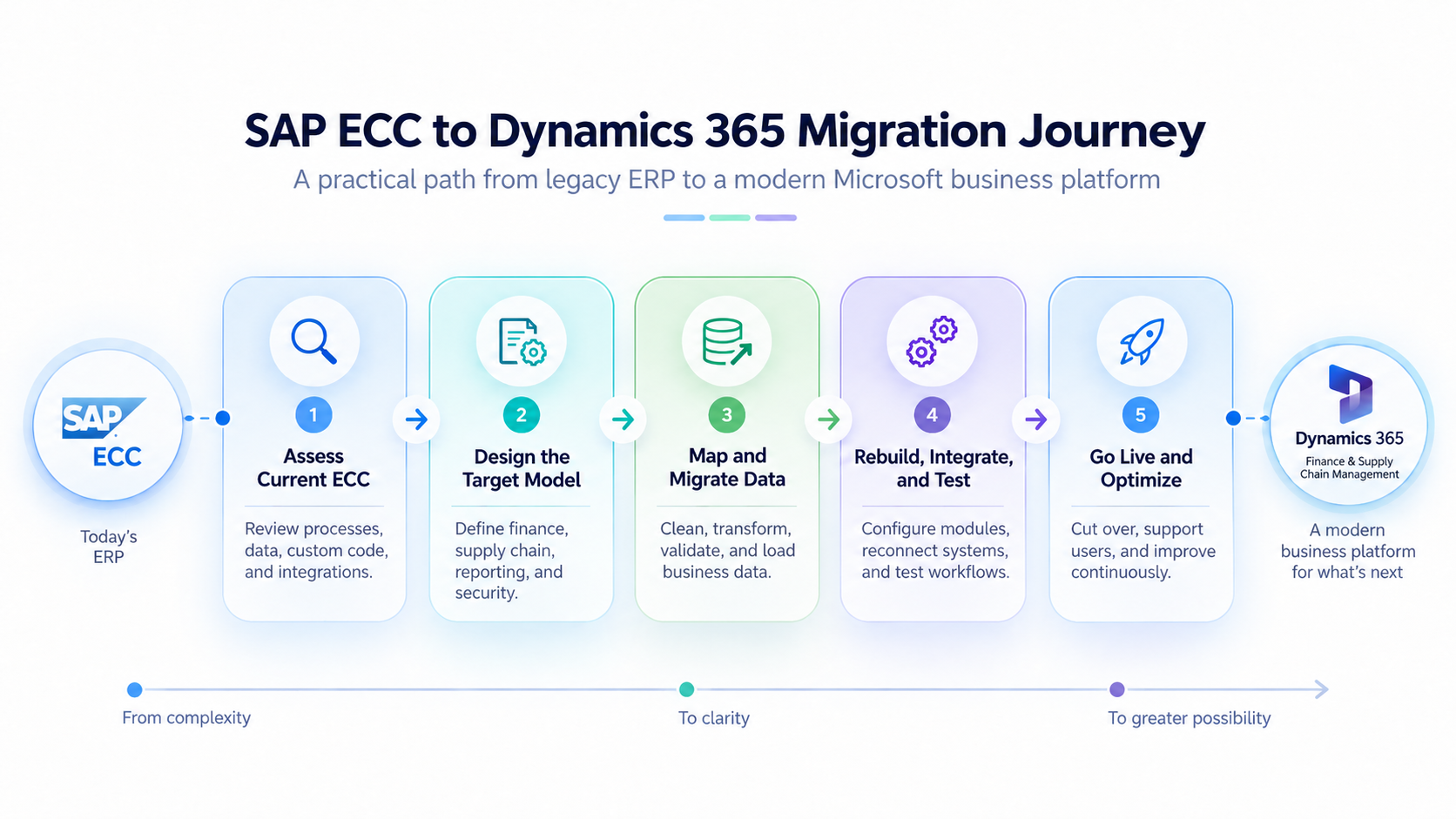
SAP ECC to Dynamics 365 F&O Migration Steps
Once the roadmap, target model, and data scope are agreed, the actual migration can become much more structured.
1. Assess the Existing ECC Environment
Begin by building an inventory of processes, modules, customizations, data, reports, integrations, interfaces, roles, and dependent applications. This establishes what has to be replaced, redesigned, integrated, archived, or retired.
2. Design the Dynamics 365 Target Environment
Configure Dynamics 365 around the future operating model. This includes legal entities, chart of accounts, financial dimensions, products, warehouses, procurement structures, manufacturing processes, security, workflows, and reporting requirements. The target model needs to exist before source data can be mapped correctly.
3. Map SAP Data to Dynamics 365
Define how every required SAP object translates into the target Dynamics 365 entities. This is where company structures, materials, vendors, customers, financial dimensions, inventory, assets, and open transactions are mapped, and transformation rules are documented.
Microsoft recommends explicitly documenting source and target systems, entities, volumes, transformation requirements, dependencies, migration sequence, and ownership.
4. Clean the Data Before Moving It
Do not wait until Dynamics 365 rejects a record to discover that SAP contains duplicate vendors, unused materials, invalid addresses, stale open transactions, or inconsistent codes. Clean the source data before extraction wherever practical. The smaller and cleaner the migration scope becomes, the easier every later migration run is to validate.
5. Extract and Transform the Data
Required data is extracted from SAP and moved through a staging and transformation process. The data is reshaped according to the mappings already agreed and prepared for the Dynamics 365 import mechanisms rather than being written directly into underlying application tables.
For Finance and Supply Chain Management, Microsoft's Data Management Framework and data entities provide the primary migration layer. OData is available for scenarios better suited to synchronous integration.
6. Load in the Right Sequence
ERP records depend on other ERP records. You cannot reliably load transactions that refer to customers, products, accounts, warehouses, dimensions, or other master records that do not yet exist. Configuration and foundational records therefore need to be loaded before dependent masters and transactions.
The exact sequence varies by implementation, which is why migration dependencies should be designed rather than discovered during go-live.
7. Reconcile What Arrived
A technically successful import does not prove that the migration is correct. Finance needs to reconcile balances, supply chain teams need to validate inventory, procurement and sales teams need to confirm open orders.
Master-data owners need to validate customers, vendors, products, addresses, tax information, and related records.
The question is not simply:
Did 100,000 rows load?
It is:
Does Dynamics 365 now represent the same business position that SAP represented before the migration?
8. Run Mock Migrations Before Go-Live
The first complete migration should not happen during the production cutover. Run the process in non-production environments, measure how long extraction, transformation, import, validation, and reconciliation actually take, then correct the problems and run it again.
Microsoft recommends practicing the cutover in a test environment and repeating it until the team is confident in both the process and the timing.
This is where teams discover issues that spreadsheets rarely reveal, such as dependencies loaded in the wrong order, data that fails validation, transformations that create unexpected balances, or integrations that do not behave correctly against real volumes.
9. Cut Over and Validate Again
Once the business signs off on readiness, SAP transactions are controlled or stopped according to the cutover plan, the final changes are extracted, and the approved migration process is run against production.
The team then performs the same reconciliation procedures practiced during the mock migrations.
Cutover should include clearly assigned owners, validation checkpoints, go/no-go criteria, communications, and a rollback plan. Microsoft specifically recommends treating cutover as a business-led activity rather than only a technical data exercise.
10. Stabilize Before Calling the Migration Finished
Go-live is not the finish line. Users need support, integrations need monitoring, reports need validation, unresolved data issues need controlled correction, and business teams need to confirm that end-to-end processes operate correctly under real production volumes.
SAP ECC should only be decommissioned according to the agreed retention, audit, access, and stabilization plan.
Ready to Plan Your ECC Exit?
At Nalashaa Digital, we help businesses move from complex legacy ERP environments to Dynamics 365 without treating the migration as a simple system replacement.
Our approach starts with understanding what you have today. We assess the existing ERP environment, customizations, integrations, data, and business processes before defining what should move, what should be redesigned, and what no longer deserves a place in the new system. From there, we help shape the target Dynamics 365 architecture, plan and validate the data migration, rebuild only the customizations that still add value, test the environment, manage cutover, and support the system after go-live.
With 75+ implementations, 300+ upgrades, and more than 15 years of experience across Microsoft Dynamics environments, we have seen what makes large ERP transitions work and where they begin to go wrong.
So, if SAP ECC is forcing an ERP decision onto your roadmap, you do not have to make that decision based on assumptions. Let our Dynamics 365 experts assess your environment, map the right exit path, and help you determine whether D365 F&O is the right next move for your business.
Let us help you build the right ECC exit strategy.
Related Resources
Exploring your options beyond SAP ECC? These resources can help you go deeper into Dynamics 365 planning, implementation, and modernization.
Frequently Asked Questions
How long does an SAP ECC to Dynamics 365 F&O migration take?
Nine to eighteen months is a reasonable range for a mid-sized enterprise with a contained custom code footprint and a small number of legal entities. Multi-entity, multi-country programs with complex manufacturing and heavy integration typically run eighteen to thirty months. Any estimate given before a current-state assessment is a guess.
Is it cheaper to move to D365 F&O than to S/4HANA?
It depends on whether your S/4HANA path is a brownfield conversion or a re-implementation. Against a brownfield conversion with contained custom code, S/4HANA is usually cheaper. Against a full re-implementation, which is what a large share of ECC customers face, the two are closer than expected, and licensing and skills costs often favor D365. Compare total program cost including licensing, implementation, integration, training, and five years of support, not license price alone.
What happens to our custom ABAP code?
It does not carry over. Every custom object goes through a fit-gap review and lands in one of four places: covered by standard D365 functionality, handled by configuration, rebuilt in Power Platform, or rebuilt as an X++ extension. In most ECC estates a large share of custom objects turn out to be unused, duplicated, or replaceable by standard functionality.
Can we migrate our SAP data directly into Dynamics 365?
No. The two systems structure data differently, so every significant object requires structural translation through the Data Management Framework or OData endpoints rather than a direct table transfer. Company codes become legal entities, controlling area structures become financial dimensions, and material master data is redistributed across the product master and released products. Plan for a mapping and redesign exercise, not an extract and load.
How much transaction history should we bring across?
Open items and current balances, plus prior-year comparatives if your reporting requires them. Historical transactional detail belongs in a read-only archive on Azure Data Lake, Fabric, or SQL with a reporting layer over it. This satisfies audit and retention requirements at a fraction of the cost, and it keeps the live ERP fast.
How many data conversion cycles do we need?
Three at minimum. The first surfaces mapping errors, the second surfaces volume and performance issues, and the third proves the process is repeatable and gives you a reliable cutover duration. Each cycle should end with a reconciliation signed off by finance.
Does D365 F&O handle complex manufacturing as well as SAP?
For discrete manufacturing, distribution, and mixed-mode operations, yes. For process manufacturing in industries where SAP built dedicated industry solutions over decades, such as chemicals, oil and gas, and utilities, SAP retains genuine depth that D365 typically addresses through ISV solutions. This should be a specific line item in your fit-gap, not a general assumption in either direction.
What if we start now and cannot finish by December 2027?
Start anyway, and secure extended maintenance as your bridge. A program that goes live in early 2029 with extended maintenance covering the gap is in a far better position than one that starts in 2028 competing for delivery capacity with every other late decider. The extended maintenance premium is inexpensive relative to a rushed cutover.
Recent Posts
Dynamics 365 Activate: Do You Still Need a Migration Partner?
Oct 05, 2026
Tableau to Power BI Migration: A Practical Guide
Sep 09, 2026
Late to Upgrade from AX 2012 to Finance and Operations? [A Reality Check]
Sep 07, 2026
Category
Our Expertise



About Author

Aiswarya Madhu
Aiswarya Madhu is an experienced content writer with extensive expertise in Microsoft Dynamics 365 and related Microsoft technologies. With over four years of experience in the technology domain, she has developed a deep understanding of Dynamics 365 applications, licensing, integrations, and their role in driving digital transformation for organizations across industries.
Never Miss News
Want to implement Dynamics 365?
We have plans which will meet your needs, and if not we can tweak them around a bit too!