Salesforce Business Central Integration: What to Know Before You Scope It
Aug 27, 2026 Aiswarya Madhu
Short on Time? Start Here
Salesforce and Business Central can be integrated, but there is no native first-party connector between them. Your main options are a prebuilt connector, iPaaS, Power Platform/Azure, or custom APIs.
If your workflows are mostly standard, a prebuilt connector is usually the simplest place to start. If several systems need to exchange data, an iPaaS gives you a more manageable integration layer. If you already operate heavily in the Microsoft ecosystem, Power Platform or Azure may fit better. And if your process depends on highly specific rules, approvals, or mappings, custom APIs may be the right route.
Whichever path you choose, get clear on who owns customers, pricing, tax, inventory, orders, and financial status before development begins. Those decisions will shape the integration more than the tool itself.
Already have a route in mind? Talk to our integration experts to validate it before you scope the build.
Need more clarity first?
Keep reading for a breakdown of each approach and the process decisions that matter most.
Salesforce and Microsoft Dynamics 365 Business Central often sit on opposite sides of the same customer journey.
Salesforce holds the opportunity, account, quote, and sales activity. Business Central holds inventory, orders, invoices, payments, and the financial record.
That is exactly where Salesforce Business Central integration becomes important, because the problems usually start when those systems operate independently.
- Sales commits before operations has the full picture
A rep confirms a delivery date without knowing whether inventory is available, reserved, on order, or sitting in another location. - Finance spends time reconciling two versions of the same transaction
Salesforce shows the opportunity as closed, while Business Central shows a different invoice amount, date, or no invoice at all. - Operations re-enters data that already exists in CRM
Orders, quantities, or customer details get keyed again, adding delay and creating room for errors. - IT ends up owning the gap between systems
The Salesforce team owns CRM. The Business Central team owns ERP. When a record fails in between, ownership becomes unclear.
None of these are isolated process problems. I know at least one person reading this has already seen one of these problems firsthand. They come from the same architectural gap: Salesforce and Business Central do not have a native first-party integration with each other.
Business Central provides first-party integration options for Microsoft Dataverse, Dynamics 365 Sales, Dynamics 365 Field Service, and Shopify. Salesforce requires another integration layer. That layer may be a connector application, an integration platform, Microsoft Power Platform or Azure, or custom development against both systems' APIs.
That choice affects much more than implementation cost. It determines who owns failures, how easily the integration can change, how much maintenance it requires, and whether it can keep up as transaction volumes increase.
Four Ways to Integrate Salesforce with Business Central
The right choice depends on how standard your process is, how many records you move, how many other applications will eventually participate, and how much custom code you want to maintain.
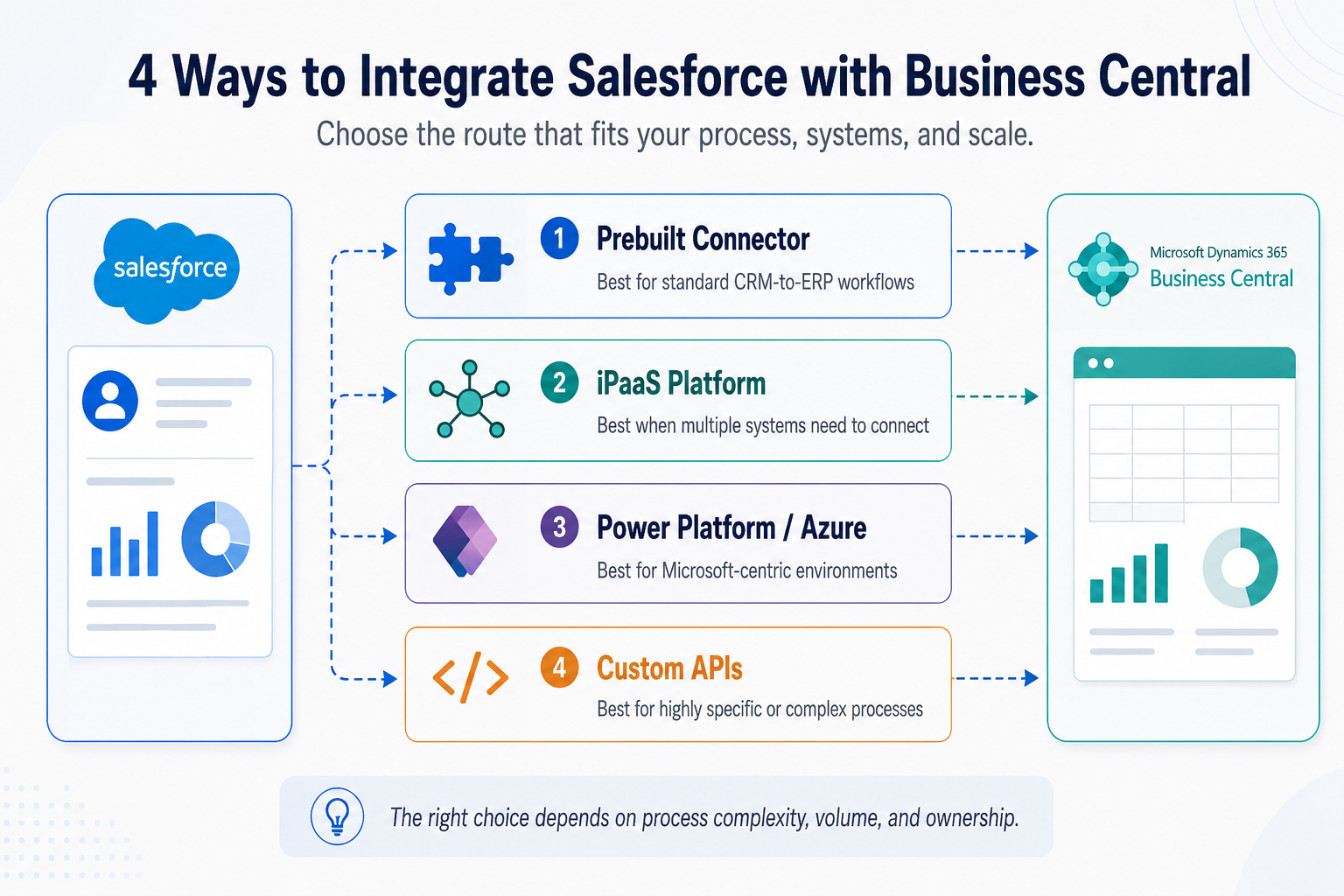
1. Use a Prebuilt Connector for Standard Processes
A prebuilt connector is the most straightforward way to connect Salesforce and Business Central when your processes are close to standard CRM-to-ERP workflows.
These products usually come with common mappings already built, such as:
- Salesforce Accounts to Business Central Customers
- Products to Items
- Opportunities or Orders to Sales Orders
- Inventory back into Salesforce
- Invoices and payment status back into Salesforce
So instead of building every integration flow from scratch, you configure the connector around your systems and business rules.
When this works well
A prebuilt connector is usually a good fit when:
- Your Salesforce and Business Central data structures are fairly standard
- You need to sync common objects such as customers, products, orders, and invoices
- Transaction volumes are moderate
- You want to get the integration live without owning a large custom codebase
- Most differences in your process can be handled through configuration
For example, if a new Salesforce Account becomes a Business Central Customer and the required ERP fields can be populated using simple rules or defaults, a connector can handle that cleanly.
Where teams need to be careful
The challenge appears when your process differs from the connector's standard model.
A Salesforce Account may only contain basic customer information, while Business Central may also require posting groups, payment terms, tax treatment, dimensions, or credit rules before the customer can be used.
The same issue appears with products, pricing, discounts, inventory, and sales lines.
This does not mean a connector is the wrong choice. It simply means you need to understand how much of your process is configuration and how much becomes customization.
2. Use an iPaaS When Salesforce and Business Central Are Only Part of the Landscape
An iPaaS becomes useful when Salesforce and Business Central are only two parts of a wider application landscape.
That could include:
- Ecommerce
- Warehouse or 3PL systems
- Customer portals
- Payment platforms
- Marketing applications
- Data warehouses
- Service systems
- Supplier feeds
The reason is simple: point-to-point integrations become harder to manage as the number of systems grows.
You connect Salesforce to Business Central first. Then the webstore needs Business Central data. Later the warehouse needs orders, the payment platform needs customer information, and the data warehouse needs everything.
Each connection may work perfectly on its own.
The problem is that after a few years, different tools, owners, schedules, and business rules start to accumulate. When something changes in one system, it becomes harder to know which other integrations need to change with it.
An iPaaS such as Boomi, Workato, Jitterbit, MuleSoft, or Celigo gives you one integration layer where those flows can be managed more consistently.
When this works well
An iPaaS is usually a good fit when:
- Salesforce and Business Central are not the only systems that need to exchange data
- You expect more applications to be added over time
- Several teams need to reuse the same customer, product, order, or inventory data
- You need centralized monitoring and error handling
- Maintaining multiple point-to-point integrations is becoming difficult
- You want one place to manage mappings, transformations, retries, and integrations
Think of it as replacing several separate connections with a common integration hub.
For example, instead of Salesforce, the ecommerce platform, and the warehouse each having their own separate connection to Business Central, the integration platform can coordinate how customer and order data moves between all of them.
What the platform does not decide for you
An iPaaS gives you the infrastructure to manage the flows. It does not define your business rules.
Your team still needs to decide things such as:
- Which system owns the customer record?
- How are duplicate or slightly different customer names matched?
- What happens when Salesforce pricing and Business Central pricing disagree?
- How many times should a failed transaction retry?
- Who gets notified if it still fails?
- Should later orders continue processing if an earlier order is rejected?
These decisions matter just as much as the platform itself. A well-designed iPaaS gives you one place to implement and monitor those rules. A poorly designed one simply moves inconsistent data between more systems.
3. Use Power Platform or Azure When You Are Already Microsoft-Centric
If your team already works heavily with Microsoft technologies, Power Platform or Azure can be a natural way to connect Salesforce and Business Central.
The important thing is to separate the simpler use cases from the ones that need a more durable integration layer.
For example, a Power Automate flow can be perfectly adequate if the requirement is something like:
- Create a Business Central customer when an Account reaches a certain stage in Salesforce
- Push invoice status back to Salesforce once a day
- Notify an account manager when an order is posted
- Move a relatively small number of records between the two systems
Once the process becomes more critical, the architecture usually needs to change.
If you are moving large order volumes, handling multiple systems, retrying failed transactions, or need to make sure records are not lost when one application is temporarily unavailable, Azure services such as Logic Apps, Service Bus, and Functions become more useful.
When this works well
Power Platform or Azure is usually a good fit when:
- Your internal IT team already has Microsoft cloud skills
- Business Central is a major part of your application landscape
- You want to avoid introducing another integration platform
- Your first use cases are relatively simple, but you may need more scale later
- You want monitoring, queues, retries, and custom logic inside the Azure ecosystem
- You already use Azure for other integration or application workloads
4. Build Against the APIs When the Process Is Truly Non-Standard
Custom integration makes sense when the process has enough unique rules that a packaged connector starts becoming a constraint.
On the Business Central side, that can mean API v2.0, OData v4, or custom API pages. On the Salesforce side, it usually means REST APIs for transactional work and Bulk API 2.0 for larger data volumes.
You would usually consider this route when:
- Standard connectors cannot support the mappings you need
- The process includes several custom validation or approval rules
- Transaction volumes are high
- You need tighter control over retries and failed records
- Performance requirements are more demanding
- The integration is important enough to justify dedicated ownership
For example, a Salesforce opportunity may only become a Business Central sales order after customer credit is checked, contract pricing is applied, the right fulfilment location is selected, and an approval is completed.
If a connector can only handle that through layers of workarounds, custom APIs may be the cleaner option.
The advantage is control. Your team can decide:
- What gets validated before a record is created
- Which system owns each rule
- What happens when something fails
- Which errors retry automatically
- Which ones go to manual review
- How larger batches are processed
But that control comes with ownership.
Once you build the integration yourself, your team is also responsible for:
- Monitoring
- Documentation
- Release testing
- API changes
- Authentication and security
- Performance tuning
- Knowledge transfer
That is the part teams sometimes underestimate.
The first version may be straightforward to build. The real question is whether you want to maintain that logic for the next several years.
For many mid-market organizations, a connector or iPaaS will still be easier to manage. Custom development becomes worthwhile when your business process is genuinely specific enough that the standard options create more compromise than value.
Tell us how Salesforce and Business Central work today, where the handoffs break, and what you want to automate.
Once You Choose the Route, Decide What Actually Moves
Once you have chosen the integration route, the next step is to define how Salesforce and Business Central should work together day to day.
The most important decisions are not about the tool itself. They are about how customers, orders, pricing, tax, inventory, and financial status should move between the two systems.
Get those rules clear early, and the integration becomes much easier to build, test, and scale.
1. How Does a Salesforce Account Become a Business Central Customer?
Salesforce and Business Central ask for different information because they serve different teams.
A sales rep may only need to create an Account with the customer name, address, contact details, territory, and owner.
Business Central needs additional information before that customer is ready for financial transactions, including:
- Posting groups
- Payment terms
- Currency
- Tax or VAT treatment
- Dimensions
- Credit rules
The answer is not to ask the sales rep to understand ERP configuration.
Instead, decide which values can be derived automatically.
For example, country and customer type may determine the posting group and tax treatment, while customer segment may determine the default payment terms. If a small number of additional fields are needed in Salesforce, capture only those fields that genuinely help the rules work.
Anything the rules cannot resolve can go to a finance approval queue.
That way, the Account exists immediately in Salesforce and the sales rep can keep working, while finance only reviews the exceptions before the Customer becomes billable in Business Central.
The goal is to keep sales moving without pushing incomplete or incorrectly configured customers into the ERP.
2. What Happens When an Opportunity Becomes a Sales Order?
This is where pricing and line-level differences start to matter.
Salesforce may show products, quantities, discounts, and a quoted total. Business Central may need item numbers, locations, units of measure, charges, and other line types before it can create a valid sales order.
The most important question to settle is:
What happens when Salesforce shows one price and Business Central calculates another?
If Business Central is the financial system of record, it usually makes sense for it to remain the pricing authority.
Where possible, Salesforce should consume pricing from Business Central rather than maintain a separate set of prices that can drift over time.
If that is not practical in phase one, define what happens when an incoming order reprices in Business Central. For example, the integration can flag the order for review before it is confirmed.
The same principle applies to line types.
You do not need to automate every variation on day one. A sensible first phase may automatically map standard item lines while leaving freight, charges, G/L lines, or unusual adjustments for manual handling in Business Central.
Once you have seen enough real transactions, you can automate the exceptions that occur often enough to justify it.
The important part is that a pricing difference should be caught inside the process, not discovered by the customer when the invoice arrives.
3. Which System Owns Tax and the Final Total?
Salesforce and Business Central should not independently calculate the same final amount and both be treated as authoritative.
That creates a reconciliation problem by design.
In most Business Central-led fulfilment environments, Business Central should own the posted financial transaction, including the final tax and total.
Salesforce can still show an estimated value during the sales process, but users need to understand when that number becomes final.
Make that distinction visible and consistent.
If the quote in Salesforce is an estimate, say so. If the final amount is confirmed only after Business Central applies tax, discounts, or other financial rules, the sales team should know that before they speak to the customer.
4. Which Inventory Number Should the Sales Rep See?
“Sync inventory to Salesforce” is not specific enough.
The sales team does not simply need an inventory number. They need the number that tells them what they can safely promise.
That may be:
- Available-to-promise
- Available inventory
- On-hand less reserved
- Inventory by location
- Another availability measure that reflects your fulfilment rules
Using on-hand inventory alone can create the exact problem the integration was supposed to solve.
If Business Central shows 100 units on hand but 90 are already reserved, showing “100” in Salesforce may be technically correct but commercially misleading.
Where possible, send available-to-promise by location.
If that is too complex for phase one, a simpler calculation such as on-hand minus reserved may still be more useful than raw stock.
The field label matters too. If the number represents available stock, call it Available, not Stock.
The sales rep should understand what the number means without needing to know how Business Central calculates it.
5. What Should Come Back from Business Central?
Many Salesforce Business Central integration projects begin by focusing on data moving from CRM into ERP.
It is worth looking at the return path just as carefully.
Sales and service teams often need a relatively small set of answers:
- Has the order posted?
- Has it shipped?
- Has the invoice been created?
- Has the customer paid?
- Is the customer on credit hold?
- What is the outstanding balance?
This information already exists in Business Central, and much of it can be pushed back to Salesforce on a schedule.
That makes it a strong candidate for an early phase because it is usually simpler than full bidirectional order synchronization and can remove a large amount of day-to-day friction between sales and finance.
In some organizations, this is worth building before the more complex order flow.
Once sales can see order, invoice, payment, and credit information without calling finance, you may find that the original requirement becomes smaller.
That is an important distinction.
Sometimes the business does not need every object synchronized in both directions. It simply needs the right people to stop working with incomplete information.
More from Our Salesforce Integration Repository
Learn how to bring Salesforce data into Power BI for clearer reporting, better visibility, and more useful cross-functional dashboards.
See how Salesforce and Shopify can work together across customer, order, product, and commerce data without creating more manual handoffs.
Understand how Salesforce and Outlook integration can simplify email, calendar, contact, and activity tracking for sales teams.
See how Nalashaa integrated a textile distributor’s web lead process with Salesforce to automate data capture, improve visibility, and reduce manual entry.
A Second Set of Eyes Can Help You Get It Right
A Business Central Salesforce integration can look pretty straightforward at first. Connect the two systems, decide what moves where, and automate the handoffs.
But the integration itself is rarely the messy part. The mess usually comes from what is happening underneath it.
How your sales team creates customers. How finance expects them to be set up. Which system owns pricing. What “available inventory” actually means in your business. Which exceptions are normal. Which ones should stop the process altogether.
That is why the right integration setup depends less on the tool and more on the way your operations actually work and the quality of the data behind them.
If those rules are clear, the build becomes much easier. If they are not, even a good connector can end up creating more manual work than it removes.
If you are planning a Business Central Salesforce integration and want a second set of eyes on the process before you commit to a route, get in touch with our integration experts. We can help you work through the data, the edge cases, and the architecture that makes sense for your setup.
Frequently Asked Questions
Which Microsoft tool should I use for Salesforce Dynamics 365 integration?
It depends on volume and who maintains it. Power Automate suits business-process flows and low to moderate record counts. Azure Logic Apps suits higher-volume, enterprise scenarios that need retries, dead-lettering, and monitoring. Azure Data Factory suits bulk data movement and initial loads. Many projects use Logic Apps for ongoing sync and Data Factory for one-time migration.
Can Power Automate connect Salesforce and Business Central?
Yes. Power Automate can work well for simpler, lower-volume workflows. For higher volumes, complex retries, stronger operational controls, or business-critical transaction processing, Logic Apps, Service Bus, an iPaaS, or another integration architecture may be more appropriate. The Business Central connector's authentication limitations also need to be considered during design.
How long does a Salesforce to Dynamics 365 migration take, and what drives the cost?
Timelines depend on the number of custom objects and fields, how much Apex, Flow, and Process Builder logic needs rebuilding in Power Platform, how many years of historical data need to move, and how many integrations currently point at Salesforce. Custom logic and downstream integrations usually drive more effort than record volume. A discovery pass across those areas is needed for a defensible estimate.
Will our existing customizations affect Salesforce Dynamics 365 integration?
Yes. Custom fields, objects, tables, workflows, plugins, validation rules, and automation on either side can change how records need to map and what should happen when they sync. Before development starts, review which customizations actually participate in the process. Some may need direct mappings, while others may trigger additional logic or block a record from being created.
What factors have the biggest impact on Salesforce Business Central integration cost and timeline?
The biggest variables are data complexity, custom objects and fields, business rules, data quality, integration volume, and the number of workflows that need custom handling. Existing Salesforce automation and Business Central extensions can also add effort because they affect mappings, validation, and error handling. The more clearly these are documented before development starts, the more predictable the project becomes.
What hidden costs should we plan for beyond the initial integration build?
Implementation is only part of the total cost. Teams should also plan for data cleanup, historical migration, testing, user acceptance, internal staff time, training, post-go-live support, monitoring, and ongoing maintenance. Changes to Salesforce, Business Central, APIs, or business processes can also create future integration work, so the budget should include continued ownership after launch.
How can we reduce the risk of a Salesforce Business Central integration failing or running over budget?
Start with a data audit and document the business rules before building anything. Agree on which system owns each record, how conflicts and duplicates are handled, what happens when a sync fails, and who is responsible for resolving exceptions. A phased rollout with a smaller pilot dataset can expose mapping and process issues before they affect the entire organization.
Recent Posts
Still on Dynamics GP? Here's Why 2027 Is Your Last Safe Year to Decide
Aug 12, 2026

AI in Business Central [Capabilities, Costs, and Readiness]
Jul 30, 2026
Business Central Payables Agent [What Finance Teams Need to Know]
Jul 16, 2026
Category
Our Expertise



About Author

Aiswarya Madhu
Aiswarya Madhu is an experienced content writer with extensive expertise in Microsoft Dynamics 365 and related Microsoft technologies. With over four years of experience in the technology domain, she has developed a deep understanding of Dynamics 365 applications, licensing, integrations, and their role in driving digital transformation for organizations across industries.
Never Miss News
Want to implement Dynamics 365?
We have plans which will meet your needs, and if not we can tweak them around a bit too!