Microsoft Dragon Copilot: Use Cases Worth Investing In
Nov 03, 2026 Aiswarya Madhu
"Introducing", yet another rebranding and combining of existing services with the "copilot" name slapped on top.
That was one of the reactions on Reddit when Microsoft introduced Dragon Copilot in March 2025. And if you have been following Microsoft's AI announcements, you can probably understand the sentiment. The Copilot name has appeared across productivity applications, business systems, development tools, and now healthcare. With each announcement, it becomes a little harder to distinguish a genuinely new capability from an existing product presented under a different name.
The skepticism surrounding Dragon Copilot is therefore understandable. After all, Microsoft already had Dragon Medical One for clinical dictation and DAX Copilot for ambient clinical documentation. Combining the two and giving them another Copilot name might initially seem like a product consolidation exercise.
In fact, Microsoft was quite open about that combination in its original announcement. Dragon Copilot brought together existing speech recognition and ambient documentation technologies, adding generative AI capabilities and healthcare-specific safeguards.
But looking only at what Microsoft combined misses an important development. Healthcare organizations have spent years investing in EHR systems, clinical documentation tools, speech recognition, and automation technologies. Yet clinicians still spend considerable time moving between these systems, reviewing patient information, preparing notes, and completing administrative work after an encounter.
Dragon Copilot represents Microsoft's attempt to bring more of that work into a single clinical experience. And as its capabilities have expanded through 2026, the conversation has moved beyond whether it can accurately document a patient visit.
The more interesting development is what happens when the information captured during that visit can also support other clinical and administrative workflows.
On this Page
- First, Dragon Copilot Is Not the Copilot Most of Us Know
- Where Dragon Copilot Starts Making a Difference in Healthcare
- What the Early Numbers Tell Us
- What Healthcare Organizations Should Get Right Before Deploying Dragon Copilot
- So, Was the Reddit Criticism Wrong?
- Bring Microsoft AI into Everyday Healthcare Workflows
- Frequently Asked Questions
First, Dragon Copilot Is Not the Copilot Most of Us Know
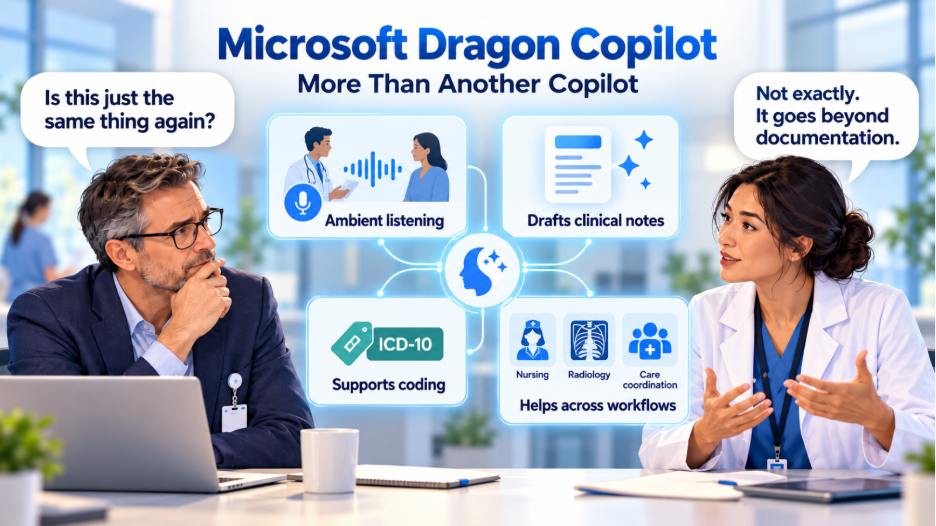
When people hear Microsoft Copilot, they typically think of an AI assistant that summarizes meetings, drafts emails, analyzes documents, or retrieves information from workplace applications. Microsoft 365 Copilot is designed around those knowledge-work activities.
Dragon Copilot operates in a very different environment.
Consider a physician conducting a routine consultation. The patient describes recurring headaches, mentions a medication that no longer seems effective, and brings up an earlier test result. During that conversation, the physician must listen, examine the patient, consider the clinical history, reach a decision, and eventually document everything in the EHR.
A conventional productivity assistant might help summarize a transcript after someone supplies it. Dragon Copilot is designed to participate in the clinical documentation workflow itself, using ambient recording to capture the conversation, prepare a clinical note, and support further documentation tasks.
This distinction matters because clinical conversations are not structured like business meetings. Patients rarely describe their symptoms in the order a medical record expects. They may remember an important detail halfway through the examination, contradict an earlier statement, or mention another concern just as the consultation is ending.
An AI system working in this environment needs more than a general ability to summarize conversations. It needs to recognize clinical terminology, organize information into appropriate documentation, and support the clinician's review of what was captured.
Dragon Copilot builds on Nuance's established medical speech recognition technology and DAX Copilot's ambient documentation capabilities. It also allows clinicians to edit documentation using natural language, generate additional clinical documents, and interact with relevant information through voice or text.
For example, rather than manually rewriting a paragraph, a physician can ask the assistant to expand a section of a note using information from the encounter. Microsoft's March 2026 update describes these contextual editing capabilities alongside suggestions for more specific ICD-10 coding.
The clinical responsibility, however, remains with the physician. AI-generated documentation must still be reviewed for accuracy, completeness, and clinical appropriateness.
The difference, then, is not simply that Dragon Copilot understands medical words while another Copilot understands business language. It is that Dragon Copilot has been designed around the activities that happen during and immediately after patient care, with connections to the systems where that information is ultimately used.
Where Dragon Copilot Starts Making a Difference in Healthcare
The earliest discussion around Dragon Copilot focused heavily on reducing documentation time. That remains an important application, but it is only one part of the opportunity.
A patient encounter produces information that can influence follow-up care, referrals, nursing documentation, coding, and revenue cycle activities. Much of that information has traditionally required clinicians and administrative teams to enter, interpret, or retrieve it across multiple systems.
Dragon Copilot becomes more interesting when healthcare organizations examine how its capabilities could reduce some of this repeated work.
1. Primary Care: Making the Clinical Conversation the Starting Point
Primary care is perhaps the easiest place to understand the practical value. Physicians frequently deal with several concerns during a single appointment, and documentation becomes more complicated as the conversation moves between symptoms, medication history, examination findings, and treatment recommendations.
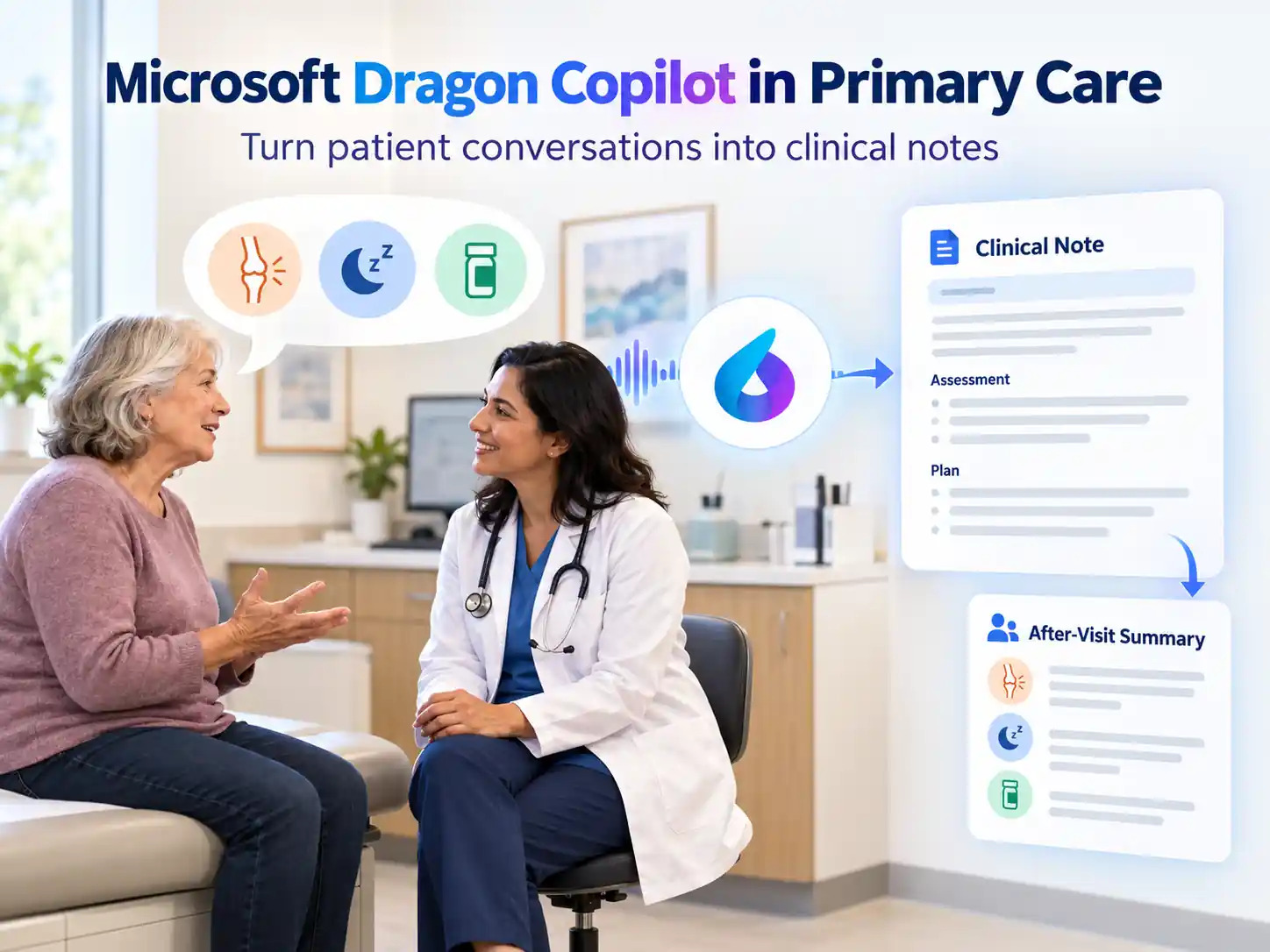
Imagine a patient visiting a family physician for persistent knee pain. During the consultation, the patient also mentions difficulty sleeping and asks whether a medication prescribed months earlier could be responsible. The physician now has several separate clinical concerns to investigate and document.
With Dragon Copilot, the physician can use ambient capture, with appropriate patient consent, to create a draft note from the encounter. The note can then be reviewed, corrected, and organized according to the practice's documentation requirements. The clinician can also use supported capabilities to prepare related documents, such as an after-visit summary or referral letter.
This potentially changes how the physician divides attention during the visit. Instead of constantly alternating between the patient and the computer, the clinician can spend more time on the conversation while reserving time to check the resulting documentation.
2. Specialty Care: Bringing Relevant Patient History Into the Encounter
The documentation challenge becomes more demanding in specialty care, where a physician may need to consider years of patient history, previous procedures, imaging, medication changes, and findings from other departments.
Take an oncology consultation. The oncologist may be reviewing an existing treatment plan while discussing newly reported symptoms, recent laboratory findings, and the patient's response to medication.
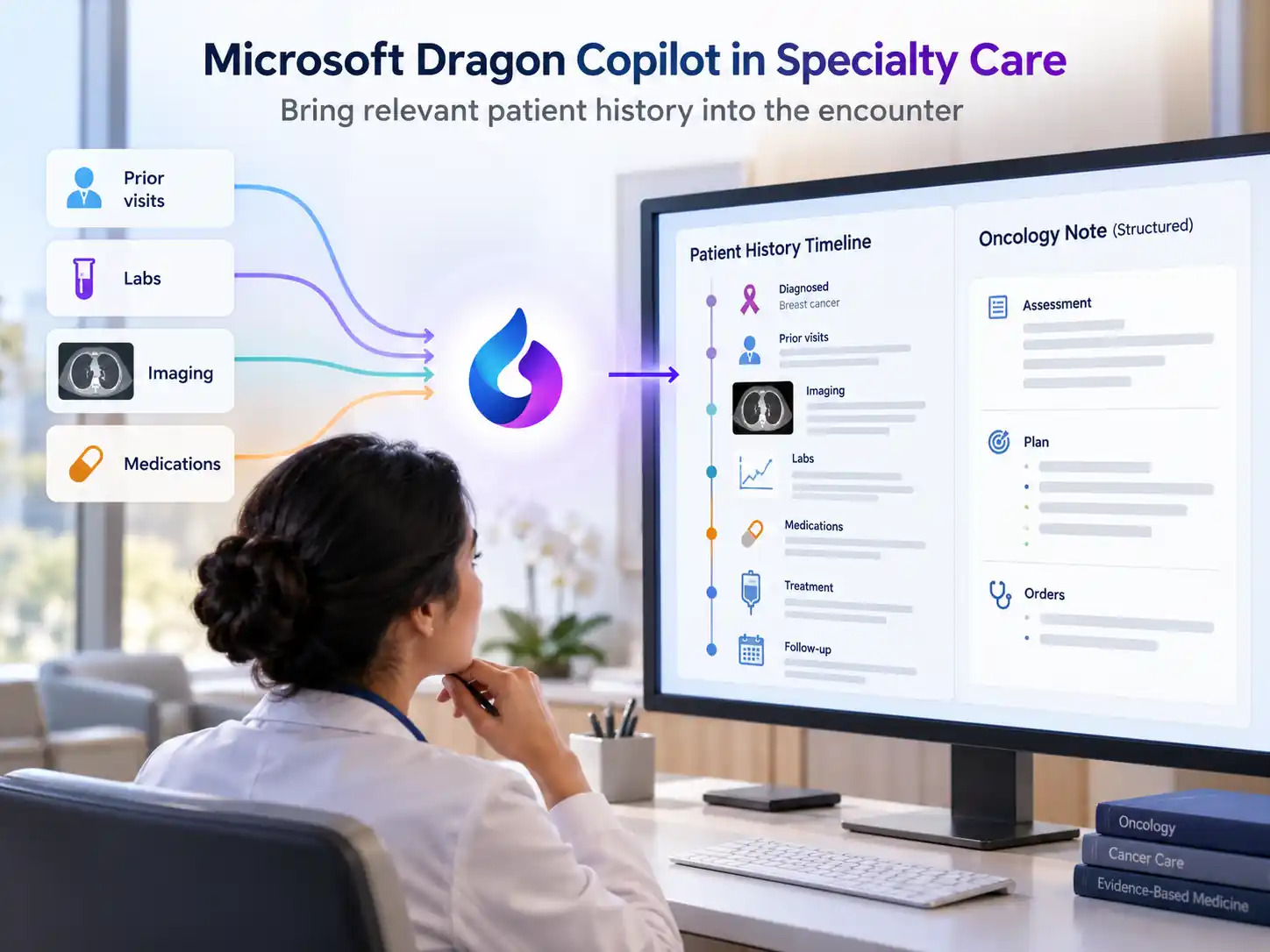
Ambient documentation can capture what is discussed, but the larger opportunity comes from combining that conversation with relevant clinical context. Depending on the EHR integration and capabilities available, Dragon Copilot can support information retrieval and specialty-specific documentation.
This is where healthcare organizations need to distinguish between generating a note and supporting a complete clinical workflow.
For instance, an oncology department might explore whether its clinicians can more easily review relevant history, create appropriately structured follow-up documentation, and identify information that requires closer attention. Specialized templates may also help physicians capture the details their specialty needs rather than repeatedly restructuring a general-purpose note.
Microsoft has expanded its specialty-specific documentation capabilities, but the quality of the output still depends on the clinical setting, available information, and configuration.
A specialist should not have to spend ten minutes correcting a note that the system took seconds to generate. For hospitals evaluating these tools, the time spent reviewing and correcting documentation is therefore an important measure of actual value.
3. Nursing: Moving from Conversations to Structured Documentation
Physicians and nurses document care differently, which is one reason the expansion of Dragon Copilot into nursing deserves attention.
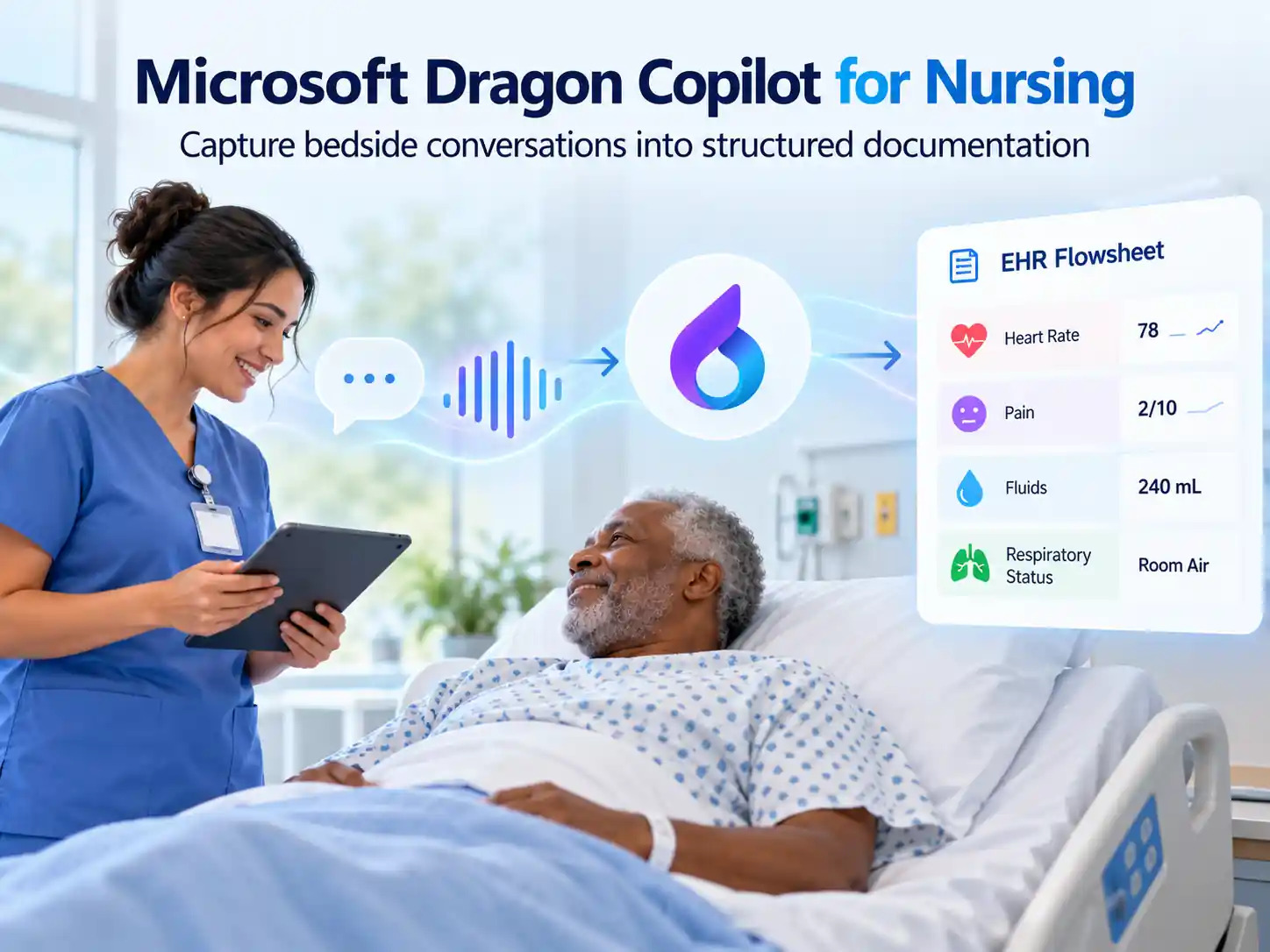
A physician may primarily need a narrative consultation note. A nurse may need to record vital signs, pain assessments, intake and output, and other observations in structured EHR flowsheets. These activities are often distributed throughout a shift and require frequent interaction with the documentation system.
Microsoft introduced nursing-specific Dragon Copilot capabilities in October 2025 and has since expanded its support for structured nursing workflows.
Consider a nurse checking on a patient recovering from surgery. During the interaction, the nurse discusses pain levels, observes the patient's condition, and performs routine assessments. Instead of relying entirely on manual entries afterward, supported ambient documentation capabilities can help convert relevant information into structured flowsheet entries for review.
Microsoft's nursing experience includes integration with Epic Rover for ambient recording and flowsheet documentation, while the broader Dragon Copilot application provides additional capabilities for reviewing information and preparing nursing notes.
For a hospital, the opportunity is to reduce documentation effort during routine bedside care without removing the checks required for accurate charting.
But this also illustrates why deployment decisions must consider the actual workflow. A tool that performs well in a physician's consultation room may require different configuration, training, and device support when introduced on a hospital ward.
The technology must adapt to the care team's responsibilities, not expect every clinician to document in the same way.
4. Radiology: Reducing the Work Around Report Interpretation
Radiology offers another example of how Dragon Copilot is expanding beyond conventional speech-to-text functionality.
Radiologists have used dictation tools for years, so simply adding another voice interface would hardly represent a major change. The more useful development is the ability to bring relevant information into the reporting experience.
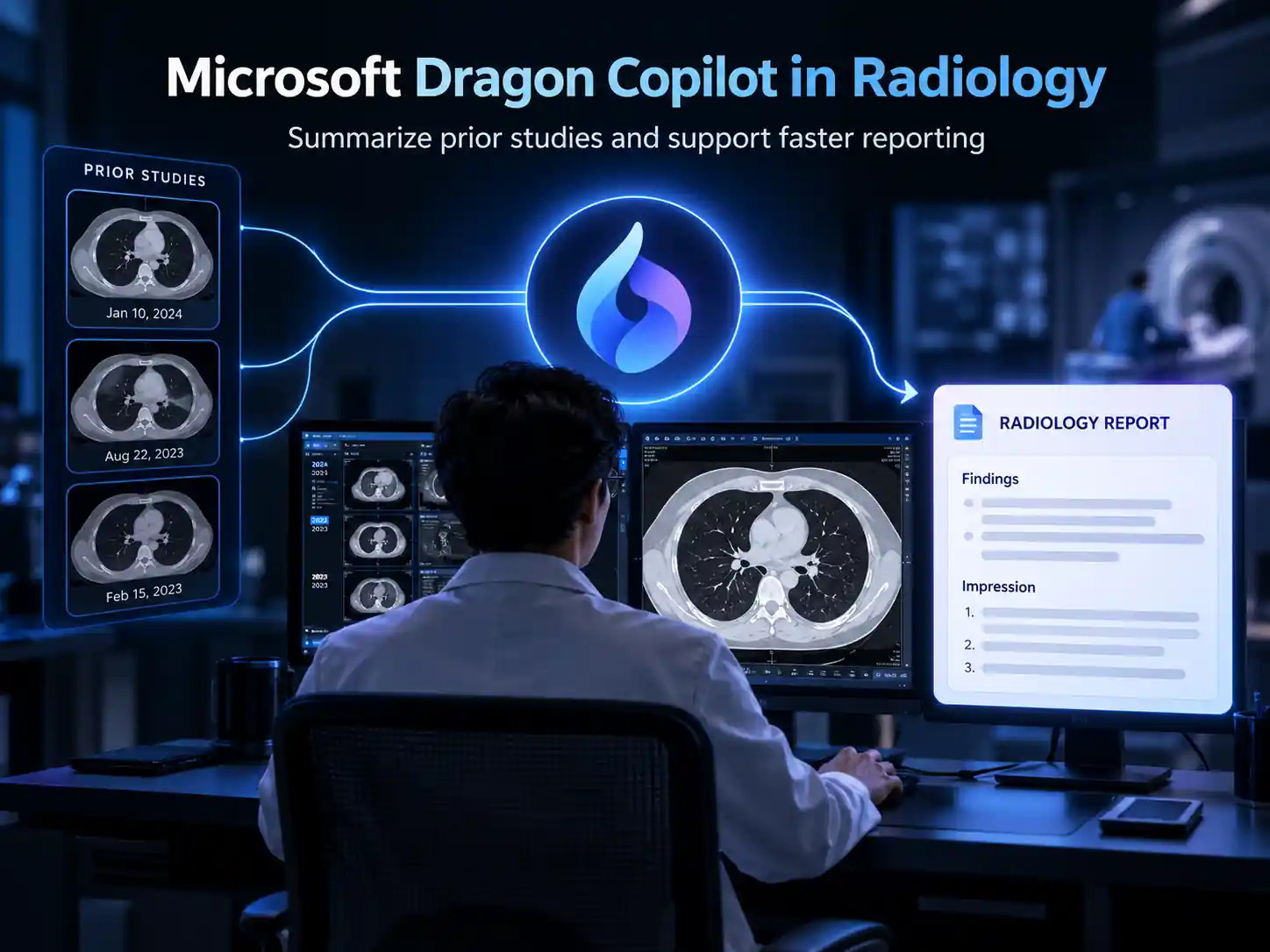
When reviewing a new scan, a radiologist may need to compare it with earlier studies, consult previous reports, and check whether findings were previously documented.
Microsoft's Dragon Copilot radiology experience, paired with PowerScribe One, is designed to help summarize prior radiology reports, surface clinical context, and support AI-assisted reporting activities.
A radiologist reviewing a new chest CT, for example, could potentially use relevant summaries of earlier reports to locate historical findings more quickly. The radiologist would still need to examine the images, verify the information, and determine what belongs in the final report.
At the University of Rochester Medical Center, Microsoft has described an early evaluation of these capabilities as part of its radiology experience.
As of Microsoft's March 2026 announcement, the radiology experience remained in preview in the United States, so hospitals should verify current availability and integration requirements before planning deployment.
Still, the direction is worth watching. Radiology AI has often focused on interpreting images or detecting particular findings. Dragon Copilot explores another part of the workflow: helping radiologists work with the information surrounding those images.
5. Revenue Cycle Management: Where Better Clinical Documentation Could Have a Financial Impact
One of the less obvious applications of Dragon Copilot lies outside the immediate patient interaction.
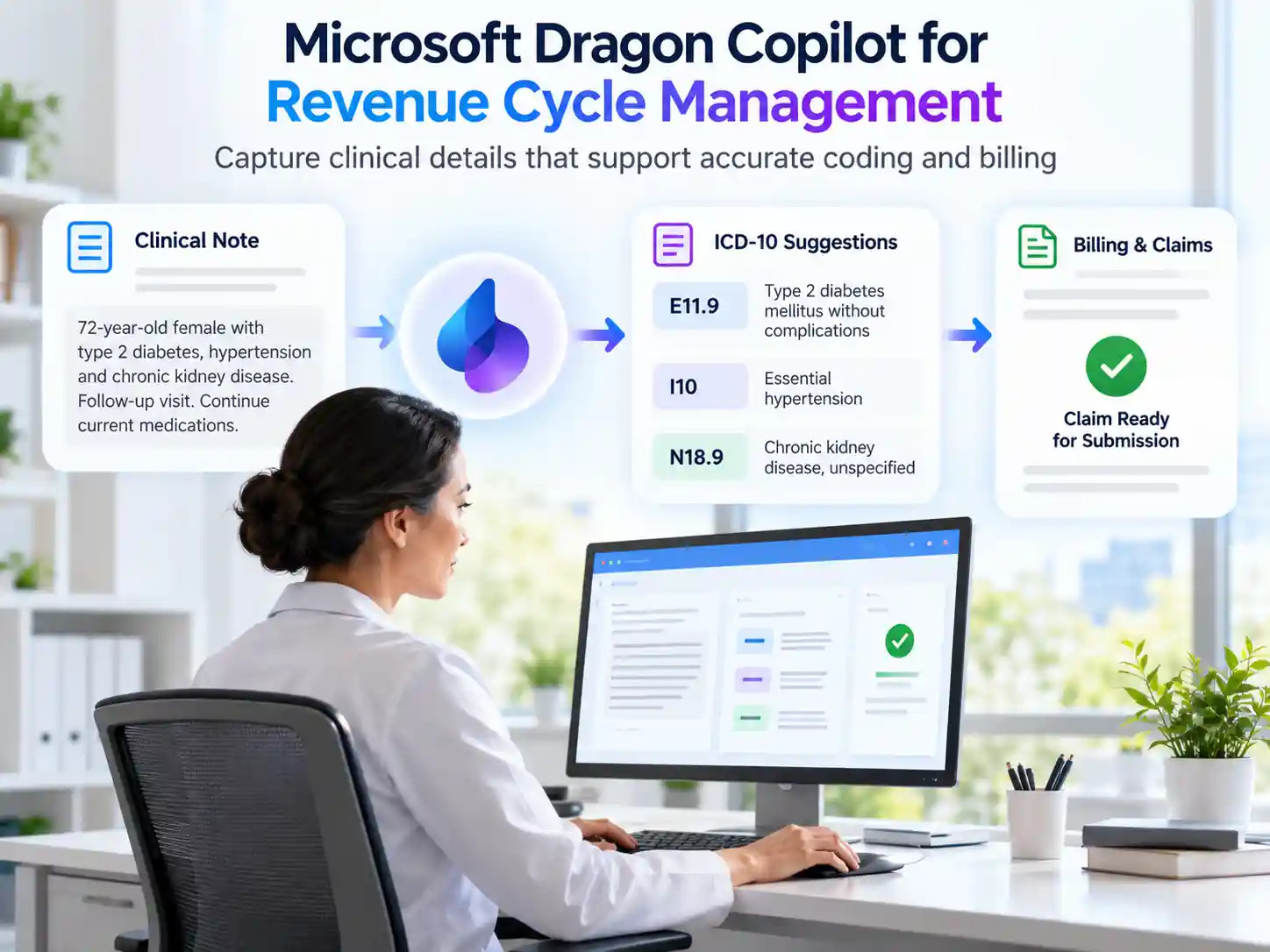
Clinical documentation eventually influences medical coding, billing, risk adjustment, and sometimes prior authorization. When relevant details are missing or unclear, the work often returns to clinicians through documentation queries, corrections, or clarification requests.
A physician may understand a patient's condition perfectly well but document it without the specificity needed for coding. That difference can create additional work downstream.
Microsoft has introduced proactive ICD-10 specificity suggestions and support for partner-built applications addressing areas such as revenue cycle management, clinical insights, and prior authorization.
Consider a hospital exploring these capabilities in a cardiology department. An approved documentation or coding application could help identify where additional clinical specificity may be useful while the physician is reviewing the note, rather than leaving every clarification to a later coding process.
The potential advantage is earlier feedback, while the clinical information is still fresh.
This should not be confused with fully automated coding, guaranteed reimbursement, or the elimination of coder review. Coding accuracy depends on documented clinical evidence, applicable rules, and appropriate human oversight.
The larger point is that improving documentation at the point of care could reduce some of the correction work that traditionally happens much later in the revenue cycle.
For healthcare organizations, that makes coding and revenue cycle leaders relevant participants in Dragon Copilot evaluations, even when the initial use case is physician documentation.
What the Early Numbers Tell Us
Microsoft’s original Dragon Copilot announcement referenced results from its earlier DAX Copilot experience, including clinicians reporting approximately five minutes saved per encounter. It also reported that 70% of surveyed clinicians saw better work-life balance and reduced burnout and fatigue, while 93% of surveyed patients said their physician was more personable and conversational.
These findings are encouraging, but they need context. They were based on surveys involving the earlier DAX Copilot product, not an independent evaluation of every feature now available in Dragon Copilot. They should therefore be treated as indicators of potential value rather than universal outcomes.
The five-minute figure nevertheless provides a useful starting point for understanding the scale of documentation work. As an illustration, across 20 daily consultations, five minutes per encounter would amount to 100 minutes of time saved, assuming the same result could be consistently achieved.
Whether that time is genuinely recovered depends on what happens afterward. Additional documentation corrections, system delays, or incomplete EHR integration could reduce the benefit.
There is also evidence that organizations have already achieved measurable improvements with earlier Nuance technologies. Microsoft reports that SolutionHealth, which used DAX Copilot within Epic, saw clinicians spend an average of 56% less time documenting during encounters, based on a Microsoft survey of 190 DAX Copilot users in December 2024. Again, this is a customer-reported outcome involving predecessor technology, rather than a result every Dragon Copilot customer should expect.
By March 2026, Microsoft reported that more than 100,000 clinicians relied on Dragon Copilot in their daily practice. That level of adoption suggests that ambient clinical AI has moved beyond limited experimentation, although adoption alone does not establish improvements in patient outcomes or financial performance.
For healthcare executives, the useful measurements remain fairly practical: how much documentation time is reduced, how often notes require correction, whether after-hours charting declines, and whether the resulting information supports downstream clinical and administrative work.
What We Have Already Done for Healthcare Teams
Clinical AI only pays off when it connects cleanly to the systems around it. Here is how Nalashaa has helped healthcare technology teams get there,
- 70% less documentation time per consult. We built MediNote AI for a fertility EMR provider. It turns a dictated consult into a structured note that the provider reviews before it reaches the record.
- 30% less chart review time, and six more charts per coder each day. A clinical NLP layer pre-organized charts for a U.S. physician group, and certified coders still confirmed every code.
- 40% faster data retrieval and 99.9% data availability. A secure FHIR integration with eClinicalWorks now feeds a behavioral health platform’s AI engine.
- Partner onboarding in 3 to 5 days instead of weeks. A configurable integration layer cut manual integration support by 80% and recovers 95% of temporary delivery failures automatically.
- FHIR R4 delivered in 6 weeks, with no disruption to existing workflows. An HL7 v2 EHR vendor met ONC patient access requirements without replacing its production feeds.
If you are planning ambient documentation or any clinical AI, the AI usually isn’t the hard part. Connecting it to your EHR, your standards and your governance is. That is the work we do.
Talk to our healthcare technology team about connecting emerging AI capabilities with your existing healthcare systems.
What Healthcare Organizations Should Get Right Before Deploying Dragon Copilot
Dragon Copilot can reduce the documentation burden, but successful adoption depends on how well it fits into existing clinical workflows. A good demonstration shows what the technology can do. The real test comes when clinicians use it during everyday patient encounters.
Here are six areas worth checking before expanding its use across departments.
1. Make Sure Clinical Notes Reach the Right Patient Record
Even an accurate clinical note becomes a problem if it reaches the wrong patient record or encounter. Most hospitals also use separate platforms for laboratory results, imaging, pharmacy, and billing. Understanding which systems Dragon Copilot connects with is important before introducing it into clinical workflows.
What to do: Map how documentation moves from the consultation to the EHR. Verify patient matching, encounter association, and note transfer. Test scenarios involving patients with similar names and confirm which connected systems are supported.
2. Test Beyond the Demonstration Environment
A controlled demonstration cannot fully represent a busy consultation room. Background noise, interruptions, unfamiliar medical terms, and patients discussing multiple conditions can affect the quality of generated documentation.
What to do: Test Dragon Copilot in realistic clinical scenarios across the specialties involved in the pilot. Measure documentation accuracy, correction frequency, and the time clinicians spend reviewing notes.
3. Establish Patient Consent and Data Privacy Procedures
Ambient documentation involves capturing patient conversations and processing sensitive health information. Healthcare organizations need clear procedures for obtaining consent, handling recordings and transcripts, and controlling access to clinical data.
What to do: Define consent procedures, access permissions, data handling policies, and documentation responsibilities before introducing the tool into patient consultations.
4. Prepare Clinicians for a Different Documentation Process
Dragon Copilot changes how clinicians approach documentation. Instead of manually recording every detail during the encounter, they review and refine an AI-generated draft. Some clinicians may welcome this immediately, while others may need time to adjust.
What to do: Provide practical training, establish clear review responsibilities, and collect feedback during the pilot. Clinicians should understand that they remain responsible for the accuracy of the final documentation.
5. Confirm Which Capabilities Are Actually Available
Not every Dragon Copilot feature is available across all regions, clinical roles, or EHR environments. Features demonstrated in one hospital may depend on integrations, licensing, or additional applications that another organization does not have.
What to do: Confirm available features, technical requirements, and integration support for your environment. Build the pilot around capabilities that can actually be deployed rather than everything shown in product demonstrations.
6. Start With One Workflow Before Expanding
Introducing ambient documentation, clinical information retrieval, AI agents, and additional automation at the same time makes it difficult to measure their individual impact.
What to do: Start with one department and a clearly defined use case, such as outpatient clinical documentation. Measure time saved, note accuracy, clinician satisfaction, and correction effort before expanding to other workflows.
So, Was the Reddit Criticism Wrong?
Not entirely.
Dragon Copilot did begin by bringing together technologies that Microsoft already owned. Anyone describing the original announcement as a consolidation of Dragon Medical One and DAX Copilot was making a reasonable observation.
But a product's origins do not necessarily tell us what it becomes.
The more important developments are the expansion into role-specific workflows, the ability to work with relevant clinical information, and the introduction of partner applications that can support activities beyond transcription.
These changes make Dragon Copilot worth evaluating on different terms from a conventional dictation product or a general-purpose AI assistant.
There is still a considerable difference between what these technologies can demonstrate and what they can reliably accomplish inside a complex healthcare organization. And no amount of AI assistance can replace clinical judgment, trustworthy patient data, or carefully designed integration.
Perhaps that is where the conversation around Dragon Copilot should go next.
Instead of judging it by how many existing Microsoft products sit underneath the Copilot name, healthcare organizations can examine whether it meaningfully changes how clinicians capture information, make use of patient context, and complete the work surrounding care.
Because ultimately, another AI-generated clinical note is not especially remarkable anymore.
What matters is whether that note becomes part of a more useful, accurate, and connected clinical workflow.
Bring Microsoft AI into Everyday Healthcare Workflows
Microsoft Dragon Copilot is another example of how AI is moving closer to the work people perform every day. But making these capabilities useful requires more than introducing a new application. Healthcare organizations need to understand where AI can assist their teams, how it fits into existing Microsoft environments, and which workflows are worth improving first.
At Nalashaa Digital, we help organizations explore, implement, and extend Microsoft AI capabilities across their business applications and workflows. From Copilot consulting and AI agent development to Microsoft Dynamics 365, Azure AI, and Power Platform, we help businesses put Microsoft technologies to practical use.
Exploring how Microsoft AI could fit into your healthcare operations?
Frequently Asked Questions
Is Dragon Copilot worth the monthly cost?
It is worth it when the minutes it returns per clinician outweigh the price, and that depends on your visit volume and correction rate. Microsoft lowered the standard per-user list price on May 1, 2026 and now charges ambient and generative AI fees per encounter, so older figures quoted in forums may be out of date. Compare the current cost with your own baseline for documentation time, after-hours charting and note corrections. If you count the payback as one extra visit a day, confirm your schedule and patient demand can absorb it.
Is Dragon Copilot affordable for a small practice or solo physician?
Microsoft retired the Dragon Copilot Physician Practice offer on May 1, 2026. Customers now get the full set of enterprise capabilities through the standard per-user license at the reduced price. A small practice can start with one or two clinicians and judge the result on measured documentation time before adding more licenses.
Who handles the IT side of a Dragon Copilot rollout?
Your IT team or managed IT provider can. A deployment needs a modern EHR, Microsoft 365 infrastructure and clear audio capture, according to HealthTech. That puts sign-in, devices, network setup, microphones and EHR connectivity squarely in IT’s lane, and the clinical team can stay focused on workflow and review.
Should we switch from Dragon Medical One to Dragon Copilot?
Switch for a reason, not because of a sales push. Dragon Copilot makes sense if you want ambient capture, the nursing or radiology experiences, or partner AI apps alongside dictation. Healthcare IT News reports that migration from the Dragon Medical One ambient scribe preserves existing commands, vocabularies, profiles, templates and auto texts, and Microsoft publishes a quick start guide for Dragon Medical One users. Pilot with one team first, and compare the licensing terms against what you pay today.
Is Dragon Copilot reliable, and do the notes need heavy editing?
No ambient tool is error-free, and Microsoft says so. Its transparency note states that drafts must be validated by the clinician before entering the record. It lists transcription errors from background noise, overlapping speakers and underrepresented accents, and summaries that can omit findings or include details nobody said. HealthTech Magazine adds that specialists tend to make more corrections than generalists early on. So track your own correction rate during the pilot instead of relying on anyone’s averages.
Can I make Dragon Copilot notes shorter and less wordy?
Yes, within limits. Clinicians can set whether notes are verbose or concise, and whether they read in clinical language or plainer terms, and version 5.0 added AI-assisted templates you can create by describing the note you want. HealthTech notes that tuning these settings can take a while to get right, so plan that time into the pilot before you judge the drafts.
Recent Posts

Dynamics 365 Activate: Do You Still Need a Migration Partner?
Oct 05, 2026

Tableau to Power BI Migration: A Practical Guide
Sep 09, 2026
SAP ECC to Dynamics 365 Finance & SCM Migration Guide
Sep 09, 2026
Category
Our Expertise



About Author

Aiswarya Madhu
Aiswarya Madhu is an experienced content writer with extensive expertise in Microsoft Dynamics 365 and related Microsoft technologies. With over four years of experience in the technology domain, she has developed a deep understanding of Dynamics 365 applications, licensing, integrations, and their role in driving digital transformation for organizations across industries.
Never Miss News
Want to implement Dynamics 365?
We have plans which will meet your needs, and if not we can tweak them around a bit too!