Microsoft Copilot for Education [Rollout Roadmap]
Jun 01, 2026 Aiswarya Madhu
Microsoft Copilot can work in education, but not when it is treated as a basic software rollout. The institutions getting real value from Microsoft Copilot for education are approaching it as a governance project with a software component. That distinction matters because most AI pilots fail when licenses are issued before policies, permissions, training, and measurement are ready.
Copilot has clear potential across schools, colleges, and universities. It can reduce administrative load, help educators prepare materials faster, support student study workflows, assist with communication, and improve access to information already stored in Microsoft 365. But the same access that makes Copilot useful also creates risk. If data permissions are messy, Copilot will expose that mess faster.
A responsible deployment depends on three things:
- starting with the right version of Copilot
- cleaning up data governance before scale, and
- measuring whether the tool improves real workflows instead of simply increasing AI usage.
The Opportunity, and Why Speed Can Undermine It
Most AI pilots in education fail for a familiar reason. Licenses are purchased, an announcement is sent, and adoption is expected to follow. Six months later, usage is uneven, policy questions remain unresolved, and the institution still does not know whether the tool improved anything important.
The actual opportunity is narrower, but much more useful. Copilot will be present inside tools that many institutions already use every day, including Teams, Word, Outlook, Excel, and SharePoint. That matters because adoption does not require a completely new interface or a separate SaaS platform. It extends familiar workflows with AI support.
The highest value use cases of Microsoft Copilot for education are not about replacing jobs. They are about removing time from repetitive, document heavy, and communication heavy work.
For example:
- Educators can reduce time spent preparing first drafts of lesson plans, rubrics, quizzes, and classroom communication.
- Administrative teams can summarize long email threads and turn them into action items.
- Help desk teams respond to repeated support questions faster.
- Registrar and student service offices can draft clearer student communication.
- Faculty and administrative teams can prepare grant documents, meeting summaries, and reports with less manual effort.
Let's See What Microsoft Copilot for Education Is Already Delivering
Broward County Public Schools is one of the clearest examples. The district deployed Microsoft 365 Copilot across 20,000 staff licenses, making it the largest K-12 Copilot deployment globally. The scale matters because the district serves 235,000 students, including a highly diverse student population. But the important part is how they approached it. Broward created a 50-person AI Task Force and evaluated use cases before rollout, treating governance as the foundation rather than an afterthought.
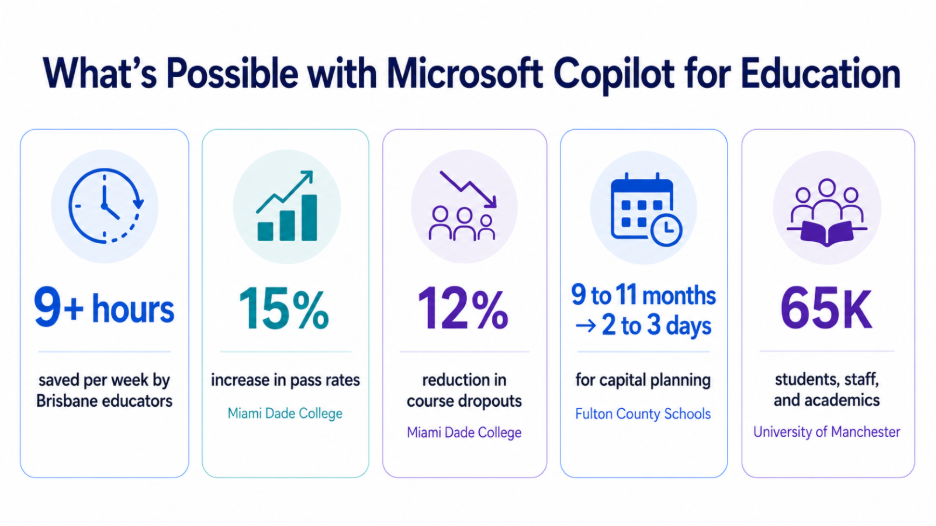
Miami Dade College saw measurable academic impact after starting with 500 Copilot users across faculty and staff. The college reported a 15% increase in pass rates and a 12% reduction in course dropouts, then expanded the deployment with 400 additional licenses. The lesson is not that Copilot alone changed student outcomes. It is that reducing administrative pressure on faculty can give them more time to focus on instruction and student support.
Fulton County Schools showed how Copilot can compress planning cycles when applied to the right administrative workflow. Its capital facility planning process, which previously took 9 to 11 months, was reduced to 2 to 3 days. That level of improvement came after the district evaluated 200+ use cases and set guardrails before scaling usage.
Brisbane Catholic Education reported one of the strongest productivity outcomes. After deploying Copilot to 12,500 educators and support staff, participating educators saved 9+ hours per week on administrative and planning work. A smaller student pilot also showed a 275% improvement in student learning agency, showing that Copilot can support more than staff productivity when introduced with the right learning structure.
The University of Manchester took a different route by making Copilot available to everyone. It provided access and training to 65,000 students, academics, and staff, positioning AI as a baseline institutional skill rather than a department-level experiment.
The common pattern is clear here, Microsoft Copilot for education works best when institutions do not rush from access to adoption. Broward built a task force. Fulton County evaluated use cases. Brisbane trained educators before expanding student use. Manchester paired universal access with training from day one.
Start with Copilot Chat Before Buying Paid Licenses
A Copilot deployment does not need to begin with paid Microsoft 365 Copilot licenses. Many education institutions already have access to Copilot Chat through Microsoft 365 education subscriptions. A1, A3, and A5 licenses include it.
Copilot Chat is web grounded, supports file uploads, includes image generation, and can be controlled through Microsoft 365 admin settings. It gives institutions a lower cost way to build AI literacy before committing to paid licenses at scale.
This makes Copilot Chat a practical first phase. Faculty and staff can learn what Copilot does in real workflows. IT teams can monitor adoption and identify edge cases. Legal, academic, and compliance teams can see where policy questions appear. Department leaders can identify which workflows actually improve before asking for broader investment.
This phase should answer three questions:
- Which workflows actually save time?
- Where do existing permissions create AI risk?
- Is Copilot Chat enough for many users, or is the paid version required for specific roles?
A practical rollout can follow this structure:
Phase one: Enable Copilot Chat for faculty, staff, and eligible adult students.
Phase two: Monitor usage for 60 days. Track which departments use it, how often they use it, and where support issues appear.
Phase three: Speak with active users. The goal is not to ask whether they liked it. The better questions are whether they saved time, which tasks improved, and whether they would use it again for the same work.
The Data Governance Problem to Solve First
The biggest risk in Copilot deployment is often not the product itself. It is the institution's existing permissions structure.
Copilot respects user permissions. If a registrar has access to a student record file in SharePoint, Copilot can surface that information when prompted. That is not a Copilot defect. It is a data governance problem.
The common risk areas include:
- Overshared SharePoint folders
- Stale access from users who changed roles or departments
- Broad OneDrive sharing permissions
- Unlabeled student records
- Ungoverned Teams sites
- Sensitive spreadsheets stored in general collaboration spaces
These issues exist even without Copilot. The difference is that Copilot can make them visible faster.
Before enabling Copilot broadly, institutions should complete a basic governance cleanup.
- Run a SharePoint permissions audit Identify folders and sites with excessive access. Pay close attention to student records, financial aid documents, health information, HR files, and advising records.
- Deploy sensitivity labels Student records, financial data, health information, employee records, and confidential institutional documents should be clearly labeled.
- Set up DLP policies Data loss prevention policies help reduce the chance that sensitive information is exposed through AI generated responses or document workflows.
- Run access reviews Review who actually needs access to which content. Educational access changes frequently, especially across semesters and academic years.
- Assign ownership for sensitive data Student records should have clear owners. Financial aid data, HR data, health data, and academic records should not sit in unmanaged shared locations.
This work takes time, but it strengthens the foundation that should already exist. Copilot simply makes the need more urgent.
A responsible deployment should involve IT, legal, academic leadership, compliance, and data owners. This is not because the tool requires bureaucracy. It is because the institution needs shared accountability before AI is connected to institutional data.
Thinking about bringing Copilot into your institution?
Talk to our team in a free 30-minute consultation
When the Paid Copilot License Makes Sense
After a 60-day Copilot Chat phase, the institution will have a clearer view of where paid Microsoft 365 Copilot licenses may create value.
The paid license works inside Word, Excel, PowerPoint, Outlook, Teams meetings, and OneNote. Instead of using a separate chat interface, users can apply Copilot directly to documents, spreadsheets, presentations, meetings, and emails.
This is where productivity gains can become more visible. It is also where access risk becomes more serious because Copilot can work across the data that the licensed user can access.
A broad license purchase should not be the first move. A focused pilot is safer and more measurable.
A strong paid pilot might include 50 to 100 users across departments with high document volume, high communication load, or repetitive administrative work. Good pilot groups may include registrar, financial aid, admissions, student services, IT help desk, HR, communications, and selected academic departments.
During the pilot, measure:
- Whether users return to Copilot after the first few weeks
- Which specific workflows save time
- Whether output quality requires heavy review
- Whether protected information appears in unexpected ways
- What training gaps appear
- Whether the paid license creates enough value to justify expansion
The key question is not whether Copilot is impressive. The key question is whether the paid license improves specific workflows enough to justify wider rollout.
Most institutions do not need paid Copilot licenses for everyone. They need paid licenses for high friction workflows and Copilot Chat for broader AI literacy.
The Under 18 Student Access Problem
For K 12 environments and higher education programs with minors, age controls need early attention.
Microsoft does not allow Copilot for students under 13, even with parental consent. For students aged 13 to 17, access requires tenant level configuration through Entra ID age group settings and admin approval.
This should not be treated as a technical checkbox. It is a governance decision.
Before enabling student access, institutions should have:
- An acceptable use policy The policy should define what students can and cannot do with Copilot. Study support, brainstorming, and practice may be allowed. Generating complete assignments for submission should not be.
- Updated academic integrity language Faculty and students need clarity on disclosure. If Copilot is used to brainstorm, summarize, revise, or draft, the institution should define whether and how that use must be disclosed.
- Parent or guardian communication For younger students, families should understand what Copilot does, how it is governed, and how the institution plans to use it.
- Educator training before student rollout Teachers need firsthand experience with Copilot before managing student use. They should understand its strengths, limits, and risks.
For many K 12 districts, the stronger path is to begin with faculty and staff use. Student access can then be introduced gradually through supervised classroom scenarios after policy, training, and communication are in place.
The Pilot That Proves Value: Administrative Workflows
Administrative workflows are often the strongest place to prove Copilot's value. These teams deal with work that Copilot handles well:
- Long email threads that need action summaries
- Policy documents that need plain language explanations
- Meeting notes that need follow up communication
- Spreadsheets that need analysis
- Repetitive questions that consume help desk time
- Reports and memos that need first drafts
A registrar's office can use Microsoft Copilot for education to draft student communication about degree requirements. A financial aid office can prepare clearer explanations of deadlines and appeals. An IT help desk can use Copilot Studio to create an agent that answers common support questions from approved knowledge sources. Communications teams can draft newsletters, board updates, and event messages faster.
In higher education, Copilot can support accreditation preparation, committee documentation, grant applications, and procurement evaluation. In K 12, it can support superintendent updates, board reports, parent communication, policy documentation, and staff training material.
A useful pilot should be specific:
- Choose three to five workflows Avoid broad goals such as "help student services." Use specific workflows such as drafting degree audit communication, summarizing appeal requests, or analyzing monthly enrollment trends.
- Define success before launch "Faster communication" is too vague. "Reduce weekly email drafting time by 40%" is measurable.
- Assign ownership Each pilot should have an IT owner, a department owner, and someone responsible for tracking outcomes.
- Run the pilot for 90 days Thirty days is too short, and 180 days delays decisions. Ninety days is enough to move beyond novelty and identify real usage patterns.
- Measure what was promised If adoption is low, do not expand licenses. Find out whether the workflow was wrong, training was weak, permissions were messy, or the tool was not needed.
Build Practical AI Literacy Through Training
Training is one of the biggest differences between successful deployments and abandoned pilots. A generic 45-minute session on "how to use Copilot" will not create lasting adoption. Training works better when it starts with actual work.
- For educators, training should show a real lesson planning or feedback workflow. For example, Copilot can draft a standard aligned lesson plan, then the educator can revise it for classroom needs, student ability, and instructional style. The training should show where the output is useful and where professional judgment is still required.
- For administrative teams, training should use real communication and reporting tasks. A registrar's office does not need abstract AI training. It needs to see how Copilot can help draft recurring student messages, summarize policy updates, or prepare meeting follow ups.
- For IT teams, training should focus on permissions, data boundaries, DLP, labels, and agent governance. Copilot respects access. That is why access must be cleaned up.
- For teams building Copilot Studio agents, training should be strict about data sources. An IT help desk agent should only answer from approved IT policies and support documentation. It should not have access to student records or unrelated institutional data.
Measure What Actually Matters
Copilot pilots should not be measured by excitement or license count. They should be measured by impact.
Copilot pilots should be measured by impact, not excitement or license count. Track a small set of signals per audience — the goal is to learn whether real workflows improved, not whether AI usage went up.
| Audience | Track this | To understand |
|---|---|---|
| Educators | Hours saved on planning/communication; output quality; human review time | Whether Copilot reduces prep time or just shifts effort into correction |
| Administrative teams | Request-to-completion time; documents processed; drafting time; repeat-question volume | Whether turnaround and capacity actually improve |
| IT | Weekly active usage; Copilot support tickets; permission and DLP/label incidents | Whether adoption sustains and whether Copilot is exposing access-control gaps |
| Students (if enabled) | Study-tool vs. direct-answer prompts; research quality; academic-integrity incidents; accessibility usage | Whether students use Copilot for learning or shortcuts, and whether policy holds |
What Should Happen Next?
Copilot should be treated as a governance transformation supported by software
Month 1 to 2
- Audit SharePoint and OneDrive permissions.
- Deploy sensitivity labels for student records, financial data, health data, and employee data
- Set up basic DLP policies
- Draft an acceptable use policy with legal and academic leadership
- Brief faculty, staff, and leadership on the rollout approach
Month 2
- Enable Copilot Chat for faculty, staff, and eligible adult students
- Run workflow based training
- Communicate that adoption and outcomes will be measured
Month 2 to 3
- Monitor usage
- Speak with active users
- Identify departments that may benefit from paid licenses
Month 4
- Launch a paid Copilot pilot with 50 to 100 users in high friction departments
- Measure time saved, output quality, adoption rate, and risk signals
- Track compliance incidents and policy edge cases
Month 6
- Review pilot results
- Decide whether to expand, modify, or pause
- If expanding, set governance rules before scale
For under 18 students
- Complete policy, training, and parent communication before enabling access
- Start with supervised classroom use
- Avoid broad licensing until controls are tested
Ongoing
- Review permissions every semester
- Monitor Copilot usage for risk patterns
- Update policies based on real usage
- Continue training as features and use cases evolve
Bottom Line
Well, if Copilot is introduced only as another AI tool, the rollout will likely create more questions than value. Licenses alone will not improve teaching workflows, reduce administrative pressure, or make students use more responsible.
The real value comes when Copilot is deployed with the right controls around it. That means cleaning up permissions first, starting with Copilot Chat, testing paid licenses in specific high-friction workflows, training users around real work, and measuring impact before scaling.
Planning to bring Copilot into your education environment? Book a 30-minute consultation with our team to assess your readiness, identify the right pilot workflows, and build a safer rollout plan.
Recent Posts

Dynamics 365 Activate: Do You Still Need a Migration Partner?
Oct 05, 2026

Tableau to Power BI Migration: A Practical Guide
Sep 09, 2026

SAP ECC to Dynamics 365 Finance & SCM Migration Guide
Sep 09, 2026
Category
Our Expertise



About Author

Aiswarya Madhu
Aiswarya Madhu is an experienced content writer with extensive expertise in Microsoft Dynamics 365 and related Microsoft technologies. With over four years of experience in the technology domain, she has developed a deep understanding of Dynamics 365 applications, licensing, integrations, and their role in driving digital transformation for organizations across industries.
Never Miss News
Want to implement Dynamics 365?
We have plans which will meet your needs, and if not we can tweak them around a bit too!