Microsoft AI for Healthcare [Build a Holistic Care Intelligence Ecosystem]
May 15, 2026 Aiswarya Madhu
The average U.S. physician spends nearly 2 hours on administrative work for every 1 hour of direct patient care. Nurses allocate up to 40% of every shift to documentation, not patients. Clinician burnout has crossed 50% in most specialties.
Meanwhile, $935 billion is lost annually to healthcare administrative waste in the U.S. alone, and the average hospital operates on margins so thin (2 to 4%) that a single inefficient workflow can tip a quarter into the red.
And yet, most healthcare organizations are spending more on AI than ever before.
So why isn't it working?
Because there's a question every healthcare leader should be asking right now, and it isn't "should we invest in AI?" It's "are our AI investments actually connected to each other?"
Most aren't. And that's the real problem.
The average health system today is running an ambient documentation pilot in one department, a separate patient portal chatbot, a data analytics initiative stuck in IT, and a population health tool that can't talk to the EHR.
A 2026 study by Microsoft and The Health Management Academy found that while 60% of healthcare leaders expect AI to significantly disrupt patient care within three years, only 3% have agentic AI running in live clinical workflows. The gap between belief and deployment isn't a technology gap. It's a fragmentation gap.
On the payor side, claim denial rates are climbing while prior authorization backlogs draw regulatory fire across states. In life sciences, 85% of clinical trials are delayed, primarily because of enrollment failures rooted in disconnected data. In provider organizations, nurses are leaving at 22% annual turnover, with documentation burden cited as a top-three driver.
These aren't isolated inefficiencies. They are symptoms of an AI strategy that optimizes locally while the system deteriorates globally.
Microsoft AI for Healthcare is built on a different premise: the most valuable thing AI can do in healthcare isn't automating a single workflow. It's creating a connected intelligence layer across your entire organization. One platform. Shared data. Compounding outcomes.
This is what separates the health systems, payors, and life sciences organizations pulling ahead from those still running pilots that never scale.
What Microsoft AI for Healthcare Actually Is
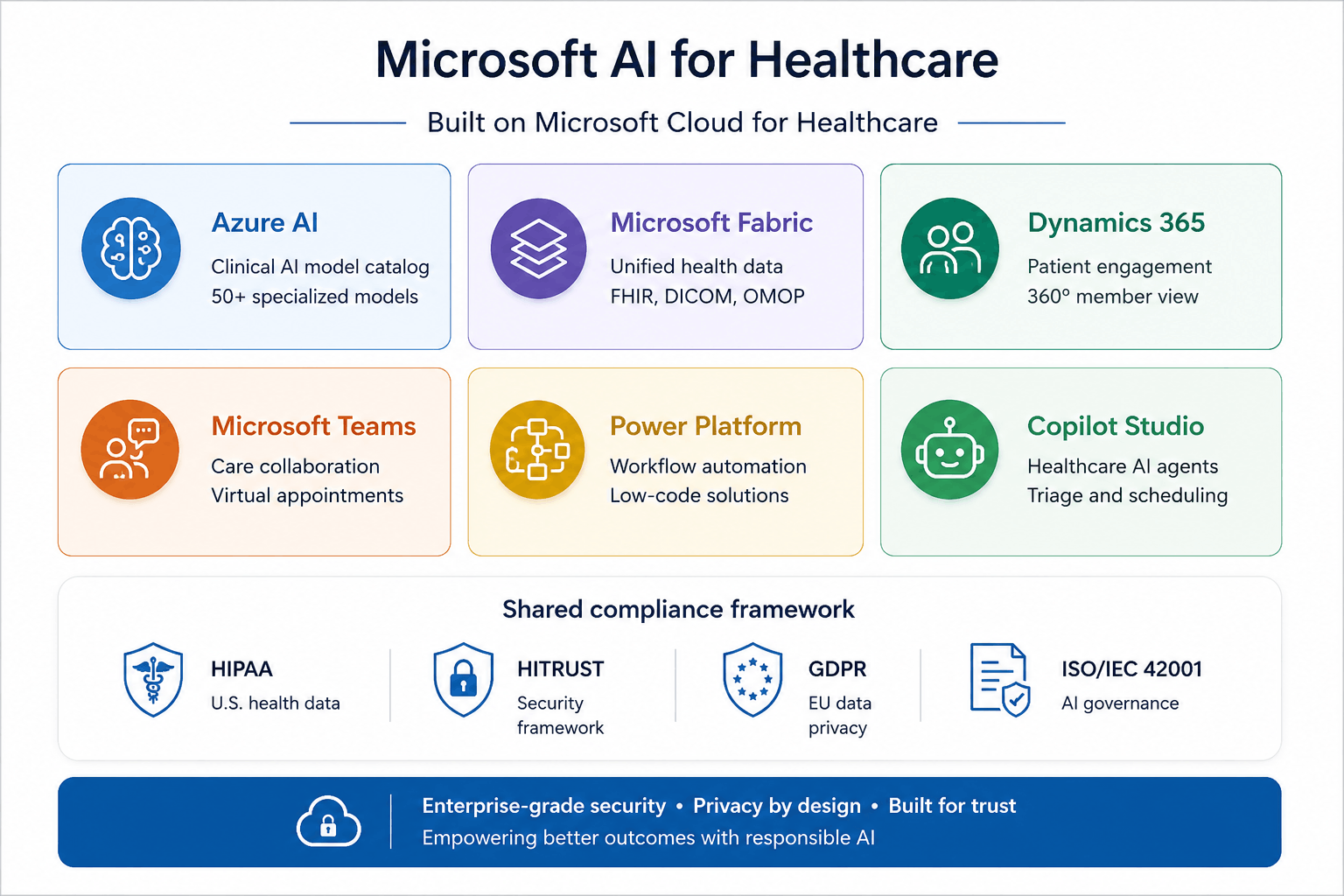
Microsoft AI for Healthcare is an integrated suite of AI-powered products and cloud capabilities purpose-built for the healthcare industry. It spans clinical workflows, health data infrastructure, patient and member engagement, operational efficiency, and research acceleration, all built on a single foundation: the Microsoft Cloud for Healthcare.
It brings together six core pillars under one roof:
- Azure AI
- Microsoft Fabric
- Dynamics 365
- Microsoft Teams
- Power Platform, and
- Microsoft Copilot Studio
What holds them together isn't just a shared interface. It's a shared compliance framework covering HIPAA, HITRUST, GDPR, and ISO/IEC 42001, designed from the ground up for the regulatory realities healthcare leaders navigate every day.
That distinction matters more than it sounds. Most healthcare organizations today are stitching together AI tools from multiple vendors, each with its own compliance posture, its own data model, and its own definition of "secure." Every integration is a liability. Every handoff between systems is a place where data gets lost, governance breaks down, or workflows stall.
Microsoft AI for Healthcare eliminates that problem by design. It is not a single tool. It is not a point solution. It is an operating system for healthcare intelligence, and the value of any one capability inside it scales directly with how well it connects to everything else.
Here is what each piece does, what problem it solves, and how they work together to deliver outcomes no single product can achieve alone.
The Core: Microsoft Dragon Copilot
For every hour a physician spends with a patient, they spend nearly two hours documenting that encounter. At the end of a twelve-hour shift, that burden doesn't disappear — it follows them home. Across a health system of thousands of clinicians, the cumulative cost of that imbalance shows up in burnout rates, retention numbers, and patient access.
Dragon Copilot is Microsoft's answer to that problem.
Launched at HIMSS 2025 and now live with more than 100,000 clinicians across the U.S., U.K., Germany, France, and eight other countries, Dragon Copilot is an AI clinical assistant embedded directly into the workflows your physicians, nurses, and radiologists already use.
What your clinicians get
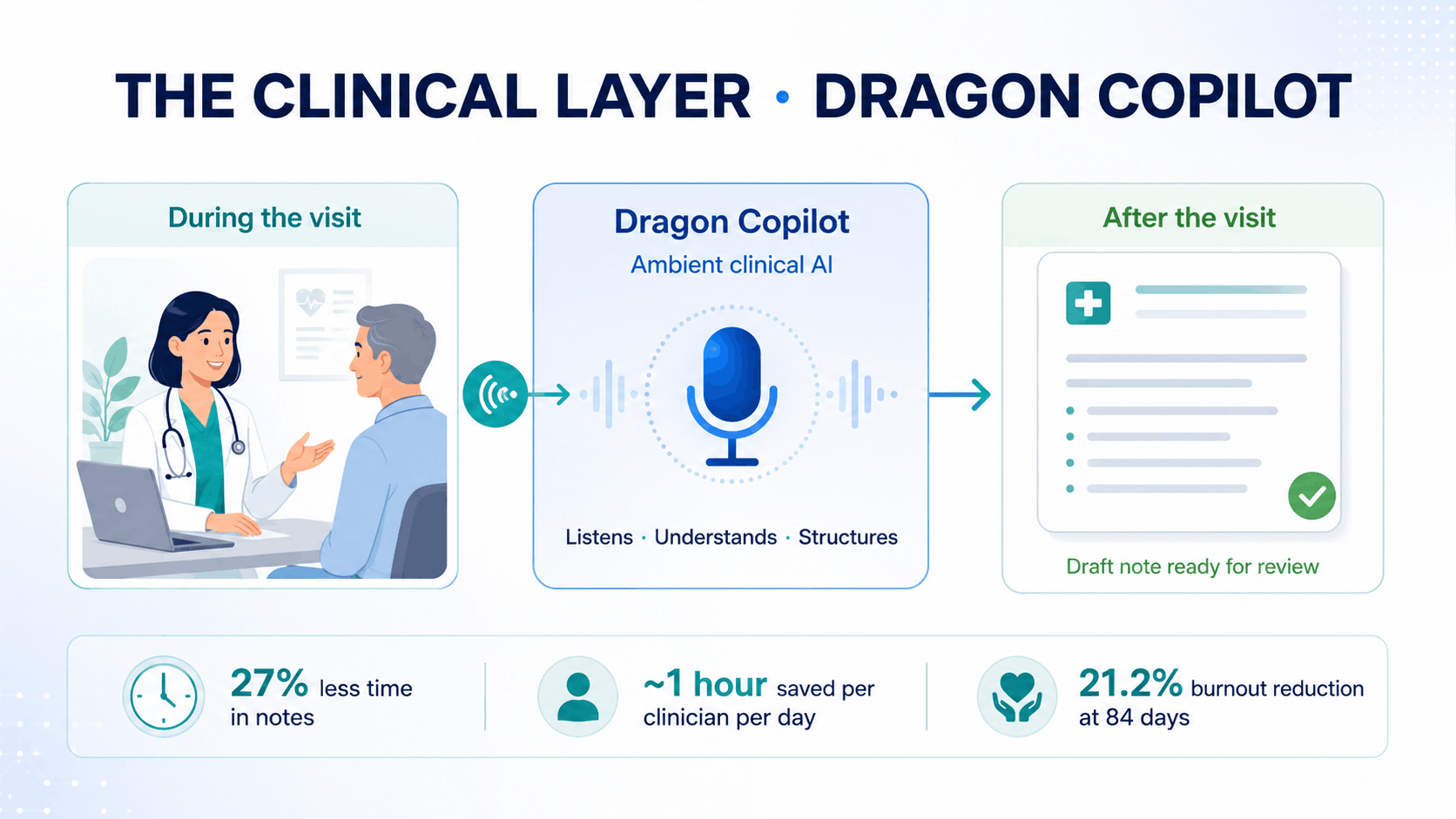
When a physician walks into a patient room, Dragon Copilot listens to the encounter and drafts a structured clinical note by the time it ends. The physician reviews and approves — rather than creating documentation from scratch after hours.
This is made possible by three capabilities working together as a single product:
Dragon Medical One is the world's leading clinical voice recognition platform, trained on billions of patient records from 600,000+ clinicians. It understands clinical language across specialties, settings, and speaking styles.
DAX Copilot is the ambient AI layer that listens to patient encounters and automatically structures them into clinical documentation. It handles 3 million+ encounters per month across 600+ health systems today.
Generative AI fine-tuned on clinical language extends beyond transcription. It summarizes patient histories before an encounter begins, drafts referral letters after it concludes, surfaces relevant clinical information in real time, and automates routine orders.
Together, these capabilities operate across the entire documentation workflow — before, during, and after every patient encounter — embedded natively inside Epic, Epic Rover, Oracle Health, and PowerScribe One. Clinicians do not need to change how they work. Dragon Copilot fits into existing workflows.
Here's what early adopters are reporting
For physicians
|
For nurses
|
For radiologists, Dragon Copilot integrates with PowerScribe One to automate prior-report summarization. Radiologists begin each read with patient history already organized and relevant clinical context surfaced inside their existing workflow, rather than pulled from multiple systems manually.
The Data Layer: Microsoft Fabric for Health
Imagine your Chief of Population Health wants to identify patients at rising risk of readmission before they deteriorate. The clinical data is in the EHR, the claims data is in a separate system, the social determinants data in a third, and the pharmacy data in a fourth. Her team spends three months just pulling those sources together before any analysis begins. By the time the model runs, the window to intervene has often already closed.
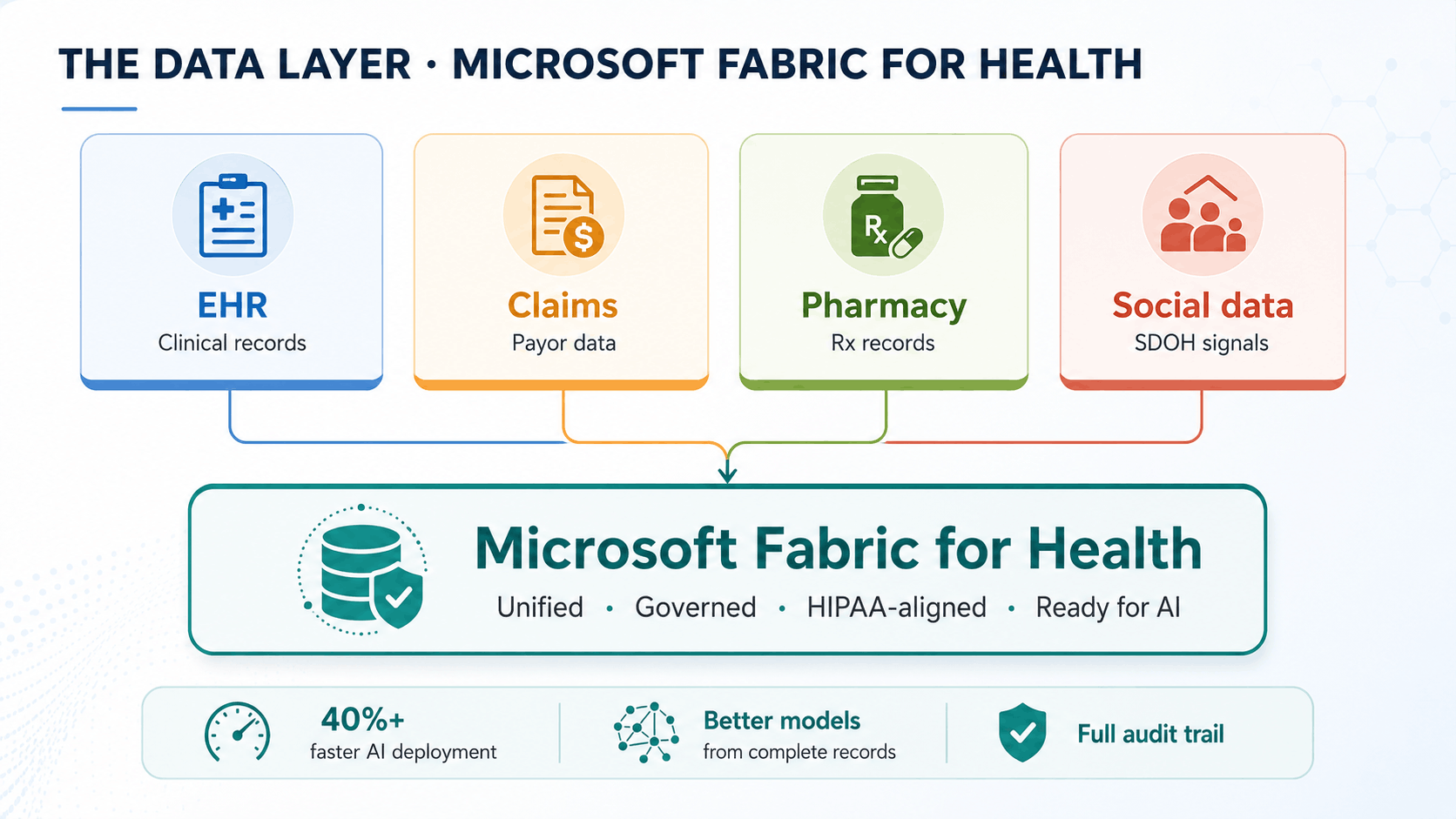
Microsoft Fabric for Health solves this. It brings your FHIR, DICOM, claims, and pharmacy data onto a single governed foundation, standardized, connected, and ready for analysis without requiring IT to build a new integration for each data type.
The practical impact is significant across every function. Your population health team can build and run risk stratification models across all data sources simultaneously. Your finance and operations leaders can finally see clinical and financial data in the same place. Your research teams can identify patient cohorts for clinical trials or quality improvement without custom data extraction requests to IT.
Crucially, every AI application you deploy on top of Fabric performs better than it would on fragmented data. Dragon Copilot generates richer patient summaries. Predictive models train on complete records. Prior authorization agents pull full clinical justification rather than approximating from partial data.
Microsoft Purview, which sits alongside Fabric, gives your compliance team auditable answers to three questions that currently take days: Where does this data come from? Who has accessed it? Does its use comply with HIPAA and state-level privacy obligations? Every data movement has a lineage trail. Every AI application that touches patient data operates within policies your team defines.
Organizations that build this foundation first stop rebuilding the data layer for every new AI initiative. Implementation partners report 40%+ reductions in project time and cost on subsequent deployments once the Fabric foundation is in place.
The Intelligence Layer: Azure AI and the Healthcare Agent Service
Your oncology team meets every Tuesday for tumor board. The attending spends two hours the night before pulling chart summaries, staging details, treatment history, and supporting notes for each patient on the agenda.
That is two hours of preparation for sixty minutes of clinical decision making.
The same pattern appears in patient support. Patients call member services with questions about medication interactions, upcoming procedures, care instructions, or coverage requirements. Staff often answer the same questions throughout the day, using the same reference sources each time.
These are not rare scenarios. They are part of the daily workload in many healthcare organizations.
Azure AI and the Healthcare Agent Service help reduce this burden by bringing intelligence closer to the workflow. Instead of asking clinicians and staff to gather context manually before every decision or response, AI agents can prepare the information, organize it, and route it for review.
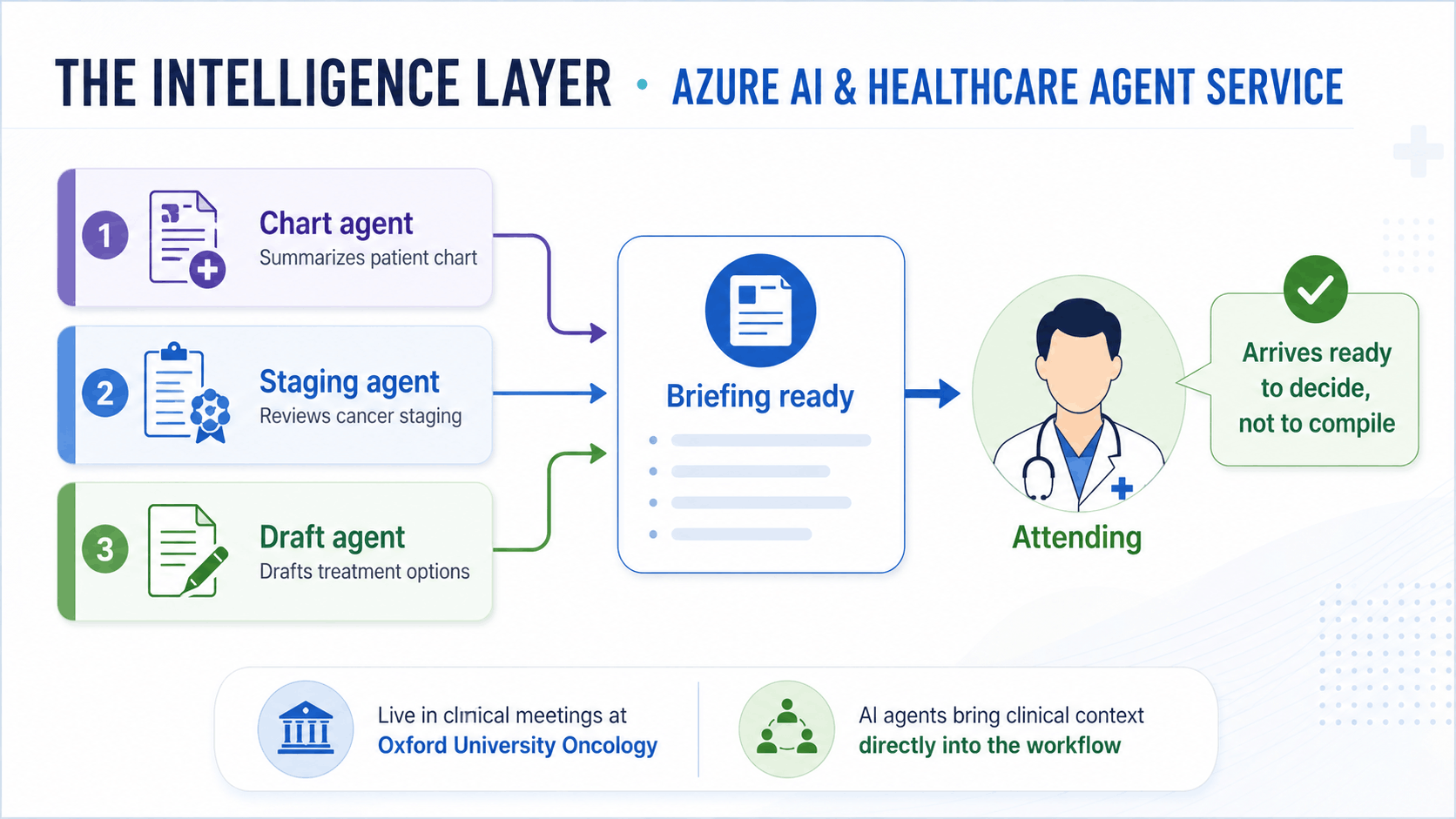
In tumor board preparation, three coordinated agents can support the process:
- One agent summarizes the patient chart
- One agent reviews cancer staging information
- One agent drafts treatment plan options for clinical review
The attending still makes the clinical decision. The difference is that the required context is already prepared before the meeting begins.
Oxford University's Department of Oncology has deployed this exact workflow, integrated directly into clinical team meetings through Microsoft Teams. That makes the example important because it is not just a lab concept or future-facing idea. It is being used in a live clinical environment, where the attending arrives ready to decide rather than spend time compiling information.
In radiology, specialized models from the Healthcare AI Model Catalog, including MedImageInsight and CXRReportGen, support prior-report summarization and structured imaging findings. This helps radiology teams review historical context faster, prepare reports with greater consistency, and keep the workflow closer to how clinicians already work.
In operations, healthcare AI agents can manage patient inquiries around the clock using trusted clinical reference sources such as FDA, CDC, MedlinePlus, DailyMed, and MSD Manuals. Built-in safeguards determine when an inquiry can be answered automatically and when it should be escalated to a human.
This is especially useful for:
- Routine patient questions
- Medication and procedure-related inquiries
- Coverage or care instruction questions
- Support requests that follow standard guidance
- Cases that need escalation because they are complex or sensitive
Prior authorization is another high-impact area. AI agents can handle intake, extract relevant clinical information, validate requests against coverage policies, route completed submissions, and flag only the exceptions that require human judgment.
The results are measurable. A digital healthcare provider operating across Sweden, France, and the UK, reported a 20% increase in clinician productivity and a 30% reduction in administrative time per patient visit using Azure OpenAI. Early pilots of the Healthcare Agent Service across more than 5,000 outpatient visits showed up to 80% fewer avoidable denials, 25% lower provider call volume, and up to 75% fewer reimbursement errors.
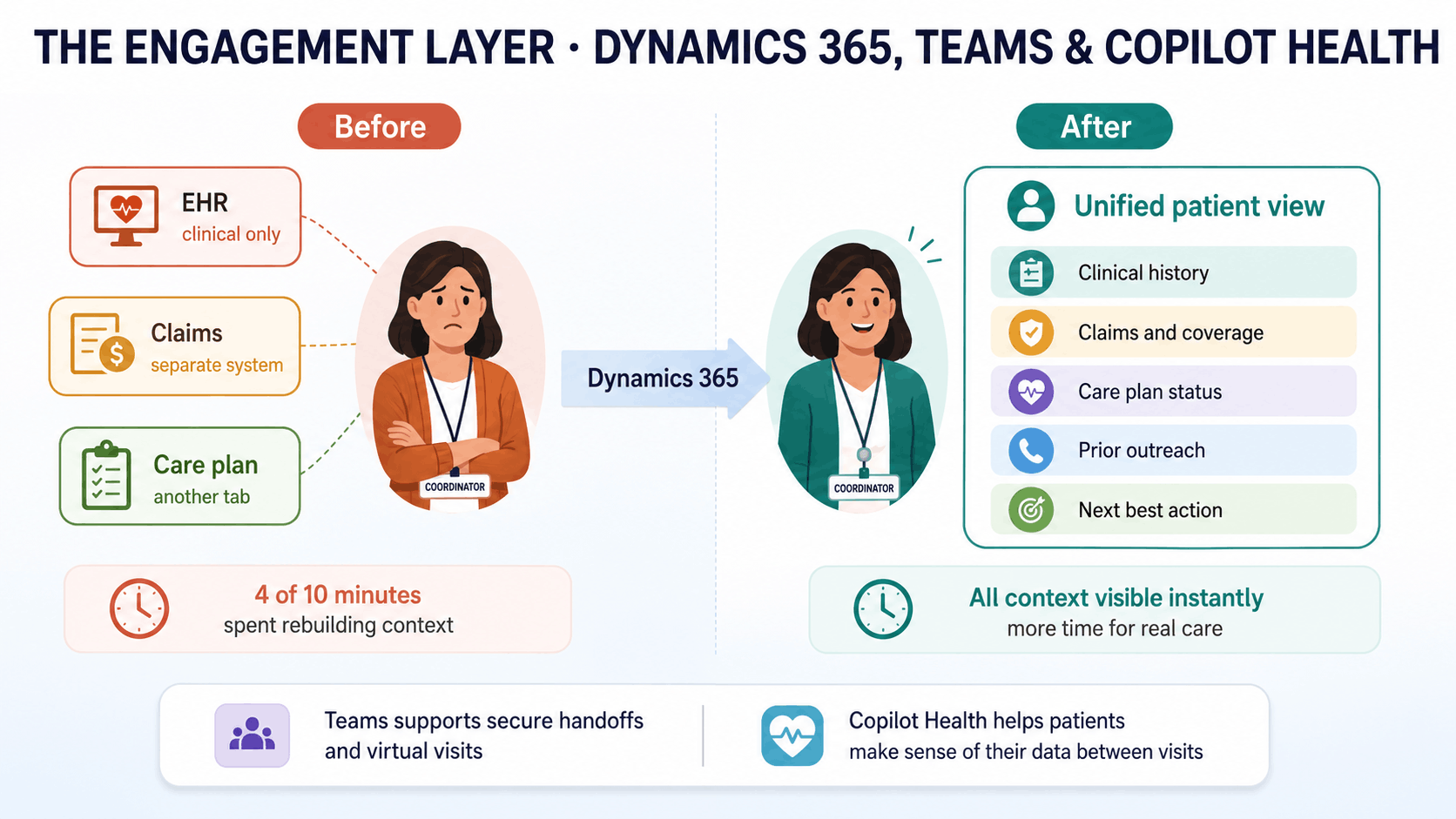
The Engagement Layer: Dynamics 365, Teams, and Copilot Health
A care coordinator receives a call from a member who missed a follow-up appointment after hospital discharge. The coordinator opens the member record, but it only shows the last clinical visit. Claims history sits in another system. The care plan is somewhere else. Prior outreach is not immediately visible.
Four minutes of a ten-minute call are spent piecing together context that should have been available before the phone rang.
That is a coordination failure, not a clinical one. It affects satisfaction scores, readmission risk, care gap closure, and member retention.
Dynamics 365 Customer Insights helps care teams bring that context into one view before the conversation begins. A coordinator can see:
- Clinical history
- Claims history
- Care plan status
- Prior outreach
- Engagement history
- Relevant next steps
This changes how population health outreach works. It stops being a generic broadcast and becomes a more specific, timely interaction.
For example:
- A member overdue for a diabetic eye exam receives a message about that exact care gap, with a direct scheduling link
- A member discharged last week receives a check-in during the post-discharge window
- A missed follow-up triggers outreach with the right clinical and engagement context already available
- Care teams can prioritize members based on risk, history, and next best action
The difference between outreach that closes care gaps and outreach that gets ignored is relevance. Dynamics 365 helps deliver that relevance at scale.
Microsoft Teams for Healthcare supports the coordination layer by giving clinical teams secure messaging, priority flagging, virtual appointments, scheduling integration, and EHR-connected patient context inside Teams.
A hospitalist discharging a patient on a Friday afternoon can send a priority handoff to the community care team and the patient's primary care physician at the same time, with clinical context attached before the patient leaves the building.
Copilot Health adds another layer by helping patients make sense of their health data between clinical encounters. It brings together wearable data and EHR records in a secure experience, so patients can arrive at appointments with better context, clearer questions, and stronger engagement.
The goal is not more communication. It is better-timed, better-informed communication, where patients, care teams, and coordinators are working from the same context instead of rebuilding it every time.
The Operations Layer: Power Platform and Microsoft 365 Copilot
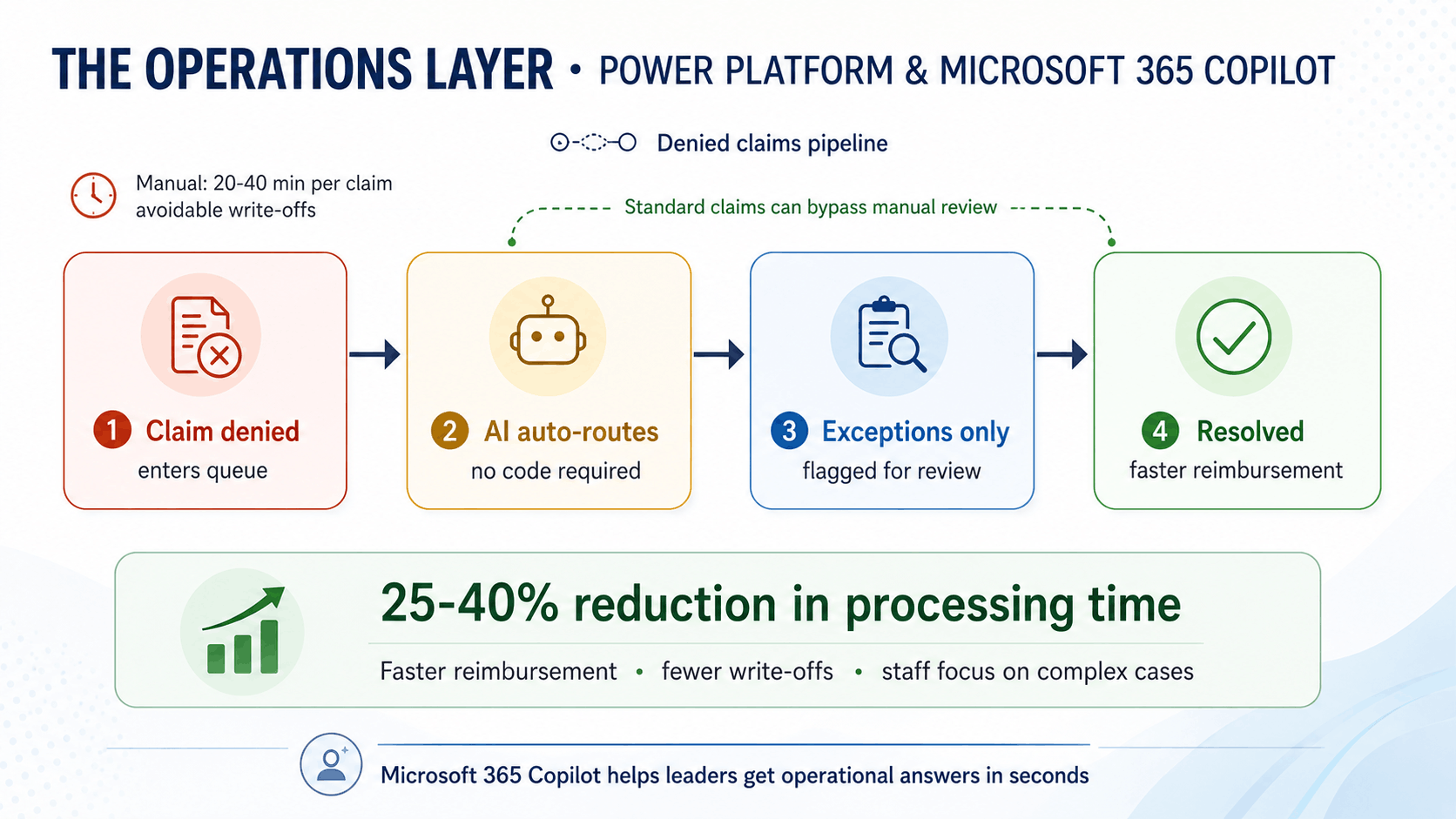
A revenue cycle team processes hundreds of denied claims every week. Each claim needs someone to review the denial reason, pull supporting clinical documentation from the EHR, reformat the evidence, and resubmit it.
That can take 20 to 40 minutes per claim. If the claim is not resolved on time, it can age out of the recovery window and become a write-off.
Power Platform helps reduce that manual load across revenue cycle and broader healthcare operations.
With Power Automate, teams can build automated routing workflows for prior authorization and claims processes without writing code. For example:
- Claims that meet defined criteria can move automatically
- Exceptions can be routed to the right reviewer
- Clinical context can be attached before review
- Follow-ups can be triggered before deadlines are missed
- Status updates can move across systems without manual tracking
This helps teams reduce processing time, speed up reimbursement, and prevent avoidable write-offs from claims that sit too long.
The same approach applies beyond revenue cycle.
With Power Apps, operations teams can build digital intake forms that feed directly into the EHR or other internal systems, without waiting for a custom development project.
With Power BI, leaders can track referral leakage in real time, including which referrals are going out of network and which specialties are affected. That visibility helps teams act before leakage becomes a larger revenue or patient access issue.
Microsoft 365 Copilot adds another layer for leadership visibility. Instead of waiting days for reports to be pulled together, leaders can ask operational questions in plain language and get faster answers.
For example:
- A CMO can ask which service lines improved documentation completion after a clinical documentation tool was deployed
- A CFO can prepare board updates without spending hours consolidating reports
- A CHRO can identify overtime spikes in specific units and compare them with scheduling patterns before they become a retention issue
The value is not just faster reporting. It is faster awareness across the organization.
And because Power Platform and Microsoft 365 Copilot operate within the same Microsoft governance and compliance environment, healthcare teams can automate operational work without separating it from the controls that already govern clinical systems. That means one connected environment for data, workflows, AI, compliance, and day-to-day execution.
How It All Connects
- A physician documents an encounter through Dragon Copilot. The note is more complete than a manually typed one. That completeness flows downstream in three directions simultaneously.
- The coding team gets a note with fewer gaps, which means fewer claim denials and faster reimbursement. The revenue cycle team spends less time on rework.
- The patient's longitudinal record in Microsoft Fabric for Health gets updated with accurate, structured clinical data. The population health model running on that record is more precise. The patients it flags as high risk are the right patients, surfaced early enough for a care manager to intervene before a readmission occurs.
- The prior authorization request for that patient's next procedure gets processed by the Healthcare Agent Service, which pulls the clinical justification directly from the documentation already created, validates it against the coverage policy, and routes it complete. Early pilots across 5,000+ outpatient visits showed up to 80% fewer avoidable denials, 25% lower provider call volume, and up to 75% fewer reimbursement errors, specifically because the clinical context was connected to the claims process.
- When those same patient calls member services, the agent handling the interaction is grounded in their actual clinical record and coverage status. The call resolves in one interaction.
- When the CHRO asks why overtime spiked in two units last month, Microsoft 365 Copilot draws from scheduling, workforce, and operational data on the same governed foundation as the clinical AI. One question, one environment, one answer.
- Each capability makes the next one more effective. Each data source added to the foundation improves every model, agent, and summary that draws from it. Each workflow automated reduces the manual work consuming time elsewhere in the organization. That is the difference between a platform and a collection of tools.
Where to Start and What to Build Toward
Before mapping out where to go, it helps to understand what is coming.
In June 2025, Microsoft published research on MAI-DxO, an AI diagnostic system that achieved 80% accuracy on 304 complex diagnostic cases from the New England Journal of Medicine. Practicing physicians given the same cases averaged 20%. This is not available for clinical deployment today, and Microsoft has committed to rigorous clinical evaluation before it reaches care settings. But it signals clearly where diagnostic AI is heading and what infrastructure it will require when it arrives.
A January 2026 study by Microsoft and The Health Management Academy, published in the New England Journal of Medicine, found that 60% of healthcare leaders expect AI to significantly disrupt patient care within three years. Only 3% have agentic AI running in live clinical workflows today. The gap is not technology. It is data readiness, governance, and organizational sequencing.
The organizations that close that gap are the ones building in the right order. Here is what that order looks like.
Phase 1: Build the foundation (Months 1 to 6)
Get your data layer in place before anything else. Deploy Microsoft Fabric for Health and bring your FHIR, DICOM, and claims data onto a single governed foundation. Set up Microsoft Purview with healthcare-specific compliance templates, data lineage tracking, and access controls. Define which teams own which data and what governance policies apply before any AI application touches it.
This step feels slow. It is the step that makes everything after it faster.
Alongside this, run a structured Dragon Copilot pilot in one or two high-volume clinical departments. Set baselines before you start: time-in-notes, burnout survey scores, patient satisfaction, and claim denial rates. Run the pilot for 60 to 90 days. Measure against those baselines with EHR telemetry, not just self-reported surveys.
If the pilot does not show at least a 15% reduction in documentation time, stop and diagnose the change management gaps before scaling.
Phase 2: Scale what is working and connect the layers (Months 6 to 12)
Once the data foundation is stable and the documentation pilot has produced measurable results, scale Dragon Copilot across physician, nursing, and radiology workflows. The role-specific coverage matters. Solving physician documentation while nursing documentation remains manual leaves half the workforce burden unaddressed.
Connect Dragon Copilot's output to Dynamics 365, so care coordinators are working from complete, current patient records. Deploy healthcare agents through Copilot Studio for your highest-volume, lowest-complexity interactions: appointment scheduling, prior authorization intake, medication information, and post-discharge follow-up. Ground every agent in your Fabric data layer so it is working from your patient population, not generic reference sources.
Stand up Agent 365 governance before any agent touches a patient or member interaction. Define which decisions agents can make autonomously, which require human review, and what the audit trail looks like for each.
Phase 3: Move from automation to intelligence (Months 12 to 24)
With the foundation in place and the core workflows running, shift focus from automating existing processes to generating intelligence that did not previously exist.
Deploy population health risk models on your unified Fabric data. Surface rising-risk patients to care managers before they deteriorate. Run care gap analysis across your member population and connect the output to Dynamics 365 Marketing, so outreach is segmented and specific rather than broadcast.
Deploy the Healthcare Agent Orchestrator for multi-step clinical workflows: tumor board preparation, complex prior authorization cases, clinical trial matching. These are the workflows where coordinated agents, each handling a specialized task, produce outcomes no single tool can achieve.
Use Microsoft 365 Copilot to give your executive and operational leadership teams real-time visibility into how AI is performing across the organization. Documentation completion rates, denial rates, care gap closure, workforce overtime patterns: all of it accessible from a single governed environment, without a report request.
Phase 4: Prepare for what is coming (Month 24 and beyond)
The infrastructure your organization builds in the first two years is the infrastructure that will support diagnostic AI, medical superintelligence capabilities, and agentic workflows that do not yet exist in production. MAI-DxO and the capabilities that follow it will require clean, structured, governed health data. They will require organizational trust in AI outputs that have been built through two years of measurable, accountable deployment. They will require governance frameworks that are already in place, not built in response to a new capability arriving.
Conclusion
Most healthcare organizations already have capable technology. The problem is that none of them talk to each other. When tools operate in isolation, data scatters. And scattered data is what creates gaps in care, gaps in revenue, and gaps in the visibility your leadership team needs to make good decisions.
What Microsoft AI for Healthcare offers is not mere tools. It is the connective layer that turns what you already have, and what you deploy next, into a single system that compounds value over time.
If you want to understand what that looks like for your organization specifically, book a 30-minute call with us. We will show you where it connects to the problems you are already trying to solve.
Ready to transform your healthcare organization with connected AI intelligence? Discover how Microsoft AI for Healthcare can eliminate fragmentation and deliver measurable outcomes across clinical, operational, and financial workflows.
Recent Posts

Dynamics 365 Activate: Do You Still Need a Migration Partner?
Oct 05, 2026

Tableau to Power BI Migration: A Practical Guide
Sep 09, 2026

SAP ECC to Dynamics 365 Finance & SCM Migration Guide
Sep 09, 2026
Category
Our Expertise



About Author

Aiswarya Madhu
Aiswarya Madhu is an experienced content writer with extensive expertise in Microsoft Dynamics 365 and related Microsoft technologies. With over four years of experience in the technology domain, she has developed a deep understanding of Dynamics 365 applications, licensing, integrations, and their role in driving digital transformation for organizations across industries.
Never Miss News
Want to implement Dynamics 365?
We have plans which will meet your needs, and if not we can tweak them around a bit too!