LCS to PPAC Migration [The Dynamics 365 Platform Shift You Shouldn't Miss]
Sep 07, 2026 Aiswarya Madhu
Did you know that Microsoft is systematically moving away from Lifecycle Services (LCS), the platform that has managed Dynamics 365 environments, deployments, and support tickets for over a decade?
On 16 February 2026, Microsoft stopped letting new customers create cloud implementation projects in Lifecycle Services for Dynamics 365 Finance & Supply Chain Management, Human Resources, and Project Operations. That date has passed. Power Platform Admin Center (PPAC) is now the only front door for new projects.
If you are an existing Dynamics 365 customer, LCS still works today. But the direction is settled: environment management, deployments, monitoring, and support are moving to PPAC as part of Microsoft's One Dynamics, One Platform programme, and the support experience is already redirecting in staged rollouts.
This is not a portal refresh. It changes how you provision environments, ship code, monitor health, and raise tickets, and it changes who on your team does each of those things.
This guide covers:
- What LCS did and what PPAC replaces it with
- A capability-by-capability comparison table
- What breaks if you wait
- A four-phase migration roadmap
- Perks of moving to PPAC
What Is LCS and Where Is It Going?
Lifecycle Services (LCS) has been the operations hub for Dynamics 365 for Finance and Operations (now called Dynamics 365 Finance and Supply Chain Management). It's where you:
- Provision and manage environments (Dev, Test, Production)
- Deploy code updates and apply Microsoft patches
- Submit and track support requests
- Access diagnostic logs and health dashboards
- Monitor service health and performance metrics
- Configure regression testing
Power Platform Admin Center (PPAC) is the replacement. Managed through the Microsoft 365 admin portal, PPAC consolidates environment management, tenant-level administration, and advanced analytics under a single pane of glass. It represents Microsoft's push to unify Dynamics 365, Power Platform, and cloud operations into a cohesive ecosystem.
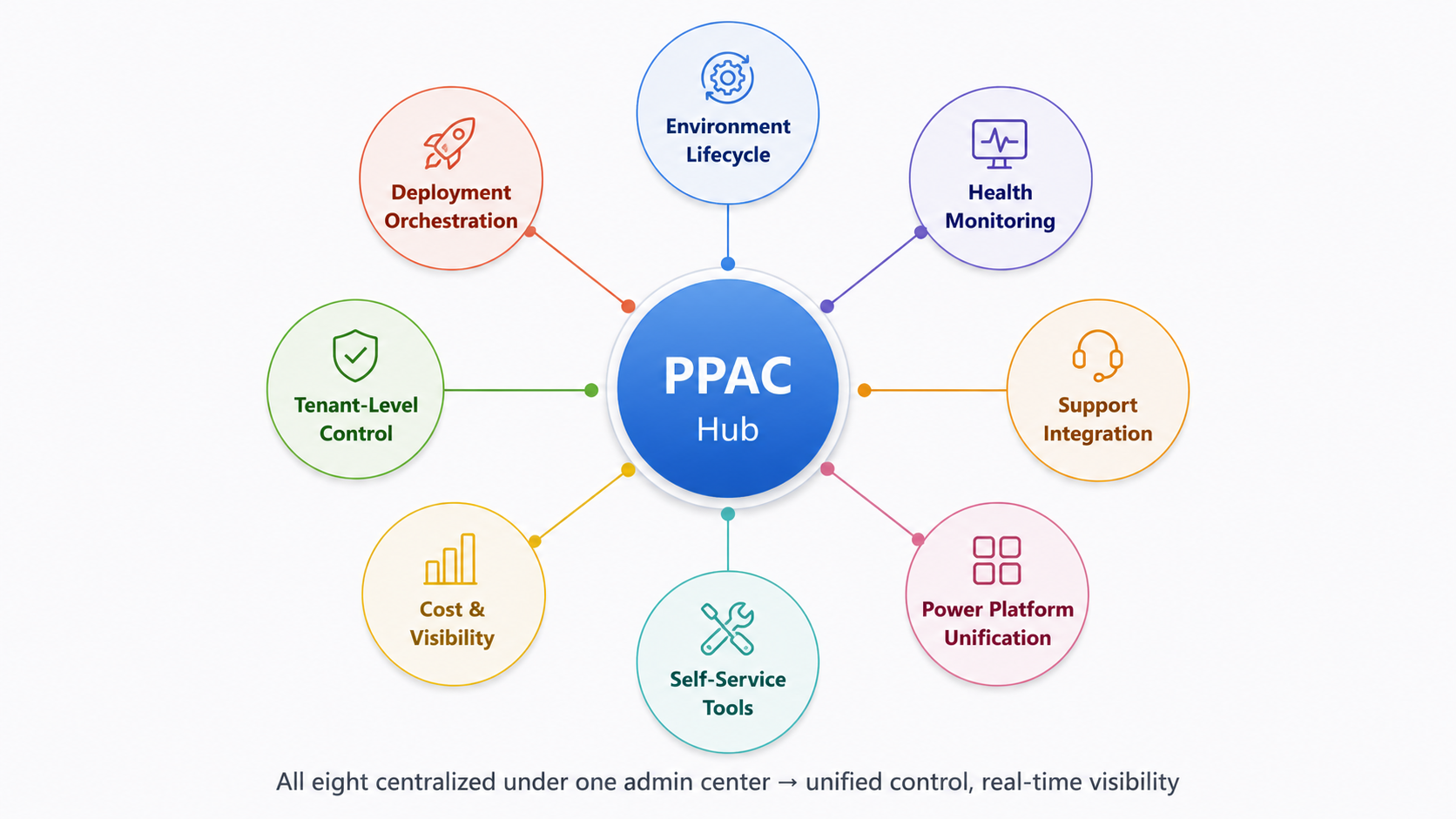
What Gets Centralized Under PPAC
The migration is not a simple lift-and-shift. Microsoft is restructuring operational governance:
- Environment lifecycle management: Provisioning, deprovisioning, and sandbox creation move to PPAC
- Deployment orchestration: code updates, hotfixes, and package deployments now use PPAC's deployment engine
- Health monitoring and diagnostics: Azure-native monitoring, power-usage analytics, and AI-driven insights replace LCS dashboards
- Support integration: Ticketing and Dynamics Service Engine (DSE) diagnostics migrate to PPAC's unified support UX
- Tenant-level control: Role-based access, licensing, and compliance settings consolidate into one admin center
- Self-service tools: Environment resets, point-in-time restores, and performance tuning become self-service through PPAC
The Confirmed Timeline: What Has Already Changed and What Comes Next
Microsoft has already passed several key milestones in the move from LCS to PPAC. For organizations planning their transition now, the important question is no longer when does this start? but which changes are already in effect, and which are still being rolled out?
| Date | Milestone | What it means |
|---|---|---|
| January 2026 | LCS code freeze implemented | Microsoft froze LCS code ahead of the project creation change, signalling that new investment is shifting away from LCS. |
| 16 February 2026 | New LCS cloud implementation project creation frozen | New customers for Dynamics 365 Finance, Supply Chain Management, and Project Operations can no longer create new LCS cloud implementation projects and should use PPAC instead. Existing LCS projects can continue to operate. |
| Mid-2026 | Self-service migration tooling preview for existing LCS customers | Microsoft identified mid-2026 as the preview milestone for tooling intended to help existing customers move from LCS to PPAC. Organizations with active LCS projects should now be tracking availability and readiness for their environments. |
| In progress | LCS Support experience moves to PPAC | Microsoft is retiring the LCS Support page in three stages: first a banner and PPAC link, then automatic redirects, and finally removal of LCS Support access. Each stage lasts at least one month, or longer if required fixes are still being deployed. |
Source: Microsoft Learn — Lifecycle Services project creation freeze and Migration of the Lifecycle Services Support experience to Power Platform admin center
If you see the table two important changes are already behind us: the January code freeze and the February 16 project creation freeze.
New Dynamics 365 implementations should therefore be planned around PPAC rather than assuming LCS remains the default administration path. Existing customers are in a different position. Their current LCS projects remain usable, but Microsoft is progressively moving experiences such as support and migration tooling toward PPAC.
Feeling late to the PPAC transition? Let our Dynamics 365 experts help you identify the next steps
Why This Is Happening [Microsoft's One Dynamics, One Platform Vision]
The move from Lifecycle Services to Power Platform Admin Center is not just a portal change. It reflects Microsoft's broader direction for Dynamics 365 and Power Platform: fewer product-specific management layers and a more unified model for administering business applications.
LCS was built for a period when Dynamics 365 Finance and Operations operated more independently. Today, enterprise environments increasingly combine Finance, Supply Chain Management, Power Apps, Power Automate, Dataverse, Azure services, and Copilot capabilities.
That makes a separate operating model harder to maintain.
6 Reasons Behind Microsoft's Shift from LCS to PPAC
The move toward PPAC is being shaped by several broader changes across the Microsoft ecosystem:
- Dynamics 365 and Power Platform are becoming more tightly connected. Microsoft is moving environment management, governance, administration, and application lifecycle processes toward a common platform model.
- Enterprise administration is becoming tenant-centric. Instead of managing Finance and Operations through one control plane and Power Platform through another, organizations are moving toward centralized environment and tenant management.
- Azure is playing a larger role in monitoring and platform services. Diagnostics, identity, integration, data services, and observability increasingly sit within the wider Microsoft cloud architecture rather than inside an application-specific management layer.
- Automation and CI/CD are becoming more important to application management. The operational model is moving away from heavily manual administrative workflows toward repeatable deployment and lifecycle processes.
- AI is becoming part of the administration experience. Copilot and other AI capabilities are being embedded across Microsoft's business application ecosystem, making Power Platform a more natural foundation for future administrative and automation experiences.
- Finance and Supply Chain Management are becoming part of a broader application estate. Organizations increasingly manage Dynamics applications alongside Power Apps, automation, customer engagement applications, and other Microsoft services rather than treating Finance and Operations as an isolated platform.
LCS vs. PPAC: A Head-to-Head Comparison
The following table maps LCS capabilities to their PPAC equivalents, highlighting what's new, what's improved, and what requires rethinking:
| Capability | LCS (Legacy) | PPAC (New Approach) | What Changed | Impact on Ops |
|---|---|---|---|---|
| Environment Provisioning | LCS portal → manual steps | PPAC → 1-click provisioning | Simplified workflow; built-in templates | Faster sandbox creation; self-service available |
| Sandbox Resets | LCS service request (2–5 days) | PPAC self-service (2–4 hours) | On-demand, no waiting for Microsoft | Reduced support tickets; faster test cycles |
| Deployment / Code Promotion | LCS Release Management UI (static) | PPAC Deployment Management + Pipelines (IaC-friendly) | Pipeline-driven; supports CI/CD integration | Better alignment with DevOps practices |
| Hotfix / Patch Application | LCS download → manual upload | PPAC auto-application or on-demand | Fewer manual steps; rollback available | Lower downtime; faster patches |
| Health Monitoring | Static LCS dashboards (50+ tabs) | PPAC + Azure Monitor + Copilot Insights | AI-driven anomaly detection; real-time alerts | Proactive issue detection; less manual triage |
| Diagnostic Logs | LCS Download Manager (bulk export) | Azure Data Lake Export (streaming) | Continuous ingestion; queryable via KQL | Better audit trails; forensic capability |
| Support Ticket Integration | LCS Support portal (separate system) | PPAC Support + DSE Integration | One portal; linked to health data | Faster MTTR; context-rich tickets |
| Performance Insights | LCS SQL insights (database size, top queries) | Azure Synapse Analytics + AI insights | Deeper analysis; workload recommendations | More actionable tuning recommendations |
| User Access Management | LCS roles (Project Administrator, etc.) | Azure AD + RBAC (tenant-wide policy) | Centralized; consistent with Office 365 | Easier offboarding; audit compliance |
| Licensing & Capacity | LCS usage monitor (separate dashboard) | PPAC Tenant Capacity dashboard + Power BI | Unified billing; per-environment visibility | Better cost forecasting; chargeback models |
| Compliance & Audit | Separate audit trails in LCS | Azure AD + Unified Audit Log | Centralized compliance logging | Streamlined compliance r |
What Happens If You Wait
The risk here is not that PPAC arrives unannounced. It is that the migration window compresses, and the work you deferred lands in the same quarter as everyone else's.
1. You cannot start new projects in LCS at all
The 16 February 2026 freeze is live. Any new implementation — a new legal entity, a new subsidiary rollout, an acquisition being brought onto D365 — has to be built in PPAC. If your team only knows the LCS operating model, that project starts with a skills gap.
2. Your support path changes with roughly a month's notice per stage
The LCS Support experience is migrating in three stages — a banner, then redirects, then the Support page is blocked — each lasting about a month. If your incident runbooks, escalation paths, and on-call documentation still point at LCS, that is a live operational risk, not a future one.
3. LCS-dependent automation fails quietly
Scripts, monitoring integrations, and reporting jobs built on LCS APIs do not throw a warning before a feature is deprecated. Some LCS features have already been removed under One Dynamics, One Platform. Teams typically discover these dependencies during a release, not during planning.
4. Migration tooling is new, and support bandwidth is finite
Self-service migration tooling entered preview mid-2026. Early movers get Microsoft and partner attention while the queue is short. Organisations that wait until the tooling is mature will be migrating alongside everyone else who waited.
5. A rushed cutover costs more than a planned one
The expensive version of this project is the one run to a deadline: no pilot, no dependency map, no validated rollback, production moved before non-production workflows were proven. The work is the same. The risk profile is not.
How Organizations Should Prepare for the Move to PPAC
The preparation path depends on whether you are already operating Dynamics 365 Finance and Operations through LCS or starting a new implementation. Existing customers need to manage a transition. New customers can avoid much of that migration work by building directly around PPAC from the start.
For Existing Dynamics 365 Finance and Supply Chain Customers
A phased approach helps reduce disruption and gives teams time to validate processes before production is moved.
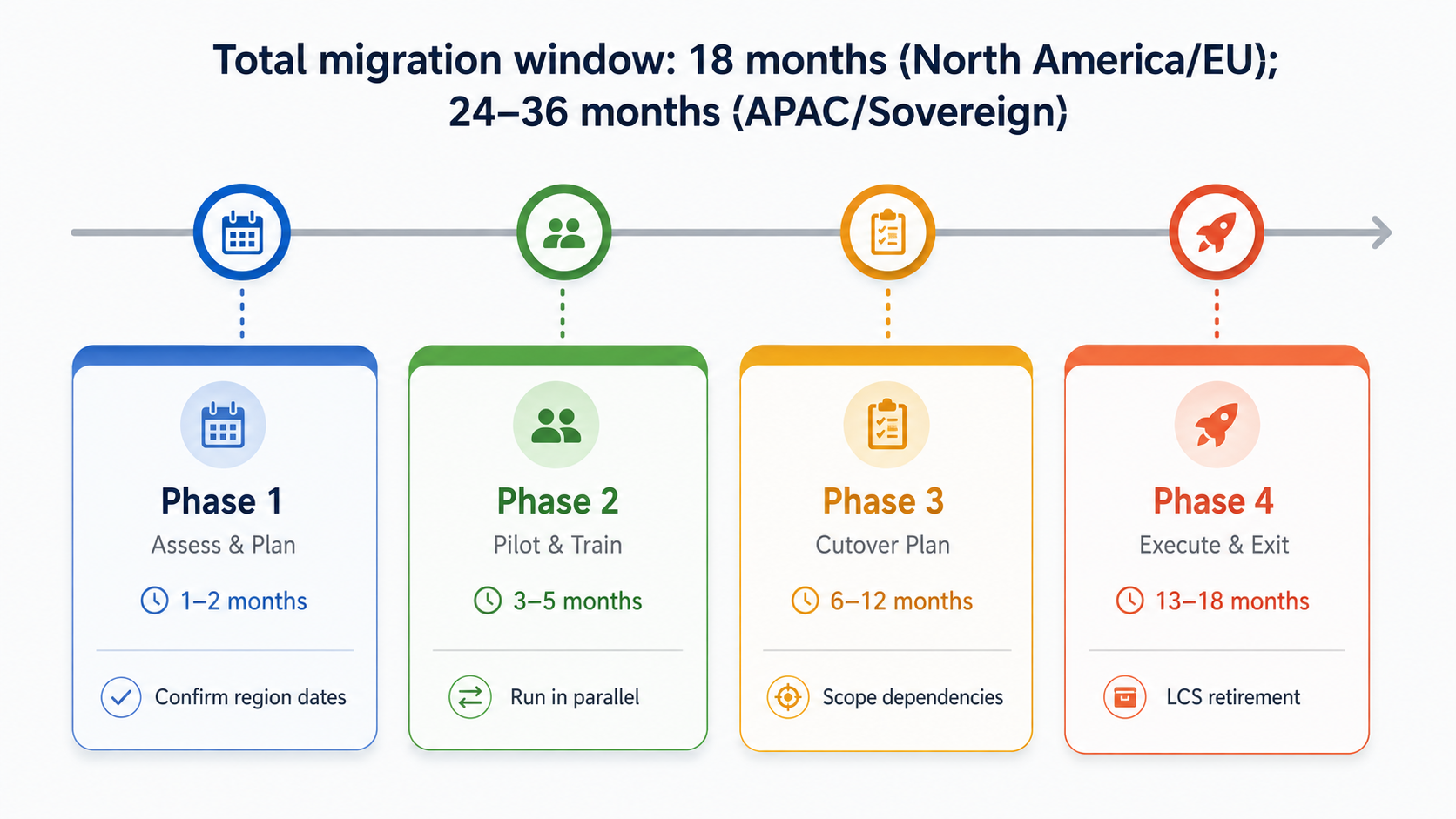
Phase 1: Understand Your Current LCS Footprint
Start by identifying where LCS is still embedded in your day-to-day operations.
Review:
- The environments you currently manage, including Dev, Test, UAT, and Production
- How often sandboxes are reset or reprovisioned
- Whether deployments still depend on LCS Release Management
- Which teams manage environments, deployments, monitoring, and support
- Any integrations, monitoring tools, reporting processes, or automation that rely on LCS APIs or data
- Your current support and incident management workflows
Phase 2: Pilot PPAC Before Changing Production
Once dependencies are understood, move a non-production environment into a controlled PPAC pilot.
Use the pilot to test the activities your team performs most often:
- Provision or reprovision a development environment
- Run an environment reset
- Deploy a code package
- Test monitoring and diagnostics
- Submit and track a support request
- Validate integrations that currently depend on LCS
- Train administrators and operations teams on the new workflows
Phase 3: Prepare the Operating Model for Cutover
After the pilot is stable, begin preparing the wider organization.
Plan the migration sequence with non-production environments first and Production last. Assign cutover dates, update operational procedures, and define when teams will stop using LCS for specific activities.
This is also the point to strengthen automation where it makes sense.
Review:
- Deployment pipelines and CI/CD processes
- Incident response procedures
- Monitoring and alerting
- Escalation paths
- User roles and administrative access
- Internal communication and training
- Environment-specific cutover plans
Phase 4: Execute, Monitor, and Retire LCS Dependencies
Move environments according to the approved sequence, with Production handled only after non-production workflows have been validated.
During and immediately after cutover:
- Monitor environment health closely
- Confirm deployments and support processes are functioning as expected
- Verify that diagnostics and operational data remain accessible
- Resolve any remaining LCS-dependent integrations
- Archive historical information required for audit or compliance purposes
- Retire obsolete LCS processes progressively
Already on LCS? Block 30 minutes on our Dynamics 365 experts' calendar for a free PPAC consultation
For New Dynamics 365 Customers
New implementations have a simpler path because there is no established LCS operating model to unwind.
Where PPAC is supported for the required Finance and Operations capabilities, teams can design the environment around the newer administration model from the beginning.
A practical starting sequence is:
- Set up the tenant and administrative structure
- Define identity, security, and environment roles
- Provision the required development and test environments through PPAC
- Establish source control and deployment pipelines
- Configure monitoring, support, and operational procedures
- Train the team on PPAC-based administration from day one
Starting a new D365 implementation? Plan a PPAC-first environment from day one.
What You Can Expect from the Move to PPAC
The table we provided above shows a broader pattern: PPAC moves Dynamics 365 administration toward a more self-service, automated, and centralized operating model.
1. More Self-Service, Less Dependence on Support
Routine environment tasks are moving toward self-service administration. Sandbox provisioning, environment resets, and other lifecycle activities that previously involved more manual coordination can increasingly be handled directly through PPAC. For IT teams, the practical benefit is faster turnaround and fewer operational tasks waiting on external intervention.
2. Deployment Becomes More Automated
PPAC moves application lifecycle management closer to modern DevOps practices. Instead of relying primarily on manual release workflows, teams can work with deployment pipelines, source-controlled development, and CI/CD processes through tools such as Azure DevOps and GitHub. The result is a more repeatable deployment model with less manual coordination between releases.
3. Troubleshooting Becomes More Proactive
LCS has historically required teams to work across dashboards, logs, and diagnostic tools to understand what went wrong. With PPAC and the broader Microsoft cloud ecosystem, monitoring moves toward integrated telemetry, alerts, and AI-assisted diagnostics. That means teams can spend less time finding the problem and more time resolving it.
4. Governance and Security Become More Centralized
User access, administrative roles, security controls, and compliance activity can be managed more consistently across the wider Microsoft environment. For organizations already using Dynamics 365, Power Platform, Microsoft 365, and Azure, this reduces the need to maintain separate governance approaches for individual applications. It also gives IT teams a clearer operating model for access control, auditing, and compliance.
5. Cost and Capacity Become Easier to See
PPAC brings greater visibility into areas such as environment capacity, storage, usage, and licensing. Instead of viewing these in disconnected administrative tools, organizations can monitor them more centrally and use historical trends to support budgeting, capacity planning, and internal chargeback models. For finance and IT leaders, the benefit is not simply lower cost. It is better visibility into where platform resources are being consumed.
6. Dynamics 365 Fits More Naturally into the Power Platform Ecosystem
Perhaps the most important change is architectural. Finance and Supply Chain Management are increasingly being managed alongside Power Apps, Power Automate, Dataverse, and other Dynamics applications rather than as a separate operational estate. This creates a more unified foundation for governance, automation, application development, and future Copilot capabilities. For organizations already investing across the Microsoft stack, PPAC makes the operating model more consistent with the way those technologies are actually being used.
How Nalashaa Digital Supports Your LCS-to-PPAC Migration
Moving from LCS to PPAC affects environment management, deployment processes, support workflows, integrations, governance, and the teams responsible for running Dynamics 365.
Nalashaa supports organizations across each stage of that transition.
1. Assessment and Transition Planning
We begin by reviewing how LCS is currently used across your Dynamics 365 environment, including provisioning, deployments, support processes, integrations, monitoring, and administrative dependencies.
This helps identify which processes need to move, where existing workflows need to change, and which dependencies could create risk during migration.
From there, we build a phased PPAC transition plan aligned with your environment structure, internal teams, and operational priorities.
2. Team Readiness
The move to PPAC changes how administrators, developers, and support teams work with Dynamics 365.
We help teams prepare for those changes through practical guidance on environment management, deployment workflows, monitoring, troubleshooting, support processes, and the broader PPAC administration model.
Where teams are still dependent on manual deployment processes, we also help them prepare for a more automated operating model.
3. Integration and Deployment Modernization
Organizations often have scripts, tools, monitoring processes, or integrations built around LCS.
We help identify those dependencies and adapt them to the PPAC environment. This can include reworking integrations, reviewing API dependencies, and modernizing deployment practices through source control, CI/CD, automated testing, and repeatable release pipelines.
The objective is not just compatibility with PPAC, but a cleaner and more maintainable deployment model.
4. Pilot and Cutover Support
We support the transition from pilot through production.
That includes validating PPAC workflows in non-production environments, planning the migration sequence, testing deployments and integrations, updating operational runbooks, and coordinating the production cutover.
During the transition, we also help teams establish clear escalation paths and confirm that critical monitoring, support, and administrative processes continue to work as expected.
5. Post-Migration Optimization
Once PPAC becomes the primary administration environment, we review how the new operating model is performing.
This can include environment strategy, governance, deployment processes, capacity, monitoring, and opportunities to simplify administration across Dynamics 365 and Power Platform.
The goal is to make sure the organization is not simply running the same processes in a different portal, but actually taking advantage of the new operating model.
The Focus Is Operational Readiness, Not Just Migration
A successful LCS-to-PPAC transition is not defined by whether environments have moved.
It is defined by whether your teams, integrations, deployment processes, governance model, and support workflows are ready to operate effectively in PPAC.
It's Time to Make the Move
At this point, the priority is not to keep evaluating whether the shift to PPAC is coming. It is to make sure your organization is ready for it.
That means setting a clear transition plan, assigning ownership, and moving forward before the change becomes a rushed operational exercise.
Nalashaa's Dynamics 365 experts can help you assess your readiness, plan the transition, and support the move to PPAC with minimal disruption.
Ready to start planning your LCS-to-PPAC transition? Talk to our Dynamics 365 experts.
Frequently Asked Questions
When exactly is LCS being retired?
Microsoft is phasing out LCS in stages through 2026–2027. The timeline depends on your region and cloud environment:
- North America & EU: Mid-to-late 2026 (most likely first wave)
- APAC, UK, Japan: Potentially 2027
- Sovereign clouds (FedRAMP, Gov Cloud): 2027+
Microsoft has NOT published specific region-by-region dates yet. For your exact cutoff date, contact your Microsoft Account Manager or check the Microsoft Dynamics 365 Roadmap, LCS support portal, or Microsoft Learn lifecycle page.
Can I still use LCS alongside PPAC
Yes, during a transition period. Microsoft supports parallel use for 12–18 months to allow migration. However, Microsoft strongly recommends accelerating to PPAC-only operations as soon as feasible, as LCS bug fixes and enhancements have ended.
Do I need Azure DevOps to use PPAC?
Not strictly, but Microsoft strongly recommends it. PPAC's deployment pipelines are designed to work with modern CI/CD tools. If you're currently using LCS Release Management without CI/CD, PPAC will motivate you to adopt these practices.
What if I have a custom LCS integration (e.g., third-party monitoring)?
PPAC exposes most LCS functionality through REST APIs and Azure services (Azure Monitor, Azure Data Lake). Your vendor or your internal dev team can re-map the integration.
How long does an LCS-to-PPAC migration take?
It depends on your current state, but here's a realistic timeline:
- Assessment & Planning: 2–4 weeks (mapping dependencies, building your roadmap)
- Pilot (non-prod): 4–8 weeks (testing workflows, training teams, validating integrations)
- Production planning: 2–4 weeks (detailed cutover sequence, runbooks, team prep)
- Production migration: 1–2 weeks per environment (move non-prod first, then Production)
- Stabilization: 2–4 weeks post-cutover (monitoring, troubleshooting, retiring LCS)
Total: 4–6 months for a well-planned migration with dedicated resources.
Organizations that rush this do it in 6–8 weeks and spend the next 3 months fixing things. The extra planning time is worth it.
What happens to my LCS support tickets, diagnostic history, and compliance records after migration?
PPAC preserves your support and diagnostic data:
- Support tickets: Migrated to PPAC's unified support UX; full history remains accessible
- Diagnostic logs: Moved to Azure storage / Azure Log Analytics; can be queried and retained per your compliance requirements
- Audit trails: Consolidated into Azure Activity Log + PPAC audit logs
- Compliance records: Accessible for SOX, HIPAA, GDPR, etc., per your retention policy
Archive strategy: Before retiring LCS, export historical logs and audit trails you need for long-term compliance (7+ years for financial records, per your industry requirements).
Recent Posts

Microsoft Dragon Copilot: Use Cases Worth Investing In
Nov 03, 2026
Dynamics 365 Activate: Do You Still Need a Migration Partner?
Oct 05, 2026
Tableau to Power BI Migration: A Practical Guide
Sep 09, 2026
Category
Our Expertise



About Author

Aiswarya Madhu
Aiswarya Madhu is an experienced content writer with extensive expertise in Microsoft Dynamics 365 and related Microsoft technologies. With over four years of experience in the technology domain, she has developed a deep understanding of Dynamics 365 applications, licensing, integrations, and their role in driving digital transformation for organizations across industries.
Never Miss News
Want to implement Dynamics 365?
We have plans which will meet your needs, and if not we can tweak them around a bit too!