Inside the Latest Dynamics 365 CE Updates [AI, Copilot, and Intelligent Features]

Inside the Latest Dynamics 365 CE Updates [AI, Copilot, and Intelligent Features]

Mar 16, 2026 Aiswarya Madhu

Many organizations invested in CRM systems to track customer interactions. Few expected those systems to start guiding decisions, automating tasks, and predicting outcomes.

That shift is now happening inside Dynamics 365 Customer Engagement.

Over the past few years, I’ve been closely watching how organizations are actually using Dynamics 365 Customer Engagement (CE) in production environments. And right now, a lot is happening across the platform.

Microsoft continues to release major updates to Dynamics 365 CE twice every year, and with each release wave the platform is expanding well beyond traditional CRM capabilities. New features powered by Copilot, AI automation, and deeper Microsoft ecosystem integration are reshaping how teams manage sales, customer service, field operations, and customer data.

What stands out across real implementations is a clear pattern. Companies are no longer using CRM systems just to manage contacts or track service tickets. They are using Dynamics 365 CE to redesign how sales teams sell, how service teams resolve issues, and how customer journeys operate end to end.

Before looking at the latest feature updates, it is worth understanding the business impact organizations are already seeing from AI powered Dynamics environments.

The evidence below highlights measurable outcomes reported across sales, service, and operational teams adopting Copilot and AI capabilities within Dynamics 365 CE.

Evidence of Business Value from AI in Dynamics 365 CE

Business Area Measurable Outcome What It Means for Leaders
Revenue Performance 5–10% higher win rates from AI assisted selling Sales teams prioritize the right deals and move opportunities faster
Sales Productivity ~1 hour saved per seller per day A team of 50 sellers gains roughly 12,500 hours of productivity annually
Operational Costs Up to 20% reduction in operational effort Routine administrative work shifts to AI assisted automation
Customer Service Efficiency Significant reduction in call abandonment and faster case resolution Support teams handle higher volumes while improving customer satisfaction
CRM Adoption & Onboarding New hires reach productivity up to 25% faster AI assisted guidance reduces ramp up time for sales and service teams
Payback Period Many organizations see ROI within 6–12 months AI adoption delivers measurable business value quickly

(The outcomes above are supported by industry research and enterprise adoption data on AI in Dynamics environments, including Forrester Total Economic Impact studies, implementation analysis on Copilot and AI agents in Dynamics 365 (CRM Software Blog), and industry reporting on AI driven service automation and contact center transformation (CX Today).)

Major Updates Across Dynamics 365 Customer Engagement Modules

Now let’s take a closer look at what the latest Dynamics 365 Release Wave from Microsoft introduces across the Customer Engagement modules.

Dynamics 365 Sales Adds Copilot Driven Lead Management and AI Guided Selling

The most significant advancements in Dynamics 365 Customer Engagement are happening inside Dynamics 365 Sales, where Microsoft is placing AI, Copilot, and autonomous agents at the center of the sales process.

Instead of acting as a system where sellers manually record activities, Dynamics 365 Sales is evolving into an AI assisted revenue platform that helps teams identify opportunities, prioritize deals, and move opportunities forward faster.

In the latest release wave, Microsoft continues this shift by expanding the role of Copilot and AI driven sales automation across lead management, opportunity acceleration, and sales operations.
Sales Management Capabilities in D365

AI Driven Lead Management and Pipeline Generation

One of the biggest productivity challenges in sales is identifying which leads deserve attention and which do not.

Dynamics 365 Sales now uses AI-powered lead management to help sellers focus on prospects with the highest probability of conversion.

Copilot agents assist sales teams by:

  • Automatically researching leads across multiple sources
  • Surfacing buying intent signals and contextual insights
  • Generating personalized outreach messages
  • Validating and enriching customer data automatically
  • Identifying ideal customer fit and purchase readiness
  • Disqualifying low intent leads to maintain a clean pipeline

This allows sales teams to spend less time on manual prospecting and more time engaging with the right customers.

For organizations evaluating CRM modernization, this capability directly improves pipeline quality, lead qualification speed, and overall conversion rates.

Opportunity Acceleration and AI Guided Selling

Once a lead becomes an opportunity, the next challenge is moving deals forward efficiently.

Dynamics 365 Sales introduces opportunity acceleration capabilities powered by AI, ensuring sellers always know the next best action to take.

Copilot supports sellers by:

  • Summarizing opportunity and account insights instantly
  • Prioritizing deals that require immediate attention
  • Generating sales pitches using RFP documents and product materials
  • Providing real time recommendations for customer engagement
  • Identifying potential deal risks early in the sales cycle

These capabilities shift the CRM experience away from static pipeline tracking toward active deal guidance.

Copilot as the Seller’s AI Assistant

A major theme of this release is positioning Copilot in Dynamics 365 Sales as an everyday AI assistant for sellers.

Through its conversational interface, Copilot can help sales professionals:

  • Catch up on opportunity updates
  • Prepare for meetings with summarized account insights
  • Review customer history and engagement patterns
  • Access real time information about leads and opportunities
  • Stay aligned with team activity across Outlook, Teams, and SharePoint

By integrating directly with familiar Microsoft tools, Dynamics 365 Sales reduces the need for sellers to constantly switch between systems, allowing them to stay focused on relationship building and revenue generation.

Stronger Sales Management and Forecasting Capabilities

The release also strengthens sales management and operations capabilities, enabling leaders to guide teams more effectively.

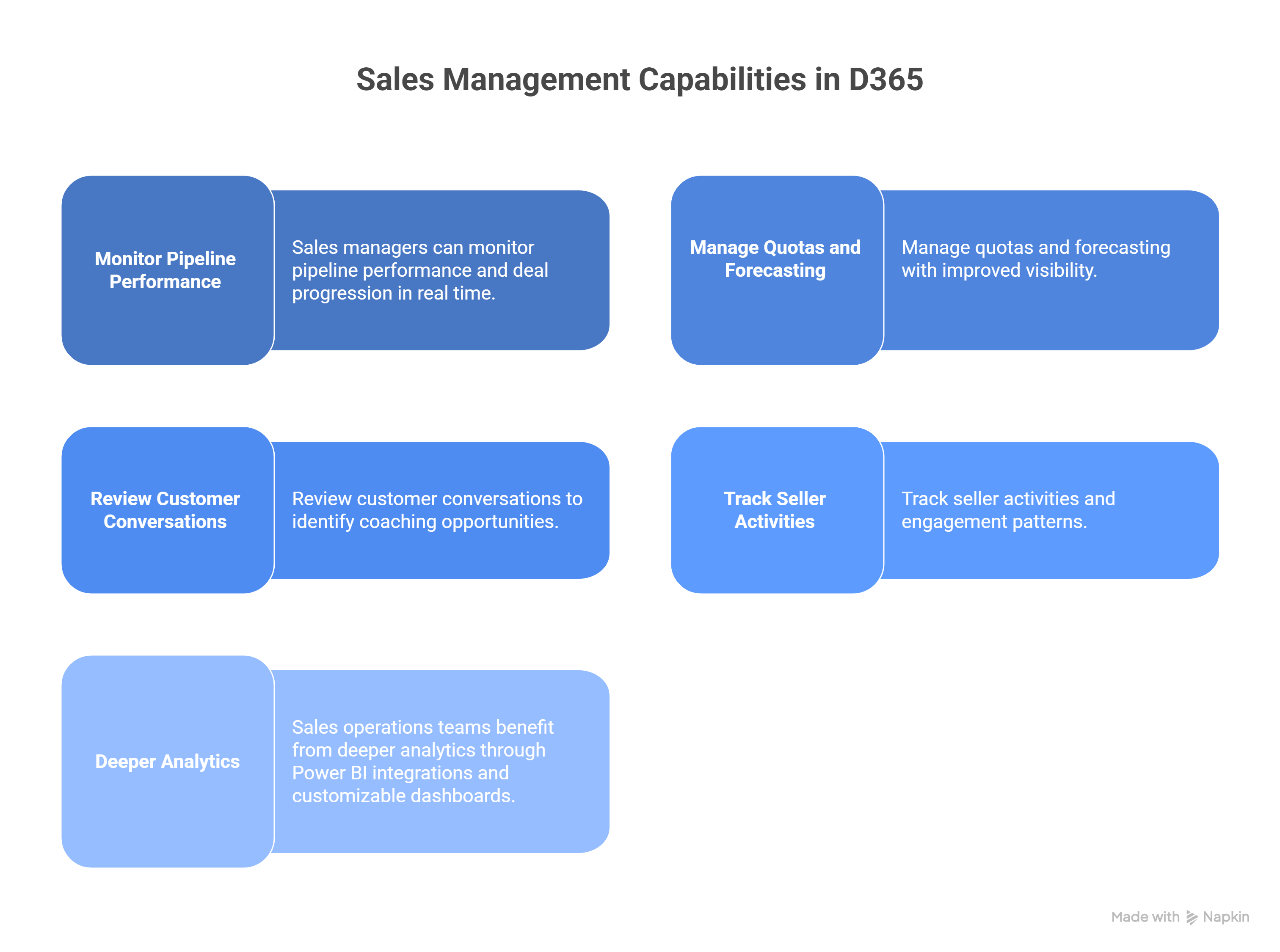
Sales managers can now:

  • Monitor pipeline performance and deal progression in real time
  • Manage quotas and forecasting with improved visibility
  • Review customer conversations to identify coaching opportunities
  • Track seller activities and engagement patterns

Sales operations teams benefit from deeper analytics through Power BI integrations and customizable dashboards, helping organizations scale successful sales processes across teams.

This provides leadership with the insights needed to improve forecast accuracy and drive predictable revenue growth.

Learn how Dynamics 365 Sales reporting and analytics help teams track performance, monitor pipeline health, and make smarter decisions.

Customer Service Gets AI Assisted Case Resolution and Intelligent Routing

Customer service improvements in the latest update focus on making support operations faster, more automated, and easier to manage at scale.

With Dynamics 365 Customer Service and Dynamics 365 Contact Center, Microsoft is expanding the use of Copilot, generative AI, and intelligent routing across the entire service workflow.

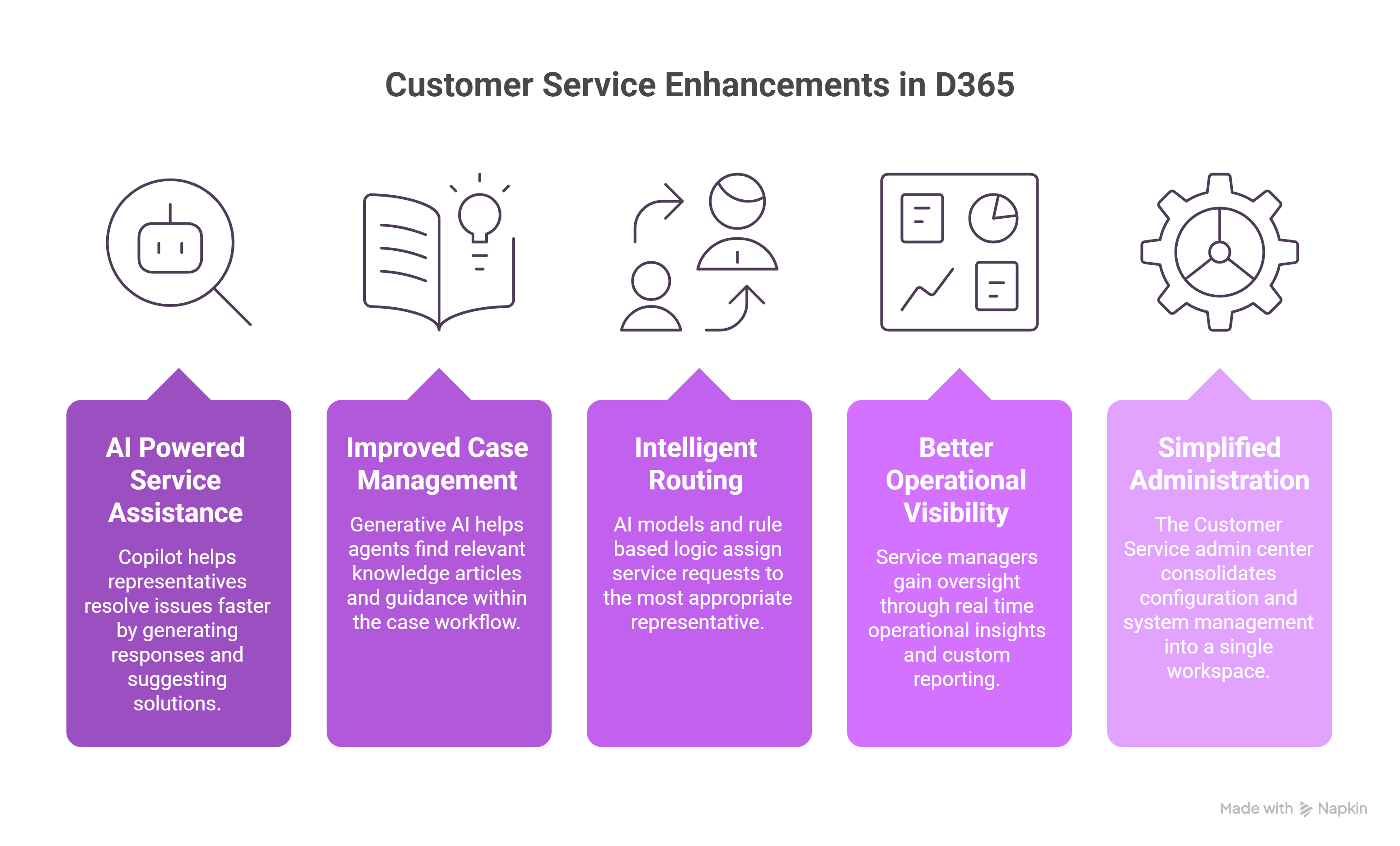
This release strengthens four core areas.

AI powered service assistance

Copilot now helps service representatives resolve issues faster by generating contextual responses, summarizing cases, and suggesting solutions from internal and external knowledge sources. Agents can ask Copilot questions while investigating a case and generate conversation or case summaries instantly. This reduces research time and helps agents respond with more accurate information.

Improved case management and knowledge usage

Generative AI helps agents find relevant knowledge articles and guidance while handling support requests. Instead of manually searching through documentation, the system surfaces answers directly within the case workflow. This improves first contact resolution and reduces handling time.

Intelligent routing across channels

Unified routing uses AI models and rule-based logic to assign incoming service requests to the most appropriate service representative. Requests from cases, chat, voice, and digital messaging are automatically classified and routed based on priority, skills, and availability. Features such as overflow routing, preferred agent routing, and percent-based routing help organizations manage large volumes of support interactions efficiently.

Better operational visibility for supervisors

Service managers gain stronger oversight through real-time operational insights. Supervisors can monitor customer sentiment, track service performance metrics, and intervene when issues escalate. They can also extend the reporting model by adding custom metrics and integrating additional analytics.

Simplified administration and system setup

The Customer Service admin center consolidates configuration and system management into a single workspace. Administrators can manage omnichannel settings, routing rules, and support workflows through a guided setup process, along with built-in system health checks.

For organizations running high volume support operations, these improvements translate into clear operational benefits.

Support teams spend less time searching for answers. Cases are routed automatically to the right agents. Supervisors gain real time insight into service performance. And customers receive faster, more consistent responses across channels.

Learn how Dynamics 365 Sales reporting and analytics help teams track performance, monitor pipeline health, and make smarter decisions.

Customer Service Enhancements in D365
Learn how Dynamics 365 Customer Service helps support teams resolve cases faster and deliver better customer experiences.

Field Service Expands AI Scheduling, Mobile Performance, and Asset Visibility

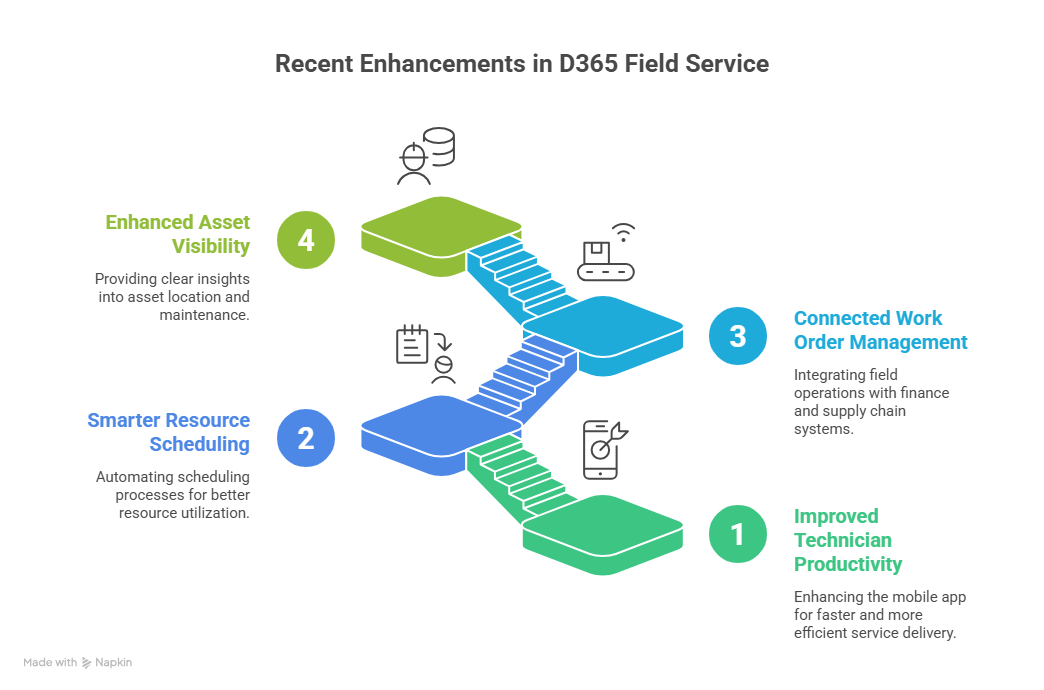
The latest Dynamics 365 Field Service upgrades that were released by Microsoft focus on improving technician productivity, strengthening scheduling intelligence, and connecting field operations with broader business systems.

Field service operations often struggle with disconnected systems, inefficient scheduling, and limited visibility into assets and service activity. This release addresses those gaps by improving how technicians work in the field and how dispatch teams coordinate service delivery.

The updates concentrate on three operational areas:

Improved technician productivity through mobile enhancements

Technicians rely heavily on the Dynamics 365 Field Service Mobile app to manage daily service tasks. This release improves the reliability, usability, and performance of the mobile experience.

New workflow controls help technicians move through common service activities faster, reducing time spent navigating the application. Performance improvements also reduce synchronization delays and improve the loading speed of forms and service data. These changes ensure technicians can access information quickly, even in environments with limited connectivity.

The result is less time spent on administrative work and more time completing service tasks in the field.

Smarter resource scheduling with automation

Scheduling remains a core challenge for field service teams. Dispatchers must balance technician's availability, location, skills, and service commitments while responding to changing conditions.

The release expands the Scheduling Operations Agent, which helps automate and optimize scheduling decisions. Dispatch teams can manage service demand more efficiently while reducing manual planning effort.

Usability improvements also make it easier for dispatchers to view schedule status, adjust assignments, and manage exceptions. Performance improvements ensure the scheduling system remains responsive even when service operations scale.

These capabilities help organizations improve technician utilization while maintaining reliable service delivery.

Connected work order and asset management

Work order management continues to evolve with deeper integration across Finance, Supply Chain Management, and Project Operations. This allows service activities to connect directly with financial and operational data without requiring complex integrations.

Asset management improvements provide better visibility into asset location, maintenance planning, and service history. This context helps organizations plan proactive maintenance, coordinate work between field teams and back-office staff, and improve long term asset reliability.

Enhancements to Copilot capabilities also support service teams with insights and operational assistance across work orders and service activities.

For organizations running field operations, these updates translate into practical improvements.

Technicians can complete work faster with a more responsive mobile experience. Dispatch teams gain better scheduling tools to manage service demand. Service managers gain clearer visibility into assets, work orders, and operational performance.

Recent Enhancements in D365 Field Service
Learn how Copilot in Dynamics 365 Field Service helps technicians, dispatchers, and service managers automate daily field operations.

Customer Insights Integrates Copilot and Microsoft Fabric to Power Customer Intelligence

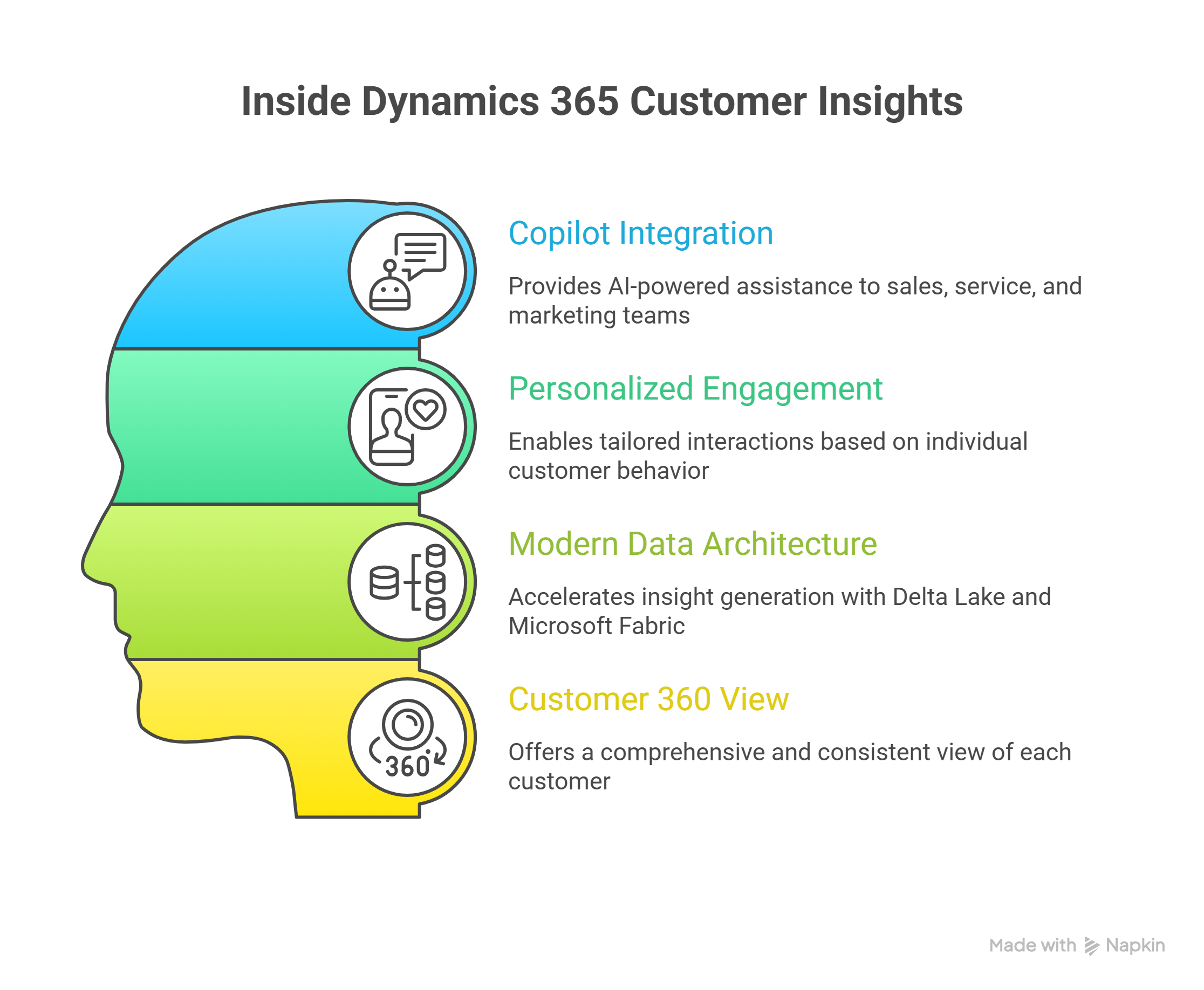
Recent improvements in Dynamics 365 Customer Insights Data make it easier for organizations to unify customer data and use those insights more effectively across sales, service, and marketing activities.

Many companies collect large volumes of customer data across systems such as CRM platforms, marketing tools, support channels, and digital platforms. The challenge is not collecting data. The challenge is turning that data into something teams can actually use.

Dynamics 365 Customer Insights addresses this by acting as an AI powered customer data platform (CDP) that consolidates information from multiple systems and creates a unified customer profile.

This release focuses on three practical improvements.

Making customer data usable by Copilot and AI agents

Customer Insights Data can now act as a knowledge source for Microsoft Copilot and autonomous agents. Instead of working with fragmented data, sales teams, service agents, and marketers can access unified customer profiles directly within their workflows.

This means sales teams can see buying signals and engagement history when evaluating opportunities. Service teams can understand a customer's past interactions before responding to a support request. Marketing teams can build campaigns based on behavioral signals rather than static lists.

The result is more informed decisions and more relevant customer engagement.

Enabling more personalized customer engagement

Customer Insights Data now provides deeper context about both individual customers and the organizations they belong to. This allows teams to analyze behavior across multiple channels and adjust engagement strategies accordingly.

Integration with advertising platforms such as Google Ads and Facebook Ads also allows organizations to activate these insights across marketing channels. Customer segments and behavioral signals can be used to deliver more relevant campaigns and improve engagement and conversion rates.

Accelerating insight generation with modern data architecture

The platform now supports Delta Lake and Microsoft Fabric integration, which significantly improves how data is processed and analyzed.

Instead of reprocessing entire datasets, the system processes only incremental data changes. This reduces data movement and helps organizations generate insights faster.

For data teams, this means less time spent managing data pipelines. For business teams, it means faster access to updated customer insights and a more reliable Customer 360 view.

For organizations trying to improve customer engagement and decision making, these improvements deliver practical benefits.

Customer data becomes easier to unify across systems. Insights become available faster. And teams across sales, service, and marketing can act on a consistent view of the customer.

Features in Dynamics 365 Customer Insights
Read about how AI in Dynamics 365 CE actually reduces costs and improves team productivity.

What These Updates Mean for Businesses?

The latest improvements across Dynamics 365 Customer Engagement (CE) are not just feature additions. They signal a shift in how organizations will run customer facing operations. Whether a company is already using Dynamics 365 CE or evaluating CRM platforms, the direction is clear: Microsoft is embedding AI directly into everyday workflows across sales, service, and operations.

However, the value of these updates will look slightly different depending on where an organization currently stands.

For Organizations Already Using Dynamics 365 CE

For existing Dynamics 365 CE customers, the opportunity is less about replacing systems and more about activating capabilities that are already becoming part of the platform.

Many of the new features are introduced through configuration updates, Copilot enablement, or workflow changes rather than full system migrations.

Organizations should start evaluating:

  • Strong Copilot adoption across teams
    Identify where Copilot can assist sales representatives, service agents, and managers with daily tasks such as research, summarization, and decision support.
  • Strong Agent based automation opportunities
    Explore how autonomous agents can assist with lead qualification, case resolution, scheduling, and other repetitive processes.
  • Strong Workflow redesign across sales and service
    Traditional CRM processes often require heavy manual updates. AI assisted workflows allow teams to shift toward automated insights and recommended next actions.
  • Strong Data readiness for AI driven experiences
    AI capabilities perform best when customer data is clean, unified, and accessible. Organizations should evaluate their data quality, integration layers, and analytics readiness.

For many existing customers, the competitive advantage will not come from simply having access to these features. It will come from how quickly teams adopt and operationalize them.

For Organizations Considering Dynamics 365 CE

For businesses evaluating CRM platforms, these updates highlight the broader direction Microsoft is taking with the Dynamics ecosystem.

Dynamics 365 CE is evolving into three things at once:

  • A traditional CRM platform for managing customer relationships
  • An AI powered workspace where Copilot assists employees with daily decisions
  • An operational execution layer that helps teams run sales, service, and engagement workflows more efficiently

Instead of adding AI as a separate product or integration, Microsoft is embedding intelligence directly into the core applications that employees already use.

For organizations modernizing customer engagement systems, this approach provides a platform that supports both current CRM needs and future AI-driven automation strategies.

When comparing CRM solutions, businesses should evaluate how these AI assisted workflows, Copilot capabilities, and agent-based automation models align with their long-term goals for productivity, service delivery, and revenue growth.

Final Thought

A lot of updates are happening across Dynamics 365 Customer Engagement, and the direction is becoming clear. The platform is gradually evolving from a traditional CRM into an AI driven operational layer for customer facing teams, where sales, service, marketing, and field operations are supported by Copilot, automation, and intelligent agents.

The impact of this shift is already visible. Sales teams using Copilot are saving up to one hour per seller per day through automated emails, summaries, and meeting preparation. For a team of 50 sellers, that translates to roughly 12,500 hours of productivity gained annually.

Organizations are also reporting measurable revenue improvements. AI assisted selling is linked to 5 to 10 percent higher win rates, shorter sales cycles, and improved deal values. Financial studies show initial ROI appearing within 30 to 90 days, with long term returns exceeding 200 percent over three years.

If you are exploring how these AI capabilities fit into your CRM strategy, get in touch with our Dynamics 365 consultants to understand what these updates could mean for your sales, service, and field operations.

About Author

Never Miss News

Want to implement Dynamics 365?


We have plans which will meet your needs, and if not we can tweak them around a bit too!

Field will not be visible to web visitor