Late to Upgrade from AX 2012 to Finance and Operations? [A Reality Check]
Sep 07, 2026 Aiswarya Madhu
Dynamics AX 2012 may still be running, but the environment around it is becoming harder to justify.
AX 2012 R3 has been out of extended support since January 2023. SQL Server 2016 reached end of extended support in July 2026, and Windows Server 2016 follows in January 2027. At the same time, Microsoft's current Bridge to the Cloud 3 migration offer closes to new enrollments on December 31, 2027.
Moving to Dynamics 365 Finance & Supply Chain Management is not simply a version upgrade. You need to decide whether to upgrade the existing AX estate or migrate into a cleaner implementation, then assess customizations, integrations, data, ISVs, testing, and what is actually worth carrying forward.
The important question is no longer whether AX can keep running.
It is whether continuing to maintain it still makes more sense than starting the move on your own terms.
What Has Changed Since AX Support Ended?
A few dates explain why the conversation looks different in 2026.
| Date | What happened |
|---|---|
| October 12, 2021 | Mainstream support ended for Dynamics AX 2012 R3 |
| January 10, 2023 | Extended support ended. No more hotfixes, including security updates |
| October 10, 2023 | Windows Server 2012 R2, the newest OS AX 2012 R3 was certified on, left support |
| January 1, 2026 | Microsoft opened Bridge to the Cloud 3. The migration discount dropped from 40% under the previous program to 30% |
| January 15, 2026 | Microsoft began enforcing user license validation on Dynamics 365 Finance and Supply Chain Management |
| February 16, 2026 | Microsoft froze new Lifecycle Services project creation for new Finance and Supply Chain customers. AX 2012 upgrade projects are currently exempt |
| July 14, 2026 | SQL Server 2016, the newest database engine AX 2012 R3 was certified against, left extended support |
| January 12, 2027 | Windows Server 2016 leaves extended support |
| December 31, 2027 | Bridge to the Cloud 3 enrollment closes |
Two of those dates deserve a second look before you read further. A typical AX to D365 F&SCM migration runs nine to eighteen months. Bridge to the Cloud 3 enrollment closes on December 31, 2027. If you start scoping in mid-2027, you are enrolling under commercial pressure with no leverage and no time to run a proper fit-gap. The organizations that get the best terms are the ones deciding in the next few quarters, not the ones reacting in the last one.
What is actually happening to AX 2012 right now
Your AX 2012 R3 system still runs. That is the part that keeps this decision off the executive agenda year after year. Nothing crashed on January 10, 2023 when extended support ended, and nothing crashed on July 14, 2026 when SQL Server 2016 followed it out the door. The system boots, users log in, month-end closes.
What changed is everything underneath it.
AX 2012 R3 was certified to run on a specific set of Microsoft platforms, and that list tops out at SQL Server 2016 and Windows Server 2012 R2, with Windows Server 2016 as the practical ceiling for most estates. Windows Server 2012 R2 left support in October 2023. SQL Server 2016 left extended support on July 14, 2026. Windows Server 2016 goes in January 2027. That means the entire certified stack under your ERP is now unpatched, and there is no forward path inside AX 2012 because Microsoft never certified it against SQL Server 2019, 2022, or 2025.
You can buy Extended Security Updates for SQL Server 2016, and Microsoft prices them to make the point. Year one costs 75% of the original license price, year two 150%, year three 300%. Across the full three-year bridge to July 2029 you pay 525% of what the license originally cost, and you receive critical security fixes only. No feature work, no non-security hotfixes, no restored product support. Microsoft describes ESU as a bridge while you migrate, not a place to live.
So the real state of an AX 2012 estate in 2026 is this. The application has had no vendor support for three and a half years. The database engine has none. The operating system loses its own in a few months. Every one of those layers is a line item your auditor, your cyber insurer, and your customers' procurement teams can now ask about by name.
Why the Urgency Changed in 2026
The infrastructure clock is now part of the ERP clock
AX support ending in 2023 was one deadline.
The database and operating system underneath many AX estates introduce their own deadlines.
SQL Server 2016 has now left extended support. Windows Server 2016 is approaching the same point.
This matters because an ERP is not just the application users see. Its support position depends on the entire stack required to keep that application running.
Every additional unsupported component increases the amount of legacy technology your IT and security teams have to account for.
Microsoft's migration incentive has an expiry date
Microsoft's current Bridge to the Cloud 3 promotion runs from January 1, 2026 through December 31, 2027.
Eligible customers can receive a 30% discount on qualifying Dynamics 365 online subscriptions for a fixed three-year term. The offer applies to qualifying customers moving from eligible Dynamics on-premises products, subject to Microsoft's licensing and Enhancement Plan requirements.
The previous Bridge to the Cloud 2 promotion offered a higher discount.
That does not mean Microsoft will never offer another migration program. It does mean there is a known commercial window available today, and there is no reason to build a migration business case around an incentive that has not been announced.
Lifecycle Services is also changing
Microsoft is moving Finance and Operations environment administration toward the Power Platform admin center (PPAC).
Since February 16, 2026, new Finance, Supply Chain Management, and Project Operations customers can no longer create new cloud implementation projects in Lifecycle Services.
Importantly, AX 2012 upgrade projects are currently unaffected. Existing LCS customers can also continue using their projects.
So this is not a reason to panic about the AX upgrade tooling disappearing tomorrow.
It is another indication of where Microsoft's platform is heading: Finance and Operations is increasingly being managed as part of the broader Dynamics 365 and Power Platform ecosystem rather than through a separate administrative model.okay are
Are You Already Late to Move Off Dynamics AX?
If you are still running Dynamics AX 2012 R3, the question is no longer whether support is ending. It already has.
Microsoft ended extended support for Dynamics AX 2012 R3 in January 2023.
If you are still on AX 2012 R3
You are already beyond the normal support window.
Microsoft no longer provides mainstream or extended support for AX 2012 R3. The system may still be running, but it is doing so outside the standard Microsoft support lifecycle.
If your AX environment runs on SQL Server 2016
Another support deadline has already passed.
Extended support for SQL Server 2016 ended in July 2026.
Extended Security Updates can provide additional security coverage in eligible cases, but they do not put the platform back into normal support or bring back regular fixes and product improvements.
If Windows Server 2016 is also part of the stack
Your next deadline is approaching.
Extended support for Windows Server 2016 ends in January 2027.
At that point, an AX environment can have several layers of the technology stack at or beyond their normal Microsoft support lifecycle.
If your migration assessment has not started
This is where the delay becomes more important.
Moving from AX 2012 to Dynamics 365 Finance and Supply Chain Management is not simply a database move or version update.
Customizations need to be assessed. Integrations need to be reviewed. Data has to be prepared and tested. Microsoft also recommends multiple test passes and mock cutovers before production go-live.
So even if AX is still working today, the migration itself still requires preparation.
Already feeling late? Our D365 F&SCM experts can help you assess your AX environment and plan the right next steps.
What Dynamics 365 F&SCM gives you that AX cannot
Skip the feature list for a moment. Three structural changes carry most of the value, and each one maps to something your finance and operations teams complain about today.
Multi-entity work stops being a switching exercise: In AX, transactions across legal entities mean switching companies, and cross-entity invoicing and journal entries carry a manual overhead that grows with every new entity. F&SCM handles cross-entity accounting, intercompany flows, and multi-currency management inside a single session. For a group running eight legal entities across four tax jurisdictions, that is not a convenience feature, it is several days of every close.
Regulatory change becomes Microsoft's problem instead of yours: Under AX 2012 with no extended support, a change to a tax rate, a filing format, or a statutory report is a development ticket in your own backlog. F&SCM ships regulatory updates as part of the service cadence, and the Global Electronic Reporting framework lets your finance team configure new report formats without a developer. Organizations operating across multiple countries usually find this line alone justifies a meaningful share of the subscription cost.
Reconciliation, allocations, and audit trails run on system logic rather than spreadsheets: Bank statement matching, percentage and revenue-based cost allocations, duplicate expense detection, and version-controlled audit policies are configured capabilities in F&SCM. In most AX 2012 estates we see, at least two of those live in an Excel file maintained by one person.
On top of that sits the part AX can never reach: browser and mobile access to live data, native integration with Power BI, Power Automate, Teams, and the Dataverse layer, and access to the Copilot and analytics capabilities Microsoft is now shipping only to the cloud applications.
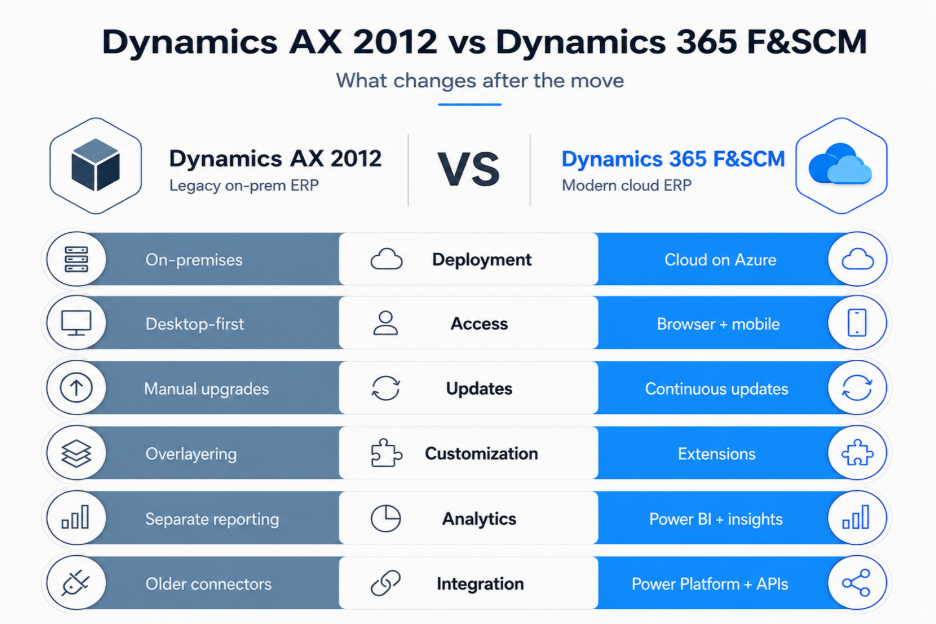
Upgrade or Migrate: Pick the Right Path
“Upgrade” and “migration” often get used as if they mean the same thing.
They do not.
An upgrade brings the existing AX estate forward
Microsoft provides an upgrade path from AX 2012 R2 and R3 that can bring existing application code and the database into Finance and Operations.
The data upgrade process can bring the database forward, including full transactional history.
That can make sense when much of the existing AX design is still appropriate for the business.
But Microsoft's tooling does not eliminate the work.
Custom code still has to be analyzed and adapted to the current extensibility model. Deprecated functionality must be addressed. Data needs preparation. Business processes have to be tested.
Systems using certain deprecated features, including virtual companies or data partitions, cannot currently use the supported upgrade path without resolving those issues first.
A migration or reimplementation starts more selectively
Instead of bringing the entire AX estate forward, a business can implement a cleaner F&SCM environment and selectively move the data, configuration, and processes that should survive.
Historical information can be handled separately where appropriate rather than automatically carrying every legacy decision into the new ERP.
This path creates more design work up front, but it also creates an opportunity to remove years of accumulated technical and process debt.
The question is not “Which option is cheaper?”
The better question is:
How much of the AX system you have today deserves to exist in the system you want tomorrow?
That is what the assessment phase needs to answer.
Conclusion
Waiting can feel easier while AX is still doing its job. But at some point, keeping the old environment running starts creating more cost, more dependency, and less flexibility than planning the move itself.
That is the point to focus on now.
You do not need to rush into Dynamics 365 Finance & Supply Chain Management without a plan. What matters is understanding whether an upgrade or a migration makes more sense for your environment, what needs to move, what can be retired, and where the biggest risks sit before the project begins.
Our Dynamics 365 F&SCM experts can help you assess your current AX environment, plan the right upgrade or migration path, and build a practical roadmap around your business, data, integrations, and customizations.
Ready to understand your next move? Get in touch with our Dynamics 365 F&SCM experts.
Frequently asked questions
What is the difference between an AX 2012 upgrade to Dynamics 365 and a migration?
An upgrade converts what you already have. Microsoft's data upgrade tooling brings your whole database forward with full transactional history, and your X++ passes through the code upgrade service. A migration builds a clean environment and moves selected data into it using the Data Management Framework, so you bring reference data, master data, and open documents while history stays behind in an archive or a data warehouse. Upgrade suits a lift and shift. Migration suits a reimplementation where you are restructuring data or processes anyway.
Can we migrate Dynamics AX to Dynamics 365 one legal entity at a time?
Not on the upgrade path. The data upgrade tool is all or nothing. It cannot upgrade some legal entities while leaving others running in AX 2012, and it cannot handle partitions selectively. If you need to phase the move by region or entity group, which most organizations with thirty or more legal entities do, that requirement points you to the migration path rather than an upgrade.
Which AX versions support a direct Dynamics AX to Dynamics 365 upgrade path?
Only AX 2012 R2 and AX 2012 R3, and only once you are on the latest cumulative update for your release. AX 2012 RTM is not supported for cloud upgrade. The reason is the financial dimension structure changed substantially between RTM and R2, so the tooling has no reliable route from the earlier schema.
How much does it cost to migrate AX to Dynamics 365 Finance?
There is no single price, and anyone quoting one before seeing your database is guessing. The consistent cost drivers are custom code remediation, which is usually the largest line and scales with the conflicts in your code upgrade report, then data volume and quality, integration rebuilds, ISV replacements, licensing, and your own team's time for testing and training. One detail worth knowing: part of your subscription cost is based on database size, which is why the cleanup the upgrade analysis report recommends reduces your ongoing bill rather than just your project timeline. Two things people miss are that the Power BI designer license for building custom reports is separate from the embedded Power BI included with Finance and Operations, and that the servers, hosting, disaster recovery, and security monitoring you fund for AX today all come off the books.
Recent Posts

Microsoft Dragon Copilot: Use Cases Worth Investing In
Nov 03, 2026
Dynamics 365 Activate: Do You Still Need a Migration Partner?
Oct 05, 2026

Tableau to Power BI Migration: A Practical Guide
Sep 09, 2026
Category
Our Expertise



About Author

Aiswarya Madhu
Aiswarya Madhu is an experienced content writer with extensive expertise in Microsoft Dynamics 365 and related Microsoft technologies. With over four years of experience in the technology domain, she has developed a deep understanding of Dynamics 365 applications, licensing, integrations, and their role in driving digital transformation for organizations across industries.
Never Miss News
Want to implement Dynamics 365?
We have plans which will meet your needs, and if not we can tweak them around a bit too!