It is not the strongest of the species that survives, nor the most intelligent, but the one most responsive to change.
When Leon C Megginson said this in his 1963 speech at the convention of the Southwestern Social Science Association, of course he wasn’t talking about ERP systems. But the idea fits surprisingly well in this context. Technology platforms that last are rarely the ones that stay exactly as they were built. They are the ones that keep adapting as the way people work changes.
That is the direction Business Central has been moving in across 2025 and into early 2026. The recent updates across versions 27.4 and 27.5, along with the 28.0 preview published in March 2026, show Microsoft steadily making the product more useful in the flow of work rather than simply adding more features on top.
What is changing is easy to see.
- Business Central is becoming more AI-driven, more connected, and more operationally aware.
- ‘Search’ is getting smarter. Agents are taking on more work.
- Documents are moving with less manual handling.
- Analytics are appearing closer to the transaction.
- Admin controls are getting stronger as the platform becomes more active, more extended, and more dependent on steady updates.
Some of these capabilities are already generally available, some are in preview, and some are about to become the next normal in April 2026.
Top 11 Dynamics 365 Business Central Changes to Watch Right Now
1. Business Central Is Becoming More AI Native
AI is gradually shifting from being just another software feature to becoming something closer to a digital co-worker inside business systems. As Satya Nadella has often noted, AI is not simply another technology layer. It becomes part of the fabric of how work gets done. In the same way, enterprise platforms are moving beyond acting as systems that only record activity and toward systems that actively help complete work.
That shift is becoming visible inside Business Central. AI is becoming part of the product’s day-to-day operating model.
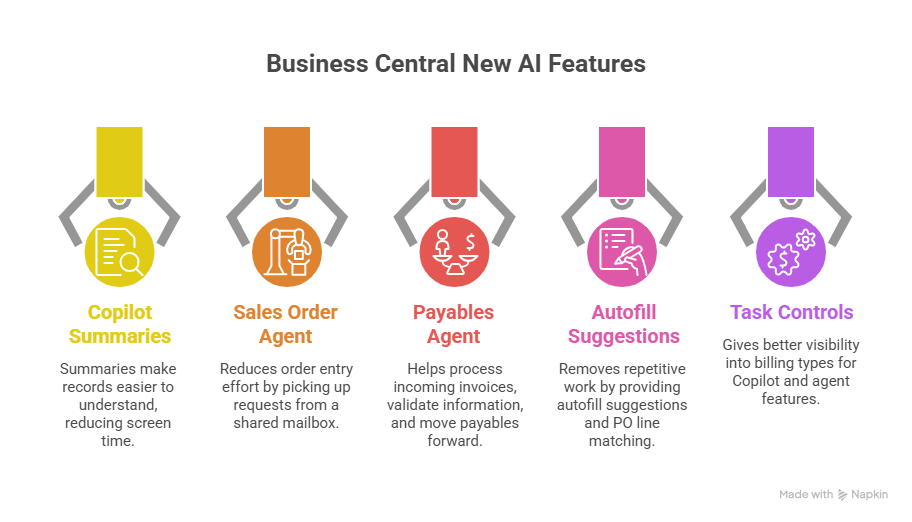
This started with Copilot capabilities such as Summarize, autofill suggestions, and purchase order line matching.
It is now extending into workflow execution through agents like Sales Order Agent and Payables Agent.
Let’s see more of them
Copilot summaries make records easier to understand
Teams can use the Summary FactBox to quickly understand customers, items, and orders without reading through full records manually. This helps reduce screen time and speeds up decision-making.
Sales Order Agent can reduce order entry effort
The Sales Order Agent can pick up requests from a shared mailbox, identify the customer, prepare the quote, verify availability, request approval, and convert it into a sales order. For businesses still handling a high volume of order requests through email, this can shorten order processing cycles significantly.
Payables Agent gives finance teams a visible starting point for AI
The Payables Agent helps process incoming invoices, validate information, surface exceptions, and move payables work forward with less manual effort. For finance teams dealing with repetitive invoice handling, this is one of the clearest areas to begin.
Autofill suggestions and PO line matching remove repetitive work
Not every improvement requires a full agent rollout. These features already reduce repetitive checking, data completion, and line-level review, which makes them useful for teams looking for measurable gains without redesigning the full workflow.
Task controls and billing visibility make rollout easier to govern
Business Central now gives better visibility into billing types for Copilot and agent features, supports prepaid Copilot Credits more easily, and includes controls such as Stop all tasks in 27.5, with stronger task management in 28.0 preview. This makes AI rollout easier to manage from both an operational and governance standpoint.
2. Search is moving from keyword lookup to intent based discovery
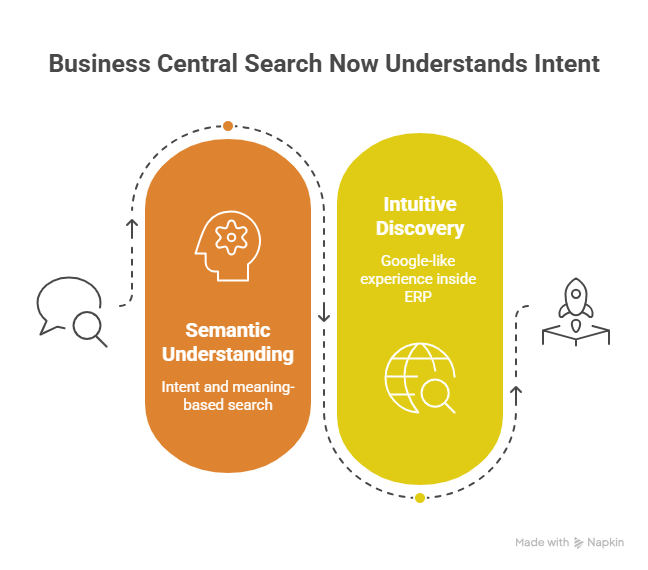
Microsoft is also changing how users find information inside Business Central. With Advanced Tell Me, search is no longer limited to exact page names or keyword matches. It is becoming more semantic, which means users can find pages, reports, and actions based on intent and meaning.
In most ERP environments, users do not always remember the exact name of a page, and different teams often use different terms for the same task. A finance user may search one way, a warehouse user uses another way, while the system may label it differently altogether. Semantic search reduces that gap.
For leadership teams, this is not just a UX improvement. It can improve adoption, reduce onboarding friction, and make occasional users productive faster. It also helps cross-functional teams across finance, operations, purchasing, warehousing, and service work with less search friction inside the ERP.
3. Finance is getting more Copilot support where manual work usually piles up
Finance is one of the clearest places where Business Central is turning AI into everyday operational help. Microsoft has already added Copilot support for bank reconciliation, and the broader release direction continues to push more intelligence into finance-heavy tasks that usually take time at month end or during exception handling.
Bank reconciliation is getting easier to move through
Copilot can help improve matching between bank transactions and ledger entries, which reduces the amount of manual review finance teams need to do during reconciliation.
Transaction review becomes less repetitive
Finance teams are getting more help where the work usually slows down: identifying likely matches, clearing exceptions faster, and reducing the effort spent reviewing line by line when records do not align cleanly. This is especially useful for teams handling high transaction volumes.
Month-end processes become easier to tighten
The value here is not only speed. It is also reducing the fatigue and inconsistency that build up when reconciliation and cleanup still depend too heavily on manual checks. Microsoft is clearly making finance workflows more assistive, not just more automated.
4. Agents are also opening Business Central to the outside world
One of the most important shifts in Business Central is the MCP server capability. Microsoft is opening ERP entities such as customers, items, and sales orders to external AI agents through a standardized API model that works with platforms like Azure OpenAI and Copilot Studio.
By default, this access is read only. Create, modify, and delete actions must be granted explicitly. That matters because Microsoft is not treating external agent access as a free for all. It is building this as a governed extension of the ERP.
This changes the role of Business Central. It is no longer limited to embedded Copilot experiences inside the application. It can now participate in a broader agent ecosystem where external agents read Business Central data, combine it with context from other systems, and support multi-step workflows across functions.
That opens up scenarios such as:
- querying Business Central data from external AI assistants
- combining ERP context with Dynamics 365 Sales, Power BI, supplier systems, or internal portals
- orchestrating workflows such as inventory checks, quote generation, purchase actions, and follow-up notifications
- reducing the need for custom API development in common AI-led scenarios
Microsoft is also putting governance at the center of this shift. Permissions can be controlled by entity and action. Authentication is handled through enterprise identity controls. Auditability, billing visibility, and task controls become part of how external agents are managed.
5. Manufacturing and supply chain are getting more practical improvements
Business Central is improving the parts of the system that affect warehouse speed, production flexibility, inventory accuracy, and planning effort. These are not abstract upgrades. They fix the small but costly issues that slow teams down on the shop floor and in the back office.
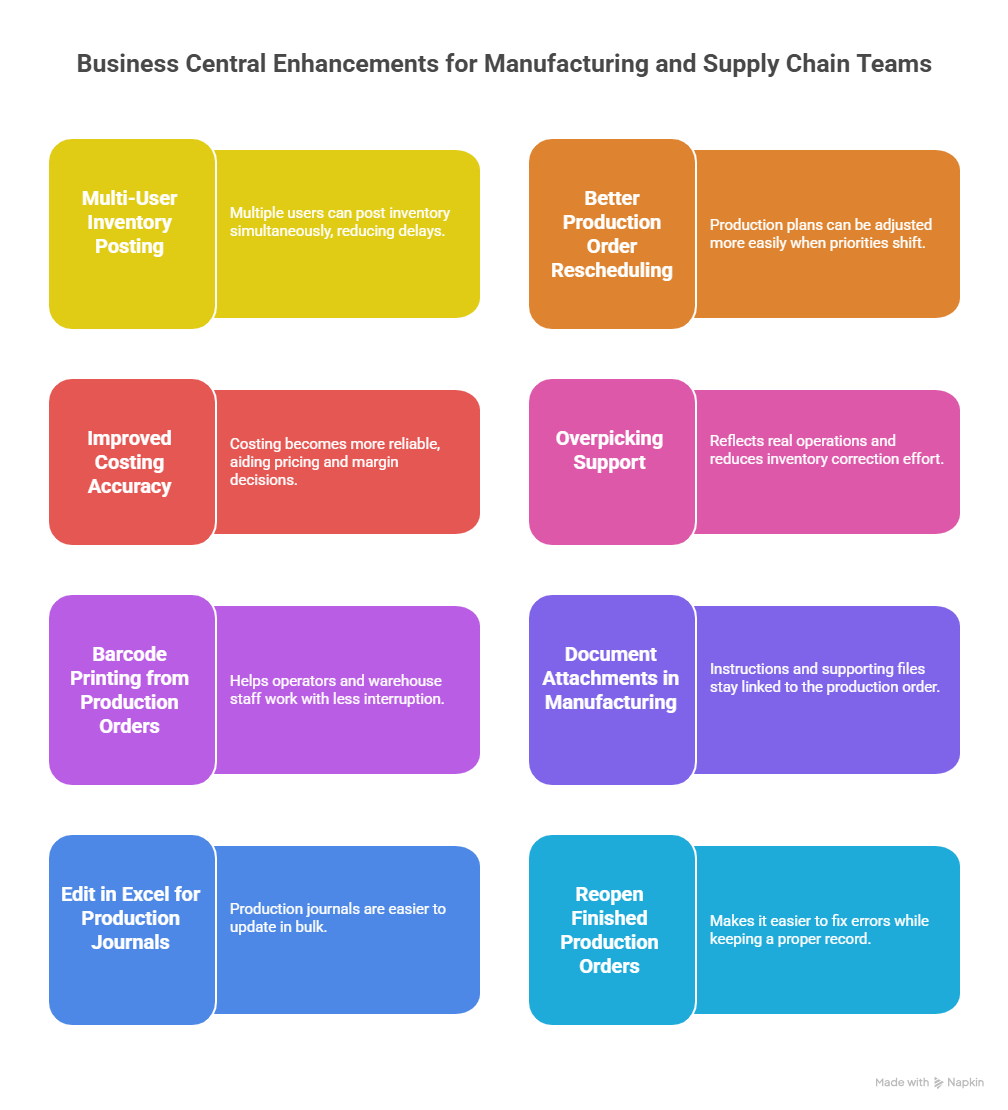
Recent updates include multi-user inventory posting, better production order rescheduling, improved costing accuracy, overpicking support, barcode printing from production orders, document attachments in manufacturing, Edit in Excel for production journals, and the ability to reopen finished production orders.
For manufacturers, this means:
Warehouse teams can move faster during busy periods
Multiple users can post inventory at the same time instead of waiting on one person to complete updates. That helps reduce delays and keeps stock visibility more current.
Production plans can be adjusted more easily when things change
If materials are delayed or priorities shift, production order rescheduling gives planners more flexibility without forcing messy workarounds.
Finished orders can be corrected cleanly when needed
Reopening finished production orders makes it easier to fix quantity, yield, or process errors while keeping a proper record of what changed.
Inventory and shipping can stay more accurate
Overpicking support reflects what actually happens in real operations and reduces the effort needed to correct inventory after the fact.
Barcode printing can happen closer to the production flow
This helps operators and warehouse staff work with less interruption.
Instructions and supporting files stay linked to the production order
Document attachments make it easier for teams to find the right information when they need it.
Production journals are easier to update in bulk
Edit in Excel helps planners handle larger updates faster instead of changing records one line at a time.
Costing becomes more reliable
Improved costing accuracy helps manufacturers make better pricing and margin decisions.
Stockout risks can be spotted earlier
Forecasting helps teams see where inventory is likely to run short before the issue starts affecting daily order flow or production planning.
Replenishment decisions become more informed
Instead of treating replenishment as a simple reorder task, teams can work with forecast-driven recommendations tied to expected demand patterns.
Inventory can be planned with less guesswork
This helps companies balance service levels against carrying cost more effectively, which is one of the most common pressures in inventory-heavy businesses.
6. Document automation is becoming a core Business Central capability
Document handling is one of those areas where work becomes messy very quickly. Invoices come in through email, attachments arrive in different formats, some files contain multiple documents, and teams end up spending too much time checking, splitting, routing, and posting everything manually.
Business Central is getting much better at handling that.
Recent updates include two-step processing, preview of incoming e-invoices before processing, duplicate detection, the ability to create multiple incoming e-documents from multiple attachments, broader support for e-document handling, and Power Automate integration through APIs.
For a finance or AP team, this means the process can become much cleaner:
Users can review documents before posting them
That helps catch mistakes earlier instead of fixing them after the transaction is already in the system.
Duplicate invoices can be caught before they create problems
This reduces the risk of duplicate entries and payment issues.
Multiple attachments can be handled more easily
If one email contains several invoice files, Business Central is getting better at turning them into separate documents without as much manual effort.
Document flows can be routed more easily
Approval steps, checks, and follow-up actions can connect more naturally to the rest of the workflow.
Invoice intake becomes easier to scaleTeams can handle more volume without adding the same amount of manual work.
7. Integrations are becoming more complete and more operational
This is where Business Central starts becoming more useful in real day to day work. The latest integration updates are not just about connecting systems. They are about helping your teams stop doing the same work twice.
- If you are using Field Service, service activity and finance no longer have to feel like two separate worlds. Work order completion, item consumption, project journals, and invoicing can move together more smoothly. Your technicians finish the job, the parts used are easier to account for, finance gets cleaner data, and billing can move faster. You also get better visibility into item availability with warehouse and technician context, which helps dispatching, stock planning, and service execution.
- If you are using Shopify, Business Central is getting better at handling B2B company and location data, customer matching, skipped record troubleshooting, and product synchronization. That means fewer order issues, fewer manual fixes, and less time spent figuring out why data did not come through properly. Enhancements around variant images and product options from item attributes also make the connection more useful for businesses managing more complex product catalogs.
The same pattern also matters for businesses using more of the Microsoft stack around Business Central. The value is no longer just that systems can exchange data. It is that customer, service, order, stock, and finance processes can stay connected with less manual patching between them. That is where integration starts becoming operationally useful instead of technically complete.
8. Analytics is becoming broader and more embedded
One of the most practical changes in Business Central is that insight is appearing closer to the transaction instead of being delayed until a separate reporting cycle. Instead of exporting data to spreadsheets, waiting on a BI team, or reviewing numbers only after the month is over, users can increasingly see useful information on the same screen where they are making decisions. That is what makes this update important. Analytics is moving closer to the work itself.
Microsoft has been expanding analytics across inventory, finance, sales, purchasing, projects, manufacturing, and sustainability. It has also added features such as analysis mode with related table fields, stronger financial reporting, report layout validation, Word layout metadata access, PDF post processing, richer KPI summaries, and more embedded insight across the product. Together, these updates are making analytics feel like part of the product, not something separate from it.
For your team, this means:
Finance can see cash flow earlier and act faster
Instead of waiting for delayed reporting, finance users can work with more current visibility into receivables, forecasts, and trends while they are already inside the system.
Warehouse and operations teams can spot stock issues faster
Users can understand inventory movement, slow movers, and purchasing patterns with less manual checking and less dependence on offline reports.
Production teams can catch cost and performance issues sooner
Variances, margins, and operational signals become easier to review closer to the point where action is needed, not only after the damage is already done.
Project teams can work with live margin and performance data
Instead of exporting data and piecing the picture together later, they can get a clearer view inside the workflow itself.
Users can explore data without leaving the page
Analysis mode, related data visibility, and richer page-level insight make it easier to move from a number to the context behind it without jumping between systems or relying on a separate reporting process.
Dashboards are becoming more helpful, not just more visual
The value of newer KPI summaries and embedded insight is that users can understand priority, exception, or change faster without first building a custom report stack.
9. Admin, platform, and governance updates matter more than they look
Some of the most important Business Central updates are the ones that help your system stay stable while everything around it gets more complex.
Microsoft has added IPv6 support, more flexible environment update management, enhanced index troubleshooting, MultiSubnetFailover support, preview version updates for sandbox environments, and the ability to export sandbox environment databases in preview. These may sound like backend improvements, but they directly affect how safely your Business Central environment can keep running as you add more extensions, more integrations, more automation, and more frequent updates.
If you are already running Business Central live, this is what these updates give you:
Safer update cycles
Preview sandbox updates make it easier to test changes before they reach production. That matters when your environment depends on extensions, custom apps, or connected workflows that could be affected by a release.
Better protection against extension issues
As features become mandatory in newer versions, the risk of app or extension breakage increases. Earlier testing and validation help catch those issues before they affect users.
Better performance control as usage grows
Enhanced index troubleshooting becomes more important when AI features, agents, integrations, and larger data volumes start putting more pressure on the system.
Stronger uptime protection
MultiSubnetFailover support improves resilience for environments where failover speed matters and downtime is costly.
Better recovery options
Sandbox database export gives teams a safer way to preserve, inspect, and recover environments when testing or troubleshooting gets more serious.
More room to scale cleanly
IPv6 support may not feel urgent to every customer today, but it strengthens the platform for future growth and network readiness.
10. Developers and partners are getting a stronger foundation
These updates may sit in the developer layer, but the advantage shows up in your day to day Business Central roadmap. They affect how quickly custom features can be built, how safely extensions can be updated, and how much effort it takes to keep your customizations working as the product keeps changing.
What you are getting now is a much better base for building and maintaining custom apps, reports, workflows, integrations, and AI-driven extensions.
That includes:
- faster delivery of custom features and reports
- better support for more complex business logic
- easier testing of integrations and external API connections
- stronger tools for troubleshooting extension issues
- better support for AI-assisted development
- less breakage risk when Business Central updates roll out
This matters when your business needs something specific that the standard product does not handle on its own. That could be a custom warehouse workflow, a new finance report, an industry-specific process, or an integration with another system. These updates make that work easier to build, easier to test, and easier to carry forward.
That is a big shift for customers. Custom work has often been treated as something expensive, slow, and risky. The newer development capabilities are helping reduce that risk. Your partner or internal team can work faster, test earlier, and catch more issues before a feature reaches production.
It also improves the long-term side of customization. As Business Central adds more AI features, more agents, and more frequent changes, extensions have more chances to break if they are not built and tested well. These updates help reduce that problem by improving how code is written, validated, and maintained.
You are also getting a stronger path for AI-related customization. Developers now have better support for AI-assisted coding, better testing options, and better troubleshooting tools when building intelligent extensions or updating existing ones. That means faster prototyping, less manual debugging, and a better chance of shipping something useful without turning it into a long rework cycle.
11. User experience is getting a steady cleanup
Some of the newest Business Central updates are focused on something very simple: removing the small frustrations users deal with every day.
PDF attachments can now be previewed directly in the web client. FactBox pane width can be adjusted. Screen space on the web is being used more efficiently. There are also general interface improvements that make data entry, review, and correction smoother.
These are not headline features, but they are the kind of changes users feel immediately.
A finance user reviewing invoices does not have to keep downloading PDFs just to check supporting documents. A sales or service user can widen the FactBox and keep more customer or order context visible on the same screen. A warehouse or operations user can work with pages that show more usable data instead of wasting space and forcing constant scrolling.
This means
- easier document review without extra downloads
- more context visible while working on the same record
- less scrolling and less screen frustration
- faster review, correction, and day to day navigation
- a cleaner experience for teams who live in Business Central all day
That matters because Business Central is not used once in a while. It is used continuously across finance, sales, purchasing, warehousing, and operations. When users can see more, click less, and move through records with less friction, the time savings build up quickly.
What’s Next?
At this point you might be thinking, most of these updates arrive automatically inside Business Central. When Microsoft releases a new version, the features appear in the system anyway. So why would a business need to do anything more?
That is where things become a little more nuanced. New capabilities rarely create value just because they exist. They create value when they are applied to the right workflows, configured properly, connected with other systems, and adopted by the teams who actually use the product every day.
Consider a simple scenario.
A company receives hundreds of order requests by email every week. The Sales Order Agent technically exists inside Business Central, but unless the mailbox is structured correctly, approval rules are configured, inventory checks are aligned with the workflow, and the process is tested across real order scenarios, the feature remains unused.
Sounds a little too much? I think the simple scenario doesn’t look so simple...
If you would like to explore how these capabilities could work in your environment, schedule a quick discovery conversation with our Business Central experts. We can review your current processes and highlight practical opportunities to activate these new capabilities.