Dynamics 365 Activate: Do You Still Need a Migration Partner?
Oct 05, 2026 Aiswarya Madhu
On September 9, 2026, Microsoft launched Dynamics 365 Activate, an AI-powered tool that analyzes your Salesforce org, maps it to Dynamics 365, builds the schema, and moves the data.
The first question many CIOs are going to ask now is: if Activate can handle so much of the migration, why do I still need a Dynamics 365 migration partner?
To answer that properly, you need to look at what Dynamics 365 Activate actually does, what it still leaves in your hands, where the gaps are, and what that means for a Salesforce-to-Dynamics 365 migration.
What Dynamics 365 Activate actually is?
One of the misconceptions doing the rounds is that Activate is a "Salesforce converter" you point at your org and walk away from. It isn't, and Microsoft doesn't describe it that way either.
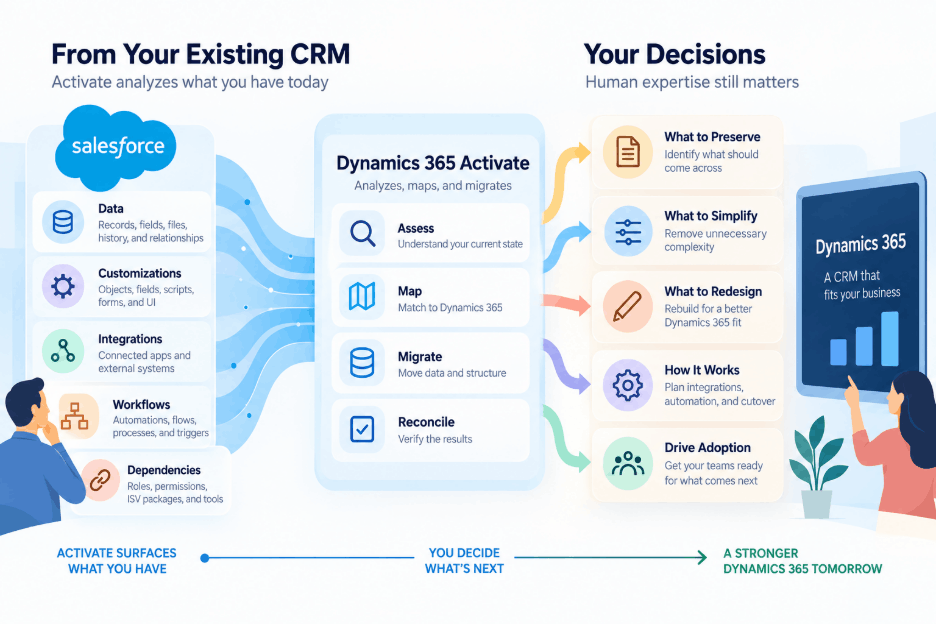
Microsoft's documentation calls it a unified, AI-assisted implementation and migration experience. Right now it supports one scenario: moving from Salesforce to Dynamics 365 Sales and Dynamics 365 Customer Service. It runs as a Microsoft-hosted web application, and it works in three stages.
Discovery
Activate starts by looking at what is actually inside your Salesforce environment. The connection is read-only, so at this stage it is inspecting rather than changing anything.
It inventories standard and custom objects, fields, relationships, flows, Process Builder processes, Apex classes and triggers, Lightning pages, installed ISV packages, connected applications, integrations, languages, currencies, licences, and user profiles.
That inventory is useful for another reason: it can expose the things that have accumulated over the years. Low-use objects, inactive automation, and other pieces of technical debt can be identified before they are carried into the new platform.
Activate then assesses the complexity of the environment and produces a migration-readiness report that can be exported as PDF, Word, or JSON.
Mapping and schema
Once you know what you are dealing with, the next step is deciding where it belongs in Dynamics 365.
Activate provides a visual interface for mapping Salesforce objects to Dataverse tables. Common entities such as accounts, contacts, leads, opportunities, cases, activities, and knowledge articles already have predefined mappings, so teams are not starting from a blank screen.
It also goes beyond data fields. Users can be mapped, Salesforce profiles and permission sets can be translated into Dataverse security roles, and Salesforce role hierarchies can be mapped to Dynamics 365 business units.
Microsoft says early Activate engagements have already processed more than six billion records, and it has publicly named Comcast and Ziwi Pets among the organizations using the platform.
So the useful way to think about Activate is not as an automatic Salesforce-to-Dynamics converter. It is closer to a guided migration framework that helps teams understand the existing environment, map it into Dataverse, move the data, and verify the result.
What Activate is going to do next?
Now, the roadmap is where things get interesting, because Microsoft isn't pitching Activate as a one-off migration utility.
Jeff Teper's launch post describes three journeys Activate is meant to cover eventually.
- "Start new" helps teams go from requirements to a solution for a new business model or unit.
- "Move from a known source" is the Salesforce scenario today, with other CRM and ERP sources to follow.
- "Grow what exists" lets current Dynamics 365 customers add an app, a geography, or a legal entity without running a fresh discovery exercise every time.
Microsoft has also said ERP capabilities are coming soon, and it has listed planned features such as agentic mapping, test sampling, natural-language migration guidance, and executive assessment summaries.
What Microsoft hasn't published yet: pricing, a general availability date, a full compatibility list for Salesforce packages and custom integrations, or which ERP sources come first. So if you're running Finance and Operations or planning an ERP move, treat Activate as future scope, not something you can plan a project around today.
Let us help you understand where Activate fits and what still needs to be planned around it.
So, can you really ditch your implementation partner?
Here's my answer: Activate removes a big chunk of the work partners used to bill for, and that's good news for you. Discovery has always been the slowest, least glamorous part of a CRM migration. Someone had to sit with admins, export metadata, trace which flow fires which trigger, and document it all in spreadsheets. Activate compresses that.
But discovery tells you what exists. It doesn't tell you what should exist, and most of the risk in a migration lives in that second question.
| What Activate handles | What still needs people who know your business |
|---|---|
| Cataloging objects, fields, flows, Apex, packages, integrations | Deciding what to preserve, simplify, redesign, or retire |
| Complexity scoring and readiness reports | Turning scores into a scope, budget, and sequence |
| Standard object mappings | Mapping custom objects to how you want to sell and serve |
| Generating schema and a solution package | Designing the data model and ALM strategy around it |
| Mapping profiles to security roles | Designing a Dataverse security model that actually fits |
| Moving records and checking counts | Validating that the data means the right thing |
| Assessing automation and code | Rebuilding that logic in Power Automate, plugins, or agents |
| Listing integrations | Rebuilding, replacing, or removing those integrations |
Where Your Teams is likely to stumble with Activate
Here's where we expect projects to hit friction:
1. The automation doesn't come with you
A lot of people assume "AI-assisted migration" means their flows and Apex get translated. They don't. Microsoft's documentation is explicit: flows, Process Builder, workflow rules, and Apex are analyzed and assessed for effort, but not converted or migrated.
So think about what that means in a mature Salesforce org. Your lead routing, approval chains, SLA escalations, discount checks, and every trigger a developer wrote in 2019 all have to be redesigned and rebuilt in Dynamics 365. That's usually where the real engineering effort sits and Activate hands it back to you as an assessment, not a solution.
2. Matching record counts isn't the same as correct data
Reconciliation compares source and target record counts. That's useful, but 50,000 accounts in, and 50,000 accounts out tells you nothing about whether ownership landed on the right person, whether a case still points to the right contact, or whether a picklist value quietly changed meaning.
Microsoft also notes that field types, picklist values, and formatting differ between the two platforms, and that Activate transforms values to fit the target schema, which can change how data appears. Someone has to test that against real business scenarios before your service team works from it.
3. Security models don't translate one to one
Salesforce and Dataverse handle access differently. Salesforce leans on role hierarchy, sharing rules, and permission sets. Dataverse uses business units, security roles, teams, and ownership. Activate can map one to the other, and Microsoft itself tells you to review every generated mapping because the models differ.
Now, if your sales org has territory-based visibility, a partner channel, or regional data restrictions, an automated mapping is a starting draft. Getting it wrong means either reps can't see their deals or they can see deals they shouldn't.
4. Integrations get listed, not rebuilt
Activate can identify the integrations connected to Salesforce, but it does not rebuild them in Dynamics 365. Connections to your ERP, marketing tools, telephony, e-signature, billing systems, and other applications still need to be redesigned, tested, and moved over.
This is where teams can underestimate the work. Knowing an integration exists is not the same as having it working correctly in Dataverse.
5. ISV packages need real evaluation
Activate lists installed managed packages and suggests Microsoft ecosystem alternatives. A suggestion isn't a decision. Someone still has to check whether the alternative covers your use case, what it costs, how its data model differs, and how the data inside the old package gets moved.
6. Discovery only sees what it's allowed to see
The Salesforce integration user's permissions determine which metadata, fields, and records Activate can access. Big Objects and External Objects aren't included at all. And no scan will find the process that lives in a shared spreadsheet, an Outlook rule, or one sales ops manager's head. Workshops with actual users still matter.
7. Large orgs will feel Salesforce API limits
Microsoft lists Salesforce API rate limits as a known limitation that can slow large migrations. If you have years of activity history and attachments, that affects your cutover window and whether you migrate history in phases. Files that exceed the Dataverse upload limit or belong to unsupported scenarios are skipped and reported, so someone needs a plan for those too.
Dynamics 365 Activate + the Right Partner Make Migration Easier
Dynamics 365 Activate can make a Salesforce migration faster to assess and easier to structure, but it does not remove the decisions that determine whether the move succeeds. You still need to decide what should come across from Salesforce, what should be redesigned, how the Dynamics 365 environment should work, and how integrations, automation, cutover, and adoption will be handled. That is where implementation experience still matters. If you are planning a Salesforce to Dynamics 365 migration, Nalashaa Digital can help you use Activate where it adds value and build the rest of the migration around your business.
Fill out the form below to speak with our Dynamics 365 team about planning your Salesforce-to-Dynamics 365 migration with Activate.
Recent Posts

Tableau to Power BI Migration: A Practical Guide
Sep 09, 2026
SAP ECC to Dynamics 365 Finance & SCM Migration Guide
Sep 09, 2026

Late to Upgrade from AX 2012 to Finance and Operations? [A Reality Check]
Sep 07, 2026
Category
Our Expertise



About Author

Aiswarya Madhu
Aiswarya Madhu is an experienced content writer with extensive expertise in Microsoft Dynamics 365 and related Microsoft technologies. With over four years of experience in the technology domain, she has developed a deep understanding of Dynamics 365 applications, licensing, integrations, and their role in driving digital transformation for organizations across industries.
Never Miss News
Want to implement Dynamics 365?
We have plans which will meet your needs, and if not we can tweak them around a bit too!