Business Central Workflow Automation: 6 Workflows That Should Already Be Automated
Apr 09, 2026 Aiswarya Madhu
Time is saved when systems evolve with your business, not when you rebuild them. With that note, let me explain why you need to put a little more thought into the system you already use. I am talking about Dynamics 365 Business Central workflow automation.
Most teams use Business Central to run operations. Orders are processed, invoices are posted, approvals happen, and reports are generated. But what often goes unnoticed is how much of this still depends on manual follow-ups, disconnected steps, or workarounds outside the system.
Take a purchase order approval as a simple example. In most Business Central environments, a purchase order gets created, and then someone has to manually email the approver, follow up when there is no response, check whether it was approved or rejected, and update the record accordingly. The system processed the transaction. The human managed everything around it. That gap, between what Business Central handled and what the team had to do manually to keep it moving, is exactly where workflow automation lives.
And the impact of closing that gap is not small. Teams applying workflow automation in the right areas are seeing 20 to 30 percent efficiency gains across finance and operations. Forrester research points to over 200 percent ROI with faster payback than most teams expect going in.
What You Might Already Be Facing Without Business Central Workflow Automation
Let me take you through a few situations. If you are using Business Central actively, chances are you have already seen at least one of these.
| What you set up | What actually happens |
|---|---|
| An approval request gets sent to the approver | The approver says they never got the email. It arrived hours late or buried in a summary. The process sat blocked the whole time. |
| Workflows were running fine | Then one day they quietly stopped. No error, no alert. You only find out when someone checks the job queue and realises something has been stuck for hours or days. |
| You updated the approver when a manager left | Approvals still route to the old person. Or they sit in limbo because that user is now inactive. You end up hunting across Approval User Setup, Workflow User Groups, and sequences to find what is still pointing where. |
| You created a flow expecting it to trigger instantly | Nothing happens. Too many records were processed at once and the trigger simply did not fire. There is no signal unless you go looking for it. |
| You defined the trigger, added conditions, set the response | The workflow skips steps, does not trigger at the expected point, or behaves slightly differently than you designed it. Everything looked right on paper. |
| You set up a basic approval flow | It takes multiple iterations. You tweak conditions, test again, adjust users, test again. It works eventually, but not without more effort than it should have taken. |
| You want the workflow to involve Outlook, Teams, or external files | Things get complicated fast. Without Power Automate structured properly, the moment you step outside Business Central the flow starts breaking down. |
Worth knowing
The recognition scenario that surprises most teams is the third one, the changed approver whose update did not carry through. Most organizations discover this not during setup, but during an audit or a period review when someone traces why an approval sat unresolved for two weeks. Validation and control workflows, which most teams set up last, would have caught it first. That is the workflow category worth prioritizing earlier than it usually is.
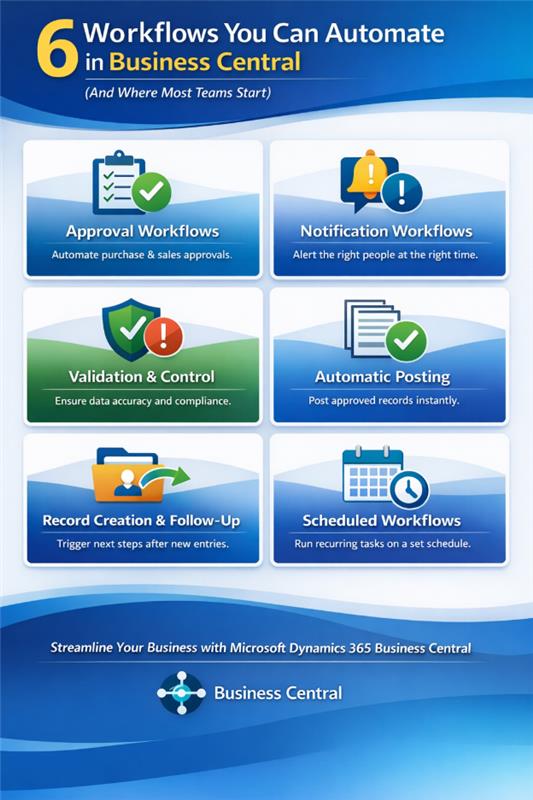
6 Workflows You Can Automate in Business Central (And Where Most Teams Start)
Workflow automation in Business Central is most valuable when applied to processes that already exist but are still handled inconsistently. In many organizations, the issue is not that work is undefined. It is that important steps still depend on manual follow-up, scattered communication, or someone remembering what needs to happen next.
That is where workflow automation creates real value. It helps teams reduce delays, improve control, and keep work moving without relying on informal handoffs.
1. Approval Workflows
Approvals are already part of how most businesses operate. The real issue is not whether approvals happen, but whether they happen consistently, on time, and with the right level of control.
In many teams, approvals still happen through emails, Teams messages, or verbal follow-up. A document is sent for review, the approver gets distracted, and the requester follows up later. That delay may seem minor in isolation, but across finance, procurement, and sales, it creates a constant drag on operations.
Consider a distribution company processing 400 purchase orders a month. Approval requests were going out by email. Approvers were responding when they got around to it, sometimes the same day, sometimes three days later. Nobody had visibility into what was pending, what was delayed, or who was the bottleneck. Procurement was planning around approval lag as if it were a fixed cost of doing business. Once approval workflows were configured inside Business Central, with automatic routing, escalation rules, and real-time status visibility, the average approval time dropped from three days to four hours. The 400 purchase orders a month did not change. The invisible drag around them did.
If you are deciding where approval workflow automation should begin in Business Central, start with the areas where decisions regularly slow work down or depend too heavily on manual intervention.
Where to start:
- Purchase documents
Purchase orders and purchase invoices are often the easiest and highest-value starting point. These already require review in many businesses, especially when amounts exceed thresholds or spending needs verification. If approvals still happen outside the system, that is usually a clear sign that workflow automation should be introduced. Business Central can route the document automatically to the correct approver before posting, based on the rules you define. - Sales documents
Discount approvals, customer credit concerns, and higher-value sales orders often need a second level of review. If your team is relying on someone to notice that an order requires additional approval, the process is already carrying avoidable risk. Business Central can identify the condition and send the document into the approval process automatically. - Payment journals
Payment journals are a strong candidate where financial control is critical. If someone is expected to verify them before posting, that control should be enforced within the system rather than handled informally outside it. Approval workflows can block posting until the appropriate review has taken place. - Master data changes
Changes to customer, vendor, or item records may not look like transactional approvals, but they can carry significant downstream impact. Updates to pricing, credit limits, or key record details often affect later processes. Bringing these changes under approval control can improve data quality without trying to automate everything at once. - Other operational areas
Once core approvals are working well, the same logic can extend into requisitions, project journals, fixed assets, and incoming documents. If a process regularly depends on someone reviewing something before the next step can happen, it is a candidate for approval workflow automation.
2. Notification Workflows
Many delays are not caused by missing work. They happen because the right person does not know that something has already changed.
An approval is waiting, but the approver has not seen it. A record is updated, but the affected team keeps working with outdated information. A background process fails, and nobody notices until users begin asking why nothing is moving. This is where notification workflows become useful. They help Business Central surface important events at the right time, rather than leaving teams to discover them too late.
If you are deciding where notification automation should start, look for the points in the process where people still rely on status checks, follow-up messages, or someone remembering to keep others informed.
Where notification workflows help most:
- Approvals that still need chasing
A document is submitted, but the approver does not notice it immediately. The requester starts following up. Even after a decision is made, the next person in the process may still be waiting to hear what happened. Business Central can notify the approver when action is required, update the requester when a decision is made, and send reminders before delays affect the wider workflow. - Changes that affect other teams
Updates to vendor credit limits, item prices, or customer records may not seem urgent in the moment, but they can create confusion very quickly if the right stakeholders are not informed. If teams frequently discover these changes only after acting on outdated information, notification workflows can improve coordination significantly. - Document movement between stages
A purchase invoice is released. A sales quote is posted. A document hits an exception and requires attention. In many organizations, the next step still depends on someone manually informing another person that something has moved. Business Central can surface those transitions automatically. - System issues that should not stay invisible
Workflow entries can get stuck. Job queues can fail. Scheduled tasks may not run. Most teams only notice these issues after a process has already stalled. Notification workflows can surface failures immediately and reduce downstream confusion. - Smaller operational changes
Warehouse updates, project status changes, or item classification changes can all affect the work of another team. If users are frequently checking the system just to see whether something changed, that is usually a sign that notification workflows can improve the process.
3. Validation and Control Workflows
One of the most expensive workflow gaps in Business Central is not delayed approval. It is bad data moving forward unchecked.
Most teams recognize this only after the issue has already created downstream work. A document is posted with a missing field. A limit is exceeded without review. A sensitive change goes through with no control around it. The real cost shows up later, when finance starts reconciling, operations encounter inconsistencies, or audit questions begin surfacing.
This is where validation and control workflows become critical. Instead of relying on someone to catch issues after the fact, Business Central can evaluate conditions at the point of action and intervene when the defined rules are not met.
Where to apply validation and control workflows:
- Incomplete data that still slips through
A purchase order moves forward with a required field left blank. A record is updated, but the information is not sufficient for the next step. Business Central can stop the action, display an error, or prevent the document from progressing until the required information is present. - Transactions that should not proceed without extra control
A sales order may be created while the customer's credit exposure is already too high. A payment journal may exceed the amount your team is comfortable allowing through without additional review. Business Central can evaluate the condition and block the action, change its status, or route it into a more controlled process. - Posting controls
If a journal still has pending approvals, if limits have been exceeded, or if required business rules have not been met, the system should not depend on users remembering that posting needs to wait. Business Central can enforce that directly. - Sensitive master data changes
A vendor update, customer modification, or item record change may seem minor during entry, but the downstream impact can spread quickly through pricing, limits, and operational rules. Business Central can stop the change, require review, or restrict the next step until the right conditions have been met. - Operational checks
A warehouse adjustment that would create negative inventory, or a transfer that should not proceed without location-level review, are both examples where validation workflows can prevent disruption before it happens.
4. Automatic Posting Workflows
A great deal of delay in Business Central happens after the real decision has already been made.
A purchase invoice is approved, but still waits to be posted. A sales order is reviewed and ready, but remains untouched until someone comes back to complete the final step. A journal is cleared for accuracy, but posting is delayed simply because nobody triggered it. At that stage, nothing is unresolved. The system is just waiting for someone to finish what is already expected to happen.
This is where automatic posting workflows become valuable. They remove the gap between approval and completion.
Where automatic posting adds value:
- Approved documents that are still waiting
Purchase and sales documents are often the easiest place to begin. Invoices, orders, and credit memos usually follow a clear sequence where approval is the key checkpoint. Once approval has happened, posting is expected. If no additional judgment is required, there is little value in leaving that final step manual. - Journals that are ready but not completed
A payment journal or general journal may go through review, and once everything is confirmed, posting still depends on someone returning to perform a manual step. If that delay is common, it is not really a process requirement. It is simply a gap in execution. - Processes where approval naturally leads into another defined action
A requisition may need to become a purchase order. A return process may need to continue without interruption. If the next step is already clear and no further input is required, automatic continuation makes the process more efficient and reliable. - Fixed assets and project-related entries
Once these have been reviewed and approved, the next action is often predictable. Leaving posting manual usually does not add control. It just introduces delay. - Multi-step flows
In many processes, the true delay comes from the sequence itself. Approval happens, posting happens later, and another action follows after that. Each step may seem small, but the pauses between them slow the process considerably. Connecting these steps into a continuous workflow is where automatic posting often creates the most noticeable improvement.
5. Record Creation and Follow-Up Workflows
Record creation in Business Central is usually straightforward. The system captures the entry as expected. The problem begins immediately afterward, when the next action still depends on someone noticing what just happened.
A new customer is created, but no one picks it up for onboarding or credit review. A sales order is entered, but the fulfillment team is not alerted in time. A new item is added, but procurement does not act until stock issues begin to surface. These delays become much more visible as transaction volume increases and manual handoffs begin to break down.
A useful way to identify where to start is to look for the places where records are created or updated, but follow-up still depends on human memory or informal coordination.
Where follow-up workflows make the biggest difference:
- Master data that needs visibility
When a new customer, vendor, or item is created, the impact usually extends beyond the person entering the record. Sales may need to begin engagement, finance may need to verify terms, or operations may need to prepare for downstream activity. If these changes are currently being shared informally or discovered later, Business Central can trigger the next step automatically. - Documents that require immediate action
A sales order is created, but nobody is assigned to follow up. A quote is converted, but the next step is delayed. A posted invoice requires communication or downstream action that is not initiated automatically. When a process depends on someone checking the system and deciding what to do next, it is usually ready for follow-up workflow automation. - Ongoing activities that depend on coordination
Journal batches may need review. Project tasks may shift in ways that affect multiple users. If those changes are not immediately visible to the right people, alignment begins to weaken. Follow-up workflows can surface those changes at the right moment and keep teams coordinated. - Warehouse and inventory updates
An item journal is posted and stock-related teams need to know. A transfer is created and may require approval or review before proceeding. If those updates are not communicated immediately, planning and execution suffer. Follow-up workflows can ensure that action begins as soon as the relevant update is made.
6. Scheduled Workflows
Some of the most practical workflow opportunities in Business Central are not event-driven at all. They are scheduled.
There are always routine tasks that the business expects to happen at fixed intervals, but which still depend on someone remembering to run them. A daily cash flow alert is supposed to go out, but gets missed. A weekly inventory review does not happen consistently. A monthly sync with another system is delayed, and reporting or payments are based on outdated data.
These are not usually complicated processes. They are recurring tasks with a clear rhythm. The issue is that they are still being handled manually, which makes them easy to overlook when priorities shift. Scheduled workflows solve that problem by ensuring the task runs at the right time without requiring someone to trigger it each cycle.
Where scheduled workflows fit best:
- Reminders and compliance follow-ups
Overdue receivables reminders, filing notifications, and other periodic compliance activities usually follow a predictable pattern. If someone is still responsible for remembering when to send them or checking whether they went out at all, the process is already carrying unnecessary risk. - Recurring checks
Teams often open the system every day or every week just to see whether something needs attention. That might include inventory exceptions, blocked customers, negative stock, or field-level compliance conditions. If the activity consists mainly of checking whether a condition exists, it is usually ready to be scheduled. - Batch reports and routine outputs
Sales summaries, recurring exports, approved journal batches, and operational reports often follow a fixed timetable. If the same report needs to be prepared and distributed every week or month, it makes more sense to automate that routine. - Repeated follow-up tasks
Quality checks, batch inspections, traceability reviews, and recurring internal tasks often fall into this category. These are exactly the kinds of activities that are easy to overlook because they fade into the background of daily work. - Integrations and recurring syncs
Data often needs to move between Business Central and another system every hour, every day, or on some other recurring interval. If those activities still depend on manual exports, ad hoc updates, or someone checking whether the sync has run, scheduled automation should be introduced.
When to use native workflows vs. Power Automate (the rule that applies across all six)
So Business Central supports two layers of workflow automation.
- A built-in workflow capability that works directly within your core processes. It allows you to define how approvals move, how validations are enforced, and how actions like posting or notifications are triggered. These workflows follow a clear structure based on events, conditions, and responses, ensuring that both system-driven actions and user decisions happen in a controlled flow.
- At the same time, when processes need to move beyond Business Central, Power Automate extends that logic into the broader ecosystem. It connects your workflows to Outlook, Teams, SharePoint, Excel, and more. Whether it is triggering a notification when a record changes or running scheduled processes, it ensures that your operations stay connected without disrupting how your system already functions.
The choice comes down to where the workflow lives and who needs to act on it. If the workflow stays inside Business Central, native workflows are usually enough. If any part of the process needs to move outside the ERP or involve other tools and users, Power Automate is the right extension. The decision is not about using both everywhere. It is about using each one where it fits best.
| Native Business Central | Power Automate |
|---|---|
| Stay inside the ERP | Reach outside the ERP |
| No extra tools needed | Used when the process travels further |
| The trigger, condition, and response all live inside Business Central | A notification needs to reach Teams, Outlook, or another tool |
| The people involved are already working inside the ERP daily | The next step involves SharePoint, Excel, Planner, or an external system |
| The goal is to enforce a rule, block an action, or route an approval | The process involves people who do not work inside Business Central |
| No message needs to reach an external tool like Teams or Outlook | You need multi-step logic that spans more than one system |
| Speed of setup matters and the logic is straightforward | Data needs to move to or from a platform outside the ERP |
Start Building Toward These Outcomes with Business Central Workflow Automation
$210K+ in finance productivity gains
Interviewed Business Central customers reported meaningful efficiency gains across accounts payable, accounts receivable, billing, and financial close, translating to more than $210,000 in finance productivity gains over three years. This is where finance automation starts becoming very real.
15.6% productivity improvement for finance teams
For finance users, the gains come from reducing time spent on manual reporting, reconciliation, and approval follow-up. In a Business Central automation context, this directly supports workflows such as purchase approvals, payment checks, and posting control.
12.5% productivity improvement for operations teams
Operations teams benefit when the system handles more of the checks, routing, and validation work automatically. That is especially relevant in validation workflows, control rules, and recurring operational follow-up.
15% productivity improvement for sales teams
When records, updates, and next steps move with less manual coordination, sales teams spend less time chasing information and more time acting on it. This supports record creation, follow-up, and notification workflows inside and around Business Central.
$729K in three-year benefits
A separate Forrester study on migration to Dynamics 365 Business Central found $729,000 in three-year benefits for the composite organization. That gives a stronger business frame for companies looking at automation as part of a broader Business Central improvement effort.
265% ROI in migration scenarios
The same study reported 265% ROI with payback in less than six months. For businesses modernizing old manual processes inside ERP, this is one of the strongest proof points you can show.
Adieu, Until You Are Ready for the Discovery Call
A few well-placed workflows can completely change how work moves in Business Central. It does not require a full overhaul. Once the basics are in place, approvals stop getting chased, posting does not wait, and routine tasks run without manual effort.
If you are wondering where to actually start, the answer for most Business Central teams is purchasing document approvals. It is consistently the highest-impact first automation because it addresses the most common bottleneck, delayed procurement decisions, with the least configuration complexity. You do not need Power Automate, custom code, or a long implementation. Business Central's native approval framework handles it out of the box.
Most teams who get purchase approvals right ask us the same question next: what else in our Business Central setup is slowing us down without us realizing it? We can help you figure that out.
Recent Posts

Proven Methods to Reduce Business Central Upgrade Time by 40%
Mar 19, 2026

Prepare for Business Central Release Waves [Here's What to Fix Before You Upgrade]
Mar 19, 2026

The Business Central Shift in Recent Release Waves Customers Cannot Afford to Ignore
Mar 19, 2026
Category
Our Expertise



About Author

Aiswarya Madhu
Aiswarya Madhu is an experienced content writer with extensive expertise in Microsoft Dynamics 365 and related Microsoft technologies. With over four years of experience in the technology domain, she has developed a deep understanding of Dynamics 365 applications, licensing, integrations, and their role in driving digital transformation for organizations across industries.
Never Miss News
Want to implement Dynamics 365?
We have plans which will meet your needs, and if not we can tweak them around a bit too!