For a long time, many Business Central customers treated release waves as something to review when time allowed. A few usability improvements here, a handful of new features there, maybe something to test later in sandbox.
It's high time to change this mindset.
What has become clear over the last few release waves is that Microsoft is not just enhancing Business Central as a finance and operations system. It is steadily turning it into an intelligent ERP, one where AI, agents, automation, search, collaboration, and decision support are becoming part of the product direction, not optional side capabilities.
That changes the conversation for every Business Central customer. The message is pretty simple. Teams that stay wave ready will find it much easier to use these changes as they arrive. Teams that keep pushing updates aside may still be on Business Central, but they will be slower to benefit from where the platform is clearly heading.
Latest Release Wave Recap
Let's walk through some recent updates and what they reveal about where Business Central is heading:
Business Central is shifting from cloud ERP to intelligent ERP
One of the easiest ways to misunderstand what is happening with Business Central is to look at every release wave as a collection of separate features and judge each one in isolation.
If you do that, here's what happens:
- A search enhancement
- An AI summary feature
- A new agent
- A tighter integration
- A few usability improvements
I know this looks like normal product evolution. But that's not the case here.
If you step back, a different pattern becomes clear. Business Central is moving closer to the flow of day-to-day work. It is no longer only where transactions are finalized, and reports are reviewed after the fact. It is becoming part of how work begins, how it moves, and how decisions are made.
That shift changes the role ERP plays in the business.
Take sales operations:
- Orders are no longer just entered after everything is confirmed
- Emails, quotes, stock checks, and order preparation are starting to connect earlier in the process
- The system is moving closer to where decisions actually happen
Finance is evolving in a similar way:
- Less time spent reviewing every invoice line manually
- More focus on exceptions, approvals, and decisions that require attention
- Routine work is gradually being reduced through automation
The same pattern shows up across the Microsoft ecosystem:
- Outlook, Teams, Power Automate, Power BI, Shopify, and Field Service are becoming part of a connected workflow
- Information moves more naturally across systems
- Users spend less time switching between disconnected tools
So, this is where customers need to pay attention because Business Central is starting to function less like a traditional back-office application and more like an operational layer that sits across sales, finance, service, reporting, and commerce. Once that begins to happen, staying current stops being a purely technical concern and starts becoming a business readiness issue.
The recent wave makes Microsoft's AI direction very practical
What stands out in the recent release waves is that Microsoft is not placing AI into Business Central in abstract or experimental ways. It is putting it into everyday operational work where teams already know there is friction.
Sales Order Agent is a good example. Instead of treating order entry as a manual task, the system can now read incoming emails, extract order details, validate information, check inventory, and prepare transactions. What used to require multiple steps across people and screens is now handled in a more continuous flow, with human review layered on top where needed.
The same shift is happening in accounts payable. Payables Agent is not trying to "assist" users in the traditional sense. It is taking on work that teams have always wanted to reduce:
- Matching invoices against records
- Verifying line items
- Prioritizing payments based on context
The impact becomes measurable at this stage. Cycle times improve, manual effort drops, and teams spend more time on exceptions instead of routine checks.
At the same time, not all AI value is coming from agents. A large part of it is showing up in how the system feels to use every day.
Smaller improvements are quietly removing friction across common tasks:
- Record summaries provide quick context without navigating multiple pages
- Autofill reduces repetitive data entry across customers, vendors, and items
- Search is becoming more contextual, helping users find what they need faster
Individually, these are not major shifts. But together, they change how much effort it takes to work inside the system. That is often what determines whether new capabilities actually get used.
Another important change is how AI is starting to connect across systems rather than staying confined within Business Central.
The platform is increasingly working alongside tools like Power Automate, Power BI, and the broader Microsoft ecosystem. With improvements in connectivity and extensibility, workflows are no longer isolated to one module or one application.
- Orders can move from intake to fulfillment with fewer handoffs
- Financial processes can connect more directly with approvals and reporting
- Custom AI-driven workflows can be built using tools like Copilot Studio
This is still evolving, but the direction is clear. AI is becoming part of a connected workflow layer rather than a set of isolated features.
At the same time, Microsoft is building governance and control alongside these capabilities. AI features operate within defined security boundaries, with controls around data movement, permissions, and compliance. This matters because adoption depends as much on trust as it does on functionality.
If you look at the current state, Business Central is already capable of handling a significant portion of routine operational work through AI, especially in areas like sales processing, payables, and data handling.
There are still areas that need to mature, particularly around advanced analytics, deeper customization for complex industries, and performance at very high volumes. But that does not change the broader picture.
Why Current BC Customers Cannot Afford to Stay Passive?
Here's what happens when release adoption keeps getting pushed aside, and why wave readiness now affects more than just IT.
The real risk is not missing one feature
The mistake many teams make is thinking the downside is missing one useful feature in one release wave. It usually is not. The bigger issue is falling out of step with the direction Business Central is moving in.
At first, the delay feels harmless. A release review gets pushed. A feature gets noticed but not tested. A workflow stays the same because there is no pressure to revisit it yet.
Now the problem starts when that becomes a habit.
Especially, in heavily customized environments, this kind of per-wave drift is common enough to become a real operational issue. It is one reason so many teams find that the longer they wait, the heavier each update cycle becomes. What could have been handled as a controlled review in one wave turns into rework across extensions, integrations, testing, and change management later.
There is also a very practical cost to waiting. Recent automation-led improvements in finance workflows are already delivering 15 to 20 percent productivity gains, while aligned customers are seeing broader returns that can reach 265 percent over three years. Those gains do not come only from switching on a feature. They come from staying close enough to the platform to use new capabilities when they are ready.
Wave readiness is now a business discipline
For a long time, release readiness in Business Central was treated as an IT activity. Review the release notes, test the environment, make sure nothing breaks, and move on.
If this is what you're thinking, that is no longer enough.
Waves now affect
- how sales orders are handled
- how payables are reviewed
- how service and finance stay connected
- how search works in heavily customized environments
- how users interact with the system every day.
Once updates start touching live workflows like these, release readiness cannot sit with the admin team alone.
Finance needs to know what changes in journals, reconciliations, approvals, and close processes.
The operations team needs to validate sales, purchasing, inventory, and fulfillment flows. Teams using extensions, integrations, and automated workflows need to confirm that what worked before still works after the wave.
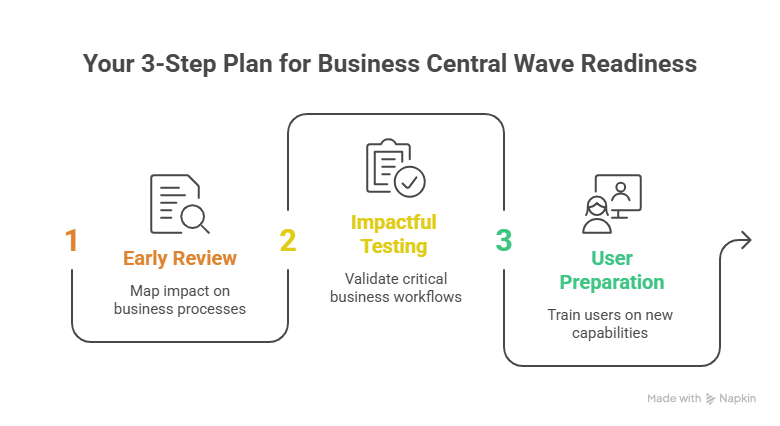
The companies moving well here are not waiting for updates to land. They review release plans early, map the impact on business processes, test what matters, and prepare users before the wave reaches production.
That difference shows up fast. Strong release discipline cuts unplanned troubleshooting, protects invoicing and month end activity, improves feature adoption, and gives teams more confidence to use what Microsoft is adding. Weak discipline usually means delayed closes, broken workflows, and another cycle of catching up while better-prepared teams move ahead.
The Evidence Is Clear [The Gains Are No Longer Theoretical]
Here is where the gain is becoming visible:
- 15 to 20 percent finance productivity gains are already being seen from newer AP and sales workflow automations.
- Organizations staying aligned with recent waves are seeing returns that can reach 265% over three years
- Companies that stay current and test early are in a stronger position to use new AI capabilities with confidence, which helps explain why cloud-aligned customers continue to report very high satisfaction, including 97% satisfaction among cloud migrants.
What You Do Next Matters More Than the Update Itself
The cost of missing that shift is not immediate, which is why it often gets underestimated. But over time, it compounds. Each deferred wave adds more rework, more alignment effort, and more friction when you eventually try to catch up. What could have been absorbed gradually becomes a larger, more disruptive adjustment later.
A more structured approach is what helps you make the difference.
- Review upcoming release waves early and understand what actually affects your workflows
- Validate extensions, integrations, and dependencies before the platform forces changes
- Test using production-like data so outcomes are predictable, not assumed
- Align finance, operations, and IT so readiness is shared, not isolated
If you would like to understand how to plan for this without missing critical changes, and where the current gaps exist in your environment, this is the right time to take a closer look.
Schedule a discovery call with our Business Central experts to assess your readiness, identify risks early, and move forward with a clear, structured upgrade plan.