Dynamics 365 Business Central release waves arrive twice a year and bring meaningful improvements across finance, operations, AI, and integrations. For most organizations the question is not whether to upgrade, but whether the environment is ready for the upgrade when it arrives.
Release waves are predictable. Major updates appear in April and October, followed by a five-month update window where administrators can choose when their environment upgrades.
After that window closes, Microsoft enters a grace period and then an enforced update stage where blocking extensions can be automatically removed to allow the update to proceed.
Because the upgrade will eventually happen regardless of preparation, the real technical work happens before the wave reaches production. Organizations that prepare early treat the release wave not as a disruption but as a controlled upgrade cycle. Those that do not often discover issues only when integrations break; extensions fail validation, or security permissions stop behaving as expected.
The Five Areas That Determine Release Wave Readiness
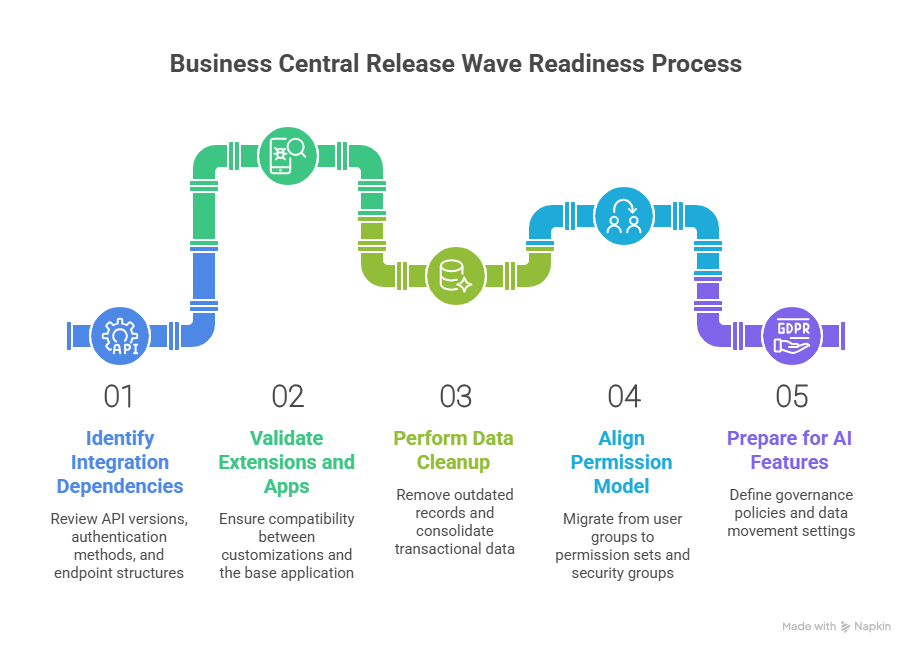
The most reliable way to prepare is to focus on five areas that historically cause most upgrade friction.
1. Integration Dependencies
Release waves often expose integration assumptions that have quietly accumulated over time. APIs change versions, authentication methods evolve, and endpoint structures shift as Microsoft modernizes the platform.
One of the most important changes affecting upcoming waves is Microsoft's transition away from legacy API structures. API version 1.0 has been marked obsolete and is scheduled for removal in upcoming waves.
Microsoft has positioned API version 2.0 as the replacement because it introduces a more stable architecture with GUID based keys and the ability to retrieve entities using SystemId. SystemId is immutable and indexed, which improves performance, auditing, and integration reliability.
Organizations that still rely on API v1.0 endpoints need to address that dependency before the wave upgrade. Obsolete in Microsoft's lifecycle does not simply mean discouraged. It means a timeline exists for removal.
Endpoint structure also matters when testing across environments. Earlier web service endpoints assumed a single production environment named Production. Modern v2.0 endpoints require the environment parameter in the URL so integrations can work across multiple production or sandbox environments. If integrations were originally written with single environment assumptions, they may appear stable in production but fail in sandbox testing.
Authentication is another area where older patterns no longer apply. Business Central SaaS environments no longer support Basic Authentication for web services and the Resource Owner Password Credentials flow has also been removed. OAuth 2.0 using Microsoft Entra ID and MSAL libraries is now the supported authentication model.
A practical integration review before the release wave should therefore confirm four things.
- The API version used by each integration and whether it depends on deprecated endpoints.
- Whether endpoint URLs support multi environment testing and include environment parameters.
- Whether authentication flows use OAuth based approaches rather than legacy methods.
- Whether downstream tools such as Power BI or Excel rely on OData services that could be affected by endpoint changes.
Another integration detail that often surprises teams appears during environment restore scenarios. When a Business Central environment is restored, integration setups are intentionally disabled and webhooks are removed to prevent unexpected behavior with external systems. If restore is part of a fallback strategy, integration reconnection must be included in the recovery plan.
2. Extensions and App Validation
Extensions are one of the most common reasons Business Central upgrades fail. If installed apps or custom extensions are not compatible with the next version, the upgrade will not proceed.
Microsoft runs automated validation before scheduling updates. This process checks dependencies between tenant customizations, AppSource apps, and the updated base application.
However, this validation only confirms technical compatibility. Functional validation still sits with your team. What works at a code level may still break real business workflows.
To prepare properly, there are a few behaviors you need to account for.
How app updates behave during release waves
- Marketplace apps automatically update during major upgrades
- Minor updates can also trigger app updates if required for compatibility
- App update cadence can be configured, but not avoided entirely
What to watch with preview environments
- Preview apps can only be tested in sandbox environments
- Updating preview apps may trigger ForceSync operations
- ForceSync can remove data if underlying tables are dropped
- This is why preview testing should never be done on production data copies without control
Schema cleanup is now a real upgrade risk
- Microsoft is actively removing obsolete schema elements
- Tables, fields, and extensions marked as Obsolete Removed are permanently deleted after one release cycle
- Over 150 tables have already been removed as part of this cleanup
- This affects both base application objects and first party apps
What developers need to handle
- Use the CLEANSCHEMA preprocessor symbol to identify objects scheduled for deletion
- Refactor code before the upgrade removes those objects
- Do not assume backward compatibility will be maintained
For legacy upgrades and cloud migrations
- Microsoft now requires a Step Release for older versions
- This intermediate upgrade clears obsolete schema before moving to the latest version
- Upgrade logic will exclude removed objects entirely
3. Data Cleanup and Operational Hygiene
Cleaner data has a direct impact on upgrade outcomes. It accelerates processing time, improves validation accuracy, and makes troubleshooting much easier. When it comes to Business Central upgrades, data volume and historical clutter can be just as troublesome as code issues. This clutter causes slowdowns during upgrades, especially when large volumes of unused records and outdated logs are processed alongside active data.
Here's what you'll experience when you clean up your data before an upgrade:
- Smaller datasets reduce upgrade processing time.
- Less historical noise ensures smoother validation.
- Troubleshooting becomes faster and more accurate.
- Post-upgrade performance is more predictable.
Where the Tension Builds: Common Data Buildup Areas
Data buildup often occurs in the following areas, where the tension between old data and upgrade requirements can create problems:
- Change logs and activity logs: These continue to grow over time, but are often left unchecked.
- Archived documents: Files that are no longer operationally relevant but still exist in the system.
- Historical ledger entries: Data that accumulates in finance and operations, adding to the bulk.
- Outdated analysis views: These can misalign with the current reporting needs, causing discrepancies.
How Retention Policies Can Help Reduce the Load
Retention policies help address this buildup by:
- Automatically deleting expired records from logs and archives, ensuring that only the most relevant data is retained.
- Preserving operational data while removing non-essential historical records, reducing the noise during the upgrade process.
- Streamlining data validation during the upgrade, making it faster and more accurate.
For these policies to run effectively, it's important to ensure the proper permissions and job queue setup are in place.
Critical Areas for Date Compression
To further reduce the upgrade load, date compression becomes critical in key data areas:
- General ledger entries
- VAT entries
- Bank account ledger entries
- Customer and vendor ledger entries
- Warehouse and fixed asset entries
By compressing older transactional data into summarized records, you can drastically reduce data volume without losing important reporting details. This makes the upgrade process faster and more efficient.
What to Check Before Running Compression
Before implementing date compression, make sure to:
- Ensure analysis views are updated and aligned with your current reporting needs.
- Confirm reporting dependencies aren't impacted by the compression process.
- Run compression selectively based on data age and business relevance to avoid unnecessary loss of critical data.
Why Telemetry Should Be Part of the Preparation
Telemetry tools like Azure Application Insights are invaluable for monitoring system behavior before, during, and after the upgrade. With these tools, you can:
- Monitor your system health before the upgrade begins, ensuring everything is prepared.
- Track system behavior during the upgrade, identifying any issues early.
- Identify performance bottlenecks, preventing slowdowns or disruptions in the process.
4. Permission Model Alignment
Security configuration often gets less attention during release preparation, but it is one of the areas most likely to cause disruption after an upgrade.
Changes in how permissions are structured can affect access, approvals, and even day-to-day workflows if they are not aligned before the release wave.
Microsoft has already moved away from older security constructs, and environments that still rely on them tend to face issues during upgrades.
What has changed in the permission model
- User groups are deprecated and no longer the recommended approach
- Permission sets now form the foundation of access control
- Security groups are integrated with Microsoft Entra ID for centralized identity management
How security groups now work
- Create groups in Microsoft Entra ID
- Map those groups to Business Central security groups
- Assign permission sets to those groups
- Apply access across one or more companies without manual duplication
Changes in special permission sets
- USERGROUP permission set is deprecated in online environments
- SECURITY permission set replaces it
- SECURITY allows delegated permission management
- Users cannot assign permissions beyond what they already have
Where most upgrade risks appear
- Processes still relying on user groups
- Custom extensions referencing outdated permission structures
- Permission mappings that no longer align with updated objects
- Over-permissioned users that create governance gaps
What to validate before the release wave
- Migrate all user group-based setups to permission sets or security groups
- Review and clean up permission assignments across roles
- Validate access across key workflows such as finance, sales, and approvals
- Ensure delegated permission management follows the SECURITY model
- Align group assignments with Entra ID for consistency across systems
5. Copilot and AI Feature Readiness
Release wave preparation now includes a layer that did not exist until recently. AI is no longer an optional add-on in Business Central. It is embedded into the platform and becomes active as part of the update cycle.
That changes what readiness means. It is no longer just about whether the system works after the upgrade. It is also about whether AI features behave in a way that aligns with your data policies, access controls, and operational expectations.
Many environments already have Copilot capabilities enabled by default. That means AI features can start interacting with business data even if the organization has not actively planned for it.
What AI readiness actually involves before a release wave
It starts with understanding that Copilot cannot be switched off at a platform level. Control happens at the feature level. Administrators need to decide which capabilities should be active, who should have access, and how those capabilities interact with business data.
Where governance needs to be defined early
- Identify which Copilot features should be enabled or restricted
- Define who can access features like chat, autofill, and summarization
- Control access to agent-based capabilities such as Sales Order Agent or Payables Agent
- Ensure permissions are aligned with business roles, not just system roles
Data movement and residency cannot be an afterthought
- Copilot processing may use Azure OpenAI services
- In some cases, data can be processed outside the region where Business Central is hosted
- The Allow Data Movement setting determines whether cross-region processing is permitted
- If the environment operates within the EU Data Boundary, processing remains within that boundary
How to align AI with data protection policies
- Use Microsoft Purview to define data loss prevention rules
- Restrict Copilot from processing sensitive data types where required
- Prevent Copilot from using files or emails with sensitivity labels in generated responses
- Ensure that AI outputs align with internal governance standards
What happens if this is not addressed before the wave
AI features become available without clear controls. Users may gain access to capabilities that interact with sensitive data. Data movement policies may not align with compliance requirements. Instead of enabling productivity, AI becomes a governance risk that needs to be corrected after the upgrade.
What Happens Next Depends on How You Prepare
The readiness and the capability you get from Business Central depend entirely on how you treat the system. Small gaps that feel manageable today tend to surface during upgrades, and even minor misses can turn into larger issues when everything comes together at once.
With AI now becoming part of the system, this only becomes more important. What you ignore does not stay isolated. It carries forward into how the system behaves, how data flows, and how users interact with it after the update.
If you want these updates to feel controlled instead of reactive, the work has to happen before the wave reaches you.
If you are not sure where your environment stands or what needs attention, it is worth getting a second set of eyes on it. Connect with our Business Central experts and we will help you prepare your environment properly before the next wave hits.