Business Central Expense Management [The Complete Guide]
Jun 29, 2026 Aiswarya Madhu
Microsoft has finally filled a gap Business Central users have worked around for years. The new expense management capability is smart, AI-assisted, and surprisingly affordable at low volume. It can read receipts, classify expenses, check policy rules, and build the report without asking employees to live inside Business Central.
But here is the catch. It still does not replace the full expense stack many finance teams depend on today.
For years, the answer to “how do we manage expenses in Business Central?” was simple: buy something else. Continia, Zetadocs, Concur, ExpenseIn, or another add-on usually entered the picture because Business Central gave finance teams the accounting foundation, but not a complete expense workflow.
Microsoft had the Employee table, journals, and posting logic, while the real expense capture, approval, receipt handling, and policy enforcement lived elsewhere.
That is now starting to change. With the 2026 Release Wave 1, Microsoft is bringing expense management into Business Central, and the interesting part is not just the module. It is the AI agent around it.
The agent can read receipts, extract details, categorize the expense, check it against company rules, and prepare the report with far less manual work. For the employee submitting a receipt, the process can happen without needing to log in to Business Central at all.
What Microsoft Actually Built
Microsoft has built two things
- The first is a native expense management module inside Business Central. This is the operational layer: expense categories, posting groups, approval routing, per diem, mileage, hotel itemization, reimbursement handling, and the accounting structure that turns an employee receipt into a ledger entry. For Business Central users who have been stitching together spreadsheets, purchase invoices, journals, and manual approval chains, this is the long-overdue foundation.
- The second is the Expense Agent, and this is the part that makes the release interesting. An employee can take a photo of a receipt in a web app, email it to a shared inbox, or eventually submit it through Outlook or Microsoft 365 Copilot Chat. The agent reads the receipt, extracts the merchant, amount, date, currency, and payment method, chooses the likely category, checks the expense against company rules, identifies duplicates, itemizes complex receipts, and prepares the report for approval.
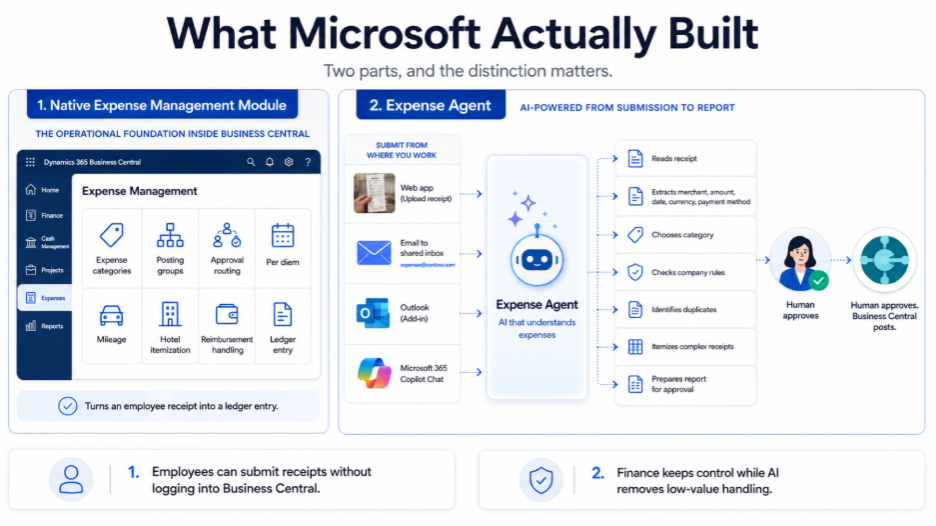
A human still approves. Business Central still posts. The finance team still controls the rules. What changes is the amount of low-value handling required to get a receipt from someone’s phone into the ERP.
There is one detail finance and IT teams should not miss. The Expense Agent runs on Anthropic’s models, which means Anthropic has to be approved as a data subprocessor in the Microsoft 365 admin center before the capability works. Many Business Central users are used to Copilot features running on Azure OpenAI, so this approval step may surprise teams that already have a formal AI vendor review process.
The business case is straightforward. Field teams, drivers, technicians, sales reps, and occasional travelers can submit expenses without needing full Business Central access. For companies paying per-user fees to third-party expense tools largely because employees need a simple way to submit receipts, that changes the economics.
How It Works: The Life of a Receipt
The easiest way to understand the Expense Agent is to follow one receipt from submission to posting.
Imagine a sales rep checking out of a hotel in Denver after a three-day trip. The folio includes room charges, taxes, parking, breakfast, and one minibar charge that finance probably does not want reimbursed.
The employee takes a photo of the receipt on the way to the airport. From there, the Expense Agent starts doing the work that would normally sit with the employee, manager, and finance team.
1. It reads the receipt
The agent first extracts the basic transaction details: merchant name, date, amount, currency, payment method, receipt number, and a short description of what was purchased.
That removes the first layer of manual entry. The employee does not have to type every detail into an expense form, and finance does not have to fix avoidable data-entry mistakes later.
2. It chooses the expense category
Next, the agent assigns the receipt to the most likely expense category. This is where setup quality matters.
A vague category description like “Hotel” gives the agent very little to work with. A stronger description that explains what counts as lodging, what should be itemized separately, and what should be excluded will produce better results.
In other words, the AI is only as useful as the expense structure finance gives it.
3. It itemizes complex receipts
A hotel bill is rarely one clean expense. The agent can separate the folio into individual lines such as room charge, tax, parking, breakfast, and minibar.
That separation is important because each line may need different treatment. The room charge may be allowed. Parking may be allowed. Breakfast may depend on policy. The minibar charge may be marked as non-refundable and kept out of the posting flow.
This is where the tool starts to feel less like receipt capture and more like expense control.
4. It separates what is allowed from what is owed
Expense systems often confuse two ideas: refundable and reimbursable.
Refundable means the expense is allowed under company policy and can be recognized by the business. Reimbursable means the company owes the employee money for it.
A client dinner paid with a corporate card may be refundable but not reimbursable, because the company already paid. A hotel room paid out of pocket may be both refundable and reimbursable, because the expense is allowed and the employee needs to be paid back.
The Expense Agent helps apply that distinction before the report reaches finance.
5. It handles per diem and mileage
For per diem claims, the agent can use trip details such as itinerary, hotel dates, and eligible travel days to calculate the allowance. If breakfast was included at the hotel, the allowance can be reduced based on the company’s rules.
Mileage follows a similar logic. The employee confirms the start and end points, the agent proposes the route, calculates the distance using the company’s mileage rate, and attaches map evidence so the approver is not relying only on the employee’s claim.
6. It checks the expense against company rules
Once the report is assembled, the policy rules run.
Finance can set numeric controls that flag expenses above a threshold, require a justification, demand a receipt number, or block spend beyond a defined limit. Some issues can be treated as warnings that the employee can explain. Others can be hard stops that prevent submission until corrected.
The more advanced version, where finance teams write the travel policy in plain English and the agent reasons against it, is expected later. For now, the preview should be understood around structured rules, not full policy interpretation.
7. It prepares the report for approval and posting
After the expense lines are prepared, the report moves to approval. A manager reviews it, either in the web app or inside Business Central, and signs off.
Business Central then handles the accounting side. It can create general ledger entries, employee ledger entries for reimbursable amounts, project ledger entries for job-related spend, and billable lines that can later be invoiced back to the customer. Reimbursement still runs through the normal payment journal.
Make expense management easier to submit, approve, and control inside Business Central
What It Does Well?
Microsoft has aimed this release at a very real cost problem. Many companies pay for named expense users who do not live in finance systems. They travel once a quarter, submit a handful of receipts, and still create recurring software cost. A consumption-based model changes that conversation, especially for companies with large field teams or occasional travelers.
The agent also handles work that finance teams should not be doing manually at scale. Receipt reading, duplicate detection, category suggestion, itemization, and basic rule checks are exactly the kind of tasks where automation can reduce low-value effort without removing financial control.
The project and billable expense flow is another advantage. Because the expense lands inside Business Central, job-related spend can connect more naturally to project accounting and customer invoicing. That reduces the need to move data from a separate expense tool into the ERP and then reconcile it later.
In short, Microsoft’s strongest case is not that it has built the most mature expense product on the market. It is that it has removed a lot of the friction for Business Central customers whose expense needs are practical, periodic, and closely tied to the ledger.
Where It Still Breaks?
The biggest gap is corporate card feeds. For many mid-market finance teams, this is not a nice-to-have. It is the center of the expense process. They need card transactions imported, matched to receipts, reconciled, reviewed, and posted without a spreadsheet chase at the end of the month. Microsoft’s release recognizes card spend as a payment method, but it does not yet automate corporate card import and matching.
That alone will keep many companies on their existing expense platforms for now.
Geography is the second limitation. The preview is US-only and English-only. The United Kingdom, Australia, and New Zealand are expected later, with other markets following after that. Global Business Central customers should not treat this as a ready-to-run replacement until the rollout covers their locations, languages, tax treatment, and policy requirements.
Policy enforcement is also not complete. Numeric rules are useful, and they cover many basic controls: flag expenses above a threshold, require justification, demand receipt details, or block spend beyond a limit. The more interesting capability, where the agent interprets a written policy and reasons against it, is not in the preview.
Finally, it is still a preview. Microsoft may call it production-ready, but finance teams should treat any rollout as a controlled pilot rather than a broad replacement decision. Preview timelines move. Capabilities shift. Edge cases appear when real employees start submitting real receipts.
Microsoft Expense Agent vs Mature ISV: Which One Fits Your Finance Team?
Should Microsoft’s native expense tool replace part of your current expense process, or should your existing add-on stay in place for now? The answer depends less on the feature list and more on the expense reality inside your business.
| If Your Finance Team Needs… | Microsoft Native Expense Tool + Agent Makes Sense When… | A Mature ISV Still Makes Sense When… |
|---|---|---|
| Lower cost for occasional submitters | You have employees who submit receipts only occasionally, and you do not want to pay a monthly named-user fee for each one. Microsoft’s consumption-based model is attractive here. | Your submitters use the system frequently enough that a per-user model is already justified by the workflow maturity and convenience. |
| Simple receipt submission | Web app, email, Outlook, and Copilot Chat submission are enough for your users. This works well for employees who need a simple way to submit receipts without logging into Business Central. | Your users depend on full mobile apps, offline capture, receipt scanning on the road, push reminders, and a mature field experience. |
| Corporate card reconciliation | Corporate card feeds are not central to the process yet, or finance can continue handling card spend through another workflow for now. | Card reconciliation is the core pain. If you need Visa, Mastercard, or Amex transactions imported and automatically matched to receipts, the ISV still wins. |
| Multi-country expense handling | Your rollout is US-first, English-first, and your policy rules are relatively straightforward. | You operate across countries and need localized tax rules, country-specific per diem, mileage policies, currency handling, and compliance maturity. |
| AI-assisted expense review | You want receipt reading, categorization, duplicate detection, itemization, and basic policy checks inside the Business Central process itself. | You already rely on a mature expense platform with proven extraction accuracy, exception handling, and AI features tested across high-volume usage. |
| Project and billable expense flow | You want expenses to connect more naturally with Business Central jobs, project ledger entries, customer billing, and reimbursement posting. | Your current ISV already handles project expenses well, and the reconciliation back into Business Central is stable enough. |
| Policy control | Numeric rules, thresholds, justifications, and basic hard stops are enough for the first phase. | Your expense policy is complex and needs mature rules, layered approvals, local compliance, and advanced exception workflows. |
| Product confidence | You are comfortable piloting a Microsoft preview capability on controlled use cases before a wider rollout. | You need a production-tested expense platform today, with years of vendor support, edge-case handling, and proven stability. |
Here’s the Tip
The practical move is not to replace everything at once. Start by piloting Microsoft’s native expense tool where the risk is low and the cost problem is obvious: occasional travel, simple receipt capture, straightforward approvals, and project-linked expenses. Keep the ISV where the business depends on card feeds, global policy handling, and mature expense operations.
Alternatives to Expense Management in Business Central
Microsoft’s native expense management capability is important, but it is not the only option available to Business Central users. In fact, many companies already manage expenses through mature third-party tools that integrate directly with Business Central. The right choice depends on how simple or complex your expense process is.
1. Continia Expense Management
Continia is one of the more established expense management options built for Business Central. It supports mobile expense submission, OCR-based receipt scanning, credit card transaction imports, automatic receipt matching, mileage tracking through Google Maps, and configurable approval workflows.
This makes it a strong fit for companies that need end-to-end automation from receipt capture to approval and posting, especially where credit card reconciliation is a recurring finance workload.
2. Zetadocs Expenses
Zetadocs Expenses is another cloud-based option for capturing, submitting, approving, and posting expenses into Business Central. It supports mobile receipt capture, multi-level approval workflows, spend limits, policy controls, reminders for overdue approvals, and currency conversion.
This is useful for organizations that want a structured expense approval process with better visibility before expenses are posted into Business Central.
3. ExpenseIn
ExpenseIn focuses on real-time visibility and finance control. Employees can submit expenses through the mobile app, while finance teams get better insight into spending patterns, approvals, compliance, and reporting.
It is a practical choice for teams that want stronger reporting, automated workflows, and direct Business Central integration without relying on manual re-entry.
4. Expensify
Expensify is a broader expense management platform with strong automation features. It offers receipt capture through SmartScan OCR, corporate card transaction import, automated approval workflows, global currency and tax support, and integrations with travel-related apps.
For companies with high receipt volume, frequent travel, corporate card usage, or international expense needs, Expensify may still offer a more mature experience than Microsoft’s native preview capability.
5. Rydoo
Rydoo is designed for mobile and web-based expense submission, real-time analytics, policy enforcement, mileage calculation, and advanced reporting. It is useful for teams that need fast expense capture, stronger spending visibility, and automated compliance checks.
Rydoo can be a good fit for organizations where finance leaders want both employee convenience and real-time control over expense activity.
Getting It Right the First Time
Expense management never works in isolation. It runs across finance, HR, projects, and operations, and this release adds an AI agent, Copilot Credit costs, and a real choice between Microsoft's native tool and a third-party add-on. The decision and the setup now matter as much as the software itself.
That's where we come in. At Nalashaa, we help you:
- Assess your current expense process, volumes, and cost
- Choose the right fit: Microsoft's native Expense Agent or an ISV like Continia or Zetadocs
- Configure categories, policies, per diem, mileage, posting groups, and approvals
- Set up integrations, card handling, and correct GL, project, and reporting posting
- Govern Copilot Credit spend so AI costs stay predictable
- Train your employees and approvers so the rollout actually sticks
Get this right and you avoid the usual failures: the wrong tool, over-customisation, runaway AI costs, broken posting, and low adoption.
The smartest first move is a short, honest assessment of what you have and where you're headed. Send us your real expenses and we'll show you, native or add-on, exactly what fits and what it will cost. Book a 30-minute fit assessment.
Frequently asked
Is Business Central Expense Management free?
The software is included with Business Central. The AI agent is not free: it costs 50 Copilot Credits per receipt, about 40 cents. Submitters don't need a paid BC seat, but approvers and finance staff still do.
Does it replace Continia or Zetadocs?
For simple expense workflows, increasingly yes. For corporate-card reconciliation, multi-country per diem, and native mobile apps, not yet. Most companies will run both for a while.
What AI model powers the Business Central Expense Agent?
The Expense Agent runs on Anthropic's models, not Azure OpenAI. Because of that, Anthropic must be approved as a data subprocessor in the Microsoft 365 admin center before the capability will work — a step that can surprise teams whose Copilot features normally run on Azure OpenAI and who have a formal AI-vendor review process.
What do you need to set up before using the Expense Agent in Business Central?
Two things. First, consumption-based Copilot Credits billing must be enabled in your Business Central environment, since the agent processes each receipt using credits. Second, Anthropic must be approved as a data subprocessor in the Microsoft 365 admin center. After that, the quality of results depends on how well your expense categories and policy rules are described.
Recent Posts

Dynamics 365 Activate: Do You Still Need a Migration Partner?
Oct 05, 2026

Tableau to Power BI Migration: A Practical Guide
Sep 09, 2026
SAP ECC to Dynamics 365 Finance & SCM Migration Guide
Sep 09, 2026
Category
Our Expertise



About Author

Aiswarya Madhu
Aiswarya Madhu is an experienced content writer with extensive expertise in Microsoft Dynamics 365 and related Microsoft technologies. With over four years of experience in the technology domain, she has developed a deep understanding of Dynamics 365 applications, licensing, integrations, and their role in driving digital transformation for organizations across industries.
Never Miss News
Want to implement Dynamics 365?
We have plans which will meet your needs, and if not we can tweak them around a bit too!