From Copilot to Agentic ERP [Business Central Gets AI Agents for Finance and Sales]
Jun 18, 2026 Aiswarya Madhu
Most companies running Dynamics 365 Business Central are not getting full value from what they already own. Copilot is included with the license, and autonomous agents can now take real operational work off the team's hands. Yet in many businesses, the third day of the month still looks familiar: controllers chasing invoices, clerks keying sales orders from emails, and the close slipping by another day.
The gap is rarely the technology. It is knowing what is available, what to switch on, and in what order.
This guide walks through exactly that: the free capability you are likely underusing, the agents worth deploying, where they can break, and the sequence that helps you get value without expensive mistakes.
First, the Difference That Governs Everything: Copilot Assists, Agents Act
Treating Copilot and agents as the same thing is one of the most common and costly misunderstandings.
Copilot:
Think about the small friction points in a normal day. You need to find a posted invoice but can't remember the number. You're staring at a bank statement, matching lines one by one. A colleague asks for a quick summary of a customer's recent activity and you start scrolling. These are the moments Copilot is built for.
Copilot inside Business Central helps you work faster when you ask it to. Copilot Chat answers questions and finds records. Bank account reconciliation assistance proposes matches between statement lines and ledger entries. Summarize condenses a long record into a few lines. Analysis assist turns a list into a pivot-style view from a plain-language prompt.
In every case, you stay in control. You prompt Copilot, it responds, and nothing is posted until you review and confirm. And because these features are included with your Business Central license at no extra cost, a team that isn't using them is leaving functionality it already paid for sitting untouched.
If you do nothing else after reading this, turn these on and get your team using them. It's the lowest-risk way to see what AI in Business Central actually feels like.
Agents:
Now think about the tasks nobody enjoys. Vendor invoices arriving as PDFs that someone keys in by hand. Sales orders typed from customer emails, one line at a time. Work that follows the same pattern every time and quietly eats hours. This is where agents come in.
Agents work differently from Copilot. They are autonomous, metered, and designed to move a process forward in the background. You give an agent an objective and clear boundaries, and it reads the data, makes decisions within its permissions, and escalates to a person when it hits something that needs judgment.
Why Business Central Qualifies as an Agentic ERP?
"Agentic" should not be treated as another word for automation. Traditional automation follows fixed rules. When a condition is met, the system performs the next defined action. That model is useful, but it is limited because every possible path has to be planned in advance.
An agent works with more context. It is given a goal, permissions, and boundaries, and then it works through the task by reading relevant data, deciding the next step within those limits, continuing where confidence is high, and asking for human input when judgment is required.
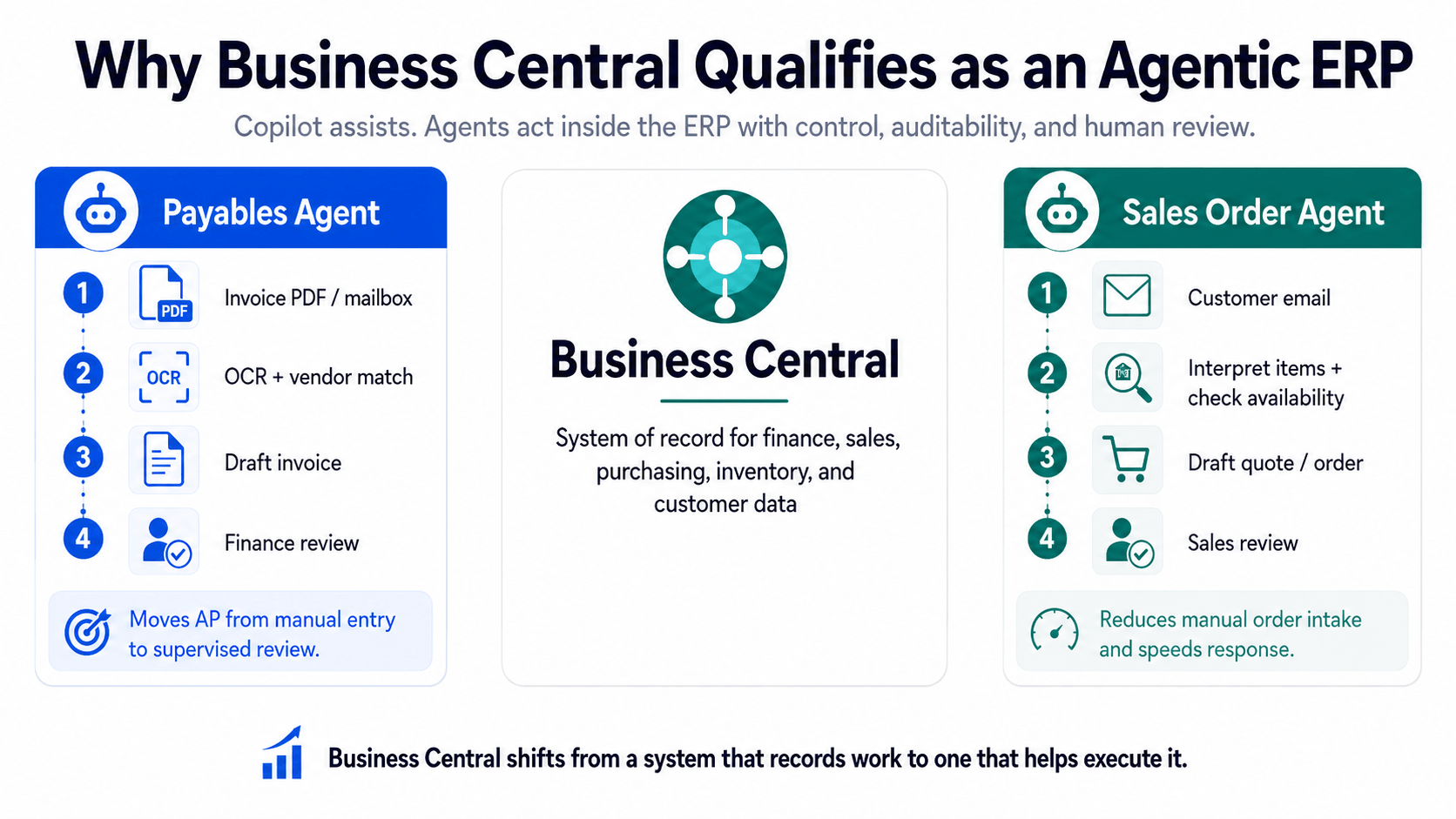
That distinction matters in Business Central because the agents are not disconnected AI tools sitting outside the ERP. They operate inside the system of record, where finance, sales, purchasing, inventory, and customer data already live. As a result, the work they perform is grounded in the same environment that runs the business, while still remaining governed, traceable, and auditable.
Each agent runs with its own permissions, profile, and operating boundaries. It is restricted to the data and actions it is allowed to access, and every action it takes can be attributed, reviewed, and controlled. Leaders also have the ability to stop agent activity when needed. That balance between autonomy and traceability is what makes the model usable in finance and operations, where control matters as much as speed.
The clearest way to understand this shift is to look at what each agent changes in the day-to-day work.
The Payables Agent: What Changes in Accounts Payable
Without the Payables Agent, vendor invoice processing still depends heavily on manual effort. Invoices arrive by email as PDFs. Someone opens each file, reads the details, finds the vendor in Business Central, enters the header and line information, decides which general ledger accounts to use, and saves the draft for approval. Copilot can help around the edges, but the reading, matching, and keying still happen invoice by invoice.
The Payables Agent changes the first mile of that process. It monitors a dedicated mailbox, picks up invoice PDFs as they arrive, and uses OCR to extract the required information. It then identifies the vendor against existing records, suggests general ledger classifications based on how similar purchases were coded in the past, and prepares a draft invoice for review.
The finance team's role does not disappear. It changes. Instead of typing every invoice into Business Central, users review the agent's drafts, handle exceptions, and make decisions where judgment is needed.
The agent also has clear boundaries. It does not post invoices on its own, and it does not guess its way through uncertainty. If it cannot confidently identify a vendor, it pauses and asks a designated supervisor for input. If it creates a new vendor record, that record remains blocked until a person verifies it. It also operates within defined guardrails, such as limits on email volume, PDF length, and attachment size.
The net difference is meaningful. Accounts payable moves from a queue of manual data entry to a supervised process where routine invoices are prepared automatically and people focus on review, control, and exceptions. The value is not simply faster invoice entry. It is the ability to stop typing most routine invoices in the first place.
The Sales Order Agent: What Changes in Order Intake
Without the Sales Order Agent, email-based order intake can still be slow and inconsistent. A customer sends a quote request or order by email, often using informal product names or incomplete details. Someone has to read the message, identify the customer, interpret what they mean, check availability, create the quote or order, and follow up by email if anything is missing.
The Sales Order Agent takes on much of that preparation work. It reads incoming customer emails, matches the sender to a customer record, interprets requested items even when they are described loosely, checks availability, and drafts a branded quote. If information is missing, it can continue the email conversation to clarify details before the quote moves forward.
Here too, the control remains with the business. A person must review and approve every outbound message before it reaches the customer. The agent prepares the response, but it does not send customer-facing communication unsupervised. That keeps the customer voice and commercial judgment under human control while reducing the manual effort required to prepare each quote.
The net difference is reclaimed time on the intake side of order-to-cash. Instead of building every quote from scratch, the team reviews what the agent has prepared, resolves exceptions, and keeps the process moving with less manual handling.
What Comes Next for Business Central Agents
Business Central's move toward agentic ERP is not a one-time feature release. It is a direction of travel. With each release wave, Microsoft is expanding how much operational work Business Central can support through governed AI agents.
Here are the key areas to watch:
1. Custom Agents Will Become More Important
The biggest shift is that agents will not be limited to what Microsoft ships out of the box.
With the AI Development Toolkit, teams can begin designing agents around their own business processes. An agent's role can be described in natural language, permissions can be defined, and behavior can be tested in a sandbox before moving closer to production.
That matters because every business has workflows that standard features do not fully cover. One company may need support for recurring service billing. Another may need help with vendor follow-ups, project cost reviews, credit holds, or exception routing.
As this capability matures, the question changes from:
"Which agents are available in Business Central?"
to
"Which repeatable processes in our business are ready for agent support?"
2. Purchase and Sales Automation Will Go Deeper
The next wave of value will come from agents moving beyond basic preparation work.
In payables, for example, automation is already moving from invoice data capture toward more controlled finance scenarios such as purchase-order matching. That is important because it brings the agent closer to financial validation, not just transaction creation.
The same pattern is likely to continue across sales and purchasing. Agents will gradually handle more routine steps, while people remain responsible for approvals, exceptions, and business judgment.
3. Agent Coordination Will Become the Bigger Opportunity
The long-term value is environment not just one agent doing one task.
A mature agentic ERP could have one agent supporting sales order intake, another assisting with purchasing or payables, and another helping with reconciliation or reporting.
The advantage is that all of them operate on the same governed system of record. That common foundation allows work to move across functions without people manually stitching every step together.
4. Readiness Will Matter More Than Availability
New agent capabilities will continue to arrive, but availability alone does not create value.
Leaders need to prepare the business by:
- Using the AI tools already available in Business Central
- Cleaning the data agents will depend on
- Documenting the workflows agents will follow
- Defining approval and exception-handling rules
- Training teams to supervise AI-assisted work
- Modeling usage and cost before scaling
The companies that benefit most will not be the ones that switch on agents first. They will be the ones that prepare the foundation early.
5. Agentic ERP Will Compound Over Time
Business Central agents will keep improving with each release wave. That means agentic ERP should not be treated as a feature to evaluate once and revisit later.
It is a capability that compounds.
The more disciplined your data, workflows, permissions, and governance are today, the easier it becomes to use future agent capabilities with confidence.
The practical message for leaders is simple: start preparing now. Use Copilot, clean the data, document the processes, and build the habit of supervising AI-assisted work. When the next wave of Business Central agents arrives, your organization will be ready to use it instead of starting from zero.
Move from AI Curiosity to Agentic ERP Readiness
Companies that get real value from Business Central agents do not turn on every AI capability at once. They move in a controlled sequence, where each step prepares the business for the next one.
1. Start with the Copilot Features Already Included
Begin with the AI capabilities that come with the Business Central license.
Use Copilot Chat, Summarize, analysis assist, and bank account reconciliation assistance before moving into autonomous agents. These are low-risk starting points because they do not act independently and do not add metered agent cost.
They help users save time, become familiar with AI inside Business Central, and build confidence before the organization moves into agent-led workflows.
2. Clean the Data Before You Automate
Data readiness is where many agent projects succeed or fail.
Before enabling agents, de-duplicate vendors and customers, clean up account mappings, review tax setup, and document approval chains.
This work is not glamorous, but it decides whether agents reduce effort or simply create more exceptions for the team to manage.
3. Pilot One Agent on One High-Volume Process
Once the foundation is clean enough, choose one agent and one process.
For finance teams, this may mean starting with the Payables Agent on overhead invoices from known vendors. For sales operations, it may mean using the Sales Order Agent on recurring orders from familiar customers.
The best pilot is not the most complex process. It is the process that is repetitive, measurable, and supported by reliable data.
4. Keep Human Review Fully Active
During the pilot, the agent should run with human review turned on.
Run it alongside the existing process for a defined period, such as one month, and measure how well it performs. Track how many transactions are prepared correctly, how often a human has to intervene, how much review time drops, and where the agent struggles.
The goal is not only to prove that the agent works. It is to understand where it works well enough to scale.
5. Scale Only After Trust Is Built
Do not widen the scope just because the agent is available.
Expand only after the pilot proves accuracy and the team trusts the output. Add more vendors, customers, document types, or order patterns gradually.
Confidence should set the pace, not enthusiasm.
6. Build Custom Agents When the Foundation Is Ready
Custom agents should come later.Once the team understands how agents behave and the data foundation is disciplined, the AI Development Toolkit can be used to target processes specific to the business.
Even then, the approach should remain controlled. Start in the sandbox, keep the scope narrow, grant minimal permissions, and build human approval into the points where judgment matters.
Sequenced this way, each step lowers the risk of the next. Rushed, the result is usually the opposite: an agent acting confidently on weak data, a finance team that does not trust the output, and an AI rollout that quietly becomes manual again.
Bottomline
Business Central agents make it possible to move from manual execution to supervised automation. The Payables Agent can prepare vendor invoices. The Sales Order Agent can support order intake. Copilot can help users find, summarize, analyze, and reconcile information faster. But the real value does not come from simply switching these features on.
It comes from having the right foundation around them. Clean customer records, clear posting setups, documented approval rules, defined exception paths, controlled permissions, predictable Copilot Credit usage, and users who trust the output all decide whether agents reduce work or create more review queues.
That is why agentic ERP should not begin with a broad rollout. It should begin with a readiness check.
Start by asking where your Business Central environment stands today.
- Is the data clean enough for agents to use?
- Are finance and sales workflows documented clearly enough to automate?
- Which high-volume process is safe enough for a first pilot? Where should human review remain mandatory?
- What will usage and cost look like when the agent moves from testing to production?
A Dynamics 365 Business Central expert can help answer those questions before the rollout begins. The goal is not just to enable the feature, but to prepare the environment, choose the right first use case, configure the right controls, train users to supervise agent output, and scale only after accuracy and trust are proven.
Agentic ERP will keep evolving, but the companies that benefit first will be the ones that introduce it with discipline. Book a 30-minute consultation call with our Business Central specialists to assess your readiness, identify the right first use case, and understand what needs to be fixed before agents go live.
FAQs
What is agentic ERP?
Agentic ERP is an ERP system where AI agents do more than surface insights or answer questions. They can take action within defined business rules.
For example, an agent can read a vendor invoice, identify the supplier, match it to a purchase order, prepare the entry, and route it for approval without waiting for someone to key in every detail manually.
The shift is simple: ERP moves from being a system your team operates to a system that can operate alongside your team, while still staying within the guardrails you define.
Who offers the best agentic ERP solutions?
There is no single "best" agentic ERP platform for every business. The right choice depends on company size, industry, existing ERP environment, data maturity, and the processes you want agents to handle.
For large enterprises, SAP and Oracle are usually the strongest contenders. SAP has made a major push with Joule and its Autonomous Enterprise vision, offering a broad catalog of agents across finance, procurement, supply chain, and HR. Oracle is also a strong fit for complex enterprise environments, especially where multi-entity, multi-currency, and regulatory finance requirements are central.
Microsoft Dynamics 365 is a natural fit for organizations already invested in the Microsoft ecosystem. Its Copilot and agent capabilities work closely with Dynamics 365, Microsoft 365, Azure OpenAI, Teams, Outlook, and Power Platform, making it especially useful for businesses that want AI embedded into everyday finance, sales, service, and operations workflows.
Infor and IFS are also relevant in the enterprise tier, particularly for industry-specific and asset-intensive environments. In the mid-market, platforms such as Dynamics 365 Business Central, NetSuite, Sage Intacct, Acumatica, and Epicor are adding AI and agentic capabilities at different speeds.
For SMBs, the decision is more practical: choose the ERP that fits your business process first, then evaluate how mature its AI agents are. Look at whether agents are included in the base plan or priced as add-ons, what processes they can handle today, how much control users retain, and how well the system supports governance, approvals, and auditability.
How is an AI agent different from a Copilot or chatbot in ERP?
A Copilot can answer questions, summarize records, draft text, or help users analyze information. It responds when a person asks for help.
An AI agent works through a defined task with more autonomy. It can read data, make decisions within its permissions, continue the process where confidence is high, and escalate to a person when judgment or approval is needed.
In Business Central, Copilot may help summarize a vendor's history or find a record faster. The Payables Agent can go further by reading an invoice, identifying the vendor, suggesting the account classification, and preparing the document for review.
Does Business Central have agentic AI?
Yes. Dynamics 365 Business Central includes Copilot capabilities and is also moving into agentic ERP through built-in autonomous agents.
Copilot helps users work faster inside Business Central by supporting tasks such as record search, summarization, analysis, and bank reconciliation assistance. Agents go a step further by handling defined operational work, such as preparing vendor invoices or supporting sales order intake, under human supervision.
This means Business Central is no longer only a system where users record transactions. It is becoming a system that can help prepare, route, and execute parts of routine business processes.
What can agentic AI actually do inside an ERP?
Agentic AI is best suited for high-volume, repeatable work where the process is clear and the data is reliable.
Inside an ERP, agents can support tasks such as accounts payable processing, invoice reading, vendor matching, purchase order matching, sales order intake, approval routing, bank reconciliation, exception flagging, and month-end preparation.
The goal is not to remove people from finance or operations. The goal is to reduce the manual work around routine transactions, so teams can spend more time on review, exceptions, control, and business decisions.
How does agentic AI connect to or integrate with ERP systems?
Agentic AI can connect to ERP systems in two ways: through native ERP capabilities or through connected platforms and extensions.
The most reliable agents usually operate inside the ERP itself because they work on governed, permissioned business data. In Business Central, agents operate within the Business Central environment and follow the permissions, controls, and data access rules defined for the system.
For workflows that extend beyond ERP, agents can connect through tools such as Copilot Studio, Power Platform, APIs, and integration frameworks. This allows ERP agents to work with Microsoft 365 apps, external systems, documents, emails, and third-party business applications while still respecting governance and security controls.
Are agentic ERP agents safe for finance operations?
Agentic ERP agents can be safe for finance operations when they are introduced with the right controls.
The recommended model is human-supervised automation. Agents can read, prepare, classify, match, and route work, but approval gates, exception queues, review screens, and permission controls should remain in place before anything financially sensitive is posted or sent forward.
In Business Central, this is especially important for payables, sales orders, approvals, and reconciliation. Agents should prepare the work. People should approve the decisions that carry financial, customer, or compliance risk.
Clean master data, clear approval rules, limited permissions, audit trails, and a controlled pilot are what make agentic ERP trustworthy in finance and operations.
Recent Posts

Dynamics 365 Activate: Do You Still Need a Migration Partner?
Oct 05, 2026

Tableau to Power BI Migration: A Practical Guide
Sep 09, 2026
SAP ECC to Dynamics 365 Finance & SCM Migration Guide
Sep 09, 2026
Category
Our Expertise



About Author

Aiswarya Madhu
Aiswarya Madhu is an experienced content writer with extensive expertise in Microsoft Dynamics 365 and related Microsoft technologies. With over four years of experience in the technology domain, she has developed a deep understanding of Dynamics 365 applications, licensing, integrations, and their role in driving digital transformation for organizations across industries.
Never Miss News
Want to implement Dynamics 365?
We have plans which will meet your needs, and if not we can tweak them around a bit too!