AI Self-Healing in Power Automate Desktop Flows: What You Need to Know
May 18, 2026 Aiswarya Madhu
Microsoft has shipped a feature that lets your desktop flows repair themselves mid-run using AI. That sounds like an obvious win until you realize that a flow which auto-recovers incorrectly and keeps running is, in some ways, worse than one that just stops.
That tension is what this guide is about. Not whether to use self-healing (for most organizations running at scale, the answer is yes), but how to deploy it in a way that captures the upside without creating a new category of hard-to-detect failures.
This guide is written for automation leads responsible for both governance decisions and technical deployment.
Important: Self-healing is currently in public preview. It is available at no additional cost for organization premium accounts, but is subject to change before general availability. It is not currently available in government or sovereign cloud environments.
Why Desktop Flows Break So Often?
The business case for desktop automation is built on consistency. A process that runs reliably every night, without staff involvement, at a fraction of the manual cost. That case holds as long as the underlying applications stay the same.
They don't.
What most organizations discover after the first year of running Power Automate Desktop at scale is that the initial build cost is only part of the investment. The larger and less visible cost is keeping flows operational as the environments they operate in continue to change. A vendor refreshes their portal. An internal system gets a routine patch. An application update renames a field. None of these changes are flagged as automation risks, because to the teams making them, they aren't. But each one is a potential point of failure for any bot running against that interface.
The result is a pattern that plays out across most automation programmes: a growing backlog of broken or degraded flows, a disproportionate share of technical time spent on reactive fixes, and a widening gap between what the programme was projected to deliver and what it actually does.
Industry research places Power Automate RPA maintenance spend at roughly three to four times the original licensing cost. A significant portion of that is selector repair work — the cycle of identifying a broken flow, locating the changed element, updating the selector, testing, and redeploying. It is skilled work, it takes time, and it adds no new capability to the organization.
Microsoft's self-healing feature is designed to interrupt that cycle. Rather than waiting for a failure to surface and be escalated, the system detects the problem at runtime, resolves it automatically using AI, and keeps the process running. For decision makers, the relevant question is not how the technology works. It is whether the deployment is structured to capture that value reliably and without introducing new risk.
How AI Self Healing in Power Automate Desktop Works in Practice
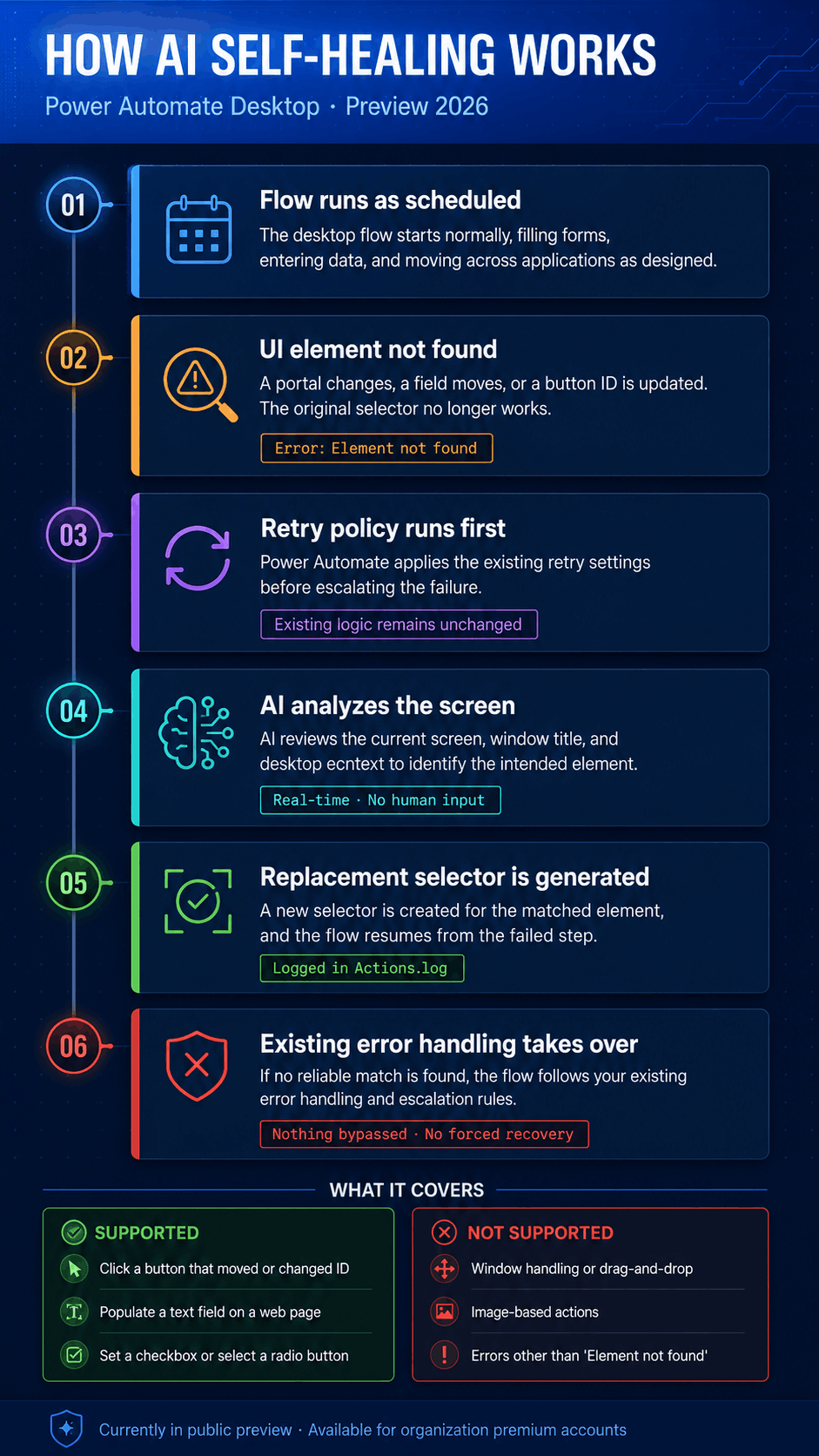
When a supported flow action cannot locate its target UI element at runtime, Power Automate desktop does not immediately fail. It works through a structured recovery sequence before escalating the error:
Retry Policy → Self-Healing AI → Custom Error Handling Rules → Continue or Fail
The important point is that self-healing slots into this sequence without displacing anything already in place. Existing error handling, notifications, and escalation paths remain intact. The AI recovery attempt happens upstream of all of it, as one additional layer of resilience before conventional error handling takes over.
If the AI attempt succeeds, the flow continues and the disruption is absorbed entirely. If it does not, the process behaves exactly as it would have before the feature was enabled.
What the System Analyses at the Point of Failure
When self-healing is triggered, Power Automate captures the current state of the screen and sends it to a combination of two AI models, GPT-4.1 mini and Claude Sonnet 4.5, along with the title of the affected window and a full image of the desktop environment.
The models analyze this visual context, identify the element most likely to match the original intent, and generate a replacement selector. The decision is made in real time, without human input, and without interrupting the flow run.
This is a meaningful capability in environments where application interfaces change frequently and without coordination with automation teams. It is also, by design, a probabilistic one. The models make an informed inference, not a guaranteed match. That distinction matters when it comes to governance, particularly for flows running unattended on sensitive processes.
The Visibility Gap That Requires Attention Now
Every run where self-healing is invoked generates a log entry containing the outcome of the attempt and the selector the AI produced. In principle, this gives organizations the audit trail they need to understand how the feature is performing across their flow portfolio.
In practice, there is a significant limitation. The Power Automate portal does not currently surface this information. Accessing it requires enabling a registry setting on each individual machine and reading log files locally. For organizations running automations across multiple machines or environments, that is not a workable monitoring approach at scale.
Until Microsoft ships portal-level visibility for self-healing activity, organizations need custom tooling to answer the questions that matter: how often is self-healing being triggered, which flows are relying on it regularly, and are there cases where the AI selected the wrong element and the flow continued regardless.
What It Covers and What It Doesn't?
Self-healing only triggers Element not found errors, and only on actions that interact with a single UI element. Understanding the boundaries before you enable it prevents false confidence in flows that are not actually covered.
| Scenario | Covered? |
|---|---|
| Click a button that moved or got a new ID | Yes |
| Set a checkbox state when element changed | Yes |
| Populate a text field on a web page | Yes |
| Select a radio button with a changed selector | Yes |
| Window handling (focus/close window) | No |
| Screen or image-based actions | No |
| Drag-and-drop | No |
| Actions interacting with multiple elements | No |
| Designer test runs (console and cloud runs only) | No |
| Any error type other than Element not found | No |
Self-healing does not replace a comprehensive error-handling strategy. Timeouts, application errors, data validation failures, and network issues all need conventional handling. A well-designed flow still needs proper error architecture. Self-healing is an additional layer, not a substitute.
The Admin Setup Chain: Where Most Pilots Stall
This is where the gap between "sounds easy" and "actually working in your environment" becomes most apparent. Self-healing requires six distinct configuration steps across three separate admin centers. Miss any one of them and the feature silently does nothing, with no clear error message to explain why.
Step 1: Microsoft 365 Admin Center: Enable Anthropic as a Subprocessor
Go to Copilot, then Settings, then AI providers operating as Microsoft subprocessors and enable Anthropic. This is enabled by default in US commercial cloud. EU/EFTA/UK tenants must explicitly opt in and accept that Anthropic processing currently sits outside the EU Data Boundary.
Step 2: Power Platform Admin Center: Allow External Models
Under Copilot, then Settings, then External models, enable Anthropic as a subprocessor at environment or environment group level.
Step 3: Enable Cross-Region Data Movement
In Manage, then Environments, then your environment, then Generative AI features, accept the terms and enable Move data across regions. Not required for US cloud regions.
Step 4: Enable Copilot Features at Environment Level
In Manage, then Environments, then Settings, then Product, then Features, turn on the Copilot features toggle.
Step 5: Deploy Power Automate for Desktop v2.66+
Self-healing requires build 2603 (installer 2.66.149.26061) or later on every machine that runs affected flows.
Step 6: Enable Per Action in the Flow Designer
Hover over a supported single-element action. If eligible, a visual indicator appears. Open Error handling settings and toggle Self-healing (Preview) on.
Note:
The configuration involves decisions that go beyond technical setup. Here are the areas where organizations most commonly need support:
Getting the sequence right across admin centers. The setup spans three separate Microsoft admin centers and involves steps that interact with each other. An out-of-order configuration silently disables the feature with no clear error to indicate why.
Understanding what each step commits you to. Enabling Anthropic as a subprocessor is not a routine toggle. It has data handling implications that should be reviewed before the setting is confirmed, not after.
EU, EFTA and UK compliance. Anthropic's processing currently sits outside the EU Data Boundary. Organizations in these regions need a data protection impact assessment completed before configuration begins. This typically requires legal, compliance, and IT to work in coordination, and is often underestimated in terms of time.
Cross-functional alignment. The steps that require the most time are rarely the technical ones. Getting the right sign-off from the right stakeholders across M365, Power Platform, and data governance functions is where most timelines slip.
Government and regulated cloud environments. Self-healing is not currently available in GCC, GCC High, DoD, or sovereign clouds. There is no published timeline for that to change.
Understand the Risk Before You Enable It
Microsoft is transparent about the limitation in its own documentation:
"Because self-healing uses generative AI, it might occasionally identify an unintended UI element." Microsoft Learn, Self-healing (preview)
This is worth taking seriously. The feature makes an informed inference at the point of failure, not a guaranteed match. In most cases it will be correct. But in a small number of cases it will not, and the flow will continue regardless, carrying that error forward into whatever process comes next.
For flows where a human is present and can course-correct, the exposure is limited. For processes running overnight without oversight, the implications are different. A flow that posts to the wrong field, submits to the wrong record, or triggers the wrong action on a financial or compliance-sensitive process may not surface that error until significant downstream damage has already occurred.
So, before you enable anything, there are things worth knowing about your own environment
The framework above only works if you already have a clear picture of what your organization is running. In practice, most automation portfolios have grown incrementally, with flows built across teams, over time, without a consistent classification system.
Here are the questions that need answers before self-healing is enabled at scale:
Which flows run unattended and when?
Overnight and early-morning runs with no human in the loop carry the highest exposure if the AI selects the wrong element.
Which processes are irreversible?
Financial postings, record updates, and submission actions that cannot be easily undone need additional safeguards before self-healing is active on them.
Which flows touch regulated data?
Compliance-sensitive processes need to be identified and treated separately, with appropriate controls documented before the feature goes live.
Where validation checkpoints are missing?
High-stakes flows that lack a downstream check on the outcome of each action need those checks added as part of the deployment, not as an afterthought.
Where It Makes the Most Difference
Here are a few areas where AI Self-Healing in Power Automate Desktop Flows make a difference:
Employee onboarding automations
Onboarding flows typically span half a dozen applications, including Active Directory, HCM, licensing portals, email setup, Teams provisioning, and line-of-business tools. These applications update constantly. Self-healing on the "click Submit" and "populate department field" steps means a new hire's accounts are ready on day one even after a portal update, rather than sitting in an IT queue because a selector broke overnight.
Third-party portal interactions
Any flow reaching into a vendor portal your team doesn't control, such as insurance portals, government filing systems, or supplier networks, is at constant risk of silent UI changes with no advance warning. Self-healing's autonomous recovery provides the highest return in exactly these scenarios.
Finance and ops re-keying flows
Invoice intake, expense routing, claims processing: repetitive form-filling across systems where a vendor's web UI updates between sprints and breaks the bot. These are often the flows that citizen developers built and now nobody wants to maintain. Self-healing buys meaningful resilience without requiring a full rebuild.
Should You Enable It? A Decision Framework
The answer is almost certainly yes for piloting. But the staged approach matters. Enabling self-healing broadly before you have monitoring, flow tiering, and validation checkpoints in place is how you create a new category of hard-to-diagnose incidents.
Stage 1: Pilot (next 30 days)
- Choose one non-production environment in a US commercial region
- Complete all six admin setup steps, verifying each before proceeding to the next
- Enable self-healing on three to five low-risk attended flow actions only
- Deliberately break the target application and verify repairWithAIInfo writes a successful repair to local logs
- Decision gate: if 80% or more of induced breakages auto-recover correctly, proceed to Stage 2
Stage 2: Controlled Rollout (30 to 90 days)
- Complete a flow inventory and risk tiering across your environment
- Enable self-healing on Tier 3 (low-stakes, reversible) flows first
- For any Tier 1 or 2 flow, add a downstream validation step before irreversible actions
- Build log monitoring from on-machine Actions.log data, tracking repair attempt rate, success rate, and wrong-element incidents
- Decision gate: if Tier 3 wrong-element rate stays below 2%, expand to Tier 2
Stage 3: Standard Operating Practice (90+ days)
- Make v2.66+ the minimum supported runtime in machine group baselines
- Update CoE governance documentation with a clear tier-based enablement policy
- Track "selector maintenance hours saved" as a KPI and report quarterly
Not Sure Where to Start?
AI self-healing in Power Automate Desktop is a useful step forward for teams that depend on desktop flows to keep routine processes running. It can reduce failures caused by changing UI elements, especially in flows that interact with third-party portals, internal applications, and legacy systems.
But this is not a feature to switch on casually.
AI self-healing in Power Automate Desktop works best when the surrounding setup is ready. That means your admin configuration is complete, your flows are classified by risk, your high-stakes automations have validation checkpoints, and your team has a way to monitor when self-healing is being triggered.
For organizations already using Power Automate at scale, the real value is not just in fewer broken flows. It is in building a more reliable automation environment, where desktop flows can recover from common UI changes without creating new blind spots.
The feature can help reduce disruption, but only when setup, monitoring, and governance are handled properly. That is where Power Automate teams need to focus before moving from pilot to production.
Recent Posts
Dynamics 365 Activate: Do You Still Need a Migration Partner?
Oct 05, 2026

Tableau to Power BI Migration: A Practical Guide
Sep 09, 2026
SAP ECC to Dynamics 365 Finance & SCM Migration Guide
Sep 09, 2026
Category
Our Expertise



About Author

Aiswarya Madhu
Aiswarya Madhu is an experienced content writer with extensive expertise in Microsoft Dynamics 365 and related Microsoft technologies. With over four years of experience in the technology domain, she has developed a deep understanding of Dynamics 365 applications, licensing, integrations, and their role in driving digital transformation for organizations across industries.
Never Miss News
Want to implement Dynamics 365?
We have plans which will meet your needs, and if not we can tweak them around a bit too!