The Dynamics 365 Case Management Agent is an AI agent that automates the case lifecycle, creating, enriching, routing, updating, and closing cases, so your service team spends less time on admin and more time on customers.
Microsoft's first Customer Service AI agents reached general availability in October 2025, marking the shift from basic Copilot assistance to agent-led service workflows.
By 2026, the platform has advanced significantly. The Case Management, Customer Intent, Customer Knowledge Management, and Quality Evaluation agents now support deeper automation, stronger Copilot integration, smarter email intake, and better visibility for admins and supervisors. Microsoft is also connecting these agents into a more coordinated service flow.
*In this guide: what it does, how it differs from Copilot, where it fits among Microsoft's other service AI agents, whether you actually need it, and what it takes to get real value.
In many customer service teams, the problem is not the agent's ability to resolve the issue. The problem is everything that happens before they can even start resolving it. Every case comes with a layer of invisible work: reading through past conversations, checking customer and account details, finding the right case category, updating fields, searching the knowledge base, routing the case correctly, writing notes, drafting follow ups, and asking another teammate for help when the answer is buried somewhere else.
That is the part of service operations most dashboards do not show clearly. Leaders usually see backlog, average handle time, first contact resolution, escalations, and customer satisfaction scores. Agents experience the problem differently. They deal with too many systems, too many manual steps, and too little time left for the actual customer conversation.
This is where AI case management in Dynamics 365 Customer Service becomes important. It is not just another AI feature added to the CRM. It changes what happens around the case before, during, and after the human agent gets involved.
For companies evaluating Dynamics 365 Customer Service, the question is practical: can Microsoft's service platform actually reduce operational friction, or is this just another AI promise?
For companies already using Dynamics 365, the question is more internal: if these capabilities exist, why are we still managing cases like we did five years ago?
Both questions lead to the same point. AI powered case management only creates value when the technology, data, knowledge base, routing logic, and service operating model are aligned.
What the Dynamics 365 Case Management Agent Actually Does?
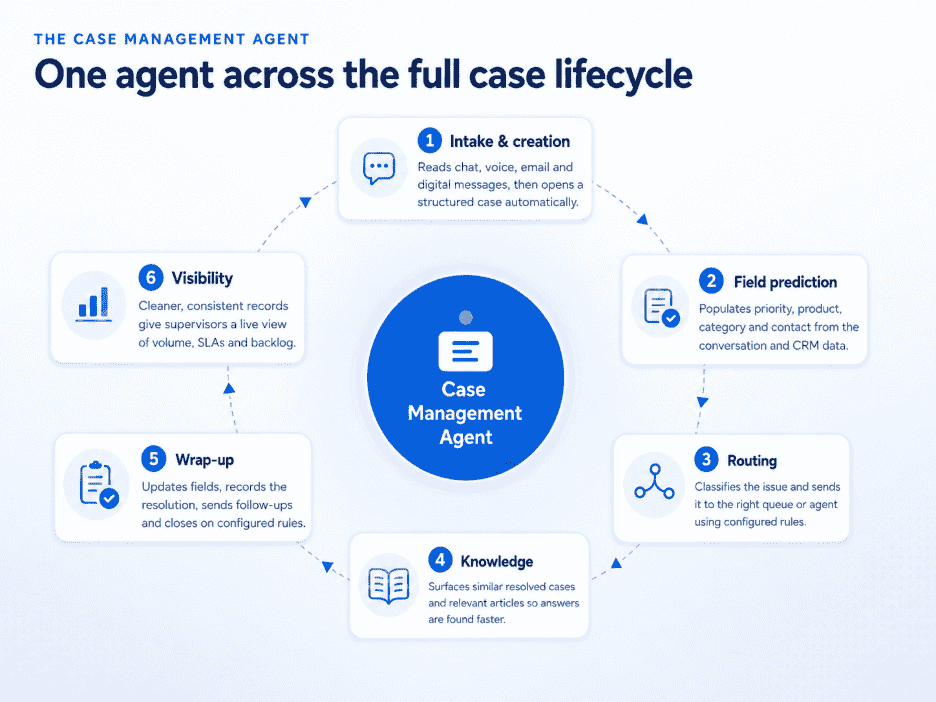
The Case Management Agent in Dynamics 365 Customer Service is Microsoft's move from agent assist to case lifecycle automation. Let's see where it fits across the case lifecycle.
1. Case Intake and Creation
The first area where the Case Management Agent helps is at the point of intake. When a customer conversation comes through live chat, voice, digital messaging, or email, the agent can analyze the available context and create a case when enough information is present.
This reduces the dependency on agents to manually convert every interaction into a structured case record. For high volume service teams, this is a major shift because delays often start at the intake stage itself. A customer may have already explained the issue clearly, but if that information is not captured properly in Dynamics 365, the next agent has to reconstruct the story from scratch. With AI assisted case creation, the system can help turn unstructured customer communication into a usable case record faster.
2. Field Prediction and Case Enrichment
Once a case is created, the quality of the case record decides how useful it will be for the agent, supervisor, and reporting team. The Case Management Agent can predict and populate configured fields such as issue description, contact, product, priority, serial number, category, and other case details by reading the conversation and using available CRM data.
Poor field quality quietly weakens the entire service process. A wrong category can distort reports, inconsistent priority values can make queue views unreliable, and missing product or customer details can force the next agent to spend extra time looking for information that should have already been captured.
AI assisted field prediction reduces that manual effort when the environment is built with clear fields, strong descriptions, reliable historical data, and a clean case structure.
3. Classification, Routing, and Assignment
After the case details are captured, the next question is where the case should go and who is best placed to handle it. The Case Management Agent can support classification and routing by identifying the nature of the issue and matching it with the right team, queue, or agent.
This is where many service delays begin. A case that lands in the wrong queue does not simply wait for reassignment. It interrupts the wrong agent, adds another handoff, delays the first meaningful response, and makes the customer feel as if the issue has to be explained all over again.
When the Case Management Agent works with the routing logic in Dynamics 365 Customer Service, cases can be directed more accurately based on category, priority, product, issue type, customer context, and configured business rules.
4. Similar Case and Knowledge Support
Once a case reaches the agent, speed depends heavily on how quickly the right answer can be found. The Case Management Agent can support this by surfacing similar cases, relevant knowledge articles, and previous resolution paths based on the current case context.
Many service teams already have useful knowledge sitting inside Dynamics 365, SharePoint, or historical case records, but that knowledge often remains hard to use during a live customer interaction. An agent may know that an answer exists somewhere, but still lose time searching through articles, past tickets, internal notes, or asking another teammate for help.
When the knowledge base and historical cases are structured well, AI can bring the right information closer to the case. Agents get faster access to proven resolutions, customers receive more consistent answers, and teams reduce the repeated effort that comes from solving the same issue from scratch.
5. Case Updates, Follow Ups, and Wrap Up
A case does not end when the customer conversation ends. Agents still have to update fields, write notes, record the resolution, send follow ups, and close the case properly. When this work is handled manually, wrap up becomes one of the easiest places for delays and missed details to enter the process.
The Case Management Agent can update case fields after a conversation ends or when a new email comes in, helping the case record reflect what actually happened without relying entirely on manual updates from the agent. It can also assist with follow up emails, case closure, and resolution details.
In configured scenarios, the agent can send follow ups and close cases automatically if the customer does not respond after a defined number of attempts. That reduces the number of cases sitting open only because the next administrative step was not completed.
For service teams, this is where AI starts removing the work that happens after the visible customer interaction. Agents spend less time on notes and repetitive follow up activity, while the case record stays cleaner for the next person who may need to review it.
6. Supervisor Visibility and Operational Consistency
Supervisors depend on case data to understand what is happening across the service operation. When case records are incomplete, inconsistently categorized, or updated differently by every agent, reports become harder to trust and queue decisions become more reactive.
The Case Management Agent can improve operational consistency by helping maintain cleaner case records, stronger categorization, more reliable updates, and more structured follow up activity. This gives service leaders a clearer view of case volume, issue patterns, overloaded queues, SLA pressure, and backlog movement.
With more consistent case data, supervisors can see where issues are coming from, which case types need better knowledge support, where routing rules may need adjustment, and which parts of the workflow are still creating avoidable manual effort. Instead of relying only on end of period reporting, they get a stronger operational view of the service process as it is unfolding.
The Case Management Agent is only one part of a broader Dynamics 365 Customer Service AI ecosystem. Microsoft's service agents support different stages of the customer service workflow and pass information from one stage to the next.
- Customer Intent Agent: Identifies why customers are reaching out by analyzing current and historical cases and conversations.
- Case Management Agent: Manages the case lifecycle, including intake, enrichment, routing, knowledge support, updates, and wrap-up.
- Customer Knowledge Management Agent: Reviews resolved cases, identifies knowledge gaps, and helps keep the knowledge base current.
- Quality Evaluation Agent: Assesses interactions against a supervisor-defined framework and surfaces coaching and quality insights.
- Email classification: Evaluates incoming emails before case creation so only relevant messages enter the workflow. It is an intake capability rather than a standalone agent.
Together, these capabilities create a connected service loop. Intent informs the case, resolved cases improve knowledge, updated knowledge supports future cases, and quality evaluation monitors the process.
How Copilot and the Case Management Agent Work Together
To understand how they work together, it is important to first understand how they are different.
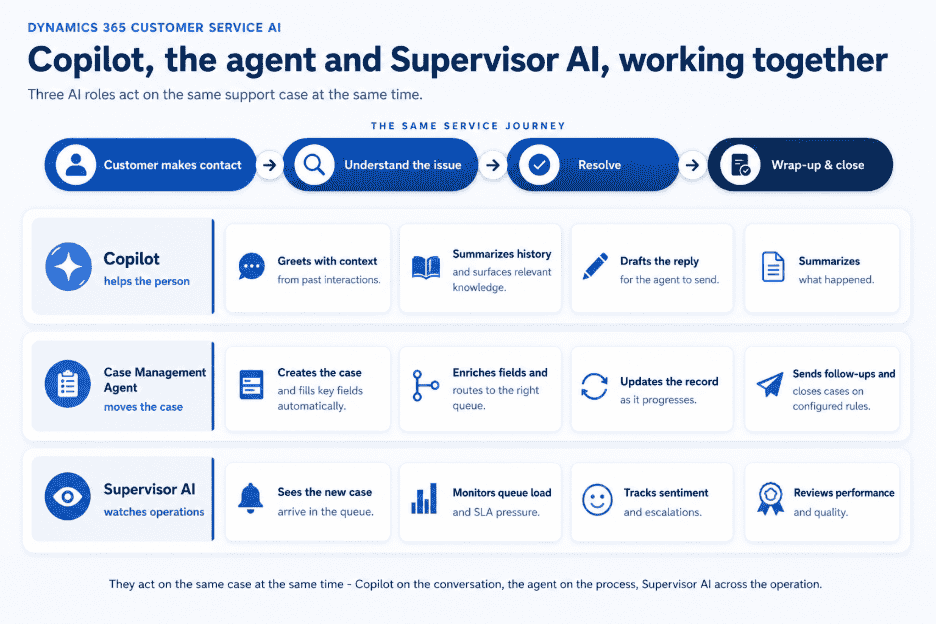
Copilot supports the service representative during the interaction. It helps the agent understand the case, find relevant information, summarize conversations, and prepare a response.
The Case Management Agent works on the case process itself. It can create the case, populate fields, route it, update records, send follow-ups, and close the case based on configured rules.
| Copilot | Case Management Agent |
|---|---|
| Helps the agent understand and respond to the customer. | Moves the case through the workflow. |
| Summarizes conversations and case history. | Creates and enriches the case record. |
| Drafts replies and surfaces relevant knowledge. | Routes, updates, follows up on, and closes cases. |
| The agent reviews and takes the final action. | The system completes configured actions, with human review where needed. |
| Works mainly inside the agent's workspace. | Works across the full case lifecycle. |
The two capabilities come together during the same service journey.
When a customer contacts the business, Copilot can help the agent understand the issue, review previous interactions, and prepare the right response. At the same time, the Case Management Agent can capture the case details, populate the required fields, assign the case to the correct queue, and update the record as the interaction progresses.
After the conversation, Copilot can help summarize what happened, while the Case Management Agent can complete follow-up actions, update the case status, and close the case when the configured conditions are met.
Supervisor AI sits across this process. It gives service leaders visibility into case volumes, queue pressure, sentiment, escalations, and agent performance.
The workflow therefore looks like this:
Copilot helps the agent handle the conversation. The Case Management Agent handles the case process around it. Supervisor AI monitors performance across the operation.
Together, they support three connected parts of customer service:
1. Assistance for service representatives
Copilot helps agents understand customer needs, find information, and respond faster.
2. Operational visibility for supervisors
Supervisor AI helps service leaders identify workload, quality, and performance issues across teams.
3. Action across the case lifecycle
The Case Management Agent and custom agents built through Copilot Studio carry out configured steps across case creation, enrichment, routing, updates, follow-ups, and resolution.
The Real Cost of Running Case Management Without AI
Before you look at AI case management as another feature, it is worth examining what your current service process may already be costing you.
The concern is not simply that agents are busy. A large part of their day may be spent on work that does not directly help the customer, including searching, updating, documenting, routing, summarizing, and coordinating across teams.
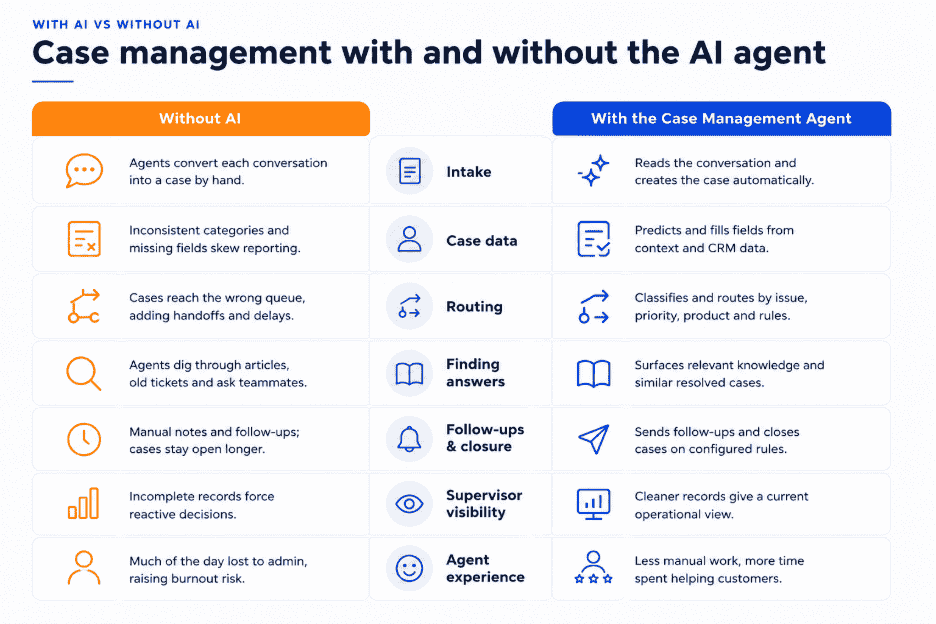
The table below shows how that manual effort appears across the case lifecycle and how the Case Management Agent changes the process.
Manual Case Management vs. the Case Management Agent
| Aspect | Without AI | With the Case Management Agent |
|---|---|---|
| Case intake | Agents manually convert each conversation into a case, increasing the risk of missed or incomplete details. | Reads the conversation, creates the case, and fills in key fields automatically. |
| Case data | Inconsistent categories and missing fields reduce reporting accuracy. | Predicts and populates fields using conversation context and CRM data. |
| Routing | Cases may reach the wrong queue, creating extra handoffs and delays. | Classifies and routes cases based on issue type, priority, product, and configured rules. |
| Finding answers | Agents search through knowledge articles, old tickets, and ask teammates for help. | Surfaces relevant knowledge and similar resolved cases automatically. |
| Follow-ups and closure | Notes, follow-ups, and closure depend on manual action, so cases may remain open longer than necessary. | Sends follow-ups and closes cases based on configured rules. |
| Supervisor visibility | Incomplete and inconsistent records lead to reactive decision-making. | Provides cleaner records and a more current operational view. |
| Agent experience | Agents spend a large part of the day on administrative work, increasing workload and burnout risk. | Reduces manual effort so agents can spend more time helping customers. |
These differences are not only about efficiency. They point to four business risks that service leaders cannot afford to ignore.
1. Your agents may be losing customer time to system work
Salesforce's sixth State of Service report found that agents spend only 39% of their time servicing customers. The remaining time goes into internal meetings, administrative tasks, and manually logging case notes.
That is the first warning sign. When agents spend more time working around the case than helping the customer, the issue is no longer only workload. It is system design.
Every case requires some background work, but when that work is mostly manual, resolution time starts leaking before the agent begins solving the issue. Reading long histories, updating fields, selecting the right category, searching the knowledge base, and writing notes may appear small in isolation. Across hundreds or thousands of cases, they become a serious productivity drain.
2. Too many disconnected screens may be slowing every case down
Salesforce's sixth State of Service report found that 58% of agents at underperforming organizations switch between multiple screens to find what they need, compared with 36% at high-performing organizations.
That gap says a great deal. Screen switching is not simply an inconvenience. It is often a sign that customer context is scattered across too many systems.
When agents must move between CRM records, email trails, knowledge articles, warranty systems, product information, and internal notes, every case becomes harder to resolve consistently. Customers do not see the system switching, but they feel the delay when the agent takes longer, misses context, or asks them to repeat information.
3. Operational friction can quickly become customer risk
This is where case management problems stop being internal.
A misrouted case, a missed follow-up, an incomplete note, or an incorrect category may look like a process issue inside the service team. To the customer, it feels as though the company does not understand the problem or is taking too long to respond.
Zendesk Benchmark data has shown that 73% of consumers will switch to a competitor after multiple bad experiences, while more than 50% will switch after only one.
That is why case management quality matters. The case record is not merely an internal file. It influences how quickly the customer receives the right answer, whether the next agent has the complete context, and whether the issue moves forward without unnecessary handoffs.
4. Agent burnout may be a symptom of poor service architecture
Salesforce's sixth State of Service report found that 77% of agents report increased and more complex workloads compared with the previous year, while more than half report burnout. The same research found that 69% of agents struggle to balance speed and quality, and 69% of service decision-makers see agent attrition as a major or moderate challenge.
This is the hidden workforce cost. Agents are being asked to handle more complex customer issues while still carrying the manual burden of documentation, routing, searching, and follow-up.
The Case Management Agent does not replace the judgment of experienced service representatives. It reduces the repetitive work surrounding the case so agents can spend more time understanding the customer, resolving the issue, and applying the expertise that automation cannot replace.
What It Takes to Make Case Management AI Actually Work
Most discussions around Case Management AI focus on the feature. Fewer discussions cover what needs to be true before the feature becomes useful. Those are two very different conversations.
The technology is not self-sufficient. It needs the right service foundation around it: clean data, a usable knowledge base, connected channels, strong governance, trained agents, and disciplined configuration. If any of these are weak, the AI output will reflect that weakness.
1. Clean Case Data
Data is usually where AI projects break first.
If case categories are inconsistent, product fields are missing, accounts are duplicated, or priority values mean different things to different teams, the system will not correct that automatically. It will reproduce the inconsistency at scale.
Historical cases need enough structure for the Case Management Agent to learn from and act reliably. That means the basics must be cleaned before automation is expanded: account records, case categories, priority rules, product fields, customer details, and resolution data.
2. A Knowledge Base Agents Can Actually Use
Knowledge base maturity is a separate problem most teams underestimate.
The issue is not always that the organization lacks articles. More often, the articles exist but are outdated, poorly tagged, duplicated, or written in a way agents cannot use during a live customer interaction.
AI can retrieve and recommend knowledge only when that knowledge is structured, current, and connected to the right case types. If the knowledge base needs cleanup, that work should happen before configuration, not after go-live.
3. Connected Service Channels
Channel integration decides how much context the agent actually has.
Email to case, chat, voice, authenticated customer interactions, workstreams, queues, and routing rules need to be connected cleanly. If one major service channel is still handled outside Dynamics 365, the case record will always be incomplete.
That means the Case Management Agent may be making decisions with partial context, which affects classification, routing, field updates, summaries, and follow ups.
4. Governance That Can Survive an Audit
In regulated industries such as healthcare, financial services, insurance, and public sector organizations, AI decisions need to be auditable.
Permissions, Dataverse access, audit history, security roles, data boundaries, retention rules, and approval flows are not minor setup tasks. They decide whether the organization can explain how AI supported a case decision, who had access to the data, and what action was taken.
Governance should be built into the implementation from the beginning, not revisited after the system is already live.
5. Agents Who Know When to Trust and Override AI
Change management is where the human side of Case Management AI lives.
Agents need to trust the system enough to use it, but they also need to know when to override it. If agents do not understand how recommendations are generated, they may either ignore the AI completely or accept suggestions without enough judgment.
Supervisors also need a better scorecard. Average handle time alone is not enough because speed can push agents to close cases too quickly, which may increase reopen rates. A stronger scorecard should combine average handle time, first contact resolution, CSAT, case reopen rate, AI suggestion acceptance, escalation rate, and quality scores.
6. Configuration Discipline Before Customization
The safest path is to activate the core capabilities first, clean the data, tune the fields, validate suggestions through simulation, and then decide where custom Copilot Studio skills are actually needed.
Heavy customization on day one can slow the program and make it harder to prove value. A better approach is to start with a focused set of case types, test how well the Case Management Agent performs, measure the results, and then expand into more complex workflows.
7. A Realistic View of What the Platform Can and Cannot Fix
For teams already using Dynamics 365, some of these gaps may sound familiar. The platform likely supports more AI capability than the organization is currently using.
The constraint is rarely the technology alone. It is usually the data, the knowledge base, the routing model, the channel setup, or the adoption plan.
Those gaps are fixable, but the AI cannot fix them for you. The foundation has to be prepared before the Case Management Agent can deliver reliable value.
What Does AI-Powered Case Management in Dynamics 365 Cost?
The cost of using the Dynamics 365 Case Management Agent comes from three areas: your Customer Service license, Copilot Credit usage, and implementation.
Dynamics 365 Customer Service License
The Case Management Agent is available with Dynamics 365 Customer Service plans, but the way AI capacity is purchased differs by plan.
Customer Service Professional and Enterprise require Copilot Credits to be purchased separately. Customer Service Premium includes a base amount of Copilot Credit capacity.
Microsoft currently lists the US prices as:
- Customer Service Professional: $50 per user/month
- Customer Service Enterprise: $105 per user/month
- Customer Service Premium: $195 per user/month
The right plan depends on the service features, channels, routing capabilities, and AI capacity your team needs.
Copilot Credit Usage
The Case Management Agent consumes Copilot Credits when it performs autonomous work, such as creating cases, updating information, routing requests, or completing follow-up actions.
Microsoft offers both pay-as-you-go billing and prepaid Copilot Credit plans. Your actual AI cost depends on the number of cases handled, the actions performed for each case, and the complexity of those actions.
A simple intake and routing scenario will generally consume less capacity than an agent that researches an issue, updates several records, communicates with the customer, and closes the case.
Implementation and Configuration
Licensing gives you access to the technology, but it does not make the agent ready for your service operation.
The agent must be configured around your case types, data, knowledge base, service channels, routing rules, escalation processes, and governance requirements. A clean and well-structured Dynamics 365 environment will usually require less preparation than one with fragmented data and inconsistent processes.
What Should You Budget For?
The license and Copilot Credit options are relatively easy to identify. The bigger variable is implementation.
Your total investment depends on the number of users, monthly case volume, actions performed per case, and the condition of your Dynamics 365 environment.
This is where experienced Dynamics 365 experts can make a difference. Clean data, well-scoped scenarios, accurate routing, and proper governance help the agent resolve cases instead of consuming Copilot Credits on ineffective workflows.
At Nalashaa, our Dynamics 365 experts help teams assess readiness, prepare their environment, and configure the Case Management Agent around real service processes so AI spending translates into measurable service outcomes.
Microsoft pricing, regional availability, discounts, and credit entitlements can change. Confirm the current figures and licensing terms before finalizing your budget.
Get Started Now
Not sure where your environment stands?
Most readiness gaps remain invisible until you assess the systems behind the workflow. A Dynamics 365 Case Management AI readiness assessment reviews your data, knowledge base, channels, routing, and governance against what the Case Management Agent actually needs.
You get a clear view of what is ready, what could limit value, and what should be fixed before you switch anything on.
Book a 30-minute consultation with our Dynamics 365 AI team to assess your readiness and identify the right next steps.